
Input Writing Guide
Write Better Inputs. Generate Better Architecture Diagrams.
AI Line Studio transforms your text into professional cloud architecture diagrams. The quality of the generated diagram depends on the quality of your input. A well-structured description helps AI Line Studio understand your system, automatically create connections between services, organize resources into logical layers, and produce clean, production-ready diagrams.
Follow these guidelines to get the best results.
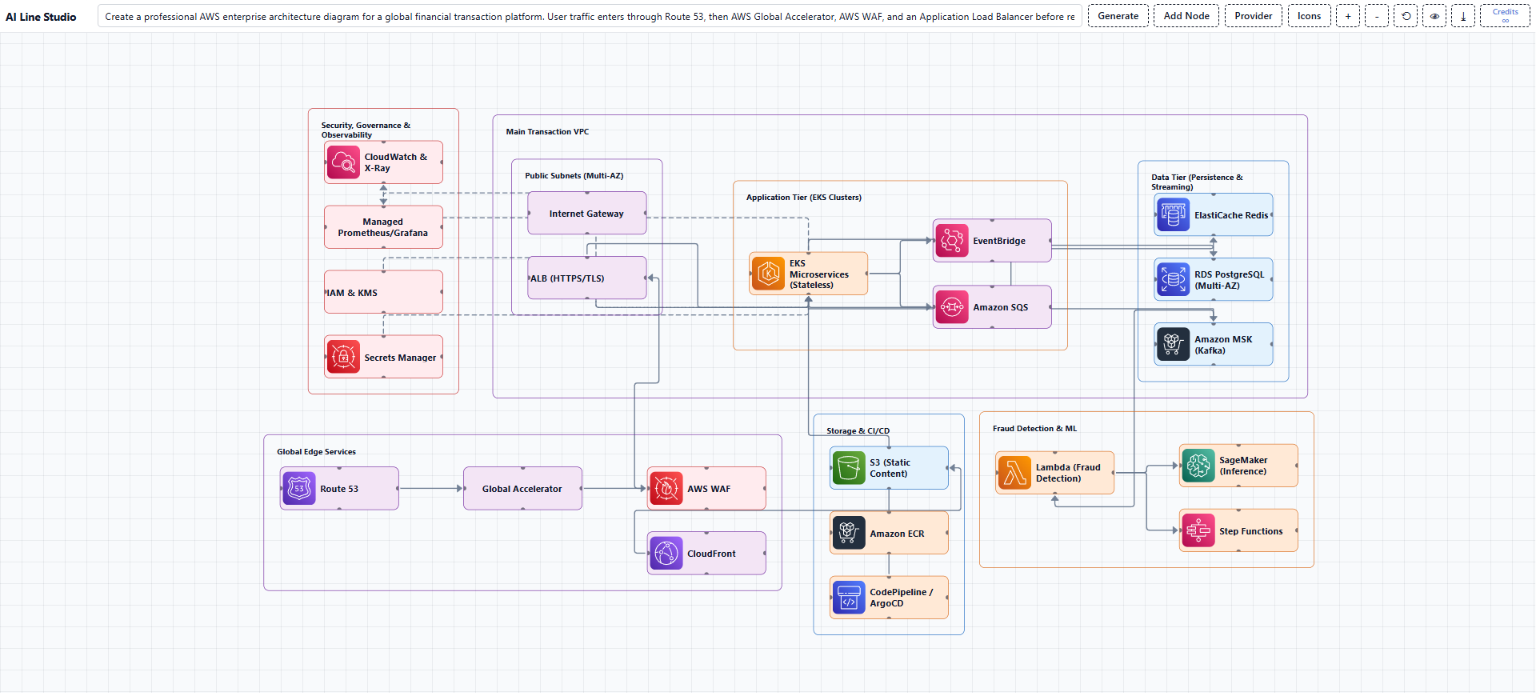
Example result: an AWS enterprise architecture diagram generated from a detailed, well-structured input.
1. Describe Your Use Case
Start by explaining what you're building.
Examples
2. Explain How Users Access the System
Describe the entry point of your application.
Include components such as:
3. Define the Compute Layer
Describe where your application runs.
Examples
Also specify if your architecture includes Multi-AZ, Multi-Region, High Availability, or Auto Scaling.
4. List the Application Services
Break the application into individual services instead of referring to it as a single application.
Examples
5. Specify the Data Layer
Mention every database and its purpose.
Examples
6. Include Messaging & Event Processing
If services communicate asynchronously, describe the messaging platform.
Examples
Explain which services publish events and which consume them.
7. Add AI & Automation
Include any AI or intelligent processing used by your application.
Examples
8. Describe Storage
Specify where your application stores:
Examples
9. Include CI/CD
Describe how your application is built and deployed.
Typical flow: Source Code → CI Pipeline → Container Registry → Deployment → Production Environment
10. Define Networking & Security
Include networking and security components such as:
Examples
11. Add Monitoring & Backup
Production architectures should include observability and disaster recovery.
Examples
12. Describe Every Connection
This is the most important part. Instead of writing generic phrases, use explicit directional connections.
Don't write: The services communicate securely.
Write:
The more explicit your connections, the more accurate and visually complete your architecture diagram will be.
13. Define the Layout
Tell AI Line Studio how you want the diagram organized.
For example: Place users at the top, networking below, compute services in the center, databases underneath, messaging on the right, monitoring and security at the bottom, and CI/CD on the left.
14. Specify the Visual Style
Finish your input by describing the desired appearance.
For example: Use official cloud provider icons, orthogonal connectors with directional arrows, labeled communication paths, minimal line crossings, grouped resources, and a clean enterprise-grade layout suitable for technical documentation.
Tips for Better Results
- Start with the business scenario.
- Explain the purpose of each service.
- Clearly describe data flow between components.
- Include networking, security, monitoring, and deployment pipelines.
- Use explicit relationships instead of generic descriptions.
The more structured and detailed your input, the more accurate and professional your AI Line Studio diagram will be.
Universal Input Template
Use this template as a starting point. Replace the placeholders with your own architecture details.
Create a professional enterprise architecture diagram for a [Business Scenario]. Users enter through [Entry Layer] and access [Compute Platform] hosting [Microservices]. The application stores data in [Databases], caches frequently accessed data using [Cache], exchanges asynchronous events through [Messaging Platform], and triggers [Serverless Services] for background processing. AI capabilities are provided by [AI Services], while files, media, and backups are stored in [Storage Services]. CI/CD is implemented using [Pipeline], [Container Registry], and [GitOps]. Networking includes [Networking Components], while security is enforced through [Identity Services], [Secrets Management], [Encryption], and [Firewalls]. Monitoring uses [Observability Stack], with disaster recovery provided by [Backup Services]. Create explicit directional connectors between every interacting service, label each connection with its communication protocol, group resources inside clearly labeled cloud regions and virtual networks, use official cloud architecture icons, orthogonal arrows, minimal line crossings, and produce a clean enterprise-grade architecture diagram suitable for professional solution architecture documentation.
Example
Here is a complete, production-ready input that follows the guidelines above. The diagram shown at the top of this page was generated from an input like this.
Create a professional AWS enterprise architecture diagram for a global financial transaction platform. User traffic enters through Route 53, then AWS Global Accelerator, AWS WAF, and an Application Load Balancer before reaching Amazon EKS running stateless microservices across three Availability Zones. EKS connects to Amazon RDS PostgreSQL (Multi-AZ) for transactional data, Amazon ElastiCache Redis for session caching, and Amazon MSK (Kafka) for event streaming. MSK publishes events consumed by AWS Lambda for fraud detection, which invokes Amazon SageMaker for real-time ML inference and AWS Step Functions for transaction orchestration. Microservices asynchronously communicate through Amazon SQS and Amazon EventBridge. Static content is served from Amazon S3 through CloudFront. Container images are built by CodeBuild, stored in Amazon ECR, and continuously deployed to EKS using ArgoCD integrated with CodePipeline. Secrets are retrieved from AWS Secrets Manager, while IAM roles and KMS encrypt all workloads. VPC Flow Logs, CloudTrail, CloudWatch Logs, CloudWatch Metrics, AWS X-Ray, and OpenTelemetry provide full-stack observability, exporting long-term metrics to Amazon Managed Prometheus and Amazon Managed Grafana. Backup and disaster recovery use AWS Backup and cross-region S3 replication. Private communication between services occurs through VPC endpoints, NAT Gateways, Internet Gateway, and Transit Gateway connecting multiple VPCs. Show explicit directional connectors between every service, label communication protocols such as HTTPS, gRPC, Kafka, REST, IAM, OIDC, and TLS, use orthogonal arrows with minimal crossing, group resources inside VPCs and Availability Zones, and color services using official AWS architecture icons to create a clean, highly interconnected enterprise cloud architecture.
Frequently Asked Questions
Common questions about writing better inputs for AI Line Studio.
AI Line Studio turns your text into professional cloud architecture diagrams. A well-structured description helps it understand your system, create connections between services, organize resources into logical layers, and produce clean, production-ready diagrams.