
3-Tier AWS Architecture Diagram: A Complete Guide to Building Scalable Web Applications
The three-tier architecture is the most widely adopted pattern for production web applications on AWS. It separates an application into three logical layers, presentation, application, and data, to enable independent scalability, enhanced security, and maintainability.
A 3-tier architecture divides a web application into three layers: Web (presentation), Application (logic), and Database (data). This design improves scalability, security, and maintainability. Each layer has distinct responsibilities and can be developed, scaled, and maintained independently.
This guide provides a complete reference for the 3-tier AWS architecture, what it is, how it works, and how to deploy it following AWS best practices.
Cloud Architecture
Create cloud architecture diagrams for AWS, Azure, GCP, and more. Design scalable infrastructure with professional cloud icons.
Complete guide to the 3-tier AWS architecture diagram, presentation, application, and database tiers with Multi-AZ, Auto Scaling, and Well-Architected practices.
Click Cloud Architecture to open AI Line Studio and generate diagrams from natural language in seconds.
What Is a 3-Tier Architecture?
A 3-tier architecture consists of three distinct layers:
- Presentation Tier (Web Layer): The user-facing frontend. This is where the application's endpoint lives and where users interact with the system. It typically serves static content (HTML, CSS, JavaScript) and forwards API requests.
- Application Tier (Logic Layer): The backend that processes business logic, executes API requests, and orchestrates data flow between the presentation and data tiers.
- Database Tier (Data Layer): The storage layer that persists application data using databases, caches, or file systems.
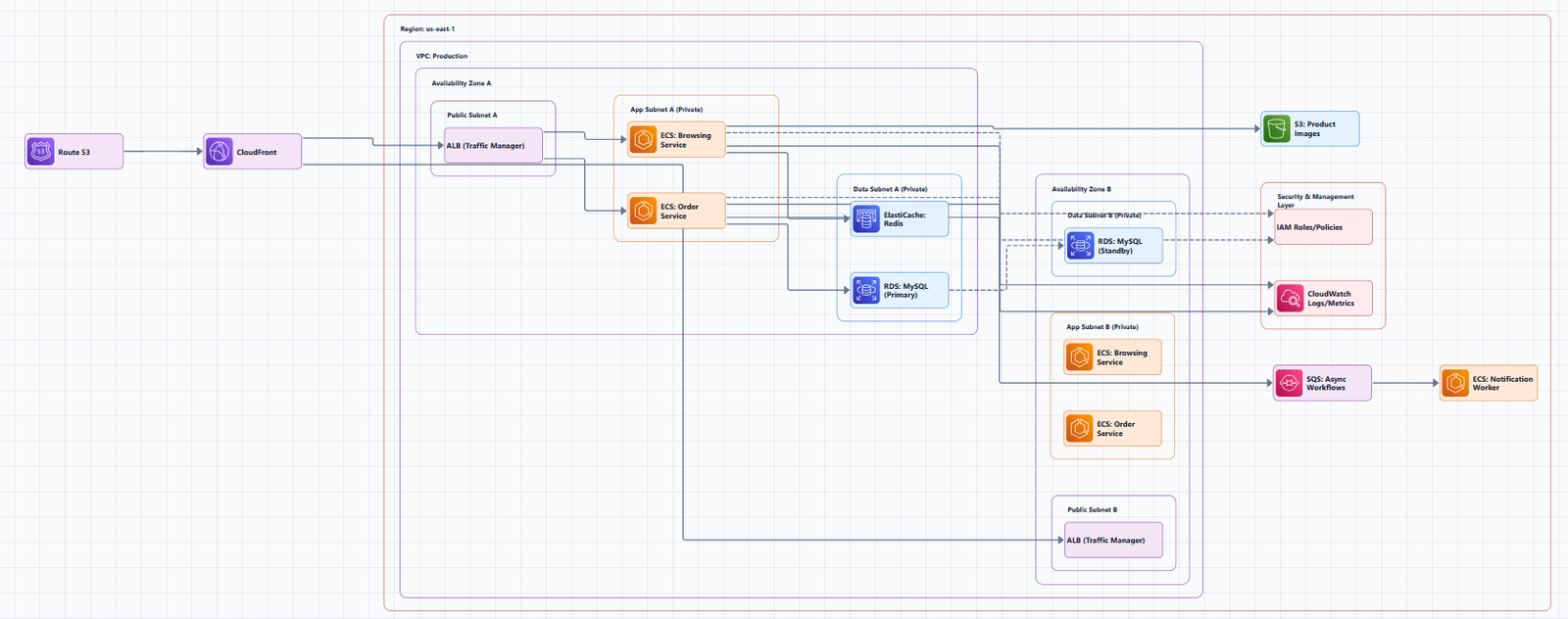
This separation contrasts with monolithic architectures where the frontend, backend, and database all reside in the same place. The multi-tier pattern provides a general framework for decoupled and independently scalable components.
The Three Tiers: Detailed Breakdown
Tier 1: Presentation Tier (Web Layer)
Purpose: Serves the user interface and handles incoming client requests.
Key Components:
- Amazon CloudFront: Global content delivery network (CDN) that caches static assets at edge locations for low-latency delivery.
- AWS WAF: Web Application Firewall that protects against malicious traffic, SQL injection, and XSS attacks.
- Application Load Balancer (ALB): An internet-facing load balancer that distributes incoming traffic across web servers in public subnets.
- Amazon Route 53: Scalable DNS and traffic management service that routes end-user requests.
Network Placement: The presentation tier typically resides in public subnets within the VPC. The ALB sits in the public subnet and acts as the entry point for all internet traffic.
Auto Scaling: Web servers are placed in an Auto Scaling Group to automatically adjust capacity based on demand.
Tier 2: Application Tier (Logic Layer)
Purpose: Executes business logic, processes API requests, and coordinates application functionality.
Key Components:
- EC2 Instances or ECS/EKS Containers: Run the application code (Node.js, Python, Java, .NET, etc.).
- Internal Application Load Balancer (ALB): A private load balancer that routes traffic from the web tier to the application tier.
- Auto Scaling Group: Dynamically scales application instances based on CPU utilization or custom metrics.
- Amazon ElastiCache: In-memory caching (Redis or Memcached) to reduce database load and improve performance.
Network Placement: The application tier is deployed in private subnets, accessible only from within the VPC. This ensures backend logic is never exposed directly to the internet.
Egress: NAT Gateways in the public subnets allow application instances in private subnets to access the internet for updates and patches without exposing them to inbound traffic.
Tier 3: Database Tier (Data Layer)
Purpose: Stores and manages application data with high durability and availability.
Key Components:
- Amazon RDS: Managed relational database service (MySQL, PostgreSQL, Aurora, etc.) with automated backups, patching, and replication.
- Multi-AZ Deployment: Synchronous replication from a primary database instance to a standby instance in a different Availability Zone.
- Amazon DynamoDB: NoSQL database option for applications requiring single-digit millisecond latency and automatic scaling.
- Amazon S3: Object storage for backups, static assets, and data lake storage.
Network Placement: The database tier resides in private subnets and is only accessible from the application tier.
High Availability: Multi-AZ configuration provides automatic failover. If the primary database fails, AWS automatically promotes the standby replica.
Complete 3-Tier Architecture Diagram
Below is a typical 3-tier AWS architecture implemented across multiple Availability Zones for high availability.
Diagram Structure (Left to Right, Top to Bottom)
┌─────────────────────────────────────────────────────────────────────────────┐
│                           AWS Cloud                                        │
│  ┌───────────────────────────────────────────────────────────────────────┐ │
│  │                        Region (e.g., us-east-1)                       │ │
│  │                                                                       │ │
│  │  ┌─────────────────────────────────────────────────────────────────┐ │ │
│  │  │                         VPC (10.0.0.0/16)                       │ │ │
│  │  │                                                                 │ │ │
│  │  │  ┌───────────────────────────────────────────────────────────┐  │ │ │
│  │  │  │                    Availability Zone 1                    │  │ │ │
│  │  │  │  ┌─────────────────────┐  ┌─────────────────────────────┐ │  │ │ │
│  │  │  │  │   Public Subnet 1   │  │     Private Subnet 1         │ │  │ │ │
│  │  │  │  │   (10.0.1.0/24)     │  │     (10.0.2.0/24)           │ │  │ │ │
│  │  │  │  │                     │  │                              │ │  │ │ │
│  │  │  │  │  ┌───────────────┐  │  │  ┌────────────────────────┐  │ │  │ │ │
│  │  │  │  │  │  NAT Gateway  │  │  │  │  Web Servers (EC2)     │  │ │  │ │ │
│  │  │  │  │  └───────────────┘  │  │  │  (Auto Scaling Group)  │  │ │  │ │ │
│  │  │  │  │                     │  │  └────────────────────────┘  │ │  │ │ │
│  │  │  │  │  ┌───────────────┐  │  │                              │ │  │ │ │
│  │  │  │  │  │     ALB       │  │  │  ┌────────────────────────┐  │ │  │ │ │
│  │  │  │  │  │ (Internet)    │  │  │  │  App Servers (EC2)     │  │ │  │ │ │
│  │  │  │  │  └───────────────┘  │  │  │  (Auto Scaling Group)  │  │ │  │ │ │
│  │  │  │  │                     │  │  └────────────────────────┘  │ │  │ │ │
│  │  │  │  └─────────────────────┘  │                              │ │  │ │ │
│  │  │  │                           │  ┌────────────────────────┐  │ │  │ │ │
│  │  │  │                           │  │  RDS (Primary)         │  │ │  │ │ │
│  │  │  │                           │  │  (Multi-AZ)            │  │ │  │ │ │
│  │  │  │                           │  └────────────────────────┘  │ │  │ │ │
│  │  │  │                           └─────────────────────────────┘ │  │ │ │
│  │  │  └───────────────────────────────────────────────────────────┘  │ │ │
│  │  │                                                                 │ │ │
│  │  │  ┌───────────────────────────────────────────────────────────┐  │ │ │
│  │  │  │                    Availability Zone 2                    │  │ │ │
│  │  │  │  ┌─────────────────────┐  ┌─────────────────────────────┐ │  │ │ │
│  │  │  │  │   Public Subnet 2   │  │     Private Subnet 2         │ │  │ │ │
│  │  │  │  │   (10.0.3.0/24)     │  │     (10.0.4.0/24)           │ │  │ │ │
│  │  │  │  │                     │  │                              │ │  │ │ │
│  │  │  │  │  ┌───────────────┐  │  │  ┌────────────────────────┐  │ │  │ │ │
│  │  │  │  │  │  NAT Gateway  │  │  │  │  Web Servers (EC2)     │  │ │  │ │ │
│  │  │  │  │  └───────────────┘  │  │  │  (Auto Scaling Group)  │  │ │  │ │ │
│  │  │  │  │                     │  │  └────────────────────────┘  │ │  │ │ │
│  │  │  │  └─────────────────────┘  │                              │ │  │ │ │
│  │  │  │                           │  ┌────────────────────────┐  │ │  │ │ │
│  │  │  │                           │  │  App Servers (EC2)     │  │ │  │ │ │
│  │  │  │                           │  │  (Auto Scaling Group)  │  │ │  │ │ │
│  │  │  │                           │  └────────────────────────┘  │ │  │ │ │
│  │  │  │                           │                              │ │  │ │ │
│  │  │  │                           │  ┌────────────────────────┐  │ │  │ │ │
│  │  │  │                           │  │  RDS (Standby)         │  │ │  │ │ │
│  │  │  │                           │  │  (Multi-AZ Replica)    │  │ │  │ │ │
│  │  │  │                           │  └────────────────────────┘  │ │  │ │ │
│  │  │  │                           └─────────────────────────────┘ │  │ │ │
│  │  │  └───────────────────────────────────────────────────────────┘  │ │ │
│  │  │                                                                 │ │ │
│  │  │  ┌───────────────────────────────────────────────────────────┐  │ │ │
│  │  │  │                    Internet Gateway                       │  │ │ │
│  │  │  └───────────────────────────────────────────────────────────┘  │ │ │
│  │  │                                                                 │ │ │
│  │  │  ┌───────────────────────────────────────────────────────────┐  │ │ │
│  │  │  │                    Route Tables & Security Groups         │  │ │ │
│  │  │  └───────────────────────────────────────────────────────────┘  │ │ │
│  │  └─────────────────────────────────────────────────────────────────┘ │ │
│  └─────────────────────────────────────────────────────────────────────┘ │
└─────────────────────────────────────────────────────────────────────────┘
Component Explanations
- Internet Gateway: The entry point for all internet traffic into the VPC.
- Application Load Balancer (ALB): Distributes incoming traffic across web servers in the public subnets.
- NAT Gateways: Allow private subnet resources (application servers, databases) to access the internet for updates, while blocking unsolicited inbound traffic.
- Web Servers (Auto Scaling Group): EC2 instances hosting the frontend application. Auto Scaling ensures availability and elasticity.
- App Servers (Auto Scaling Group): EC2 instances hosting backend business logic. Located in private subnets.
- Internal ALB: Routes traffic from web servers to application servers.
- RDS (Multi-AZ): Managed database with primary and standby replicas across Availability Zones.
- Security Groups: Act as virtual firewalls at the instance level, controlling inbound and outbound traffic.
- Network ACLs: Stateless firewalls at the subnet level for defense-in-depth.
When to Use a 3-Tier Architecture
The 3-tier pattern is suitable for building a wide range of applications: web applications, enterprise systems, and mobile apps.
Use it when:
- You need independent scaling of presentation, logic, and data layers
- Different teams own different layers (frontend, backend, database)
- You require high availability and fault tolerance
- You're building a production web application
Don't use it when:
- You're building a simple prototype or proof of concept
- The application has minimal traffic and no scaling requirements
- The operational overhead of managing three tiers isn't justified
AWS Well-Architected Best Practices
The 3-tier architecture example above follows Well-Architected best practices. Key principles include:
Operational Excellence
- Automation: Deploy using Infrastructure as Code (Terraform, CloudFormation)
- Monitoring: Amazon CloudWatch for metrics, logs, and alarms
- Auditing: AWS CloudTrail for account activity and auditing
Security
- Network Isolation: Public subnets for web tier, private subnets for application and database tiers
- Defense in Depth: Security Groups (stateful, instance-level) and NACLs (stateless, subnet-level)
- Least Privilege: IAM roles with tightly scoped permissions
- Encryption: SSL/TLS via AWS Certificate Manager
- Web Protection: AWS WAF and AWS Shield for DDoS protection
Reliability
- Multi-AZ Deployment: Resources distributed across at least two Availability Zones
- Auto Scaling: Dynamic scaling based on CPU utilization or custom metrics
- Database High Availability: RDS Multi-AZ with automatic failover
- Load Balancing: ALB distributes traffic and performs health checks
Performance Efficiency
- Caching: Amazon ElastiCache (Redis/Memcached) to reduce database load
- CDN: Amazon CloudFront for global content delivery
- Right-sizing: Choose appropriate EC2 instance types and RDS sizes
Cost Optimization
- AWS Free Tier: Use Free Tier services where possible during development
- Auto Scaling: Scale down during low traffic periods
- Reserved Instances: For predictable, sustained workloads
Architecture Variations
Containerized 3-Tier with ECS/Fargate
For teams adopting containers, the 3-tier architecture can be implemented using Amazon ECS with AWS Fargate. The web, application, and database tiers run as containerized services, with Fargate handling the underlying infrastructure.
Key differences:
- ECS/Fargate replaces EC2 instances for compute
- ECR stores container images
- Task definitions define container configurations
Serverless 3-Tier with API Gateway + Lambda
AWS offers a serverless implementation of the 3-tier pattern using API Gateway and Lambda. This eliminates server management entirely, you pay only for what you use.
Key differences:
- API Gateway replaces the ALB
- Lambda replaces EC2 instances for the application tier
- DynamoDB can replace RDS for certain workloads
- S3 + CloudFront serves the presentation tier
Benefits:
- Automatic scaling
- No server provisioning or management
- Pay-per-use pricing
Limitations:
- Lambda has a 15-minute timeout
- Not suitable for long-running processes
- Cold start latency may be a concern
Tools for Creating 3-Tier AWS Architecture Diagrams
You can create professional 3-tier architecture diagrams using:
Manual Tools:
- Draw.io (diagrams.net): Free, browser-based, includes AWS icon libraries
- Lucidchart: Collaborative diagramming with AWS templates
- Microsoft Visio: Enterprise-grade diagramming
AI-Powered Tools:
AI Line Studio generates AWS architecture diagrams from natural language descriptions in 15 to 20 seconds. Describe a 3-tier architecture, "a web application on AWS with ALB, EC2 Auto Scaling, and RDS Multi-AZ", and it produces a structured diagram with official AWS icons. For AWS-specific workflows, the dedicated AI cloud diagram generator turns descriptions into production-ready visuals.
Infrastructure as Code:
Tools like Terraform and AWS CloudFormation can generate diagrams from your infrastructure code. Terravision automatically converts Terraform code into architecture diagrams using official AWS icons.
Summary
The 3-tier AWS architecture is the most popular implementation of a multi-tier architecture. It separates an application into presentation, application, and data tiers. This separation enables independent scalability, enhanced security through network isolation, and improved maintainability.
Key takeaways:
- Presentation Tier: Public subnets, internet-facing ALB, CloudFront, WAF
- Application Tier: Private subnets, internal ALB, Auto Scaling Groups, ElastiCache
- Database Tier: Private subnets, RDS Multi-AZ, automated backups
- Security: Defense-in-depth with Security Groups, NACLs, IAM, and WAF
- High Availability: Multi-AZ deployment across two Availability Zones
- Scalability: Auto Scaling Groups for web and application tiers
To start building your own 3-tier AWS architecture diagrams, explore the AWS architecture diagram tool for templates and practical examples. For automated diagram generation, try the AI cloud diagram generator to turn a 3-tier description into a visual instantly. For end-to-end system architecture beyond AWS, the AI system architecture generator covers distributed and enterprise system designs.