
Can You Automatically Generate AWS Architecture Diagrams?
Yes, you can automatically generate AWS architecture diagrams, and in 2026, the tools to do it are better and more accessible than ever. Whether you want to type a plain-English description and have a diagram appear in seconds, or point a tool at your live AWS account and watch it reverse-engineer your entire infrastructure, automation has arrived.
Here's what actually works.
Cloud Architecture
Create cloud architecture diagrams for AWS, Azure, GCP, and more. Design scalable infrastructure with professional cloud icons.
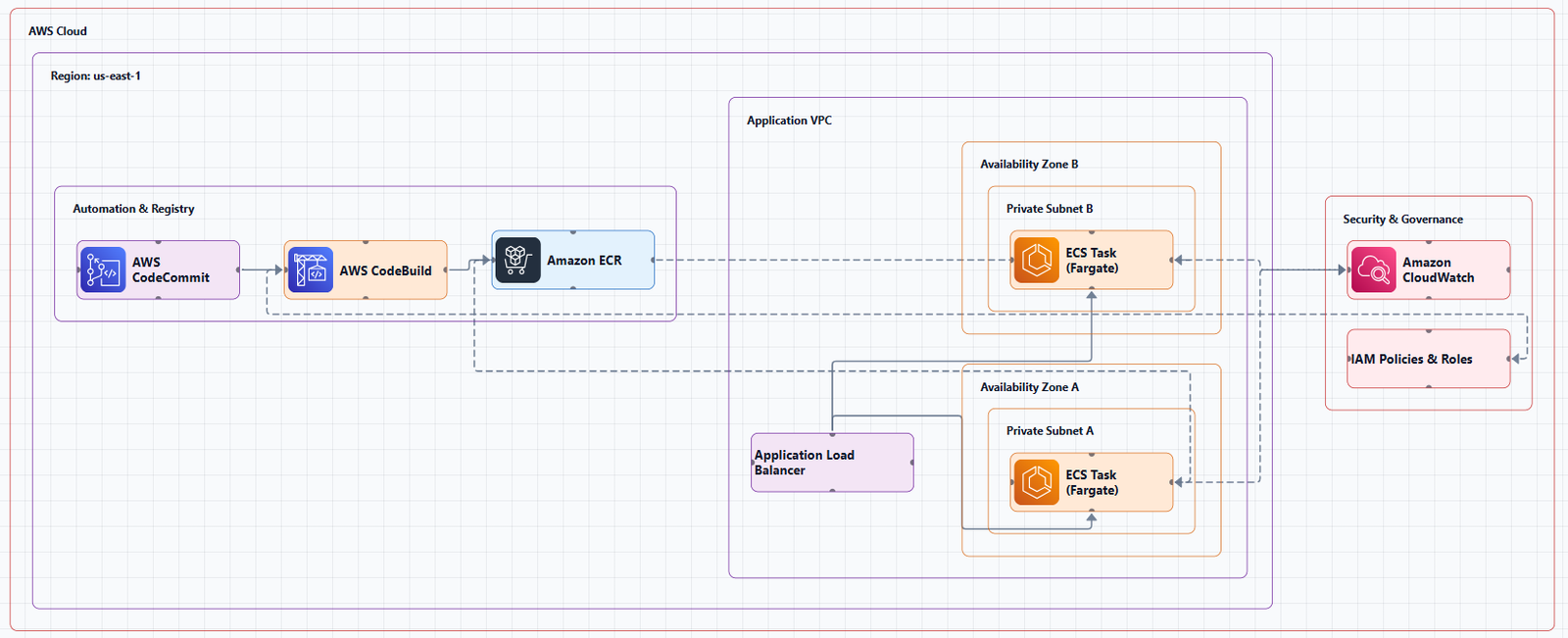
Guide to automatically generating AWS architecture diagrams in 2026 using AI text-to-diagram tools, live AWS scanners, Terraform parsers, and AI assistant skills.
Click Cloud Architecture to open AI Line Studio and generate diagrams from natural language in seconds.
The Four Ways to Automate AWS Diagrams
Automatic generation falls into four distinct categories:
- 3,000+ officially licensed icons across AWS, Azure, GCP, and OCI
- Animated diagrams (GIF, MP4) built for demos, training, and stakeholder presentations
- Multi-format export: PNG, GIF, MP4, plus shareable documentation links
- Enterprise-grade collaboration and security features
| Method | How It Works | Best For |
|---|---|---|
| AI text-to-diagram | Describe your architecture in plain English; AI builds the diagram | Rapid prototyping, iteration, documentation at speed |
| Live cloud scanning | Connects to your AWS account, reverse-engineers infrastructure | Always-current documentation of existing systems |
| Infrastructure-as-Code parsing | Reads Terraform/CloudFormation, generates diagrams | Keeping diagrams in sync with code |
| AI assistant skills | Prompt an AI agent with a skill that generates diagrams | Ad-hoc diagramming within your existing AI workflow |
1. AI Text-to-Diagram: The New Default
This is the most transformative category. You describe your architecture in plain English, and the AI builds the diagram.
AI Line Studio, The Best Value ($19/month, 200 generations)
AI Line Studio is the most cost-effective AI-powered diagramming tool available. At $19/month for 200 diagram generations, it's significantly cheaper than competitors, and faster, too.
What it does: Turns plain-language descriptions of technical systems into production-ready, animated architecture diagrams in 15-20 seconds. The primary input is natural language, not a drag-and-drop canvas. Describe "a 3-tier web app on AWS with an RDS backend and a CDN in front," and the tool generates a structured diagram from that description.
Key features:
Why it's different: Most incumbent tools are canvas-first. AI Line Studio is prompt-first, so the diagram is the output of a description, not the result of manual drawing. Animation as a native export format is a genuine differentiator.
The honest limitation: It's an early-stage product with a smaller install base and fewer enterprise deployments than established tools. Complex descriptions may need manual cleanup; it's not a zero-review tool for mission-critical documentation.
| Tool | Monthly Price | Generations | Cost Per Diagram |
|---|---|---|---|
| AI Line Studio | $19 | 200 | $0.10 |
| Cloudcraft | $49 | Unlimited | $49/month flat |
| Lucidchart | $55+ | Unlimited | $55+/month per user |
For teams creating 5 diagrams per month, that's $3.80 per diagram on AI Line Studio, far less than competitors' flat fees.
Visual Paradigm AI Cloud Architecture Studio
Visual Paradigm offers a browser-based AI Cloud Architecture Studio that builds professional diagrams from plain English descriptions.
How it works:
- Describe your system in the Discovery tab
- Choose AWS and select a deployment strategy
- The AI asks clarifying questions to refine the stack
- Click Generate to build an interactive diagram using official AWS icons
- Use the AI Modify tool to refine it with follow-up prompts
Key benefits: Well-Architected alignment, interactive editing, and high-resolution SVG export.
CloudSketcher
CloudSketcher is an AI-enabled cloud architecture tool for AWS, Azure, and GCP that converts natural language descriptions into editable architecture diagrams instantly.
Distinctive features:
- Multi-cloud conversion between providers
- Image-to-diagram upload for turning static images into editable canvases
- Integrated documentation for proposals, technical specs, and cost estimates
- SketchPricing for cost estimates and optimization suggestions
Pricing is available upon request.
GenAI-DrawIO-Creator (Open Source)
An open-source Next.js application that integrates AI with draw.io diagrams so you can create, modify, and enhance diagrams through natural language commands.
Key features:
- Non-destructive iteration by editing diagrams at the cell level
- Image-based replication of existing diagrams
- 34+ shape libraries including AWS, Azure, GCP, Kubernetes, BPMN, UML, and Cisco
- Animated connectors between elements
- Semantic verification to check requested components are present
Best for: Developers who want open-source, self-hosted AI diagram generation.
2. Live Cloud Scanning: Always-Accurate Diagrams
These tools connect to your AWS account and auto-generate diagrams from live infrastructure. They're the only category that stays current without manual effort.
Cloudcraft by Datadog, Free Tier Available
Cloudcraft is Datadog's cloud infrastructure modeling solution. It automatically generates real-time diagrams of your AWS or Azure architecture and uncovers issues.
How it works: By reverse-engineering the architecture in your cloud account, Cloudcraft can auto-generate new diagrams or enhance existing ones. Once resource collection is enabled, it visualizes resources and their connections automatically.
Key features:
- Auto-layout of components and relationships
- Version history tracking with color-coded infrastructure changes
- Live scanning that saves hours of manual work
The catch: The free tier is limited. Paid plans start at $49/month.
AWS Workload Discovery, Free (Self-Hosted)
Amazon's own visualization tool automatically generates architecture diagrams of AWS workloads based on live account data.
How it works: Workload Discovery maintains an inventory of AWS resources across accounts and regions, maps relationships, and displays them in a web UI. It scans accounts every 15 minutes to keep diagrams current.
Key features:
- Interactive diagrams with drag and zoom
- Export for annotation in other tools
- CRUD operations for saving and updating diagrams in the web UI
The catch: You deploy and maintain it yourself, but it avoids third-party security concerns.
3. Infrastructure-as-Code Parsing: Diagrams from Terraform
For teams that treat infrastructure as code, this category is transformative: your diagrams stay in sync with your code automatically.
Agedashi, Free, Open Source
A Rust command-line tool that reads Terraform/OpenTofu graph output and automatically generates visual architecture diagrams.
Key features:
- AWS resource mapping for 25+ resource types
- Multiple formats including SVG, PNG, PDF, and JPG
- Focus on clean AWS visuals with minimal effort
TerraVision, Free, Open Source
TerraVision automatically converts Terraform code into professional cloud architecture diagrams.
Key features:
- Always up-to-date diagrams generated from Terraform
- 100% client-side operation with no cloud access required
- CI/CD ready automation for diagram updates on PR merges
- Interactive HTML output with pan, zoom, search, and animated data flow
- Editable draw.io export
- Multi-cloud support across AWS, GCP, and Azure
The catch: Requires Python 3.10+, Terraform 1.x, Graphviz, and Git.
StackMap, Free, Open Source
StackMap auto-generates interactive architecture diagrams from live infrastructure inputs or Terraform state files.
Key features:
- CLI-first infrastructure visualization
- Scans Terraform state, repositories, and live AWS inputs
- Produces architecture maps with inferred relationships, grouping, workflow views, and cost forecasting
4. AI Assistant Skills: Diagramming Inside Your AI Workflow
If you already use AI assistants like Claude or ChatGPT, these skills let you generate diagrams without leaving your chat.
AWS Architecture Diagram Skill, Free
A reusable skill for generating AWS architecture diagrams in draw.io format. It works with ChatGPT, Claude Projects, Kiro CLI, Claude Code, and internal AI agents that support custom prompts and file uploads.
Key features:
- Left-to-right flow with frontend on the left and data sources on the right
- Official AWS icons via draw.io's built-in
mxgraph.aws4stencil library - Verified icon catalog using only icons known to render correctly
- Consistent styling and export support through draw.io Desktop CLI
Installation: npx skills add vidanov/aws-architecture-diagram-skill.
Cloud-Architect MCP
An MCP server that helps design AWS cloud architectures. Use it from Cursor, VS Code, Claude Desktop, or any MCP-compatible client to generate architecture designs, cost estimates, and Terraform code.
Example: "Use cloud-architect to design AWS architecture for a multi-tenant SaaS with 100k users".
Side-by-Side Comparison
| Tool | Method | Price | Output Format | AWS Icons |
|---|---|---|---|---|
| AI Line Studio | AI text-to-diagram | $19/mo (200 gens) | PNG, GIF, MP4, shareable links | 3,000+ licensed |
| Visual Paradigm | AI text-to-diagram | Subscription | SVG, PDF, Markdown | Official |
| CloudSketcher | AI text-to-diagram | Available upon request | Editable diagrams | Multi-cloud |
| GenAI-DrawIO-Creator | AI text-to-diagram | Free (open source) | draw.io | 34+ libraries |
| Cloudcraft | Live scanning | $49/mo (free tier limited) | PNG, SVG, JSON | Official |
| AWS Workload Discovery | Live scanning | Free (self-hosted) | Web UI, exportable | Official |
| TerraVision | Terraform parsing | Free (open source) | HTML, draw.io, PNG | Official |
| Agedashi | Terraform parsing | Free (open source) | SVG, PNG, PDF, JPG | 25+ resources |
| StackMap | Terraform parsing | Free (open source) | Interactive HTML | Official |
| AWS Arch Diagram Skill | AI assistant skill | Free | draw.io | Official |
Official AWS Icons: Where to Get Them
The official source for AWS architecture icons is aws.amazon.com/architecture/icons. AWS provides product icons, resources, and tools designed to be simple and easy to use in diagrams, whitepapers, presentations, data sheets, and posters.
For developers, the mxgraph.aws4 stencil library in draw.io sources icons directly from the official AWS Architecture Icons page.
Common Mistakes When Automating AWS Diagrams
Mistake 1: Not reviewing AI-generated output. AI-assisted tools can generate diagrams quickly, but they're not infallible. Complex descriptions may produce incorrect relationships. Review before sharing.
Mistake 2: Using a live scanner for design. Auto-generated diagrams show your current state, not your intended architecture. Use AI or manual tools for planning new architectures.
Mistake 3: Paying for features you don't need. If you create 10 diagrams a month, a $55/month subscription is overkill. AI Line Studio's $19/month plan gives you 200 generations.
Mistake 4: Using outdated icons. AWS updates its icon set regularly. Always use the latest official icons or a verified source like draw.io's built-in library.
External Resources
- AWS Architecture Icons (Official), official source for AWS product icons
- AWS Architecture Center, reference architectures, best practices, and design guidance
- AWS Workload Discovery, AWS's self-hosted visualization tool
- TerraVision, open-source Terraform-to-diagram generator
- AWS Architecture Diagram Skill, free skill for AI assistants
- AI Line Studio, $19/month for 200 diagram generations
Final Thoughts
Yes, you can automatically generate AWS architecture diagrams. In 2026, the options span from AI text-to-diagram tools that generate in 15-20 seconds, to live scanners that reverse-engineer your entire AWS account, to Terraform parsers that keep diagrams in sync with your code.
For most teams, the sweet spot is AI Line Studio at $19/month for 200 generations. It's prompt-first, generates diagrams in seconds, exports animated GIFs and MP4s, and uses 3,000+ official AWS icons. At $0.10 per diagram, it's one of the most cost-effective options on the market.
If you want something completely free, open-source options like GenAI-DrawIO-Creator, TerraVision, and the AWS Architecture Diagram Skill deliver powerful automation, though they require more setup.
The right tool depends on what you're trying to do. If you're iterating on a new design, use an AI text-to-diagram tool. If you're documenting an existing system, use a live scanner or Terraform parser. If you're already using an AI assistant, add a diagram skill to your workflow.