
AWS Architecture Diagram Documentation: A Complete Guide to Documenting Cloud Infrastructure
If you've ever joined a new team and spent weeks reverse-engineering the infrastructure from scattered, outdated Visio files, you know why AWS architecture diagram documentation matters. The diagram that took someone two hours to create a year ago is almost certainly wrong today.
AWS architecture documentation is the bridge between design intent and operational reality. It's how teams communicate system structure, enforce security boundaries, and maintain institutional knowledge when people leave. But most teams treat it as an afterthought, a box to check before a review, not a living asset that evolves with the infrastructure.
This guide covers everything you need to know about AWS architecture diagram documentation: what to include, how to structure it, best practices that actually work, tools that make it sustainable, and how AI is transforming the workflow from manual maintenance to automated generation.
Cloud Architecture
Create cloud architecture diagrams for AWS, Azure, GCP, and more. Design scalable infrastructure with professional cloud icons.
Complete guide to AWS architecture diagram documentation, what to include, best practices, version control, tools, and AI-powered workflows.
Click Cloud Architecture to open AI Line Studio and generate diagrams from natural language in seconds.
Why AWS Architecture Documentation Matters
A single role rarely owns cloud systems. Solution architects design them, DevOps engineers operate them, project managers track delivery, and stakeholders evaluate risk and cost. Architecture documentation creates a shared reference point for all of these perspectives.
- All major AWS services in use
- Network boundaries (VPCs, subnets, Availability Zones)
- User entry points (CloudFront, API Gateway, Load Balancers)
- Core data or request flow
- Security boundaries (Security Groups, NACLs)
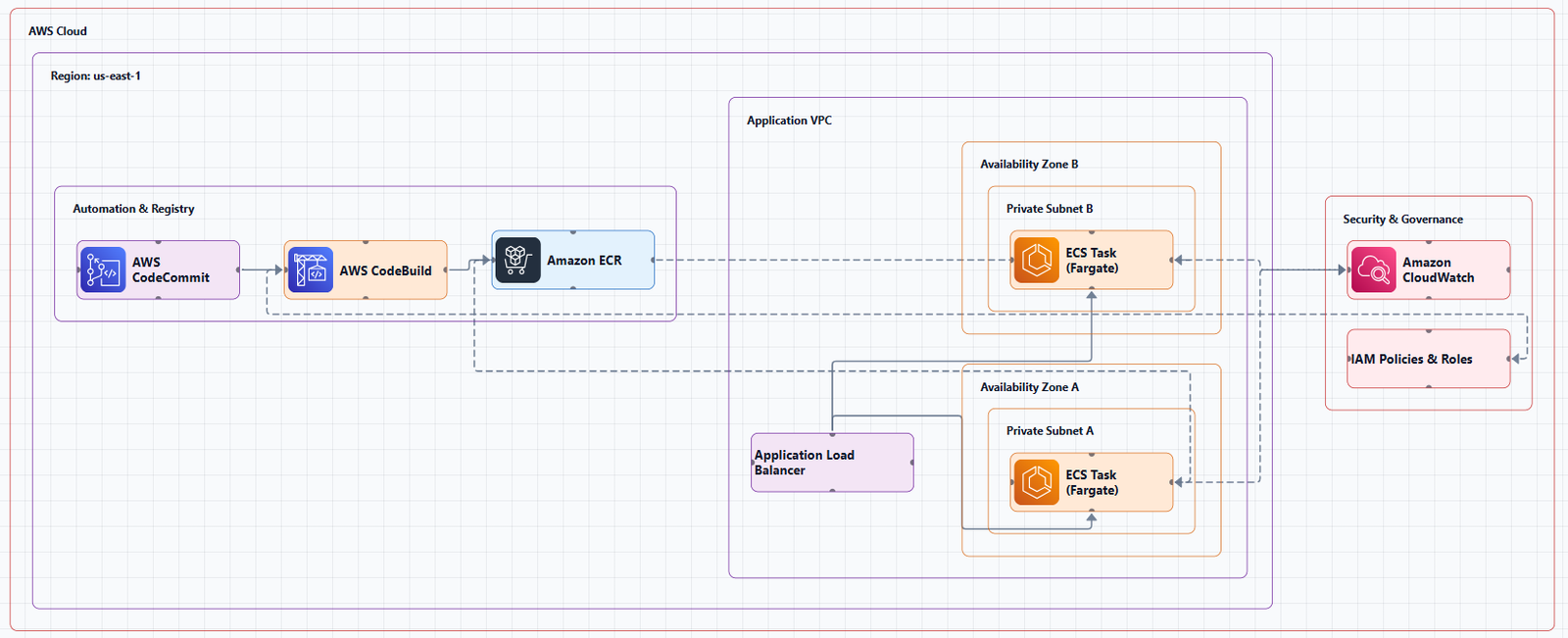
For technical teams, documentation makes relationships visible. You can quickly see how traffic enters the system, which services depend on each other, and where scaling or redundancy has been built in. This makes it easier to identify bottlenecks, security gaps, and performance risks before they surface in production.
For incident response, documentation saves time. When a security event occurs, analysts need quick access to institutional knowledge to respond effectively. Documenting internal technical diagrams and processes eases the incident response analyst's job, helping them obtain the institutional knowledge needed to respond to a security event. Without documentation, every incident starts with a frantic Slack message asking "who knows how this system works?"
For compliance and audits, architecture documentation provides evidence of due diligence. Security reviews, SOC 2 audits, and compliance assessments all require clear documentation of system boundaries, data flows, and security controls.
For onboarding, documentation accelerates time-to-productivity. New team members can understand the system's structure without bothering senior engineers for basic explanations. The AWS Well-Architected Framework emphasizes documenting and centralizing architecture diagrams as a best practice.
The hard truth: if your architecture isn't documented, it doesn't exist for anyone who wasn't there when it was built.
What to Include in AWS Architecture Documentation
A strong AWS architecture diagram should include the main services, network boundaries, user entry points, and the core data or request flow. But documentation goes beyond a single diagram.
Core Elements of Architecture Documentation
1. High-Level Architecture Diagram
This is the starting point for AWS system documentation because it shows service relationships and infrastructure boundaries in one view. It should show:
2. Detailed Component Diagrams
For each major subsystem, create focused diagrams that show internal structure. This might include:
- Data flow diagrams showing how data moves through the system
- Sequence diagrams for critical workflows
- Infrastructure diagrams showing compute, storage, and networking details
3. Service Inventory
Document every AWS service in use, including:
- Service name and purpose
- Configuration details (instance types, storage sizes, scaling policies)
- Dependencies on other services
- Cost implications
4. Network Architecture
Document the network topology:
- VPC CIDR blocks and subnet allocations
- Route tables and routing rules
- Security Groups and Network ACLs
- VPN and Direct Connect configurations
- VPC peering and Transit Gateway connections
5. Security and Compliance
Document security controls:
- IAM roles, policies, and permissions
- Encryption at rest and in transit
- Logging and monitoring configuration
- Compliance requirements and how they're met
6. Operational Runbooks
Document how to operate the system:
- Deployment procedures
- Monitoring and alerting configuration
- Backup and disaster recovery procedures
- Scaling policies and thresholds
- Incident response procedures
7. Decision Log
Document why certain decisions were made:
- Why this service was chosen over alternatives
- Why this architecture pattern was selected
- Tradeoffs considered and why they were accepted
Documentation Metadata
Every architecture document should include:
- Title and description
- Last updated date
- Author and owner
- Version number
- External references and related documents
A diagram without a date is assumed to be outdated.
Best Practices for AWS Architecture Diagram Documentation
Based on the AWS Well-Architected Framework and real-world experience, here's what actually works.
1. Keep Diagrams Simple and Readable
Focus on the components and relationships that matter for the intended audience. If a diagram has more than 15 to 20 nodes, it's too complex. Split it into multiple diagrams at different abstraction levels.
The goal of any AWS architecture diagram is to clearly communicate structure and intent, regardless of the type of system your diagram represents.
2. Use Official AWS Icons
AWS architecture icons are designed to be simple, so you can easily use them in diagrams. Consistent use of official AWS icons reduces ambiguity and makes diagrams easier to scan across teams and projects. AWS allows customers and partners to use these toolkits and assets to create architecture diagrams.
3. Emphasize Network Boundaries
Clearly show VPCs, subnets, and network boundaries. Show security groups and network ACLs. This visually communicates security and organizational structure.
4. Show Directional Data Flow
Use directional arrows to show how data moves through the system. Lines without arrows are ambiguous, always indicate direction.
5. Label Everything
Provide clear, accurate labels for each icon, grouping container, and relationship. Don't assume readers will recognize an icon and know what it means. Include both the service name and its purpose.
6. Maintain a Centralized Documentation Repository
Set up a centralized registry for system documentation, including design decisions and component versions. Store documentation in a versioned source code repository. This enables:
- Tracking changes over time
- Collaboration across team members
- Rollback to previous versions if needed
7. Implement Regular Review Cycles
Establish clear update and approval processes. Verify that documentation is up to date and regularly updated in accordance with new architecture patterns. Run reviews quarterly at minimum.
8. Integrate Documentation with Code
Integrating documentation and code involves creating, maintaining, and publishing documentation using the same tools and processes used for application development. Treat architecture diagrams and documentation as code, version-controlled, reviewable, and deployable.
9. Include Both Technical Details and Business Context
Documentation should include both technical details and business context for each component. Why does this component exist? What business requirement does it satisfy? This context is invaluable for stakeholders and future architects.
Tools for AWS Architecture Diagram Documentation
The tool you choose determines whether documentation is a sustainable practice or a constant source of frustration.
Manual Diagramming Tools
Draw.io (diagrams.net)
The most widely used free option. Completely free, runs in the browser, has built-in AWS icon libraries, and exports to multiple formats. No registration required.
Lucidchart
Professional diagramming with AWS-specific templates, real-time collaboration, and revision history. Suitable for team environments.
Microsoft Visio
Enterprise-grade diagramming with AWS templates. Integrates with Microsoft ecosystem.
Diagram-as-Code Tools
Diagram-as-code (DAC) lets you define AWS architecture diagrams using YAML or Python files. This approach enables version control, track diagram changes with Git.
Python Diagrams
Lets you draw cloud system architecture in Python code. You write Python code that generates an AWS architecture diagram with proper service icons, then commit both the code and output image to version control. Used by Airflow to generate architecture diagrams in their documentation.
awsdac (AWS Diagram as Code)
A CLI tool that enables drawing infrastructure diagrams for AWS through YAML code. It promotes code reuse and easily generates diagrams that follow AWS diagram guidelines.
diagrams-js
A TypeScript/JavaScript port of the Python diagrams library for drawing cloud system architecture diagrams as code. Supports 17+ cloud providers including AWS, Azure, GCP, and Kubernetes.
AI-Powered Documentation Tools
AI-powered tools are fundamentally changing the documentation workflow. Instead of manually creating diagrams, you describe your architecture, and the tool generates production-quality documentation.
AI Line Studio
Takes a prompt-first approach with AWS support. Describe your system, "a 3-tier web app on AWS with EC2, RDS, and CloudFront", and it generates a structured diagram with official AWS icons in 15 to 20 seconds. The output supports PNG, GIF, and MP4 exports, plus shareable documentation links. For AWS-specific workflows, the dedicated AI cloud diagram generator turns AWS descriptions into production-ready diagrams. If you're working across multiple providers, the AI architecture diagram builder supports AWS, Azure, GCP, and OCI with over 3,000 officially licensed icons.
The honest limitation: AI Line Studio is an early-stage product with a smaller install base and fewer third-party integrations than established tools. It's not a general-purpose diagramming tool, if you need org charts, mind maps, or non-technical diagrams, a broader tool is a better fit. And as with any AI-generated output, complex or ambiguous system descriptions may need manual cleanup. It's not a zero-review tool for mission-critical documentation.
AWS Diagram MCP Server
Enables AI assistants and development tools to generate AWS architecture diagrams programmatically through the Model Context Protocol (MCP). As announced in April 2025, MCP enables tools like Kiro CLI and Amazon Q Developer to generate architecture diagrams using the Python diagrams package.
Visual Paradigm AI Cloud Architecture Studio
Allows you to describe your requirements in plain English and receive a standards-compliant AWS diagram in minutes. You can update your AI-powered diagram within your documentation to keep teams aligned.
CrewAI + AWS Bedrock
AI agents can automatically generate comprehensive AWS architecture documentation including PlantUML diagrams, technical runbooks, executive summaries, and developer guides.
Version Control for Architecture Documentation
The AWS Well-Architected Framework emphasizes version control for documentation. It's a best practice to use source control in your code repository so that you have versioning and collaboration capabilities that enable multiple team members to work simultaneously.
Why Version Control Matters
Change tracking: Every change to architecture documentation is recorded with who made it, when, and why.
Collaboration: Multiple team members can work on documentation simultaneously without conflicts.
Rollback: If a mistake is made, you can revert to a previous version.
Audit trail: Documentation changes can be correlated with infrastructure changes.
Code integration: Documentation lives alongside infrastructure-as-code, making it part of the deployment pipeline.
How to Implement Version Control
For diagram-as-code tools (Python Diagrams, awsdac): Store the source code (Python or YAML) in Git. The diagrams are generated from code, so the source is the single source of truth.
For manual tools (Draw.io, Lucidchart): Store exported files in Git. Draw.io files are XML-based and can be diffed. Lucidchart supports export to SVG or PDF for version control.
For AI-generated diagrams: Store the prompt and the generated output. The prompt serves as the source of truth, regenerating from the prompt produces the same diagram.
Establish documentation repositories: Document internal repositories that detail AWS account structure, architecture patterns, and operational procedures.
The Documentation Lifecycle
Architecture documentation follows a lifecycle that mirrors infrastructure itself.
1. Planning Phase
During early design, create high-level diagrams that show the proposed architecture. Document design decisions, tradeoffs, and alternatives considered.
2. Implementation Phase
As infrastructure is built, update diagrams to reflect reality. Create detailed component diagrams for each subsystem. Document deployment procedures and operational runbooks.
3. Review Phase
Use the AWS Well-Architected Framework to review architecture documentation. The framework provides a consistent approach for evaluating architectures and implementing designs that can scale over time.
4. Maintenance Phase
Update documentation as infrastructure changes. Establish regular review cycles to verify accuracy. The AWS Well-Architected Framework emphasizes that documentation should be up to date and regularly updated in accordance with new architecture patterns.
5. Handoff Phase
When teams change or people leave, documentation ensures institutional knowledge is preserved. Documenting internal technical diagrams and processes eases the incident response analyst's job, helping them quickly obtain the institutional knowledge to respond to a security event.
Common Documentation Mistakes (And How to Avoid Them)
Mistake 1: Outdated documentation. A diagram without a last-updated date is assumed to be wrong. Solution: include metadata and update regularly. Use AI-powered tools to regenerate diagrams quickly when infrastructure changes.
Mistake 2: Too much detail in one diagram. Trying to show everything creates visual noise. Solution: layer diagrams by abstraction level, high-level context diagrams lead to detailed component diagrams.
Mistake 3: No version control. Documentation changes are lost, and collaboration is difficult. Solution: store documentation in version-controlled repositories.
Mistake 4: Missing security boundaries. Not showing VPCs, subnets, or security groups misses a critical part of the story. Solution: emphasize network boundaries in every diagram.
Mistake 5: No labels. Icons without text labels leave readers guessing. Solution: label every icon with the service name and purpose.
Mistake 6: No directional arrows. Lines without arrows are ambiguous. Solution: always show the direction of data flow.
Mistake 7: Documentation separate from code. Documentation that lives outside the codebase quickly goes stale. Solution: integrate documentation with code using the same tools and processes.
The Future: AI-Powered Documentation
AI is fundamentally changing how AWS architecture documentation is created and maintained.
Natural language to diagram: Tools like AI Line Studio, Visual Paradigm AI, and the AWS Diagram MCP server allow you to describe your architecture in plain language and receive a professional diagram in seconds.
Automated documentation generation: AI agents can generate comprehensive documentation including diagrams, runbooks, executive summaries, and developer guides. This dramatically reduces the time required to create and maintain documentation.
Diagram to infrastructure: AI can analyze architecture diagrams and generate comprehensive documentation and implementation code that adheres to AWS Well-Architected best practices.
Integration with development workflows: MCP servers enable AI assistants to build technical diagrams directly from natural language. This means documentation can be created and updated as part of the development process, not as a separate activity.
Summary
AWS architecture diagram documentation is essential for design, communication, incident response, compliance, and onboarding. The best documentation:
- Starts with a high-level architecture diagram showing service relationships and infrastructure boundaries
- Includes detailed component diagrams, service inventory, network architecture, security documentation, and operational runbooks
- Uses official AWS icons consistently
- Shows directional data flow and clear labels
- Emphasizes network boundaries and security controls
- Is stored in a centralized, version-controlled repository
- Is regularly reviewed and updated
- Integrates with code using the same tools and processes
The tooling landscape has shifted. AI-powered generators can now turn natural language descriptions into production-ready AWS diagrams in seconds, changing the documentation workflow from hours of manual effort to seconds of generation with minutes of review. The AWS Diagram MCP server enables AI assistants to generate architecture diagrams programmatically. Tools like CrewAI can generate comprehensive documentation including diagrams and runbooks.
Key takeaways:
- Documentation is not optional, it's essential for operational excellence
- An outdated diagram is worse than no diagram
- Version control is mandatory for maintainable documentation
- AI tools are transforming documentation from a chore to an automated process
- Integrate documentation with code to keep it accurate and up to date
If you're ready to move beyond manual documentation, try using an AI cloud diagram generator to turn an AWS description into a diagram instantly. For broader system architecture documentation, the AI system architecture generator covers distributed and enterprise systems. And to see how these concepts translate into production-ready templates, explore our AWS architecture diagram tool for practical examples you can adapt.
Stop maintaining documentation manually. Start documenting your AWS architectures in a way that actually keeps pace with your infrastructure.