
AWS Architecture Diagram for Web Application: A Complete Guide to Production-Ready Design
Modern web applications must be scalable, secure, and fault-tolerant. As traffic grows, a single-server architecture quickly becomes unreliable and difficult to maintain. AWS provides the building blocks to design architectures that handle traffic spikes, failures, and security threats while maintaining high availability, but knowing which services to use and how they connect is the hard part.
This guide walks through AWS web application architecture diagrams, from the classic three-tier pattern to modern serverless and containerized approaches. You'll learn what each component does, why it's placed where it is, and how to design architectures that follow AWS Well-Architected best practices.
Cloud Architecture
Create cloud architecture diagrams for AWS, Azure, GCP, and more. Design scalable infrastructure with professional cloud icons.
Complete guide to AWS architecture diagrams for web applications, three-tier, serverless, containerized patterns, Well-Architected best practices, and tools.
Click Cloud Architecture to open AI Line Studio and generate diagrams from natural language in seconds.
What Is an AWS Web Application Architecture Diagram?
An AWS web application architecture diagram is a visual representation of how AWS services work together to deliver a web application to users. A strong diagram includes the main services, network boundaries, user entry points, and the core data or request flow. It should also show how application services, databases, load balancing, storage, permissions, and monitoring connect, so engineers can understand deployment logic without filling in missing system relationships themselves.
- Presentation Tier (Web Layer): Handles incoming user requests and serves the frontend interface
- Application Tier (Logic Layer): Processes business logic and backend APIs
- Data Tier (Database Layer): Stores and manages application data securely
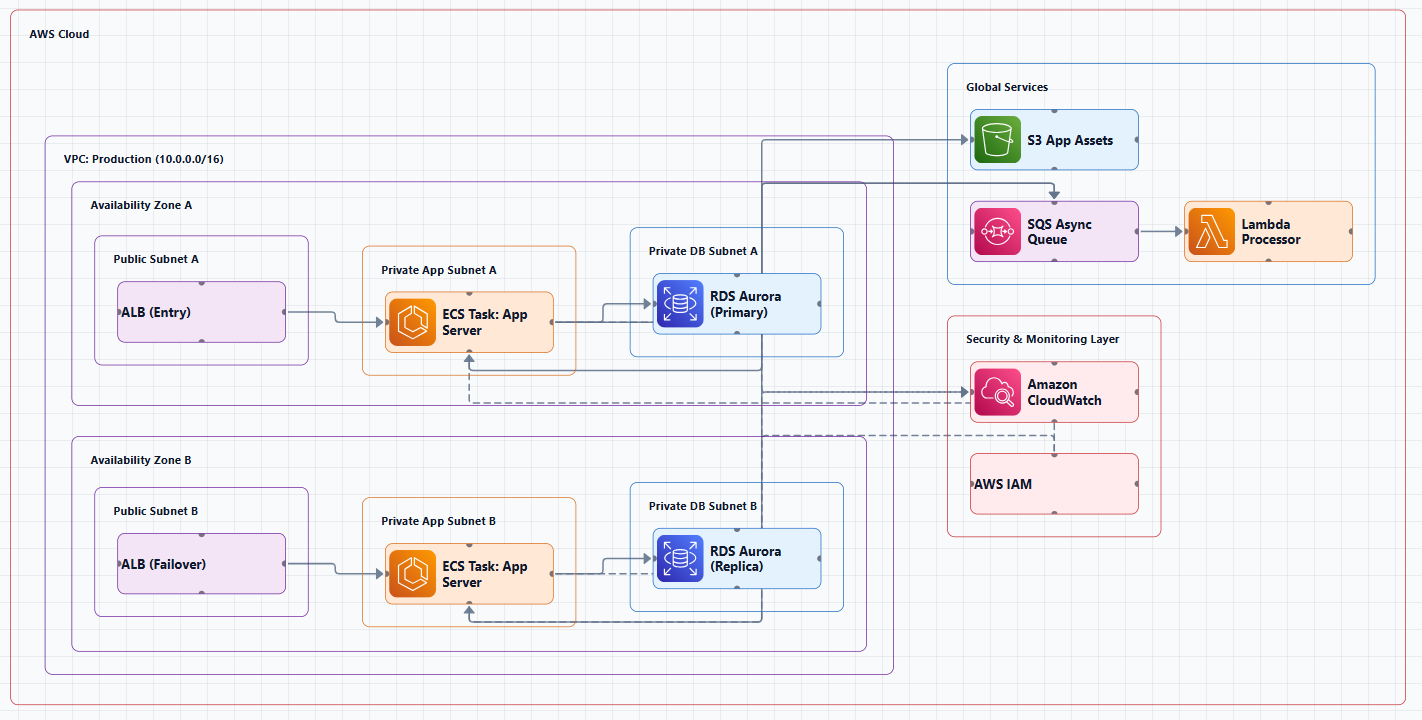
The goal isn't to show everything. The goal is to show enough that someone looking at the diagram understands the system's structure, security boundaries, and how requests flow from end to end.
The Three-Tier Web Application Architecture
The three-tier architecture is the most common pattern for production web applications on AWS. It separates an application into three logical layers:
A three-tier architecture separates an application's functionality into distinct layers (presentation, business logic, and data) to enable scalability, modularity, and flexibility in software development. This separation improves scalability, security, maintainability, and fault tolerance.
The Diagram: What It Shows and Why
A production-ready three-tier web application architecture on AWS typically includes the following components, laid out from the user's entry point to the data store.
1. Entry Point: CloudFront + AWS WAF
User requests are first handled by Amazon CloudFront and AWS WAF, which filter and distribute incoming traffic. The "front door" of the architecture is CloudFront, which allows you to enable TLS to secure data in transit. AWS WAF and AWS Shield protect from malicious attacks. CloudFront caches static content at edge locations globally for low-latency delivery.
2. Route 53 for DNS
Amazon Route 53 routes traffic from your web client based on the request path for static and dynamic content.
3. Application Load Balancer (ALB)
Traffic passes to an internet-facing Application Load Balancer within the AWS VPC. The ALB distributes incoming traffic across multiple targets in the web tier, performing health checks and routing traffic only to healthy instances. The ALB sits in the public subnets, acting as the gateway for incoming traffic.
4. Web Tier (Public Subnets)
The web tier runs on EC2 instances or containers in public subnets. These instances serve the frontend, typically a React, Angular, or Vue.js application served via Nginx. The web tier forwards API requests to the application tier.
5. Application Tier (Private Subnets)
The application tier runs backend services in private subnets. This is where business logic executes, Node.js, Python, Java, or other backend runtimes processing API requests, validating data, and orchestrating business workflows.
6. Database Tier (Private Subnets with Multi-AZ)
The application tier securely connects to a highly available Amazon RDS database deployed across multiple Availability Zones. Multi-AZ deployment provides automatic failover: if the primary database fails, AWS automatically promotes the standby replica in another AZ.
7. Supporting Services
- Auto Scaling Groups: Automatically replace unhealthy EC2 instances and scale capacity based on demand
- NAT Gateways: Allow resources in private subnets to access the internet for updates without exposing them to inbound internet traffic
- VPC and Subnets: Provide network isolation and security boundaries, public subnets for the web tier, private subnets for application and database tiers
- Security Groups: Act as virtual firewalls, controlling inbound and outbound traffic to each component. The ALB's security group ensures only HTTP/HTTPS traffic is allowed from the internet; the web servers' security group only accepts traffic from the ALB
- IAM: Controls permissions, who can access what, and which services can talk to each other
- S3: Stores static content and backups
- CloudWatch: Monitors and observes the application and all resources
Why This Pattern Works
Fault Tolerance: Components are deployed across multiple Availability Zones. If one AZ fails, the other continues serving traffic.
Auto Scaling: Both the web and application tiers automatically adjust capacity based on demand. This means your application can handle sudden traffic spikes without manual intervention.
Security: The public/private subnet split ensures that only the web tier is exposed to the internet. The application tier and database tier remain in private subnets, accessible only through internal load balancers.
Maintainability: Each tier can be updated, scaled, or replaced independently. You can update the application tier without touching the web tier or database.
When NOT to Use Three-Tier
Three-tier architecture is overkill for simple applications. If you're building a prototype, a small internal tool, or an application with predictable, low traffic, the operational overhead of managing VPCs, subnets, load balancers, and Auto Scaling groups isn't justified. For these cases, serverless architectures are often a better fit.
Alternative Patterns: When Three-Tier Isn't the Right Answer
Serverless Web Application
For applications where you don't want to manage servers at all, AWS provides a fully serverless architecture:
Services: CloudFront → API Gateway → Lambda → DynamoDB, with S3 for static assets and Cognito for auth
Layout (left to right): Users → CloudFront → S3 Bucket (static assets) → API Gateway → Lambda → DynamoDB
Why this works: Every component scales automatically. You pay only for what you use, no servers to patch, maintain, or scale manually. A fully serverless application can cost $0 while sitting idle and scale instantly to meet demand. Serverless technologies feature automatic scaling and built-in high availability to increase agility and optimize costs.
When to use: Event-driven workloads, sporadic traffic, applications with unpredictable scaling needs, or teams that want to focus on code rather than infrastructure.
When NOT to use: Long-running processes (Lambda has a 15-minute timeout), heavy computation, or applications with predictable, sustained traffic where reserved instances would be cheaper.
Containerized Web Application on ECS/Fargate
For teams adopting containers without managing Kubernetes control planes, AWS provides a containerized three-tier web application using Amazon ECS and AWS Fargate:
How it works:
- Route traffic from your web client based on the request path using Amazon Route 53
- Protect and control access using Amazon Cognito
- Use CloudFront to reduce latency for delivering static content
- Store static content and backups in S3
- Handle API calls with authorization and throttling using API Gateway
- Configure an internet-facing Application Load Balancer to distribute traffic across multiple Availability Zones
- Run the application on ECS with AWS Fargate for serverless compute
- Retrieve data from DynamoDB
- Store container images in ECR
- Monitor with CloudWatch
Why this works: Containerization allows you to dynamically adjust resources based on demand, handling increased traffic and sudden spikes without compromising performance. The architecture diagram above is an example of a solution created with Well-Architected best practices in mind.
When to use: Teams adopting containers, applications that benefit from container isolation, or workloads that need portability across environments.
Microservices on ECS/EKS
For organizations adopting microservices, this architecture deploys and manages containerized services independently:
Layout: Route 53 → CloudFront → ALB → ECS/EKS Cluster. Services communicate with each other (Service A ↔ Service B ↔ Service C). ElastiCache and RDS Aurora connect to the services. ECR stores container images. CloudWatch monitors everything.
Why this works: Each service can be developed, deployed, and scaled independently. Teams can own individual services.
When NOT to use: For small applications where the operational overhead of microservices outweighs the benefits. For teams without strong DevOps practices.
AWS Well-Architected Best Practices for Web Applications
The AWS Well-Architected Framework consists of six pillars that provide best practices for designing and operating resilient, secure, efficient, cost-effective, and sustainable systems:
- Operational Excellence: The ability to support development and run workloads effectively
- Security: Protecting information and systems
- Reliability: The ability of a workload to perform its intended function correctly and consistently
- Performance Efficiency: Using computing resources efficiently
- Cost Optimization: Avoiding unnecessary costs
- Sustainability: Minimizing environmental impact
Key Principles for Web Application Architecture
1. Start with a clear runtime boundary. Define what runs where, web tier, application tier, database tier, and enforce those boundaries with VPCs, subnets, and security groups.
2. Put CloudFront and WAF in front. Every web application should have a CDN and Web Application Firewall as the first line of defense.
3. Keep the application private. Application servers and databases should never be directly exposed to the internet. Use private subnets and security groups that only accept traffic from the ALB.
4. Treat IAM as application code. Define permissions explicitly, never use wildcards, and follow the principle of least privilege.
5. Make logs useful before you need them. Set up CloudWatch logs, metrics, and alarms during development, not after an incident.
6. Use multiple Availability Zones. Deploy across at least two AZs for high availability.
7. Automate scaling. Use Auto Scaling Groups with target tracking policies that scale compute resources dynamically based on metrics.
8. Use serverless where possible. Serverless services decrease the need for provisioning and managing servers, reducing operational overhead and labor costs. With AWS, you can start small and scale cost-effectively as your business demand increases.
AWS Architecture Diagram Templates
Here are ready-to-use patterns for common AWS web application architectures:
Serverless Web Application
- Services: CloudFront → API Gateway → Lambda → DynamoDB, with S3 for static assets and Cognito for auth
- Layout: Users → CloudFront → S3 Bucket (static) → API Gateway → Lambda → DynamoDB
VPC with Public and Private Subnets
- Layout: AWS Cloud → Region → VPC → AZ-1 (Public Subnet with NAT Gateway and ALB, Private Subnet with EC2/ECS and RDS primary) and AZ-2 (Public Subnet with NAT Gateway, Private Subnet with EC2/ECS and RDS standby)
- Users → Internet Gateway → ALB → EC2/ECS
Microservices on ECS/EKS
- Layout: Route 53 → CloudFront → ALB → ECS/EKS Cluster. Services communicate with each other. ElastiCache and RDS Aurora connect to services. ECR stores container images. CloudWatch monitors everything.
CI/CD Pipeline
- Layout: Developer → CodeCommit → CodePipeline → CodeBuild → S3 (artifacts). CodePipeline then → CodeDeploy (staging) → Manual Approval → CodeDeploy (prod)
Common Mistakes in AWS Web Application Diagrams
Mistake 1: Exposing the application tier to the internet. Application servers should be in private subnets, accessible only through internal load balancers. Never put backend servers in public subnets.
Mistake 2: Single Availability Zone. A single AZ deployment has no failover. If that AZ experiences an issue, your application goes down.
Mistake 3: No Auto Scaling. Without Auto Scaling, your application can't handle traffic spikes, and you're paying for peak capacity even during low traffic.
Mistake 4: Missing security boundaries. Failing to show VPCs, subnets, Security Groups, or private subnets misses a critical part of the architecture story.
Mistake 5: No monitoring. CloudWatch should be part of every production architecture. Logs, metrics, and alarms are how you know your application is healthy.
Mistake 6: Outdated diagrams. A diagram without a last-updated date is assumed to be wrong. Infrastructure changes, update your diagrams.
Tools for Creating AWS Web Application Architecture Diagrams
Manual Tools
- Draw.io (diagrams.net): Free, browser-based, includes AWS shape libraries and templates. No registration required.
- Lucidchart: Collaborative diagramming with AWS-specific templates and icon libraries.
- Microsoft Visio: Professional tool with AWS templates.
AI-Powered Tools
AI-powered tools let you describe your architecture in plain language and get a diagram in seconds, no manual dragging required.
AI Line Studio takes this prompt-first approach with AWS support. Describe your system, "a 3-tier web app on AWS with EC2, RDS, and CloudFront", and it generates a structured diagram with official AWS icons in 15 to 20 seconds. The output supports PNG, GIF, and MP4 exports, plus shareable documentation links. For AWS-specific workflows, the dedicated AI cloud diagram generator turns AWS descriptions into production-ready visuals. If you're working across multiple providers, the AI architecture diagram builder covers AWS, Azure, GCP, and OCI with over 3,000 officially licensed icons.
The honest limitation: AI Line Studio is an early-stage product with a smaller install base and fewer third-party integrations than established tools. It's not a general-purpose diagramming tool, if you need org charts, mind maps, or non-technical diagrams, a broader tool is a better fit. And as with any AI-generated output, complex or ambiguous system descriptions may need manual cleanup. It's not a zero-review tool for mission-critical documentation.
Diagram-as-Code Tools
Tools like diagrams-js let you define your architecture diagrams in TypeScript, with support for 17+ cloud providers including AWS, Azure, GCP, and Kubernetes. This approach enables version control, you can track diagram changes in Git alongside your infrastructure code.
Decision Framework: Which Architecture to Choose
| Pattern | Best For | When to Avoid | Key Tradeoff |
|---|---|---|---|
| Three-Tier EC2 | Most production web apps, enterprise systems | Simple prototypes, low-traffic apps | Control vs. operational overhead |
| Serverless | Event-driven, sporadic traffic, MVPs | Long-running processes, sustained high traffic | Cost efficiency vs. cold start latency |
| Containerized (ECS/Fargate) | Teams adopting containers, portable workloads | Teams without container experience | Portability vs. complexity |
| Microservices | Large teams, independent service ownership | Small apps, teams without DevOps | Scalability vs. operational complexity |
Summary
AWS web application architecture diagrams are essential for design, documentation, and communication. The three-tier architecture, with CloudFront/WAF at the edge, an external ALB in the web tier, private subnets for the application tier, and a Multi-AZ RDS database, remains the gold standard for production web applications.
Key takeaways:
- Use CloudFront and WAF as your front door
- Keep application and database tiers in private subnets
- Deploy across multiple Availability Zones for high availability
- Use Auto Scaling to handle traffic spikes automatically
- Include monitoring (CloudWatch) in every production architecture
- A three-tier architecture separates an application's functionality into distinct layers to enable scalability, modularity, and flexibility
- The architecture diagram above is an example of a solution created with Well-Architected best practices in mind
The tooling landscape has shifted. AI-powered generators can now turn natural language descriptions into production-ready AWS diagrams in seconds, changing the workflow from hours of manual dragging to seconds of generation with minutes of review.
If you're ready to move beyond studying examples, try using an AI cloud diagram generator to turn a web application description into a visual instantly. For broader architecture needs beyond web applications, the AI system architecture generator covers distributed and enterprise system designs. And to see how these concepts translate into production-ready templates, explore our AWS web application architecture diagram tool for practical examples you can adapt.
Stop spending hours on diagrams that will be outdated next week. Start documenting your AWS web application architectures in a way that actually keeps pace with your infrastructure.