
AWS EKS Architecture Diagram: Complete Guide to Production Kubernetes on AWS
Amazon EKS is the standard for running production Kubernetes on AWS, but its architecture is often misunderstood. This guide provides a complete reference for the EKS architecture, control plane, worker nodes, VPC networking, IAM, and the integrations that make it work, so you can design, deploy, and operate clusters that are secure, scalable, and maintainable.
Cloud Architecture
Create cloud architecture diagrams for AWS, Azure, GCP, and more. Design scalable infrastructure with professional cloud icons.
Complete guide to Amazon EKS architecture, control plane, worker nodes, VPC networking, IAM/IRSA, storage, scaling, and production best practices.
Click Cloud Architecture to open AI Line Studio and generate diagrams from natural language in seconds.
What Is Amazon EKS?
Amazon Elastic Kubernetes Service (EKS) is a fully managed Kubernetes service that simplifies running Kubernetes on AWS without needing to install or operate your own control plane. At a high level, Kubernetes consists of two major components: a cluster of worker nodes running your containers, and the control plane managing when and where containers are started on your cluster while monitoring their status. EKS takes care of control plane management, upgrades, and high availability, so you can focus on your workloads.
- Use informers/watches instead of polling LIST calls
- Set appropriate QPS and burst limits on controllers
- Enable API Priority and Fairness (APF) for throttling
- Cache responses client-side where possible
- Don't run tight polling loops against the API server
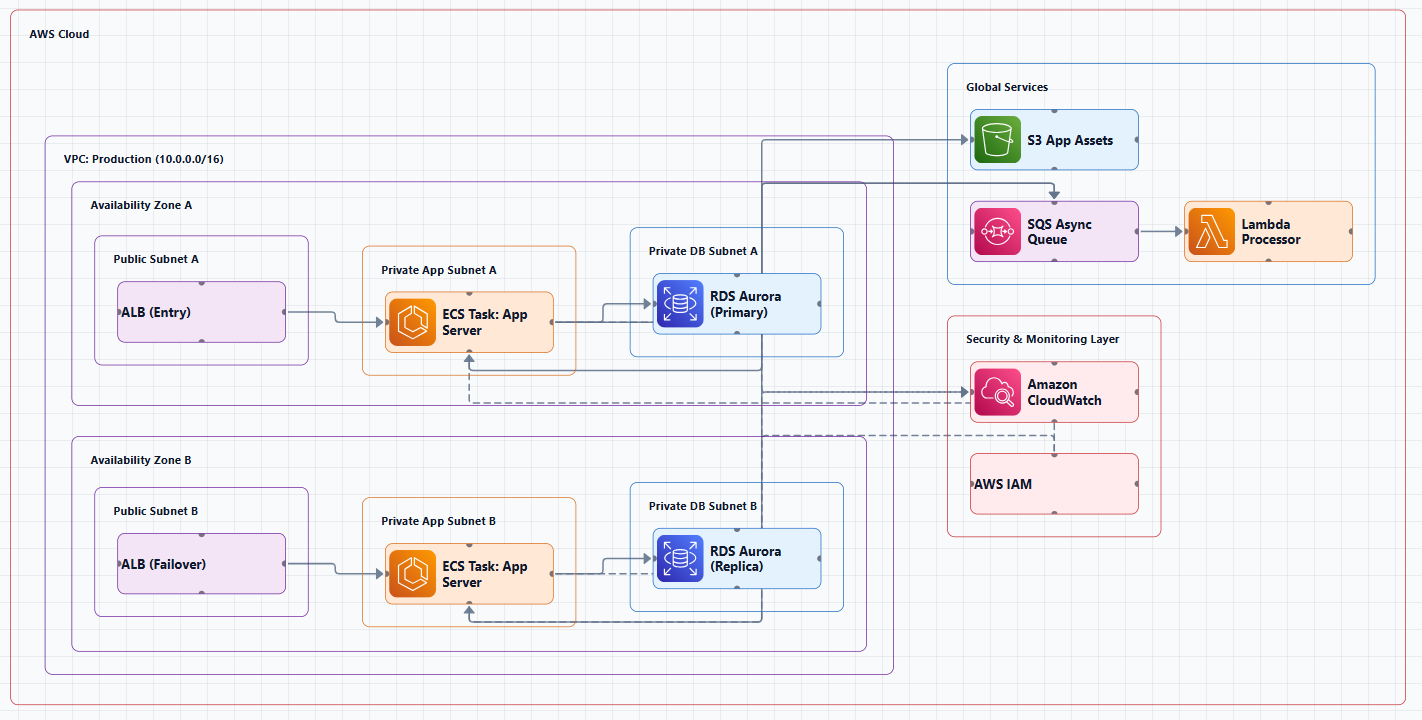
EKS provides deep integration with AWS services including IAM, security groups, and VPC networking, making it the preferred choice for organizations that want to run Kubernetes with AWS-native capabilities.
High-Level EKS Architecture
At the highest level, an EKS cluster consists of two primary components:
- Control Plane, Fully managed by AWS, runs in an account managed by AWS
- Worker Nodes, Run inside your AWS account
Both layers operate in the context of your VPC, communicate via the AWS VPC CNI plugin, and are secured through IAM roles and Kubernetes RBAC.
EKS Cluster Architecture Overview
┌─────────────────────────────────────────────────────────────────────────────┐
│                    AWS Managed Control Plane (AWS Account)                  │
│  ┌───────────────────────────────────────────────────────────────────────┐ │
│  │  • API Server (Public + Private Endpoints)                           │ │
│  │  • etcd (Multi-AZ replicated, 8 GiB limit)                          │ │
│  │  • Scheduler                                                         │ │
│  │  • Controller Manager                                                │ │
│  │  • Cloud Controller Manager (AWS integrations)                      │ │
│  └───────────────────────────────────────────────────────────────────────┘ │
│                                    │                                        │
│                     Elastic Network Interfaces (ENIs)                      │
│                     (cross-account connectivity)                           │
│                                    ▼                                        │
└─────────────────────────────────────────────────────────────────────────────┘
                                     │
                                     ▼
┌─────────────────────────────────────────────────────────────────────────────┐
│                         Your AWS Account / VPC                             │
│  ┌───────────────────────────────────────────────────────────────────────┐ │
│  │                    Public Subnets (ALB, NAT Gateways)                  │ │
│  └───────────────────────────────────────────────────────────────────────┘ │
│  ┌───────────────────────────────────────────────────────────────────────┐ │
│  │                    Private Subnets (Worker Nodes)                     │ │
│  │  ┌─────────────┐  ┌─────────────┐  ┌─────────────┐                   │ │
│  │  │ Worker Node │  │ Worker Node │  │ Worker Node │                   │ │
│  │  │  (EC2)      │  │  (EC2)      │  │  (EC2)      │                   │ │
│  │  │  ┌───────┐  │  │  ┌───────┐  │  │  ┌───────┐  │                   │ │
│  │  │  │ Pod A │  │  │  │ Pod B │  │  │  │ Pod C │  │                   │ │
│  │  │  └───────┘  │  │  └───────┘  │  │  └───────┘  │                   │ │
│  │  └─────────────┘  └─────────────┘  └─────────────┘                   │ │
│  └───────────────────────────────────────────────────────────────────────┘ │
│                                                                             │
│  ┌───────────────────────────────────────────────────────────────────────┐ │
│  │                    Data Plane Services                                 │ │
│  │  • Amazon EBS (persistent volumes)   • Amazon EFS (shared storage)    │ │
│  │  • Amazon S3 (object storage)        • Amazon RDS (databases)         │ │
│  └───────────────────────────────────────────────────────────────────────┘ │
└─────────────────────────────────────────────────────────────────────────────┘
Component 1: EKS Control Plane (Managed by AWS)
The EKS control plane is the brain of your Kubernetes cluster, entirely managed by AWS. Each Amazon EKS cluster control plane is single-tenant and unique, and runs on its own set of Amazon EC2 instances. The control plane runs in an account managed by AWS, and the Kubernetes API is exposed via the Amazon EKS endpoint associated with your cluster.
Control Plane Components
| Component | Purpose |
|---|---|
| API Server | Acts as the front-end for Kubernetes, exposing the Kubernetes API to users and components |
| etcd | A highly available key-value store that holds all cluster data. In EKS, etcd is replicated across 3 AZs and encrypted using AWS KMS |
| Scheduler | Assigns Pods to nodes based on resource availability and constraints |
| Controller Manager | Runs background processes that maintain cluster health and reconcile actual vs. desired states |
Control Plane Architecture Details
- High Availability: The cluster control plane is provisioned across multiple Availability Zones and fronted by an Elastic Load Balancing Network Load Balancer
- etcd Storage: In the Amazon EKS environment, etcd storage is limited to 8 GiB. When the etcd database size limit is exceeded, etcd stops accepting writes and the cluster becomes read-only, no new pods, no scaling, no deployments
- Networking: Amazon EKS provisions elastic network interfaces in your VPC subnets to provide connectivity from the control plane instances to the nodes (for example, to support
kubectl exec logsproxy data flows) - Encryption: All of the data stored by the etcd nodes and associated Amazon EBS volumes is encrypted using AWS KMS
What You Control vs. What AWS Controls
| Component | AWS Manages | You Manage |
|---|---|---|
| Control Plane | API server, etcd, HA, patching | RBAC, admission control, audit logging |
| Data Plane (MNG) | AMI updates, node health | Instance type, scaling, pod scheduling |
| Data Plane (Fargate) | Everything | Pod spec, resource requests |
| Data Plane (Auto Mode) | Node lifecycle, OS patching | Workload definitions |
| Networking | ENI attachment, VPC CNI releases | Subnet design, IP planning, ingress |
| Security | Control plane auth | IAM, pod security, secrets, network policies |
Control Plane Best Practices
API Server Usage:
Admission Webhook Safety:
- Avoid "catch-all" webhooks that match
apiGroups: ["*"], resources: ["*"], operations: ["*"] - Set
failurePolicy: Ignore(fail-open) withtimeoutSeconds < 30 - Exempt system namespaces (kube-system, kube-node-lease) from webhook scope
Cluster Endpoint Connectivity:
- During control plane scaling or patching, API server IPs can change (DNS TTL is 60s)
- Kubernetes API consumers should implement DNS re-resolution and retries with backoff and jitter for transient failures
Component 2: Worker Nodes (Data Plane)
Worker nodes run your actual application workloads. Amazon EKS nodes run in your AWS account and connect to your cluster's control plane via the API server endpoint and a certificate file that is created for your cluster.
EKS Compute Options Comparison
| Factor | Fargate | Managed Node Groups | Karpenter | Auto Mode | Self-Managed |
|---|---|---|---|---|---|
| Best for | Batch, small scale | Stable, predictable | Dynamic, varied | Minimal ops | Custom AMI/kernel |
| Scaling | Per-pod | ASG-based | Fast, flexible | AWS-managed | Manual ASG |
| Spot support | ❌ | ✅ | ✅ Native | ✅ | ✅ |
| GPU support | ❌ | ✅ | ✅ | ✅ | ✅ |
| DaemonSets | ❌ | ✅ | ✅ | ✅ | ✅ |
| Cost model | Per vCPU/GB/hr | Per EC2 instance | Per EC2 instance | Per EC2 instance | Per EC2 instance |
Option A: EKS Managed Node Groups (MNG)
AWS manages the EC2 instances in an Auto Scaling group, including AMI updates and node health. Use Managed Node Groups if you want a balanced approach between flexibility and ease.
Best for: Stable, predictable workloads where you want AWS to handle node lifecycle management.
Option B: Karpenter
An open-source, flexible Kubernetes-native cluster autoscaler that provisions nodes dynamically based on pod scheduling requirements. Karpenter's current getting started guide now defaults to using EKS Managed Node Groups in its example configurations.
Best for: Dynamic, varied workloads requiring fast, flexible scaling.
Option C: AWS Fargate
Serverless compute for Kubernetes. Each pod runs in its own isolated environment with per-pod billing and no infrastructure management. Use Fargate if you want zero infrastructure management and your workloads are simple.
Best for: Batch workloads, low-density workloads, and teams that want to eliminate node management entirely.
Option D: EKS Auto Mode
The newest option where AWS fully manages the node lifecycle, provisioning, scaling, OS updates, and security patches. EKS Auto Mode provides the operational baseline that makes network policy adoption more practical at scale.
Best for: Teams that want minimal operational overhead for standard workloads.
Option E: Self-Managed Nodes
You deploy and manage your own EC2 Auto Scaling groups and AMIs.
Best for: Custom AMI/kernel requirements or specialized use cases.
Worker Node Components
Each worker node runs the components needed to host and manage Pods:
- kubelet, Communicates with the control plane and ensures containers are running as expected
- Container Runtime, Executes containers (e.g., containerd, CRI-O)
- kube-proxy, Maintains network rules and manages communication between Pods and services
Component 3: VPC Networking
All EKS resources are deployed in a VPC within your AWS account. An EKS cluster actually consists of two VPCs:
- AWS-managed VPC that hosts the Kubernetes control plane. This VPC does not appear in the customer account
- Customer-managed VPC that hosts the Kubernetes nodes. This is where containers run
Subnet Configuration
A standard production EKS architecture distributes subnets across three Availability Zones:
- Public Subnets: Host internet-facing resources (ALB, NAT Gateways)
- Private Subnets: Host worker nodes and application pods
- Isolated Subnets: No internet access, for databases and sensitive workloads
VPC CNI Plugin
EKS Auto Mode includes the Amazon VPC CNI as a fully managed component, providing pods with native VPC IP addresses for optimal performance and streamlined network troubleshooting. Each pod receives an IP address from your VPC subnet via an Elastic Network Interface (ENI), providing:
- Native VPC networking for pods
- Direct communication with other AWS services
- No overlay network overhead
Security Groups
Security Groups for Pods make it easy to achieve network security compliance by running applications with varying network security requirements on shared compute resources. Best practices for security groups:
- Decouple the SGs: Do not use the default
eks-cluster-sg-*for your Worker Nodes - Use Custom Node SGs: Create a dedicated Security Group for your Node Groups
- Activate private endpoint access so that worker nodes and AWS Fargate pods communicate with the cluster through the private endpoint
Component 4: IAM and Security
IAM Roles for Service Accounts (IRSA)
Amazon EKS supports IAM Roles for Service Accounts (IRSA) that allows cluster operators to map AWS IAM Roles to Kubernetes Service Accounts. This approach uses an OpenID Connect (OIDC) identity provider and Kubernetes service account annotations to recognize Kubernetes pods.
How IRSA Works:
- Each pod's service account is mapped to a dedicated IAM role
- The pod can only access the AWS resources it explicitly needs
- Provides fine-grained permission management for apps that run on EKS and use other AWS services
Security Layers
| Layer | Purpose |
|---|---|
| IAM | Map IAM roles to Kubernetes service accounts via IRSA |
| RBAC | Control pod-level and API access |
| Secrets Manager | Store sensitive configuration |
| Pod Security Policies / OPA | Restrict container capabilities |
| KMS | Encrypt Kubernetes secrets at rest |
| Network Policies | Implement network segmentation and tenant isolation |
API Server Access
For production, AWS recommends private-only or private + public endpoint access. Public-only is not recommended for production environments.
| Configuration | Access | Use When |
|---|---|---|
| Public + Private | kubectl from internet + nodes via private | Development, mixed access |
| Private only | kubectl via VPN/bastion only | Production, security-sensitive |
| Public only | kubectl from internet, nodes via public | ⚠️ Not recommended |
Component 5: Storage
Pods are ephemeral, stateful applications require persistent storage.
| Storage Type | Use Case |
|---|---|
| Amazon EBS | Block storage, per-node, zonal |
| Amazon EFS | Shared file storage, multi-AZ |
| Amazon FSx | High-performance file systems |
| Amazon S3 | Object storage for backups, artifacts, logs |
Component 6: Monitoring and Scaling
Monitoring
| Service | Purpose |
|---|---|
| Amazon CloudWatch | Focused log event management |
| Container Insights | Pod, node, and cluster metrics |
| Amazon Managed Prometheus | Metrics collection |
| Amazon Managed Grafana | Visualization dashboards |
| AWS X-Ray | Distributed tracing for microservices |
Scaling
| Scaling Type | Managed By | Purpose |
|---|---|---|
| Cluster Autoscaler | Kubernetes | Adds/removes EC2 worker nodes |
| Horizontal Pod Autoscaler (HPA) | Kubernetes | Scales pods based on CPU/memory |
| Vertical Pod Autoscaler (VPA) | Kubernetes | Adjusts pod resource requests |
| Karpenter | Kubernetes | Fast, flexible node provisioning |
EKS Deployment Models
| Model | Description | Operational Overhead | Use When |
|---|---|---|---|
| EKS Standard | Full control over nodes, add-ons, networking | Medium-High | Need full customization |
| EKS Auto Mode | AWS manages nodes, add-ons, scaling | Low | Want minimal ops, standard workloads |
| EKS with Fargate | Serverless pods, per-pod billing | Low | Batch, low-density workloads |
| EKS on Outposts | Run EKS on-premises | High | Data residency, low-latency edge |
| EKS Anywhere | EKS on your own infrastructure | Highest | Air-gapped, custom hardware |
Production Best Practices
Control Plane Reliability
- Use informers/watches instead of polling LIST calls against the API server
- Set appropriate QPS and burst limits on controllers
- Enable API Priority and Fairness (APF) for throttling
- Monitor etcd database size, when the 8 GiB limit is exceeded, the cluster becomes read-only
- Avoid "catch-all" admission webhooks that match all API groups and resources
- Set
failurePolicy: IgnorewithtimeoutSeconds < 30for webhooks
Data Plane Reliability
- Deploy across multiple Availability Zones for high availability
- Use Pod Disruption Budgets to ensure minimum availability during voluntary disruptions
- Configure health probes (readiness, liveness, startup)
- Set resource limits to prevent noisy neighbors
- Use topology spread constraints to distribute pods across failure domains
Scaling Considerations
- Avoid scaling spikes that increase cluster size by more than ~10% at a time
- The control plane auto-scales but needs time to adapt
Network Policies
- Implement network segmentation and tenant isolation using network policies
- Security groups for Pods make it easy to achieve network security compliance
- EKS Auto Mode embeds CoreDNS and sets up the VPC CNI automatically with optimum settings for performance and security
Well-Architected Best Practices
The architecture diagram above is an example of a solution created with Well-Architected best practices in mind. This Guidance configures a secured VPC with public, private, and isolated subnets, so when applications are being deployed to Amazon EKS, they cannot be directly accessed externally. Additionally, you can use IAM to create fine-grained user-facing roles to control access to Amazon EKS clusters.
When to Use EKS vs. Alternatives
| Requirement | EKS | ECS | Lambda |
|---|---|---|---|
| Kubernetes ecosystem | ✅ Native K8s | ❌ AWS-proprietary | ❌ |
| Portable across clouds | ✅ Standard K8s API | ❌ AWS-only | ❌ AWS-only |
| Long-running services | ✅ | ✅ | ⚠️ 15 min limit |
| Minimal ops overhead | Medium | Low | Lowest |
| GPU/ML workloads | ✅ Best support | Limited | ❌ |
| Complex networking | ✅ Full control | Medium | Limited |
| Team has K8s expertise | Required | Not required | Not required |
Tools for Creating EKS Architecture Diagrams
Manual Tools
- Draw.io (diagrams.net): Free, browser-based, includes AWS icon libraries
- Lucidchart: Collaborative diagramming with AWS templates
- Microsoft Visio: Enterprise-grade diagramming
AI-Powered Tools
AI Line Studio generates AWS architecture diagrams from natural language descriptions in 15 to 20 seconds. For AWS-specific workflows, the dedicated AI cloud diagram generator turns descriptions into production-ready visuals. The AI architecture diagram builder helps build and refine EKS architecture diagrams into production-ready designs.
Visual Paradigm's AI Cloud Architecture Studio is an AI Kubernetes architecture diagram generator designed for the speed of modern DevOps. Cloudairy's AI Kubernetes Diagram Maker eliminates the 45 to 90 minutes of manual diagramming in tools like Lucidchart or Visio.
Diagram-as-Code Tools
The eks-design skill from AWS Samples generates standalone Mermaid architecture diagrams for EKS topology, VPC layout, subnet tiers, node groups, pod networking flows, and load balancer placement.
Summary
Amazon EKS is a fully managed Kubernetes service with a two-layer architecture: a highly available control plane managed by AWS and worker nodes running in your VPC.
Key takeaways:
| Layer | Location | Key Components | Managed By |
|---|---|---|---|
| Control Plane | AWS-managed account | API Server, etcd (3 AZs), Scheduler, Controller Manager | AWS |
| Worker Nodes | Your VPC | kubelet, container runtime, kube-proxy | You (with AWS assistance) |
Compute Options:
- Managed Node Groups, Balanced approach between flexibility and ease
- Karpenter, Fast, flexible scaling for dynamic workloads
- Fargate, Zero infrastructure management for simple workloads
- Auto Mode, Minimal ops with AWS-managed nodes
- Self-Managed, Full control for custom requirements
Security:
- IAM Roles for Service Accounts (IRSA) for fine-grained permission management
- Decouple security groups, use custom node SGs
- Private-only API endpoint for production
Best Practices:
- Deploy across multiple Availability Zones
- Monitor etcd database size (8 GiB limit)
- Use Pod Disruption Budgets and health probes
- Implement network policies for segmentation
- Follow Well-Architected best practices
To start building your own Amazon EKS architecture diagrams, explore the AWS EKS architecture diagram tool for templates and practical examples. For automated diagram generation, try the AI cloud diagram generator to turn an EKS description into a visual instantly. For end-to-end system architecture beyond Kubernetes, the AI system architecture generator covers distributed and enterprise system designs.