
AWS Microservices Architecture Diagram: A Complete Guide to Designing Scalable, Resilient Systems
Microservices architectures have become the default for modern cloud applications, but they're also where good intentions go to die. The promise is seductive: independent deployments, fault isolation, and the ability to scale each service on its own schedule. The reality is a distributed system with all the complexity that entails: network latency, eventual consistency, service discovery, distributed tracing, and the ever-present risk that a single misconfigured timeout will cascade into a full-blown outage.
In a microservices architecture, software is composed of small independent services that communicate over well-defined APIs. These small components are divided so that each of them does one thing, and does it well, while cooperating to deliver a full-featured application. This guide walks through the AWS microservices architecture, the components, the patterns, and the tradeoffs that separate systems that scale from those that merely sprawl.
Cloud Architecture
Create cloud architecture diagrams for AWS, Azure, GCP, and more. Design scalable infrastructure with professional cloud icons.
Complete guide to AWS microservices architecture diagrams, components, communication patterns, resilience, observability, and when microservices are the wrong choice.
Click Cloud Architecture to open AI Line Studio and generate diagrams from natural language in seconds.
Microservices vs. Monoliths: The Core Difference
Typical monolithic applications consist of different layers: a presentation layer, an application layer, and a data layer. Microservices architectures, on the other hand, separate functionalities into cohesive verticals according to specific domains, rather than technological layers.
- Amazon Route 53, DNS and traffic routing
- Amazon CloudFront, Global content delivery with SSL termination and caching
- AWS WAF, Web application firewall for request filtering and threat protection
- Application Load Balancer (ALB), Routes traffic to containerized workloads (ECS or EKS)
- Amazon API Gateway, Handles REST and WebSocket APIs, request throttling, and API versioning
The monolithic approach organizes code by technical layers. All business logic lives in a single codebase, all data in a single database. Deployment is all-or-nothing. A bug in one module takes down the entire application.
The microservices approach organizes code by business capability. Each service owns its domain, its data, and its deployment pipeline. Services communicate over the network through well-defined APIs. Each team can own its services end-to-end.
The tradeoff is straightforward: microservices give you operational independence at the cost of operational complexity. You gain the ability to scale individual services, deploy independently, and isolate failures. You lose the simplicity of in-process calls and ACID transactions.
Core Components of an AWS Microservices Architecture
A typical microservices application on AWS consists of several key layers:
User Interface Layer
The entry point for clients, web browsers, mobile apps, or other services. This layer handles request routing, authentication, and response delivery. Common AWS services include:
Microservices Implementation Layer
The compute layer where your actual business logic runs. AWS offers three primary compute options:
Container-based (Amazon ECS/EKS): Services run as containers, orchestrated by ECS or EKS. This gives you the most control over runtime environments and is ideal for complex, stateful services that need fine-grained resource management.
Serverless (AWS Lambda): Services run as functions, triggered by events. Lambda is ideal for event-driven workloads, sporadic traffic, and services that can tolerate cold starts.
Hybrid: Many production architectures mix both, containerized services for long-running workloads and Lambda for event-driven processing.
Service Discovery and Communication
Microservices need to find each other. AWS provides several options:
Amazon ECS Service Connect, We recommend Service Connect, which provides ECS configuration for service discovery, connectivity, and traffic monitoring. Your applications can use short names and standard ports to connect to services in the same cluster, other clusters, or across VPCs in the same Region.
AWS Cloud Map, Syncs the list of launched tasks to Cloud Map, which maintains DNS hostnames that resolve to internal IP addresses of tasks.
App Mesh, A service mesh that provides application-level networking for observability, traffic control, and security.
Data Store Layer
Each microservice should have its own data store. This is non-negotiable, shared databases create tight coupling and defeat the purpose of microservices. AWS provides a range of database options:
- Amazon DynamoDB, NoSQL, serverless, single-digit millisecond latency
- Amazon RDS, Relational databases (MySQL, PostgreSQL, Aurora)
- Amazon ElastiCache, In-memory caching (Redis/Memcached)
- Amazon S3, Object storage for files and static assets
Messaging and Eventing Layer
Synchronous HTTP calls between services create tight coupling and cascading failures. Event-driven communication using messaging services decouples services and improves resilience:
- Amazon SQS, Message queues for reliable, asynchronous communication
- Amazon SNS, Pub/sub messaging for fan-out patterns
- Amazon EventBridge, Event bus for integrating AWS services and custom applications
- Amazon MSK (Kafka), Managed Apache Kafka for high-throughput streaming
Observability Layer
Distributed systems are notoriously difficult to debug. Observability is not optional:
- Amazon CloudWatch, Metrics, logs, and alarms
- AWS X-Ray, Distributed tracing to visualize request flows across services
- AWS CloudTrail, API auditing and governance
CI/CD and Security Layer
- AWS CodePipeline, CodeBuild, CodeDeploy, Automated deployment pipelines
- AWS IAM, Identity and access management with least-privilege permissions
- AWS Secrets Manager / Parameter Store, Secure configuration and secret management
Typical Microservices Architecture Diagram
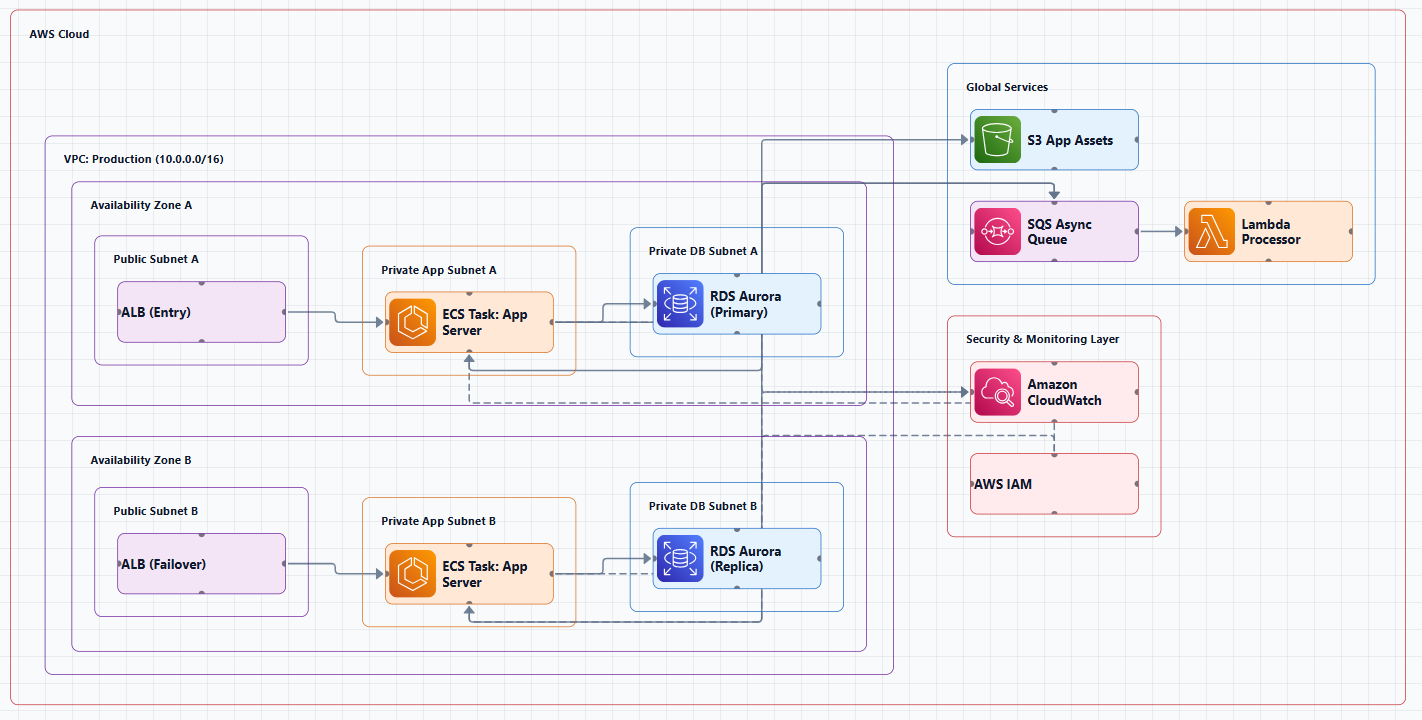
Below is a representative AWS microservices architecture for a production application, showing how the layers connect:
┌─────────────────────────────────────────────────────────────────────────────┐
│                         Edge & Ingress Layer                               │
│  ┌────────────┐  ┌────────────┐  ┌────────────┐  ┌───────────────────┐    │
│  │ Route 53   │→ │ CloudFront │→ │    WAF     │→ │   API Gateway /   │    │
│  │   (DNS)    │  │   (CDN)    │  │ (Firewall) │  │ ALB (Load Balancer)│    │
│  └────────────┘  └────────────┘  └────────────┘  └───────────────────┘    │
└─────────────────────────────────────────────────────────────────────────────┘
                                      │
                                      ▼
┌─────────────────────────────────────────────────────────────────────────────┐
│                         Compute Layer                                      │
│  ┌─────────────────────────────┐  ┌─────────────────────────────────────┐ │
│  │    Container Services        │  │        Serverless Functions         │ │
│  │  ┌──────────┐ ┌──────────┐  │  │  ┌──────────┐  ┌──────────┐       │ │
│  │  │Service A │ │Service B │  │  │  │ Lambda A │  │ Lambda B │       │ │
│  │  │  (ECS)   │ │  (ECS)   │  │  │  └──────────┘  └──────────┘       │ │
│  │  └──────────┘ └──────────┘  │  │                                     │ │
│  │  ┌──────────┐               │  │  ┌──────────────────────────────┐  │ │
│  │  │Service C │               │  │  │        Step Functions        │  │ │
│  │  │  (EKS)   │               │  │  │   (Orchestration / Saga)     │  │ │
│  │  └──────────┘               │  │  └──────────────────────────────┘  │ │
│  └─────────────────────────────┘  └─────────────────────────────────────┘ │
└─────────────────────────────────────────────────────────────────────────────┘
            │                         │                         │
            ▼                         ▼                         ▼
┌─────────────────────────────────────────────────────────────────────────────┐
│                       Messaging & Eventing Layer                           │
│  ┌──────────┐  ┌──────────┐  ┌──────────────┐  ┌──────────┐              │
│  │   SQS    │  │   SNS    │  │  EventBridge │  │   MSK    │              │
│  │ (Queues) │  │ (Pub/Sub)│  │  (Event Bus) │  │ (Kafka)  │              │
│  └──────────┘  └──────────┘  └──────────────┘  └──────────┘              │
└─────────────────────────────────────────────────────────────────────────────┘
                                      │
                                      ▼
┌─────────────────────────────────────────────────────────────────────────────┐
│                         Data Layer                                         │
│  ┌──────────┐  ┌──────────┐  ┌──────────┐  ┌──────────┐  ┌──────────┐   │
│  │DynamoDB  │  │   RDS    │  │ElastiCache│  │    S3    │  │  Aurora  │   │
│  │ (NoSQL)  │  │(Relational│  │ (Cache)  │  │(Object)  │  │(Serverless)│ │
│  └──────────┘  └──────────┘  └──────────┘  └──────────┘  └──────────┘   │
└─────────────────────────────────────────────────────────────────────────────┘
                                      │
                                      ▼
┌─────────────────────────────────────────────────────────────────────────────┐
│                         Observability Layer                                │
│  ┌──────────┐  ┌──────────┐  ┌──────────┐                                 │
│  │CloudWatch│  │  X-Ray   │  │CloudTrail│                                 │
│  │(Metrics/ │  │ (Tracing)│  │(Auditing)│                                 │
│  │  Logs)   │  │          │  │          │                                 │
│  └──────────┘  └──────────┘  └──────────┘                                 │
└─────────────────────────────────────────────────────────────────────────────┘
Diagram Walkthrough
Step 1: The Edge. Clients hit Route 53, which directs them to CloudFront for global caching and SSL termination. CloudFront passes requests through WAF, which filters malicious patterns before they reach your backend.
Step 2: Ingress. API Gateway and/or the Application Load Balancer form the ingress layer. API Gateway handles REST and WebSocket APIs with throttling and API versioning. ALB routes traffic to containerized workloads.
Step 3: Compute. Behind the gateway sit your microservices, some running as containerized services in ECS or EKS, others as Lambda functions. Step Functions orchestrate long-running workflows and sagas.
Step 4: Communication. Services communicate synchronously via HTTP/gRPC or asynchronously through SQS, SNS, EventBridge, or MSK. Each service talks to its own data stores.
Step 5: Data. Each service owns its database, DynamoDB for NoSQL, RDS/Aurora for relational, ElastiCache for caching, S3 for objects.
Step 6: Observability. CloudWatch, X-Ray, and CloudTrail watch everything, providing metrics, logs, traces, and audit trails.
Three Core Communication Patterns
The AWS whitepaper on microservices explores three popular patterns: API-driven, event-driven, and data streaming.
Pattern 1: API-Driven (Synchronous)
Services communicate via direct HTTP/HTTPS calls through API Gateway. This is the simplest pattern to implement and reason about, but it creates synchronous dependencies. A slow downstream service can block the upstream caller, and failures cascade.
When to use: Simple request-response workflows, services with clear, stable APIs, and when latency requirements are tight.
When NOT to use: When services have complex dependencies, when you need to handle high concurrency, or when you need to decouple services for resilience.
Pattern 2: Event-Driven (Asynchronous)
Services communicate through events published to a message broker (SNS, EventBridge) or queue (SQS). Publishers don't wait for consumers, they fire events and move on. This decouples services, improves resilience, and enables parallel processing.
When to use: Long-running workflows, cross-service notifications, and when you need to handle variable load without backing up.
When NOT to use: When you need immediate synchronous responses, or when the overhead of eventual consistency is unacceptable.
Pattern 3: Data Streaming
Services communicate through continuous streams of data (Kinesis, MSK). This is the highest-throughput pattern, ideal for real-time analytics, log aggregation, and change data capture.
When to use: Real-time analytics, event sourcing, and high-throughput data pipelines.
When NOT to use: Simple request-response workflows where the overhead of stream processing isn't justified.
Key Design Considerations
Data Management: Database per Service
Each microservice should have its own data store. This enables polyglot persistence, using the right database for each service's needs, and allows independent schema changes. The Saga pattern helps manage consistency across services by coordinating a series of compensating actions. Event sourcing often works hand-in-hand with CQRS, which separates data modification and data querying into different modules for better performance and security.
Resilience Patterns
Retries with exponential backoff and jitter, Essential for handling transient failures. Without jitter, retries can synchronize and cause thundering herds.
Circuit breakers, Prevent cascading failures by failing fast when a downstream service is unhealthy.
Bulkheads, Isolate failures by partitioning resources so that a failure in one service doesn't consume all available capacity.
Timeouts, Set appropriate timeouts at every network boundary. A timeout that's too long causes head-of-line blocking; one that's too short causes unnecessary failures.
Observability: The Non-Negotiable
Distributed systems are impossible to debug without proper observability. Implement:
- Structured logging, Logs that are machine-parseable with consistent fields
- Distributed tracing, Trace a single request across all services it touches
- Metrics, Business metrics (orders placed, users signed up) and system metrics (latency, error rates, saturation)
Service Discovery and Connectivity
Amazon ECS Service Connect is the recommended approach for service discovery. It provides ECS configuration for service discovery, connectivity, and traffic monitoring. Your applications can use short names and standard ports to connect to services in the same cluster, other clusters, or across VPCs in the same Region.
CI/CD and Deployment Strategies
Microservices enable independent deployments, but only if you have the CI/CD pipeline to support it. Key practices:
- Blue/Green deployments, Zero-downtime deployments with instant rollback
- Canary deployments, Gradual rollout to a subset of users
- Feature flags, Decouple deployment from release
Security: Least Privilege
Each service should have only the permissions it needs, no more. Use IAM roles for service accounts, VPC private subnets for internal services, and security groups for fine-grained network controls.
When Microservices Are the Wrong Choice
Microservices are not a silver bullet. They introduce significant complexity: network latency, eventual consistency, distributed transactions, service discovery, and operational overhead. Consider the following before adopting microservices:
- Small teams or simple applications, The operational overhead of microservices often outweighs the benefits.
- No clear domain boundaries, If you can't define service boundaries, you'll create a distributed monolith with all the pain and none of the benefit.
- Limited DevOps capabilities, Microservices require automated deployment, monitoring, and incident response.
- Low traffic or predictable load, The scaling benefits of microservices matter less when traffic is stable.
A monolithic architecture or alternative approaches may be more appropriate for your use case.
Tools for Creating AWS Microservices Architecture Diagrams
Manual Tools
- Draw.io (diagrams.net): Free, browser-based, includes AWS icon libraries. No registration required.
- Lucidchart: Collaborative diagramming with AWS templates.
- Microsoft Visio: Enterprise-grade diagramming.
AI-Powered Tools
AI Line Studio generates AWS architecture diagrams from natural language descriptions in 15 to 20 seconds. Describe a microservices architecture, "a microservices system on AWS with API Gateway, ECS, SQS, and DynamoDB", and it produces a structured diagram with official AWS icons. For AWS-specific workflows, the dedicated AI cloud diagram generator turns descriptions into production-ready visuals. The AI architecture diagram builder helps build and refine microservices diagrams into production-ready designs.
Kiro CLI with the Model Context Protocol (MCP) offers a streamlined approach to creating AWS architecture diagrams. By using generative AI through natural language prompts, architects can generate professional diagrams in minutes rather than hours, while adhering to AWS best practices. This addresses the challenges of traditional diagramming: the time-consuming process, steep learning curve, inconsistent styling, and difficulty maintaining diagrams as architectures evolve.
Diagram-as-Code
Tools like Python Diagrams and PlantUML let you define architecture diagrams in code, enabling version control and automation.
Summary
AWS microservices architectures separate functionalities into cohesive verticals according to specific domains. A well-designed system consists of:
| Layer | Key Components | Purpose |
|---|---|---|
| Edge & Ingress | Route 53, CloudFront, WAF, API Gateway, ALB | Client entry, security, request routing |
| Compute | ECS/EKS (containers), Lambda (serverless), Step Functions | Business logic execution |
| Messaging | SQS, SNS, EventBridge, MSK | Asynchronous, decoupled communication |
| Data | DynamoDB, RDS, Aurora, ElastiCache, S3 | Data persistence per service |
| Observability | CloudWatch, X-Ray, CloudTrail | Metrics, logs, traces, auditing |
| CI/CD & Security | CodePipeline, IAM, Secrets Manager | Automated deployment, access control |
Key takeaways:
- Each microservice should have its own data store
- Synchronous APIs create coupling; asynchronous events improve resilience
- Observability is non-negotiable in distributed systems
- The Saga pattern coordinates consistency across services
- Event sourcing and CQRS are advanced patterns for complex domains
- Service Connect is the recommended approach for service discovery in ECS
- Kiro CLI with MCP can generate architecture diagrams from natural language prompts
- Microservices are not always the right choice, assess your use case carefully
To start building your own AWS microservices architecture diagrams, explore the AWS microservices architecture diagram tool for templates and practical examples. For automated diagram generation, try the AI cloud diagram generator to turn a microservices description into a visual instantly. For end-to-end system architecture beyond microservices, the AI system architecture generator covers distributed and enterprise system designs.