
AWS VPC Architecture Diagram with Public and Private Subnets: A Complete Guide
If your AWS network design is wrong, everything built on top of it is compromised. Security breaches, performance bottlenecks, and runaway costs often trace back to one root cause: a poorly designed VPC.
A well-architected VPC with public and private subnets is the foundation of secure, scalable cloud infrastructure. This guide walks through everything you need to know, the components, the architecture, the security layers, and the best practices that separate production-grade networks from development experiments.
Cloud Architecture
Create cloud architecture diagrams for AWS, Azure, GCP, and more. Design scalable infrastructure with professional cloud icons.
Complete guide to AWS VPC architecture with public and private subnets, NAT Gateways, route tables, security groups, Multi-AZ design, and production best practices.
Click Cloud Architecture to open AI Line Studio and generate diagrams from natural language in seconds.
What Is a VPC with Public and Private Subnets?
A Virtual Private Cloud (VPC) is a logically isolated section of the AWS cloud where you can launch AWS resources in a virtual network that you define. You have complete control over your IP address ranges, subnets, route tables, and network gateways.
- Public Subnet: Can communicate with the internet thanks to an Internet Gateway (IGW)
- Private Subnet: Has no direct internet access, perfect for sensitive resources like databases and application servers
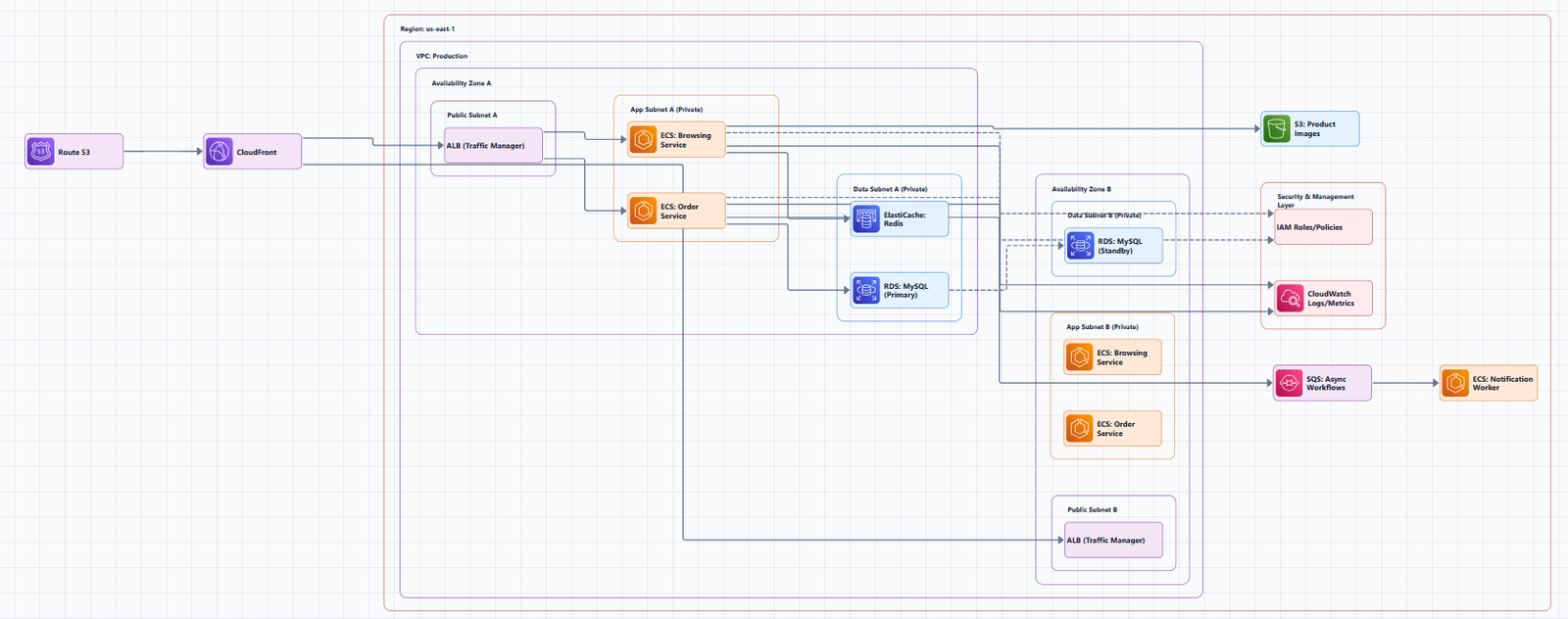
Subnets chop up your VPC's IP range into smaller segments. Each subnet lives in one Availability Zone (AZ) for redundancy:
The key architectural decision is simple: expose only what must be exposed, load balancers and bastion hosts in public subnets; everything else (application servers, databases) in private subnets.
Complete VPC Architecture Diagram
Below is a production-ready VPC architecture with public and private subnets across multiple Availability Zones, as documented in AWS reference architectures.
┌─────────────────────────────────────────────────────────────────────────────────────────┐
│                                    AWS Cloud                                           │
│  ┌───────────────────────────────────────────────────────────────────────────────────┐ │
│  │                                Region (e.g., us-east-1)                           │ │
│  │                                                                                   │ │
│  │  ┌─────────────────────────────────────────────────────────────────────────────┐ │ │
│  │  │                            VPC (10.0.0.0/16)                                │ │ │
│  │  │                                                                             │ │ │
│  │  │  ┌───────────────────────────────────────────────────────────────────────┐  │ │ │
│  │  │  │                         Availability Zone 1                           │  │ │ │
│  │  │  │  ┌─────────────────────────┐    ┌───────────────────────────────────┐ │  │ │ │
│  │  │  │  │     Public Subnet 1     │    │        Private Subnet 1           │ │  │ │ │
│  │  │  │  │      (10.0.1.0/24)      │    │         (10.0.16.0/20)            │ │  │ │ │
│  │  │  │  │                         │    │                                   │ │  │ │ │
│  │  │  │  │  ┌───────────────────┐  │    │  ┌─────────────────────────────┐ │ │  │ │ │
│  │  │  │  │  │   NAT Gateway     │  │    │  │    Application Servers      │ │ │  │ │ │
│  │  │  │  │  │   (AZ-specific)   │  │    │  │    (Auto Scaling Group)    │ │ │  │ │ │
│  │  │  │  │  └───────────────────┘  │    │  └─────────────────────────────┘ │ │  │ │ │
│  │  │  │  │                         │    │                                   │ │  │ │ │
│  │  │  │  │  ┌───────────────────┐  │    │  ┌─────────────────────────────┐ │ │  │ │ │
│  │  │  │  │  │   Load Balancer   │  │    │  │         Database           │ │ │  │ │ │
│  │  │  │  │  │   (ALB/NLB)       │  │    │  │      (RDS Multi-AZ)        │ │ │  │ │ │
│  │  │  │  │  └───────────────────┘  │    │  └─────────────────────────────┘ │ │  │ │ │
│  │  │  │  └─────────────────────────┘    └───────────────────────────────────┘ │  │ │ │
│  │  │  └───────────────────────────────────────────────────────────────────────┘  │ │ │
│  │  │                                                                             │ │ │
│  │  │  ┌───────────────────────────────────────────────────────────────────────┐  │ │ │
│  │  │  │                         Availability Zone 2                           │  │ │ │
│  │  │  │  ┌─────────────────────────┐    ┌───────────────────────────────────┐ │  │ │ │
│  │  │  │  │     Public Subnet 2     │    │        Private Subnet 2           │ │  │ │ │
│  │  │  │  │      (10.0.2.0/24)      │    │         (10.0.32.0/20)            │ │  │ │ │
│  │  │  │  │                         │    │                                   │ │  │ │ │
│  │  │  │  │  ┌───────────────────┐  │    │  ┌─────────────────────────────┐ │ │  │ │ │
│  │  │  │  │  │   NAT Gateway     │  │    │  │    Application Servers      │ │ │  │ │ │
│  │  │  │  │  │   (AZ-specific)   │  │    │  │    (Auto Scaling Group)    │ │ │  │ │ │
│  │  │  │  │  └───────────────────┘  │    │  └─────────────────────────────┘ │ │  │ │ │
│  │  │  │  └─────────────────────────┘    └───────────────────────────────────┘ │  │ │ │
│  │  │  └───────────────────────────────────────────────────────────────────────┘  │ │ │
│  │  │                                                                             │ │ │
│  │  │  ┌───────────────────────────────────────────────────────────────────────┐  │ │ │
│  │  │  │                         Internet Gateway                              │  │ │ │
│  │  │  │                   (Attached to VPC, single IGW)                       │  │ │ │
│  │  │  └───────────────────────────────────────────────────────────────────────┘  │ │ │
│  │  └─────────────────────────────────────────────────────────────────────────────┘ │ │
│  └─────────────────────────────────────────────────────────────────────────────────┘ │
└─────────────────────────────────────────────────────────────────────────────────────────┘
Component-by-Component Breakdown
VPC and CIDR Block
The VPC defines your virtual network's IP address space. For production environments, a /16 CIDR block (e.g., 10.0.0.0/16) provides 65,536 IP addresses. This gives you room for future growth across multiple subnets and Availability Zones.
Critical rule: Choose a CIDR block that won't overlap with your on-premises networks or other VPCs you might peer with.
Subnets
Subnets are segments of your VPC's IP range, each confined to a single Availability Zone. A production deployment typically uses:
- 2 public subnets (one per AZ) for load balancers and NAT gateways
- 2 private subnets (one per AZ) for application servers and databases
For private subnets, use larger CIDR blocks (e.g., /20) to accommodate growth, IP exhaustion in private subnets is a common but avoidable failure.
Internet Gateway (IGW)
The Internet Gateway is the VPC-side connection to the public internet. It's a horizontally scaled, redundant component that provides target for internet-routable traffic. Only one IGW is needed per VPC, and it must be explicitly attached.
Public subnets have a route table with a route to the IGW (0.0.0.0/0 → igw-id). Private subnets do not.
NAT Gateway
A NAT Gateway is a highly available, managed Network Address Translation service that enables resources in private subnets to access the internet. Private subnets can initiate outbound connections (e.g., for software updates) but cannot receive inbound connections from the internet.
Critical best practice: Deploy one NAT Gateway per Availability Zone for high availability. A single NAT Gateway is a single point of failure. If an AZ fails and you only have one NAT Gateway in another AZ, traffic from the failed AZ's private subnets routes cross-AZ, incurring additional data transfer costs.
Route Tables
Route tables determine where network traffic is directed. Each subnet is associated with exactly one route table.
Public Route Table:
| Destination | Target |
|---|---|
10.0.0.0/16 |
local |
0.0.0.0/0 |
igw-id |
Private Route Table:
| Destination | Target |
|---|---|
10.0.0.0/16 |
local |
0.0.0.0/0 |
nat-gateway-id |
A private subnet is defined by its route table, it lacks a route to the IGW and instead routes internet-bound traffic through the NAT Gateway in its Availability Zone.
Load Balancer
An Application Load Balancer (ALB) or Network Load Balancer (NLB) sits in the public subnets and distributes incoming traffic to application servers running in the private subnets. The load balancer's security group must allow inbound traffic from clients (e.g., 0.0.0.0/0 for public web traffic) and outbound traffic to target instances.
Auto Scaling Group
Application servers in private subnets are typically managed by an Auto Scaling Group. This provides:
- Fault tolerance: Automatically replaces unhealthy instances
- Elasticity: Scales capacity up or down based on demand
- Cost optimization: Scales down during low-traffic periods
Database Tier
Databases (e.g., Amazon RDS) run in private subnets and receive traffic only from the application servers. For production, use Multi-AZ deployment, a primary instance in one AZ and a standby replica in another for automatic failover.
Bastion Host
A Bastion Host (also called a jump box) is an EC2 instance in a public subnet that serves as a secure entry point for administrative access to private resources. You SSH into the bastion host, then SSH from there into private instances. This eliminates the need to assign public IPs to private resources.
Security Layers: Defense in Depth
A well-architected VPC uses multiple security layers. Relying on a single layer is a recipe for disaster.
Layer 1: Network ACLs (Subnet Level)
Network ACLs (NACLs) are stateless firewalls that operate at the subnet level. They evaluate traffic in both directions using separate inbound and outbound rules, and they support both ALLOW and DENY rules evaluated in numeric order.
Stateless means you must explicitly define both inbound and outbound rules for traffic to flow. For example, if you allow inbound HTTP traffic, you must also allow the corresponding outbound response traffic.
Best practice: Use NACLs for broad, coarse-grained controls, like blocking entire IP ranges or restricting traffic between entire subnets.
Layer 2: Security Groups (Instance Level)
Security Groups (SGs) are stateful firewalls that operate at the instance/ENI level. They contain only ALLOW rules and are stateful, response traffic is automatically allowed, regardless of outbound rules.
Stateful means if you allow inbound traffic on port 80, the response traffic is automatically permitted without an explicit outbound rule.
Best practice: Use Security Groups for fine-grained, instance-specific controls. Security groups can reference other security groups, making it easy to define tier-specific rules (e.g., "database security group allows traffic only from the application security group").
Layer 3: IAM and VPC Endpoints
- IAM policies control which users and services can perform actions on VPC resources
- VPC Endpoints enable private connectivity to AWS services (S3, DynamoDB, etc.) without traversing the internet
Security Group Configuration Example
For a typical two-tier architecture:
Load Balancer Security Group:
- Inbound: Allow HTTP/HTTPS from
0.0.0.0/0 - Outbound: Allow traffic to web servers on listener port
Web Server Security Group:
- Inbound: Allow HTTP/HTTPS from the load balancer security group
- Outbound: Allow outbound to the internet (for updates) or restrict to database port
Database Security Group:
- Inbound: Allow database port from the web server security group
- Outbound: None (or restrict to necessary services)
High Availability Design
A production VPC must survive Availability Zone failures. Key principles:
Multi-AZ Deployment
Deploy everything across at least two Availability Zones:
- Public subnets in both AZs (with NAT Gateways in each)
- Private subnets in both AZs (with application servers in each)
- Database with Multi-AZ (primary in one AZ, standby in another)
If one AZ fails, the other continues serving traffic.
NAT Gateway Per AZ
A single NAT Gateway is a single point of failure. Deploy one NAT Gateway per Availability Zone and configure each private subnet's route table to use the NAT Gateway in its own AZ. This keeps traffic within the AZ and avoids cross-AZ data transfer costs.
Load Balancer Cross-Zone
Enable cross-zone load balancing on your Application Load Balancer so it can distribute traffic to healthy targets in all AZs, even if one AZ has fewer instances.
Auto Scaling Across AZs
Configure your Auto Scaling Group to launch instances across all AZs that contain private subnets. This ensures capacity is available even if one AZ is impaired.
Common Architecture Patterns
Pattern 1: Two-Tier (Web + Database)
[Internet] → [IGW] → [ALB in Public Subnet] → [Web Servers in Private Subnet] → [RDS in Private Subnet]When to use: Simple web applications, APIs, and microservices that don't require a separate application tier.
Security: The web server security group allows traffic only from the load balancer; the database security group allows traffic only from the web servers.
Pattern 2: Three-Tier (Web + App + Database)
[Internet] → [IGW] → [ALB in Public Subnet]
  → [Web Servers in Public or Private Subnet]
  → [Internal ALB]
  → [App Servers in Private Subnet]
  → [Database in Private Subnet]
When to use: Enterprise applications requiring separation between presentation, business logic, and data layers.
Pattern 3: Private-Only with NAT (Production Workloads)
[Internet] → [IGW] → [NAT Gateway in Public Subnet]
  → [Application Servers in Private Subnet] (no public IPs)
  → [RDS in Private Subnet]
When to use: When you want zero public exposure for your application servers. The only public-facing components are the load balancer and NAT gateways. Servers in private subnets receive traffic from the load balancer and initiate outbound internet access through the NAT gateway.
When This Architecture Fails
This VPC architecture is the gold standard for most workloads, but there are scenarios where it's not the right fit:
Simple prototypes or POCs: For a development environment that doesn't need high availability, a single public subnet with a single NAT Gateway may be sufficient. The overhead of multi-AZ deployment isn't justified.
Serverless workloads: If you're building entirely with Lambda, API Gateway, and DynamoDB, you may not need VPC resources at all (though some services benefit from VPC endpoints).
Edge locations: For workloads running at the edge (e.g., CloudFront, Lambda@Edge), traditional VPC networking isn't applicable.
Single-region constraints: This architecture assumes you're deploying within a single Region. Global applications require additional considerations (Route 53 latency-based routing, multi-Region replication).
Cost-sensitive workloads: NAT Gateways incur hourly charges plus data processing fees. For low-volume workloads, a NAT Instance (self-managed) may be more cost-effective, though it's less resilient.
Tools for Creating VPC Architecture Diagrams
Manual Tools
- Draw.io (diagrams.net): Free, browser-based, includes AWS icon libraries. No registration required.
- Lucidchart: Collaborative diagramming with AWS templates and VPC shape libraries.
- Microsoft Visio: Enterprise-grade diagramming with AWS stencils.
AI-Powered Tools
AI Line Studio generates AWS architecture diagrams from natural language descriptions in 15 to 20 seconds. Describe a VPC, "a VPC with public and private subnets across two Availability Zones, NAT Gateways in each public subnet, and an ALB", and it produces a structured diagram with official AWS icons. For AWS-specific workflows, the dedicated AI cloud diagram generator turns descriptions into production-ready visuals. The AI architecture diagram builder helps build and refine VPC diagrams into production-ready designs.
The honest limitation: AI Line Studio is an early-stage product with a smaller install base and fewer third-party integrations than established tools. It's not a general-purpose diagramming tool, if you need org charts, mind maps, or non-technical diagrams, a broader tool is a better fit. And as with any AI-generated output, complex or ambiguous system descriptions may need manual cleanup.
Infrastructure as Code
Tools like Terraform and AWS CloudFormation can generate diagrams from your infrastructure code. The AWS VPC Terraform module implements production-grade networking with defense-in-depth subnet isolation, encrypted flow logging, and high-availability NAT Gateway deployment.
Summary
An AWS VPC with public and private subnets is the foundation of secure, scalable cloud infrastructure.
Key takeaways:
| Component | Location | Purpose |
|---|---|---|
| Public Subnets | AZ 1, AZ 2 | Load balancers, NAT Gateways, bastion hosts |
| Private Subnets | AZ 1, AZ 2 | Application servers, databases |
| Internet Gateway | VPC boundary | Internet connectivity for public subnets |
| NAT Gateway | Public Subnet (per AZ) | Outbound internet for private subnets |
| Route Tables | Per subnet | Traffic routing (IGW for public, NAT for private) |
| Security Groups | Instance level | Stateful, fine-grained instance firewalls |
| Network ACLs | Subnet level | Stateless, coarse-grained subnet firewalls |
Best practices:
- Deploy across multiple Availability Zones
- Use one NAT Gateway per AZ for high availability
- Separate public from private, expose only what must be exposed
- Use Security Groups for fine-grained controls and NACLs for coarse-grained controls
- Enable VPC Flow Logs for visibility, threat detection, and incident response
- Plan CIDR blocks carefully to avoid IP exhaustion and overlap
- Use Infrastructure as Code to make changes reviewable and reproducible
To start building your own VPC architecture diagrams, explore the AWS VPC architecture diagram with public and private subnets tool for templates and practical examples. For automated diagram generation, try the AI cloud diagram generator to turn a VPC description into a visual instantly. For complete system architecture beyond networking, the AI system architecture generator covers distributed and enterprise system designs.