
Azure AI Foundry Architecture Diagram: A Complete Guide to Enterprise AI Applications
Azure AI Foundry is the unified platform for building, evaluating, and deploying generative AI applications and intelligent agents on Azure. It consolidates capabilities from Azure OpenAI, Azure AI Search, Azure Machine Learning, and other AI services into a single, cohesive experience.
This guide provides a comprehensive reference for Azure AI Foundry architecture diagrams. You'll learn the core components, common patterns like RAG and AI agents, the hub-and-project model, enterprise landing zone architectures, and best practices for building production-ready AI applications.
Cloud Architecture
Create cloud architecture diagrams for AWS, Azure, GCP, and more. Design scalable infrastructure with professional cloud icons.
Complete guide to Azure AI Foundry architecture diagrams, hub and project model, RAG and agent patterns, landing zone designs, and best practices.
Click Cloud Architecture to open AI Line Studio and generate diagrams from natural language in seconds.
What Is Azure AI Foundry?
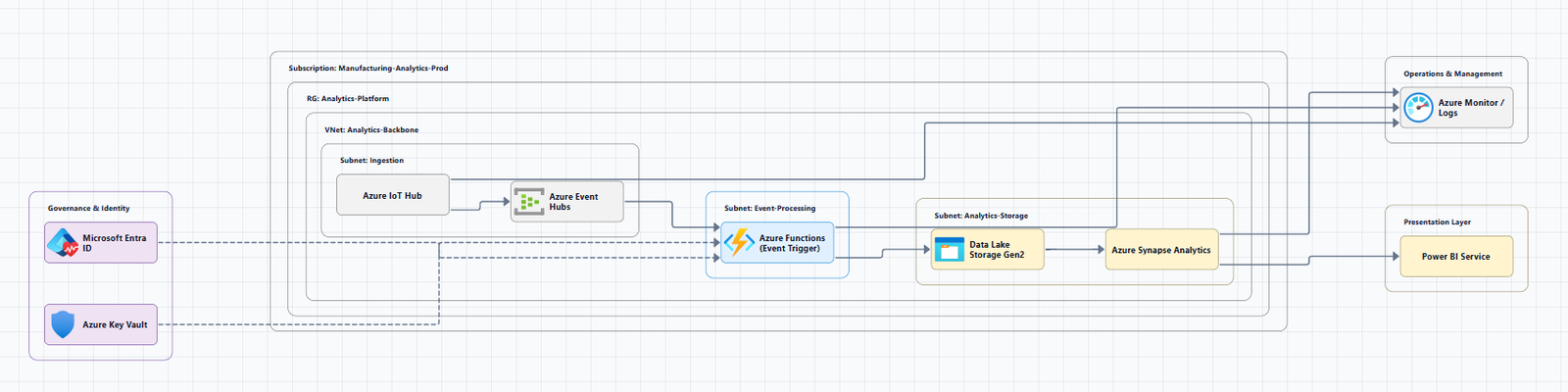
Azure AI Foundry is the primary resource for Azure AI and is recommended for most use cases. It provides a unified experience for AI developers and data scientists to build, evaluate, and deploy AI models through a web portal, SDK, or CLI.
The Foundry resource is built on the same Azure resource provider as Azure OpenAI, Azure Speech, Azure Vision, and Azure Language services. It provides access to the superset of capabilities from each of the individual services combined.
When to use Foundry:
- First-time setup: Starting a new AI project with a single resource that bundles model access, agent hosting, and evaluation tooling
- Multi-team access: Multiple teams need isolated projects with shared model deployments and centralized governance
- Compliance-driven design: Requirements for private networking, customer-managed encryption, or Azure RBAC scoping
- Azure OpenAI migration: Moving from a standalone Azure OpenAI resource while keeping existing policies and RBAC
For single-developer exploration, a Foundry resource with one project is the recommended default.
Core Components of Azure AI Foundry Architecture
Azure AI Foundry organizes AI workloads through a layered architecture: a top-level Foundry resource for governance, projects for development isolation, and connected Azure services for storage, search, and secrets management.
1. Azure AI Foundry Hub
The hub is the top-level resource in Azure AI Foundry portal, based on the Azure Machine Learning service. A hub can support multiple projects, in which developers collaborate on building a specific solution.
Hub features:
- Security configuration: Managed network that spans projects and model endpoints
- Compute resources: For interactive development, fine-tuning, and model deployments
- Connections: Hub-scoped connections to Azure services (Azure OpenAI, Azure AI Search, etc.) shared with projects
- Project management: A hub can have multiple child projects
- Associated Azure storage account: For data upload and artifact storage
The Azure resource provider for a hub is Microsoft.MachineLearningServices/workspaces, and the kind of resource is Hub.
2. Azure AI Foundry Project
A project is a child resource of the hub. Teams can create project workspaces as needed to organize their work, isolate data, and restrict access.
Project features:
- Access to development tools for building and customizing AI applications
- Reusable components including datasets, models, and indexes
- An isolated container to upload data to (within storage inherited from the hub)
- Project-scoped connections for private data access
- Open source model deployments and fine-tuned model endpoints
The Azure resource provider for a project is Microsoft.MachineLearningServices/workspaces, and the kind of resource is Project.
3. Connections
Azure AI Foundry hubs and projects use connections to access resources provided by other services, for example, data in an Azure Storage Account, Azure OpenAI, or other Azure AI services.
4. Foundry Models
Foundry Models allow you to deploy flagship models, including OpenAI models, from the Azure AI catalog in a Microsoft-hosted environment. The Foundry Models system sits between application layers and model backends, providing routing, fine-tuning, and deployment management across multiple tiers and model types.
Azure Resource Types and Providers
Within the Azure AI product family, multiple Azure resource providers support different layers of the stack:
| Resource Provider | Purpose | Supported Services |
|---|---|---|
| Microsoft.CognitiveServices | Agentic and GenAI application development | Foundry, Azure OpenAI, Azure Speech, Azure Vision, Azure Language |
| Microsoft.Search | Knowledge retrieval over your data | Azure AI Search |
| Microsoft.MachineLearningServices | Train, deploy, and operate ML models | Azure AI Hub and projects |
The Foundry resource uses the Microsoft.CognitiveServices/account provider with kind AIServices. A Foundry project is a subresource of the account.
Hub and Project Architecture
The hub-and-project model provides centralized governance with team autonomy:
- Hub: The top-level container for managing shared resources, data, connections, and security configuration for AI application development.
- Project: An organizational container with tools for AI customization and orchestration. Projects inherit Hub-level configurations while remaining isolated from each other.
Projects created using a hub inherit the same security settings and shared resource access. This enables teams to create project workspaces as needed to organize their work, isolate data, and restrict access.
Common Azure AI Foundry Architecture Patterns
Pattern 1: Basic Chat Reference Architecture
The basic architecture is an introductory setup for learning how to run chat applications using Foundry and Azure OpenAI. This architecture isn't for production, it's for learning and proof-of-concept purposes.
Components:
- Azure App Service: Hosts the client user interface (UI)
- Microsoft Foundry: Core AI platform
- Foundry Agent Service: Hosts the prompt agent that orchestrates the workflow
- Azure OpenAI: Language model deployed in Foundry Models
- Azure AI Search: Grounding data for the language model
- Azure Monitor (Application Insights): Logs request and agent interactions
Workflow:
- User interacts with a web application containing chat functionality
- HTTPS request goes to App Service default domain (
azurewebsites.net) - TLS connection is established with App Service (certificate managed by Azure)
- Easy Auth authenticates the user via Microsoft Entra ID
- App Service renders a chat UI for the user
- Chat UI connects to APIs hosted in the same App Service instance
- API connects to an agent in Agent Service using the Microsoft Agent Framework
- Agent Service uses configured tools (Azure AI Search index, web search) to fetch grounding data
- Grounding data is added to the prompt sent to the Azure OpenAI model
- Application Insights logs request and agent interactions
Download: Visio file
Pattern 2: Baseline Foundry Chat in an Azure Landing Zone
For production deployments, the baseline architecture adds production design decisions and integrates with an Azure landing zone.
Key architecture principles:
- The workload team owns the Foundry resource (recommended approach)
- Platform teams centrally manage shared resources: networking, identity access management, and policies
- This separation follows the subscription democratization principle
Download: Visio file
Pattern 3: AI Foundry Landing Zone Reference Architecture
The AI Landing Zone provides an enterprise-scale production-ready reference architecture for deploying secure and resilient AI Apps & Agents workloads in Azure.
Two deployment options:
AI Foundry Landing Zone (Spoke):
- Deployed as a spoke for agents
- Multiple deployments leveraging models from the AI Gateway Landing Zone
- Can be deployed independently if a hub for models is not required
- Consider deploying for each business unit or use-case
AI Gateway Landing Zone (Hub):
- Deployed as a hub for models
- Leverages Foundry's AI agents, model catalog, and AI evaluation
- One deployment can govern both production and non-production workloads
Design areas cover both the Cloud Adoption Framework and the Well-Architected Framework.
Pattern 4: Production-Ready AI Foundry with Private Networking
Production deployments of Azure AI Foundry require comprehensive network isolation, security controls, and monitoring.
Key architectural components:
- Azure AI Foundry Hub & Project: Core AI platform with GPT-4o model
- Private networking: Private endpoints, managed virtual networking, private DNS resolution
- Cost-optimized or enterprise configurations
- Production-ready infrastructure: Monitoring, RBAC, and security controls
Private networking in Foundry spans project private endpoints, managed virtual networks, outbound rules, DNS configuration, and first-party dependencies such as Azure OpenAI and Azure AI Search.
Pattern 5: RAG (Retrieval-Augmented Generation) with Azure AI Foundry
Foundry supports multiple patterns for working with private data.
Typical RAG workflow:
- Prepare your data: Organize and chunk private documents or knowledge base into searchable content
- Set up an index: Create an Azure AI Search index or use another retrieval service to organize content for efficient searching
Advanced RAG pipeline capabilities:
- Hybrid search architecture combining BM25 keyword search with semantic vector retrieval
- Re-ranking strategies for improved knowledge access accuracy
- Dynamic knowledge source routing across multiple indexes
Pattern 6: End-to-End AI-Native Application
The end-to-end sample demonstrates a complete AI-native application using Azure AI Foundry services.
Architecture layers:
- Frontend: React + Vite application
- Backend: Foundry Agent Service with orchestration
- Models: Azure OpenAI models in Foundry Models
- Data: Azure AI Search for grounding data
Azure AI Foundry Architecture Best Practices
1. Choose the Right Foundry Resource Model
For most AI development scenarios, including agent building, model deployment, and evaluation workflows, the Foundry resource is the recommended starting point.
2. Design for Landing Zone Integration
When deploying in an enterprise Azure landing zone, consider:
- The workload team should own the Foundry resource
- Platform teams manage shared resources (networking, identity, policies)
- Follow subscription democratization principles
3. Implement Private Networking
For production workloads, implement:
- Private endpoints for all Foundry components
- Managed virtual networking
- Private DNS resolution
- Controlled ingress and egress patterns
4. Plan Hub and Project Structure
- Use hubs for centralized governance, security, and shared resources
- Create projects for specific AI development efforts
- Projects inherit Hub-level configurations while remaining isolated
5. Enable Observability
Observability, modular orchestration, and grounding via Azure AI Foundry are strategic enablers for enterprise-grade resilience.
Tools for Creating Azure AI Foundry Architecture Diagrams
Official Microsoft Resources
Azure Architecture Center: Provides reference architectures with downloadable Visio files.
AI Landing Zone: Provides reference architecture diagrams for AI Foundry Landing Zone and AI Gateway Landing Zone.
AI-Powered Tools
AI Line Studio: Generates Azure architecture diagrams from natural language descriptions in seconds. Describe an AI Foundry architecture, "an Azure AI Foundry hub with projects, Azure OpenAI models, and RAG with Azure AI Search", and it produces a structured diagram with official Azure icons. For Azure-specific workflows, use the dedicated AI cloud diagram generator.
Mermaid Diagrams
The terraform-azurerm-avm-ptn-aiml-ai-foundry module uses comprehensive Mermaid architecture diagrams to visualize Azure services and components deployed by the AI Foundry pattern module.
Key diagram components:
- Core AI Foundry (Required): AI Foundry Account, Projects, Agent Service, and Connections
- BYOR Services (Optional): Key Vault, Storage Account, Cosmos DB, and AI Search
- Supporting Services: Log Analytics Workspace, Role Assignments, and Resource Locks
- Networking (Private Deployment): Virtual Network, Subnets, Private DNS Zones, Private Endpoints, Bastion, and VMs
Summary
Azure AI Foundry architecture diagrams are essential for designing, documenting, and communicating enterprise AI applications. A well-crafted diagram shows how Foundry integrates with Azure services to build secure, scalable generative AI solutions.
| Layer | Components | Purpose |
|---|---|---|
| Hub | Foundry resource, Azure Machine Learning workspace | Governance, security, shared resources, connections |
| Project | Child resource of hub | Development isolation, datasets, models, indexes |
| Models | Azure OpenAI, Foundry Models | Language model inference and deployment |
| Agent Service | Foundry Agent Service | Agent hosting and orchestration |
| Data | Azure AI Search, Azure Storage | Grounding data and knowledge retrieval |
| Security | Key Vault, Private Endpoints, Entra ID | Secrets management, private networking, identity |
| Observability | Azure Monitor, Application Insights | Logging, metrics, and monitoring |
Key takeaways:
- The Foundry resource is the primary resource for Azure AI, recommended for most use cases
- Hubs provide centralized governance; projects provide development isolation
- Production deployments require private networking and Azure landing zone integration
- RAG patterns combine Azure AI Search with Foundry models
- The AI Landing Zone provides enterprise-scale reference architectures for AI workloads
To start building your own Azure AI Foundry architecture diagrams, explore the Azure architecture diagram tool for templates and examples. For automated diagram generation, try the AI cloud diagram generator to turn an AI Foundry description into a visual instantly. For complete AI system architecture, the AI system architecture generator covers distributed and enterprise system designs.