
Azure Architecture Diagram Examples: Official Samples and Real-World Patterns
Here are examples of common Azure architecture diagrams, drawn from official Microsoft documentation and real-world implementations. Each example includes a description of the architecture and a link to the source for detailed workflow and component lists. You can download Visio files for most of these architectures from the Azure Architecture Center.
Cloud Architecture
Create cloud architecture diagrams for AWS, Azure, GCP, and more. Design scalable infrastructure with professional cloud icons.
Azure architecture diagram examples from Microsoft, basic App Service, hub-spoke, HA/DR, AKS microservices, Foundry chat, plus GitHub and Draw.io samples.
Click Cloud Architecture to open AI Line Studio and generate diagrams from natural language in seconds.
Official Microsoft Samples
1. Basic Web Application
This is a foundational architecture for learning how to run web applications on Azure App Service in a single region. It's an introductory setup for learning and proof-of-concept purposes, not for production applications.

Workflow:
- A user issues an HTTPS request to the App Service's default domain (
azurewebsites.net). TLS is terminated directly at App Service, with certificates managed entirely by Azure. - Easy Auth, a feature of Azure App Service, authenticates the user via Microsoft Entra ID.
- The application code connects to an Azure SQL Database using a connection string configured as an app setting.
- Information about the request and the database call are logged in Application Insights (part of Azure Monitor).
Components: App Service, Azure SQL Database, Microsoft Entra ID, Azure Monitor.
View the reference architecture | Download Visio file
2. Hub-Spoke Network Topology
This is the recommended enterprise-grade network topology from the Microsoft Cloud Adoption Framework. It centralizes shared services in a "hub" virtual network, which acts as the central point of connectivity for multiple "spoke" virtual networks that host isolated workloads.
Key concepts:
- Hub virtual network: Contains shared services like Azure Firewall, VPN Gateway, and Azure Bastion. Provides cross-premises gateway, egress/ingress control, remote access, and routing.
- Spoke virtual networks: Isolate and manage workloads separately. Each workload can include multiple tiers, with multiple subnets connected through Azure load balancers. Spokes can exist in different subscriptions and represent different environments (production, non-production).
When to use: Enterprise organizations with multiple environments and workloads requiring centralized security, connectivity, and shared services.
View the reference architecture | Download Visio file
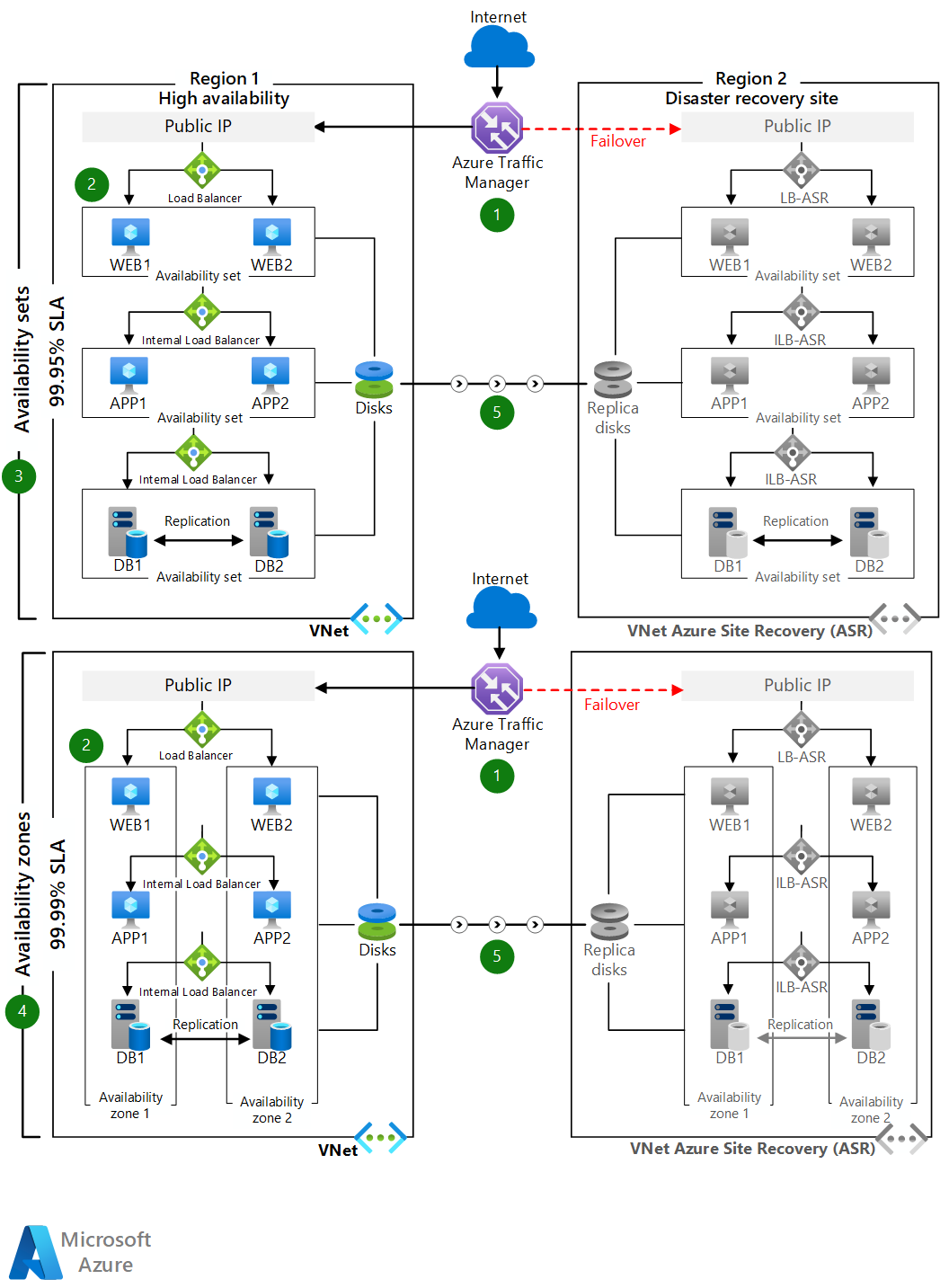
3. Multitier Web Application for High Availability and Disaster Recovery
This architecture is for mission-critical applications that require high availability and disaster recovery (DR). It features three layers, web, business, and data tiers.
Workflow:
- Users access the front-end ASP.NET web tier via the Azure Traffic Manager endpoint.
- Traffic Manager redirects traffic to the primary region's public IP address.
- A public load balancer routes the call to a web tier VM instance.
- An internal load balancer routes the call from the web tier to a business tier VM.
- The business tier connects to a SQL Server cluster (using Always On availability groups) through an internal load balancer.
- Azure Site Recovery replicates VMs to a secondary region. When a disruption occurs, you invoke Site Recovery failover and Traffic Manager automatically redirects client traffic.
High Availability: Deploy VMs in each tier across two availability zones (or within one availability set in regions that don't support zones). The database tier uses SQL Server Always On availability groups with automatic failover.
View the reference architecture | Download Visio file
4. Microservices Architecture on Azure Kubernetes Service (AKS)
This basic AKS configuration serves as a starting point for most microservices deployments.

Data flow:
- The client application sends a JSON payload over HTTPS to the managed ingress controller's public FQDN.
- The managed ingress controller routes the request to the ingestion microservice.
- The ingestion microservice processes the request and queues delivery requests in an Azure Service Bus queue.
- The workflow microservice consumes messages from the queue and calls other microservices (delivery, drone scheduler, package).
- Each microservice uses external data storage: Azure Managed Redis for caching and MongoDB (via Cosmos DB) for the package microservice.
- An HTTPS GET request returns delivery status through the delivery microservice.
Components: AKS, Azure Container Registry, Azure Service Bus, Azure Managed Redis, Azure Monitor, Azure CNI powered by Cilium.
View the reference architecture | Download Visio file
5. Advanced AKS Microservices Architecture
This reference architecture builds on the basic AKS configuration with advanced features like network policies, pod autoscaling, and distributed tracing.

Key features:
- Ingress: Azure Application Gateway routes HTTPS requests to in-cluster microservices.
- Asynchronous Communication: Azure Service Bus for reliable, asynchronous messaging between microservices.
- State Management: External data stores like Azure Managed Redis and Azure DocumentDB (Cosmos DB).
- Security: Advanced Container Networking Services policies (Cilium NetworkPolicy) govern service-to-service traffic, with optional inter-node pod encryption (WireGuard).
- Observability: Node-level and pod-level data is ingested into Azure Monitor for end-to-end visibility.
Workflow: Ingestion microservice → Service Bus → workflow microservice → delivery/drone/package microservices → external data stores.
View the reference architecture | Download Visio file
6. AKS Baseline for Multiregion Clusters
This architecture shows how to run multiple AKS clusters across regions in an active/active, highly available configuration.
Key components:
- Regional AKS clusters: Deployed in separate Azure regions. Azure Front Door routes traffic among all clusters during normal operations; if one region fails, Front Door routes to the nearest healthy cluster.
- Regional hub-spoke networks: Each region has its own hub-spoke virtual network, with Azure Firewall Manager managing policies across all regions.
- Regional Key Vaults: For storing sensitive values and keys specific to each cluster.
- Log Analytics workspaces: Regional workspaces for networking metrics; a shared workspace for all AKS instances.
View the reference architecture | Download Visio file
7. Baseline Microsoft Foundry Chat Reference Architecture
This describes a generative AI workload architecture that deploys a baseline chat application using Azure OpenAI Service, Foundry Agent Service, and Azure App Service within an Azure landing zone.
Key architecture details:
- The workload team owns the Foundry resource (recommended approach)
- Platform teams centrally manage shared resources: networking for cross-premises connections, identity access management, and policies
- This guidance helps organizations using Azure landing zones maintain consistent governance and cost efficiency
View the reference architecture | Download Visio file
Community and GitHub Samples
8. Azure Networking Design and Architectures (Draw.io)
This GitHub repository delivers layered, reusable, and GitHub-friendly network architecture diagrams for Cloud Solutions Architects. The content is based on real customer and partner design sessions with collaboration from cross-functional architects.
Design areas include:
- Azure Networking
- Hybrid connectivity architectures
- Routing, firewalling, load balancing
- Multi-region and secure design
- AKS networking
The networking complexity is broken down into layers with one diagram per design area using draw.io (diagrams.net). The repository includes a YouTube series explaining how to create layered diagrams and covering specific design scenarios.
9. Azure and K8s Architecture
This repository shares real-world inspired Azure and Kubernetes architecture diagrams to help organizations accelerate their adoption of Azure and K8s. Each diagram is accompanied by a textual explanation with key attention points.
Examples include:
- Multi-region API deployment: Global API platform in two flavors
- East-West traffic patterns: Traditional Azure Hub & Spoke and Virtual WAN
- East-West within AKS: Handling East-West traffic inside AKS clusters
- Simple Event Processing: Point-to-point, pub/sub, and different architecture options in Azure
10. Azure Resource Visualizer Example Diagram
This example from the microsoft/GitHub-Copilot-for-Azure repository shows a typical Azure resource group with resources organized into logical layers:
- Layered organization: Resources grouped by function (Network, Compute, Data, Security)
- Detailed node labels: Each resource includes configuration details (SKUs, tiers, settings)
Official Azure Icon Downloads
The Azure Architecture Center provides an official collection of Azure architecture icons, including Azure product icons, to help you build custom architecture diagrams.
Recent icon updates:
- July 2026: 10+ new icons including Azure DocumentDB, Azure Resiliency, AI Gateway, and new Microsoft Foundry icons
- November 2025: 13 new icons including Azure Kubernetes Service (AKS) Network Policy, Azure Local, Azure Linux, and Azure PubSub
Tools for Creating Azure Architecture Diagrams
- AI Line Studio: Generates Azure architecture diagrams from natural language in seconds. For Azure-specific workflows, try the AI cloud diagram generator.
- Azure Architecture Center: The primary source for official, Microsoft-validated reference architectures and downloadable Visio files.
- Microsoft Visio: A professional diagramming tool with built-in Azure icon sets.
- Draw.io (diagrams.net): A free, browser-based tool with an Azure shape library.
- Azure icon sets: Official collections of Azure product icons are available from the Azure Architecture Center.
Summary
| Sample | Best For | Key Services |
|---|---|---|
| Basic Web App | Learning, POCs | App Service, SQL Database, Entra ID |
| Hub-Spoke Network | Enterprise networking | VNet, Azure Firewall, VPN Gateway |
| Multitier HA/DR | Mission-critical apps | Traffic Manager, Load Balancer, Site Recovery, SQL Always On |
| Microservices (AKS Basic) | Containerized microservices | AKS, Service Bus, Azure Managed Redis |
| Advanced AKS Microservices | Production microservices | AKS, Application Gateway, Service Bus, Cosmos DB |
| AKS Multiregion | Global high availability | AKS, Front Door, Key Vault, Log Analytics |
| AI Foundry Chat | GenAI workloads | OpenAI, Foundry, App Service, Key Vault |
For more samples, browse all Azure architectures in the Azure Architecture Center.