
Azure Architecture Diagram for Web Application: From Basic to Production-Grade
A well-designed Azure web application architecture is the foundation of a secure, scalable, and resilient system. A single, well-crafted diagram can be the difference between a team that understands the system and one that's lost in a sea of services.
This guide explores real-world Azure architecture examples for web applications, from basic to production-grade. You'll see how components like App Service, Azure SQL Database, Application Gateway, and Azure Kubernetes Service (AKS) fit together to create robust solutions. We'll also look at the tools and best practices that help you build and document these architectures effectively.
Cloud Architecture
Create cloud architecture diagrams for AWS, Azure, GCP, and more. Design scalable infrastructure with professional cloud icons.
Azure web application architecture diagrams, basic App Service, zone-redundant baseline, multi-tier HA/DR, AKS microservices, and Well-Architected best practices.
Click Cloud Architecture to open AI Line Studio and generate diagrams from natural language in seconds.
Core Components of an Azure Web App Architecture
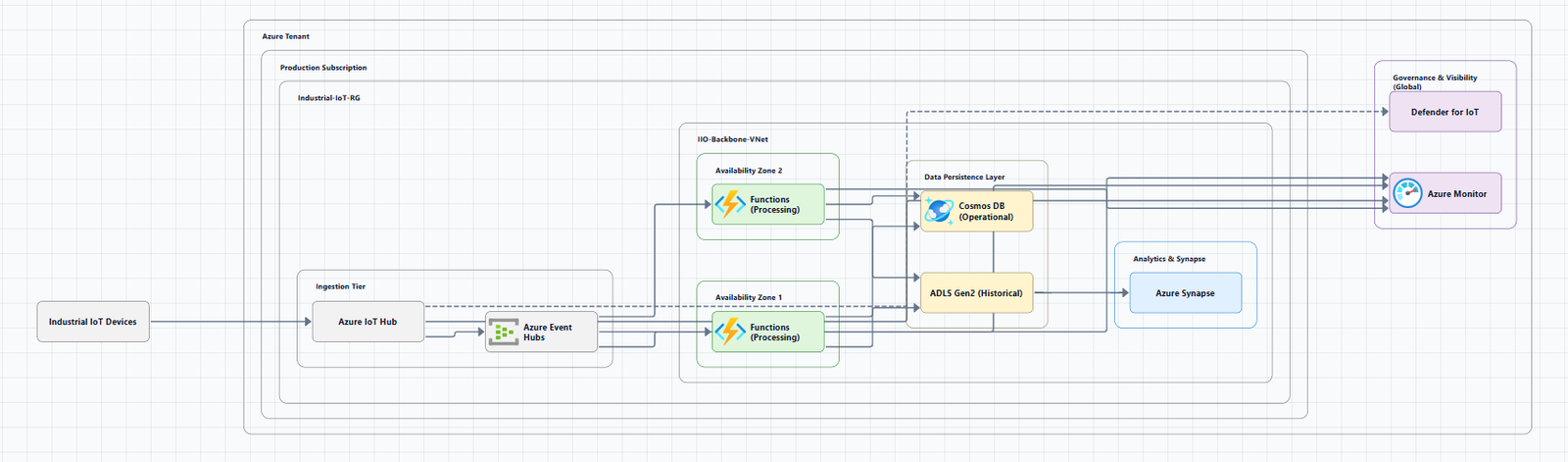
Azure web applications are built from a core set of services, which form the foundation of any diagram:
- Azure App Service: A fully managed platform for building, deploying, and scaling web apps.
- Azure SQL Database: A managed relational database service.
- Azure Virtual Network (VNet): Provides isolated, secure networking for your resources.
- Azure Front Door or Application Gateway: Acts as the entry point for routing traffic, often with a built-in Web Application Firewall (WAF).
- Azure Key Vault: Securely stores secrets like connection strings and API keys.
- Microsoft Entra ID: Provides identity and access management.
- Azure Monitor: Collects and analyzes telemetry data.
Basic Web Application Architecture
This architecture is an excellent starting point for learning or building a proof-of-concept (POC). It's a foundational setup that's not intended for production workloads.

Workflow
- User Request: A user issues an HTTPS request to the App Service's default domain (
azurewebsites.net). - TLS Termination: The TLS connection is established directly with App Service, which manages the certificate.
- Authentication: Azure App Service's "Easy Auth" feature authenticates the user via Microsoft Entra ID.
- Application Logic: The App Service-hosted application code handles the request and can connect to an Azure SQL Database.
- Monitoring: Telemetry from the request is logged in Application Insights, part of Azure Monitor.
Components
- Microsoft Entra ID: Manages permissions and roles for users.
- App Service: Hosts the web application code.
- Azure Monitor: Provides observability.
- Azure SQL Database: Stores the application's relational data.
Considerations
- Scale-Out: The architecture supports scaling out the App Service plan to handle increased load.
- DevOps: This architecture can be extended with a CI/CD pipeline.
Production-Ready Baseline Architecture
For a secure, highly available, and zone-redundant production environment, you should extend the basic architecture. This baseline architecture adds a layer of security and resilience.

Key Changes from the Basic Architecture
- Azure Application Gateway with WAF: This service acts as the single, secure entry point for client traffic. It provides layer 7 load balancing, URL path-based routing, and a Web Application Firewall (WAF) to protect against common exploits like SQL injection.
- Private Endpoints (Private Link): The App Service uses Private Link to communicate with Azure SQL Database and Azure Key Vault. This ensures data in transit stays entirely within the Microsoft network, minimizing data exfiltration risks.
- Azure Key Vault: Securely stores database connection strings and other secrets.
- Azure DNS: Provides private DNS zones to map services' FQDNs to their private endpoint IP addresses.
Considerations
- Network Security: The architecture ensures a single secure entry point, network traffic filtering, end-to-end TLS encryption, and the use of Private Link to keep traffic in Azure.
High Availability and Disaster Recovery Multi-Tier Architecture
For mission-critical applications that must survive regional failures, this multi-tier architecture is a robust choice. It includes web, business, and data tiers, and uses Azure Traffic Manager for global load balancing and failover.
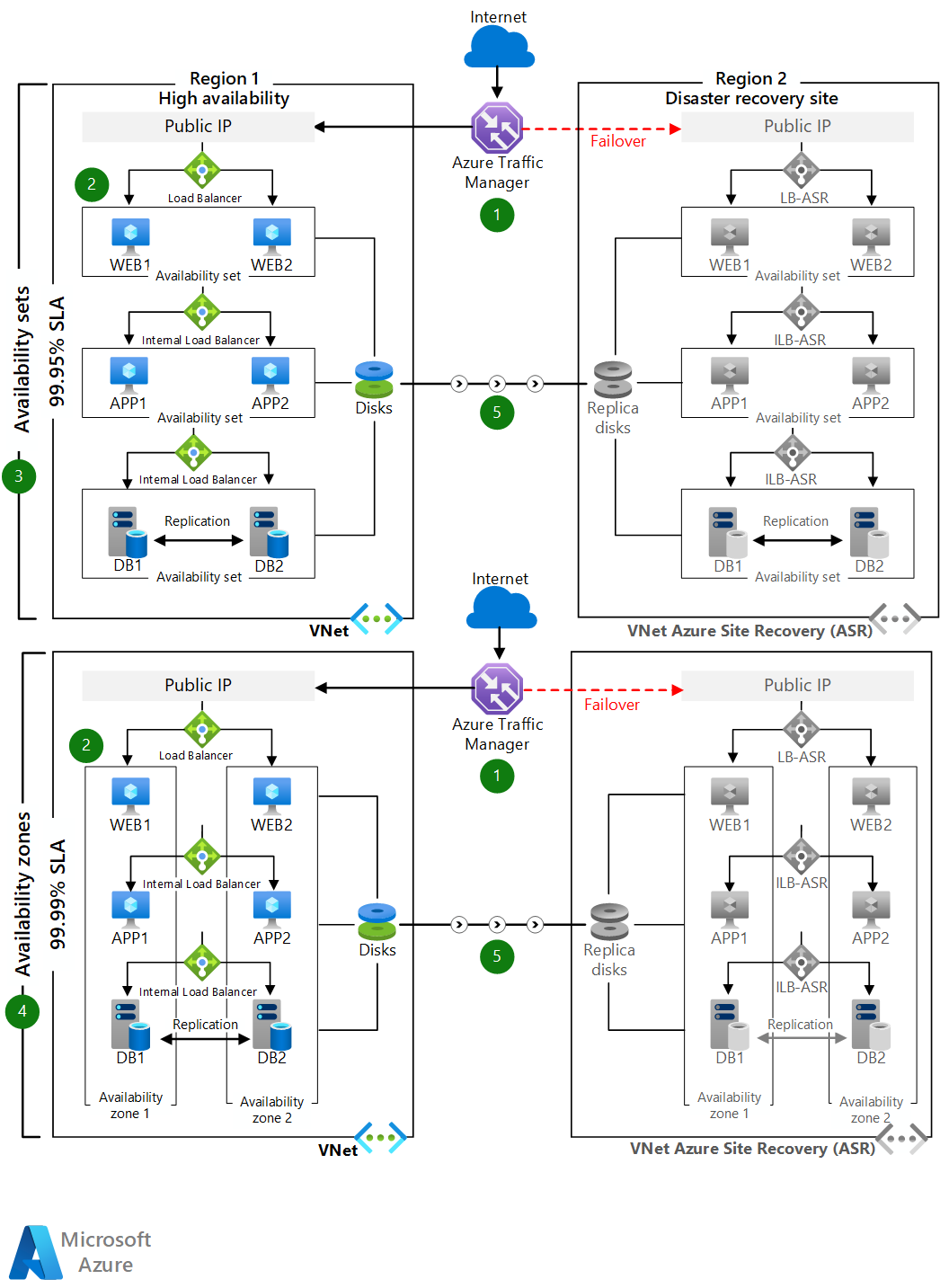
Workflow
- Global Routing: Users access the front-end ASP.NET web tier via the Azure Traffic Manager endpoint.
- Primary Region: Traffic Manager redirects requests to the primary region's public IP address.
- Web Tier: The public IP routes the call through a public load balancer to web tier VM instances.
- Business Tier: An internal load balancer routes requests from the web tier to business tier VMs for processing.
- Data Tier: The business tier connects to a SQL Server cluster (using Always On availability groups) via an internal load balancer.
- Disaster Recovery: Azure Site Recovery replicates VMs to a secondary region. If the primary region fails, a failover is invoked, and Traffic Manager automatically redirects traffic to the secondary region.
Considerations
- High Availability: Deploy VMs in each tier across two availability zones.
- Database Resilience: Use SQL Server Always On availability groups for automatic failover between replicas.
Advanced Microservices Architecture on AKS
For large, complex applications requiring independent deployment, scaling, and management of services, a microservices architecture on Azure Kubernetes Service (AKS) is a powerful option.

Workflow
This architecture implements patterns like Publisher-Subscriber and Gateway Routing.
- Ingress: An HTTPS request is submitted and passes through Azure Application Gateway to an ingestion microservice running in the AKS cluster.
- Messaging: The ingestion microservice produces a message and sends it to an Azure Service Bus queue.
- Backend Processing: A backend microservice consumes the message from Service Bus, then communicates with other microservices (delivery, drone scheduler, package) and external data stores like Azure Managed Redis and Azure Cosmos DB.
- Service-to-Service Security: Advanced Container Networking Services policies (Cilium NetworkPolicy) govern traffic between services.
- Observability: Node-level and pod-level data is ingested into Azure Monitor.
Components
- AKS: The managed Kubernetes platform that hosts the microservices.
- Azure Container Registry: Stores the container images for the microservices.
- Azure Service Bus: Provides reliable, asynchronous messaging between microservices.
- Azure Managed Redis & Cosmos DB: Provide high-performance, scalable data storage for individual microservices.
Considerations
- Choose AKS When: You need full Kubernetes control (kubectl access), custom operators or CRDs, features like service mesh, or custom CNI.
- App Service vs. AKS: Use App Service for straightforward web apps or APIs. Graduate to AKS only when you need the full power of Kubernetes and have the platform engineering capacity to operate it.
Azure Well-Architected Framework Best Practices
All these architectures should be designed and evaluated against the Azure Well-Architected Framework pillars: Cost Optimization, Operational Excellence, Performance Efficiency, Reliability, and Security.
Key practices include:
- Reliability: Use zone-redundant services, availability zones, and multi-region deployments.
- Security: Implement a Web Application Firewall, use Private Link, and store secrets in Key Vault.
- Operational Excellence: Use Azure Monitor and Application Insights for observability.
- Performance Efficiency: Choose the right compute service (App Service, AKS) and scale resources as needed.
- Cost Optimization: Right-size resources and choose the appropriate service tiers based on your needs.
Decision Framework: Choosing Your Architecture
| Pattern | Best For | When to Avoid | Key Tradeoff |
|---|---|---|---|
| Basic Web App | Learning, POCs, minimal internal apps | Production, high-traffic workloads | Simplicity vs. resilience, security |
| Zone-Redundant App Service | Production web apps needing high availability and network security | Small projects where cost is the primary driver | Resilience vs. cost, operational overhead |
| Multi-Tier (VMs) | Mission-critical workloads needing custom OS/config | New, modern applications that can use PaaS | Full control vs. management overhead |
| Microservices (AKS) | Complex applications with multiple independent teams | Simple applications, teams without K8s expertise | Scalability vs. operational complexity |
Tools for Creating Azure Architecture Diagrams
Creating professional diagrams is now easier than ever with AI assistance:
- Visual Paradigm AI: A browser-based, AI-first platform that generates Azure diagrams from natural language prompts. It can align with the Azure Well-Architected Framework.
- AI Line Studio: A powerful tool that generates architecture diagrams from natural language descriptions in seconds. For Azure-specific workflows, you can try the AI cloud diagram generator. For broader needs, the AI architecture diagram builder offers advanced capabilities.
- Azure-DrawIO-MCP: An open-source tool that generates editable Draw.io diagrams via an MCP server using official Azure icons.
- Microsoft Visio: A traditional tool with Azure templates and official icons.
- Draw.io (diagrams.net): A free, browser-based tool that can use Azure icon libraries.
Summary
Designing an Azure web application architecture requires careful consideration of your specific needs, from basic learning environments to mission-critical, globally distributed systems. By understanding the core components and leveraging proven patterns, you can build secure, scalable, and resilient applications on Azure.
| Pattern | Key Components | Use Case |
|---|---|---|
| Basic Web App | App Service, SQL Database | Learning, POCs |
| Zone-Redundant | App Service, Application Gateway, WAF, Private Link | Production workloads needing security and HA |
| Multi-Tier HA/DR | VMs, Load Balancers, Traffic Manager, Site Recovery | Mission-critical, multi-region apps |
| Microservices (AKS) | AKS, Service Bus, Container Registry, Managed Data Stores | Complex, independently scaled services |
If you're ready to start building your own Azure web application architecture diagrams, explore the Azure architecture diagram examples tool for templates and practical examples. For automated diagram generation, try the AI cloud diagram generator to turn an Azure description into a visual instantly. For complete system architecture beyond web applications, the AI system architecture generator covers distributed and enterprise system designs.