
Azure Architecture Diagram Icons: Official SVG Library, Guidelines, and Tool Setup
Azure architecture icons are the official visual representations of Microsoft Azure products and services. Using the correct icons, and following Microsoft's usage rules, keeps diagrams readable, consistent, and compliant with brand guidelines.
This guide covers where to download the official SVG icon set, Microsoft's do's and don'ts, and how to load Azure icons into Draw.io, Visio, and AI-powered diagramming tools.
Cloud Architecture
Create cloud architecture diagrams for AWS, Azure, GCP, and more. Design scalable infrastructure with professional cloud icons.
Complete guide to official Azure architecture icons, download SVG sets from Azure Architecture Center, Microsoft usage rules, and setup for Draw.io, Visio, and AI tools.
Click Cloud Architecture to open AI Line Studio and generate diagrams from natural language in seconds.
Official Source: Azure Architecture Center
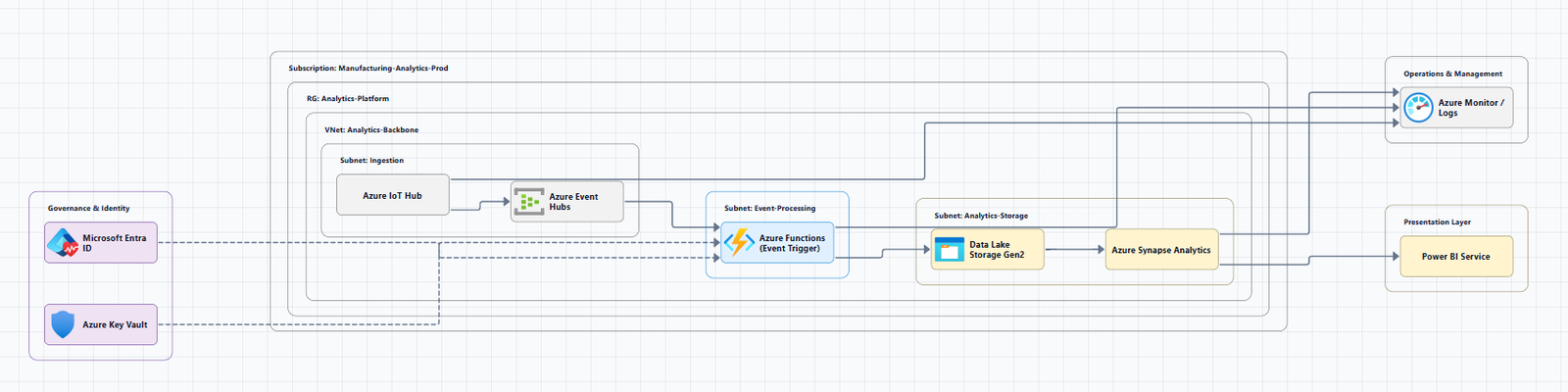
The definitive source for Azure architecture icons is Microsoft's official Azure Architecture Center. All icons are provided as general-purpose SVG files that you can drag and drop into most diagramming tools, including Microsoft Visio.
Download the latest icons: Azure Public Service Icons (SVG)
The icon set is updated regularly. Recent additions include:
- July 2026: Azure DocumentDB, Azure Resiliency, AI Gateway, Azure DDoS custom policies, and 10 new Microsoft Foundry icons
- November 2025: Azure Kubernetes Service (AKS) Network Policy, Azure Local, Azure Linux, and Azure PubSub
- August 2025: Azure Service Groups, Prometheus, and others
Usage Guidelines (Microsoft's Official Rules)
Microsoft provides clear guidelines for using these icons:
Do's:
- Use the icon to illustrate how products work together
- Include the product name somewhere close to the icon
- Use the icons as they appear within Azure
Don'ts:
- Don't crop, flip, or rotate icons
- Don't distort or change icon shape in any way
- Don't use Microsoft product icons to represent your product or service
Permitted Use: Microsoft permits use of these icons in architectural diagrams, training materials, or documentation. You can copy, distribute, and display the icons only for permitted use unless granted explicit permission.
Using Azure Icons in Popular Tools
In Draw.io (diagrams.net)
While Draw.io doesn't include Azure icons by default, community-maintained libraries provide one-click loading:
Quick Setup (One-Click):
Load all Azure public service icons directly into draw.io using this link: Azure All Icons
Alternative (Download & Import):
- Download the
.xmllibrary files from the repository - Open draw.io
- Select File → Open Library from → Device
- Choose the file to import
In Microsoft Visio
Azure icons are not provided as Visio stencils. Instead, you drag and drop the SVG files directly into your Visio diagram. Third-party community stencil packs are also available.
In AI-Powered Tools
AI Line Studio automatically generates Azure architecture diagrams with the appropriate official Azure service icons from natural language prompts. For Azure-specific workflows, try the AI cloud diagram generator. The AI architecture diagram builder supports Azure alongside AWS, GCP, and OCI.
Additional Icon Sets
Microsoft also provides icon sets for: