
Azure Architecture Diagram Templates: Official, Community, and AI Sources
Azure architecture diagram templates are the fastest way to move from a blank canvas to a professional, well-structured diagram. They provide a pre-built foundation with the correct Azure icons, service relationships, and visual hierarchy, allowing you to focus on your specific solution rather than wrestling with formatting.
Here is a comprehensive guide to finding and using Azure architecture diagram templates, from official Microsoft sources to community-driven repositories and AI-powered tools.
Cloud Architecture
Create cloud architecture diagrams for AWS, Azure, GCP, and more. Design scalable infrastructure with professional cloud icons.
Find Azure architecture diagram templates from Azure Architecture Center, Visio, Draw.io, FigJam, Lucidchart, GitHub, and AI-powered generators.
Click Cloud Architecture to open AI Line Studio and generate diagrams from natural language in seconds.
Official Microsoft Sources
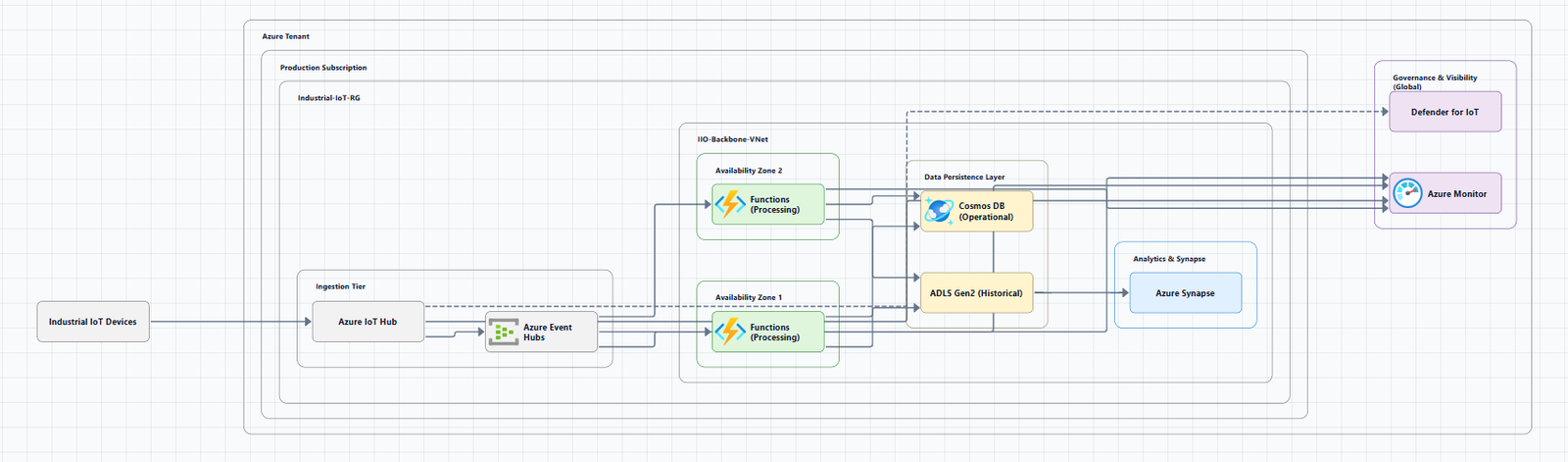
1. Azure Architecture Center (Official Icon & Template Hub)
The Azure Architecture Center is the primary source for all things Azure architecture, including official icons and reference architectures.
- Official Azure Icons: The center provides a complete, updated collection of Azure product icons in SVG format. You can download them for use in your diagrams. Recent additions include AI service icons and Azure Operator (5G) icons.
- Example Architecture Diagrams: The center allows you to "Browse all Azure architectures to view other examples", giving you a visual library of proven patterns to adapt.
2. Microsoft Visio Templates
Microsoft Visio is the recommended tool for creating Azure architecture diagrams, and it comes with built-in resources.
- Azure Diagram Template: Visio includes a dedicated Azure Diagram template with shapes and icons for various Azure services. This serves as a ready-to-use starting point.
- Visio Stencils: You can download Visio templates and stencils directly from Microsoft. A key resource is the "Microsoft Integration, Azure, Power Platform, Office 365 Stencils Pack" on GitHub, which contains fully resizable Visio shapes for on-premise, cloud, and hybrid scenarios.
- How to Access: The Azure diagrams template can be accessed in the Visio desktop app or on Visio for the web with a Visio Plan 1 or Plan 2 subscription.
Community & Third-Party Template Libraries
3. Draw.io (diagrams.net)
Draw.io (now diagrams.net) is a powerful, free, open-source alternative to Visio that includes built-in Azure templates.
- Built-in Azure Templates: You can access Azure diagram templates directly within the tool. Navigate to Arrange > Insert > Template, expand the Cloud section, and select Azure.
- Azure Icon Library: Draw.io has a collection of Azure, Office, and other Microsoft icons.
- Format Flexibility: It supports importing and exporting to various formats, including Visio (.vsdx), Lucidchart, Gliffy, and Mermaid.
4. FigJam (by Figma)
FigJam offers a collaborative, browser-based approach to diagramming with a free Azure template.
- Azure Architecture Template: FigJam provides a free Azure architecture diagram template. It includes official Microsoft Cloud icons and intuitive drag-and-drop capabilities.
- Collaboration: This is an excellent choice for team design sessions.
5. Lucidchart
Lucidchart is another popular online diagramming tool that supports Azure architecture.
- Azure Templates: It provides templates and shapes specifically for Azure architecture.
- Collaboration: Lucidchart offers a collaborative experience and can import/export to the open draw.io format.
6. GitHub Repositories (Community-Driven Templates)
The open-source community on GitHub maintains several excellent repositories with reusable Azure architecture templates.
- Azure Networking Design and Architectures: Repositories like
ems75/azure-networking-drawiooffer layered, reusable network architecture diagrams for cloud solutions architects. - Reference Architectures: The
azure-digital-natives-checklistrepository provides architecture diagrams and design decisions for common patterns like SaaS multi-tenant, event-driven microservices, and AI RAG applications.
AI-Powered Template Generation
7. AI Line Studio
AI Line Studio goes beyond static templates by generating custom architecture diagrams from natural language prompts.
- Prompt-to-Diagram: Describe your architecture in plain English (e.g., "a web app on Azure with App Service, Azure SQL Database, and Azure Front Door"), and the tool generates a structured diagram with official Azure icons in seconds.
- Export Options: The output supports PNG, GIF, and MP4 exports, plus shareable documentation links.
- Azure-Specific Workflow: For Azure-focused work, you can use the dedicated AI cloud diagram generator to turn descriptions into production-ready visuals. For multi-cloud needs, the AI architecture diagram builder supports Azure alongside AWS, GCP, and OCI.
Summary of Key Resources
| Tool / Source | Key Feature | Best For |
|---|---|---|
| Azure Architecture Center | Official icons & reference architectures | The definitive source for icons and examples |
| Microsoft Visio | Built-in Azure Diagram template & stencils | Professional, Microsoft-aligned diagramming |
| Draw.io (diagrams.net) | Built-in Azure templates & free, open-source tool | Free, flexible, and fast diagramming |
| FigJam | Free, collaborative Azure template | Team collaboration and brainstorming |
| Lucidchart | Azure-specific templates & shapes | Cloud-based collaboration with Azure support |
| GitHub | Community-driven, reusable templates | Finding and sharing custom, real-world designs |
| AI Line Studio | AI-powered, prompt-to-diagram generation | Rapid, automated creation from text descriptions |
By leveraging these templates, you can significantly reduce the time it takes to create professional Azure architecture diagrams, ensuring they are accurate, consistent, and aligned with Microsoft's best practices.