
Azure Data Factory Architecture Diagram: ETL, Medallion Lakehouse, and Best Practices
Azure Data Factory (ADF) is the backbone of modern data integration and ETL/ELT workflows on the Microsoft Azure platform. This serverless, cloud-based service allows you to create, schedule, and orchestrate data pipelines that can move and transform data from virtually any source to any destination.
While ADF is a powerful orchestration tool, its real strength is in how it orchestrates and scales across a broader ecosystem. A common misconception is that ADF does all the heavy-lifting for complex transformations. In practice, ADF excels at coordinating the entire workflow, triggering data ingestion, handing off processing to powerful compute engines like Azure Databricks or Synapse Spark pools, and then managing the loading of transformed data into serving layers.
To help you visualize this, this guide breaks down the core components of ADF, common architecture patterns, and best practices for designing robust, scalable data solutions.
Cloud Architecture
Create cloud architecture diagrams for AWS, Azure, GCP, and more. Design scalable infrastructure with professional cloud icons.
Complete guide to Azure Data Factory architecture diagrams, pipelines, activities, integration runtimes, medallion patterns, and best practices.
Click Cloud Architecture to open AI Line Studio and generate diagrams from natural language in seconds.
Core Components of Azure Data Factory
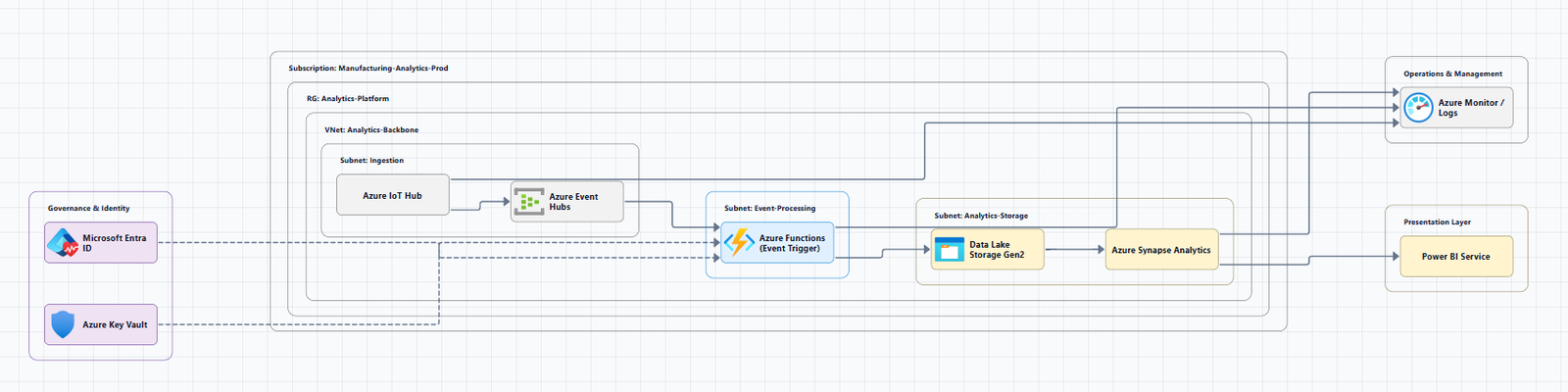
Understanding the fundamental building blocks of ADF is the first step to reading and designing effective architecture diagrams. These components work together to provide the platform for data movement and data integration.
1. Pipelines
A pipeline is a logical grouping of activities that together perform a specific unit of work. Think of it as a container that holds the steps of a data-driven workflow. Pipelines allow you to organize related tasks and manage them as a single unit.
2. Activities
Activities are the individual processing steps within a pipeline. ADF supports three main categories of activities:
- Data Movement Activities: The
Copy Activityis the primary tool for ingesting data from a source to a sink. - Data Transformation Activities: Includes
Mapping Data Flows(code-free transformations), stored procedures, and the execution of scripts on compute engines like Databricks or HDInsight. - Control Activities: Used to define flow and logic, such as
ForEach,If Condition, andWaitactivities.
3. Datasets
Datasets are data structures within your data stores that represent the specific data you want to use in your activities. They act as a reference to the data itself (e.g., a specific table in a SQL database, a container in Blob Storage).
4. Linked Services
Linked Services are the connection strings that define the required information for Azure Data Factory to connect to external resources. They define the connection to data sources (like Azure SQL Database) or compute services (like Azure Databricks).
5. Data Flows
Data Flows provide a visual, code-free way to build data transformation logic. They execute on a managed Apache Spark cluster, allowing you to perform transformations at scale without writing code.
6. Integration Runtime (IR)
The Integration Runtime is the compute infrastructure used by Azure Data Factory to provide data integration capabilities across different network environments. There are three types:
- Azure IR: A fully managed, autoscaled compute for moving data between cloud data stores.
- Self-Hosted IR (SHIR): Installed on your own network (on-premises or in a VM) to connect to data sources in a private or on-premises network.
- Azure-SSIS IR: A dedicated Azure IR for running SSIS (SQL Server Integration Services) packages in the cloud.
The Four-Stage Data Integration Workflow
A typical data-driven workflow in Azure Data Factory follows a four-stage architecture:
- Connect and Collect: Data is ingested from disparate sources (on-premises, cloud, SaaS) into a centralized staging area, often Azure Blob Storage or ADLS Gen2.
- Transform and Enrich: The raw data is then transformed, cleaned, and enriched using compute services like Azure Databricks, Azure Synapse, or Azure HDInsight.
- Publish: The processed data is then loaded into a serving layer, such as Azure Synapse Analytics or Azure SQL Database, for consumption.
- Monitor: ADF provides a management interface to monitor pipeline runs, track activities, and handle failures.
Common Azure Data Factory Architecture Patterns
The best way to design your ADF solution is to start with a proven pattern. The Azure Architecture Center provides several reference architectures that serve as excellent starting points.
1. Baseline Medallion Lakehouse Architecture
A highly recommended pattern for modern data platforms is the medallion lakehouse architecture. This pattern organizes data into three layers, incrementally improving its structure and quality as it flows through. The baseline architecture from the Azure Architecture Center is designed to implement this pattern.
Typical Data Flow:
- Bronze (Raw): Data is ingested from source systems (e.g., on-premises SQL) into its raw form in a Data Lake using Azure Data Factory.
- Silver (Cleansed): ADF orchestrates a notebook in Azure Databricks to transform and clean the raw data into a refined, queryable format, storing the results in Delta Lake tables.
- Gold (Curated): The data is further aggregated and modeled for specific business use cases, ready for consumption by analytics and reporting tools like Power BI.
2. Enterprise-Hardened Architecture
This architecture builds on the baseline by adding extra nonfunctional requirements (NFRs) for security, governance, and resilience for enterprise-wide adoption.
Key Enhancements:
- Federated Governance: Adopts a domain-based model, allowing business areas to manage their own data products within the overall governance framework.
- Advanced Security: Implements stronger encryption, stricter network isolation, and enhanced monitoring.
- CI/CD: Integrates continuous integration and delivery (CI/CD) pipelines for reliable and repeatable deployments.
3. Mission-Critical Architecture
For workloads that require the highest levels of reliability and performance, Azure Data Factory can be extended into a mission-critical architecture. This pattern is an extension of the baseline and enterprise-hardened architectures and focuses on managing a workload as a critical business operation.
Key Characteristics:
- Active-Active Deployment: Deploys the solution across multiple Azure regions for global availability and disaster recovery.
- High Concurrency: Designed to support thousands of concurrent users during peak hours.
- Strict SLAs: Targets high uptime (e.g., 99.9%) and stringent recovery point (RPO) and time (RTO) objectives.
Best Practices for Designing with Azure Data Factory
Based on the Azure Well-Architected Framework and Microsoft's own guidance, here are key best practices to keep in mind.
- Choose the Right Integration Runtime: Use the Azure IR for cloud-to-cloud data movement. Use a Self-Hosted IR for on-premises data sources. Use the Azure-SSIS IR for migrating existing SSIS workloads.
- Reuse Pipelines and Activities: Design your pipelines to be parameterized and reusable. Use a parent pipeline to orchestrate a sequence of child pipelines to avoid duplication.
- Embrace Serverless: Leverage ADF's serverless architecture to maximize throughput and only pay for the compute you use.
- Monitor and Alert: Proactively monitor your pipelines using Azure Monitor. Set up alerts for pipeline failures or performance degradation.
- Secure Your Data: Use Azure Key Vault to store and manage connection strings and secrets. Ensure data is encrypted at rest and in transit.
Tools for Creating Azure Data Factory Architecture Diagrams
- AI Line Studio: Generates Azure architecture diagrams from natural language descriptions in seconds. For Azure-specific workflows, use the dedicated AI cloud diagram generator.
- Microsoft Visio: The recommended tool. The Azure Architecture Center provides downloadable Visio files for the official reference architectures.
- Draw.io (diagrams.net): A free, browser-based tool with a built-in Azure shape library.
- Visual Paradigm AI: A browser-based AI tool that can align your architecture with the Azure Well-Architected Framework.
Summary
Designing a robust Azure Data Factory architecture is about understanding its core components and how they fit into proven patterns. By starting with a baseline medallion lakehouse architecture, you can create a solid foundation that can be hardened for enterprise needs and extended to support mission-critical workloads.
Key Takeaways:
- Core Components: Understand how Pipelines, Activities, Datasets, Linked Services, Data Flows, and Integration Runtime work together.
- Architecture Patterns: Start with the baseline medallion lakehouse, then harden for the enterprise, and finally extend to mission-critical for the highest availability.
- Best Practices: Choose the right IR, reuse pipelines, monitor relentlessly, and secure your data.
- Documentation: Leverage official reference architectures and tools like AI Line Studio and Microsoft Visio to create clear and effective diagrams.
To start building your own Azure Data Factory architecture diagrams, explore the Azure architecture diagram tool for templates and examples. For automated diagram generation, try the AI cloud diagram generator to turn a description into a visual instantly.