
Azure Network Architecture Diagram: Components, Patterns, and Best Practices
A well-designed Azure network architecture is the foundation of a secure, scalable, and resilient cloud environment. It determines how your applications communicate, how users connect, and how your data is protected. This guide provides a comprehensive look at Azure network architecture diagrams, covering core components, common patterns, best practices, and the tools you can use to design and document your own infrastructure.
Cloud Architecture
Create cloud architecture diagrams for AWS, Azure, GCP, and more. Design scalable infrastructure with professional cloud icons.
Complete guide to Azure network architecture diagrams, VNets, NSGs, hub-spoke, Virtual WAN, hybrid connectivity, best practices, and tools.
Click Cloud Architecture to open AI Line Studio and generate diagrams from natural language in seconds.
Core Components of Azure Network Architecture
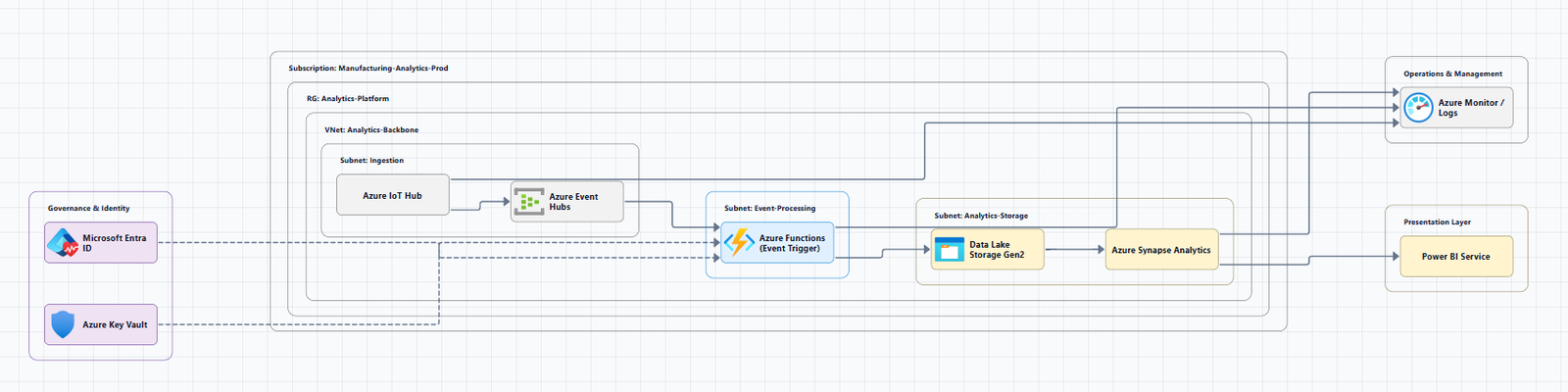
Understanding the fundamental building blocks is the first step to reading and designing network diagrams. These components form the vocabulary of your Azure network.
- Azure Virtual Network (VNet): The fundamental building block for establishing a private network on Azure. A VNet is a logical isolation of the Azure cloud dedicated to your subscription. It allows Azure resources like Virtual Machines (VMs) to securely communicate with each other, the internet, and on-premises networks.
- Subnets: A subnet is a logical segment of a VNet's IP address space. Subnets allow you to divide a VNet into smaller, more manageable address spaces. They are a key tool for organizing resources and applying security controls.
- Network Security Groups (NSGs): An NSG acts as a virtual firewall at the subnet or network interface card (NIC) level. It contains a list of security rules that allow or deny inbound and outbound network traffic based on source/destination IP, port, and protocol. The Azure Well-Architected Framework recommends using NSGs as Layer 4 firewalls at the subnet level.
- Route Tables and User-Defined Routes (UDRs): Azure automatically creates a system route table for each subnet. UDRs allow you to create custom routes to control the path network traffic takes. For example, you can force all outbound traffic from a subnet through a network virtual appliance (NVA) like a firewall for inspection and management.
- Azure Load Balancer: A service that distributes inbound traffic across a pool of healthy backend instances (like VMs or VMs in a scale set) to provide high availability and scalability.
- Azure Application Gateway: A layer 7 (HTTP/HTTPS) load balancer that can make routing decisions based on the URL path, host headers, and other HTTP attributes. It often includes a Web Application Firewall (WAF) for added security.
- Azure DNS: A hosting service for DNS domains, providing name resolution for Azure resources and custom domains.
Common Azure Network Architecture Patterns
Network topology is a critical element of a landing zone architecture, defining how applications can communicate with one another. Most Azure deployments follow one of several well-established patterns.
Hub-Spoke Network Topology
The hub-spoke pattern is the network topology recommended by the Cloud Adoption Framework for Azure. It's a best practice for many organizations because it balances centralized control with workload isolation.
- Hub Virtual Network: The central point of connectivity. It acts as a shared services center, hosting infrastructure components like Azure Firewall, VPN Gateway, and Azure Bastion.
- Spoke Virtual Networks: These are the workloads. Each spoke is a separate VNet that connects to the hub via VNet peering. They can host specific applications, environments (like dev, test, production), or business units, providing logical and security isolation.
- Connectivity: All internet-bound or cross-premises traffic from spoke VNets can be routed through the hub, allowing for centralized monitoring and security enforcement.
This architecture is the foundation for most enterprise-scale Azure landing zones. For a deep dive, you can download a Visio file of this architecture.
Azure Virtual WAN
For organizations needing global, dynamic, and transitive connectivity, Azure Virtual WAN is a Microsoft-managed networking service that simplifies end-to-end connectivity.
- Global Transit: Azure Virtual WAN allows for any-to-any connectivity between globally distributed sets of cloud workloads in VNets, branch sites, SaaS/PaaS applications, and users.
- Managed Hubs: Virtual WAN hubs are provisioned in Azure regions to which you can connect your branches, VNets, and remote users. These hubs are interconnected to provide seamless routing across regions.
- Scalability: The architecture easily scales to support multiple Azure regions and on-premises locations. This pattern is often chosen over traditional topologies when there is a need for global connectivity or integration with numerous branch offices.
Hybrid Network Architecture
For organizations that operate both on-premises and in the cloud, hybrid network architectures are essential.
- Azure ExpressRoute: A private, dedicated, high-throughput connection from your on-premises infrastructure to Azure. Data doesn't traverse the public internet, making it more secure and reliable.
- Azure VPN Gateway: A site-to-site virtual private network (VPN) connection over the internet.
- Failover Strategy: A common pattern is to use ExpressRoute as the primary connection with a site-to-site VPN as a failover connection. This provides a highly available hybrid network architecture.
Enterprise Network Segmentation
Designing an enterprise segmentation strategy is a key part of network architecture. The goal is to define segmentation layers that align with your business context.
- Management Groups and Subscriptions: Plan your tenants and subscriptions first before designing VNets to establish governance and account structure.
- Zero Trust: Implement segmentation to enhance security. Route all external traffic through a firewall, and use NSGs as L4 firewalls at the subnet level.
Best Practices for Azure Network Architecture
Following best practices from the Azure Well-Architected Framework ensures your network is secure, resilient, and performant.
- Design Early: Plan your network before deploying workloads to prevent problems later. This is especially critical for enterprise environments where changes are difficult to implement.
- Plan for Scale: Design your IP addressing scheme and subnet sizes to accommodate future growth. This includes reserving address space for new regions, VNets, and workloads.
- Centralize Shared Services: Use a hub-spoke topology to centralize network inspection, connectivity, and shared services like DNS and firewalls.
- Implement Defense in Depth: Use multiple security layers. Combine NSGs at the subnet level with firewalls (like Azure Firewall or NVAs) for advanced threat protection.
- Use Managed DNS: Leverage Azure DNS for reliable, secure, and easy-to-configure domain name resolution.
- Monitor and Audit: Enable Azure Monitor and Network Watcher to gain insights into traffic patterns, identify anomalies, and troubleshoot issues.
- Treat Configuration as Code: Use Infrastructure as Code (IaC) tools like Bicep or Terraform to define and version your network topology.
Tools for Creating Azure Network Architecture Diagrams
Several tools can help you create professional Azure network diagrams, from manual drawing to automated generation.
Manual Diagramming Tools:
- Draw.io (diagrams.net): A free, browser-based tool with a built-in Azure shape library. Community repositories offer layered, reusable network diagram templates.
- Lucidchart: Cloud-based collaborative diagramming with Azure templates and icons.
- Microsoft Visio: The recommended tool for creating professional Azure architecture diagrams.
Automated and Code-Based Tools:
- Azure Resource Visualizer: Analyzes deployed Azure resource groups and generates architecture diagrams.
- CloudNetDraw: A Python tool that automatically discovers your Azure virtual network infrastructure and generates Draw.io visual diagrams from topology data.
- Azure-Terraform-Diagram: A VS Code extension that generates Azure-style infrastructure diagrams from your Terraform projects, including security and cost insights.
- Python AzViz: Generates visual diagrams of Azure Resource Groups and their dependencies.
- Azure Networking Drawio Repository (ems75): A repository for delivering layered, reusable network architecture diagrams, complete with tips for storytelling.
AI-Powered Tools:
- AI Line Studio: Generates Azure architecture diagrams from natural language descriptions in seconds. For Azure-specific workflows, use the dedicated AI cloud diagram generator.
Summary
| Component/Pattern | Description | Key Benefit |
|---|---|---|
| Azure VNet | A private network in Azure. | Foundation for all Azure networking. |
| Subnets | Logical segments of a VNet. | Enables network segmentation and security. |
| NSGs | Virtual firewalls at the subnet or NIC level. | Controls inbound/outbound traffic. |
| Hub-Spoke | A central VNet (hub) connected to multiple workload VNets (spokes). | Centralized management and security. |
| Virtual WAN | A Microsoft-managed global transit network. | Simplifies global, any-to-any connectivity. |
| ExpressRoute | Private connection from on-premises to Azure. | Secure, high-throughput hybrid connectivity. |
| VPN Gateway | Site-to-site VPN connection over the internet. | Cost-effective hybrid connectivity or failover. |
To start building your own Azure network architecture diagrams, explore the Azure architecture diagram tool for templates and examples. For automated diagram generation, try the AI cloud diagram generator to turn a network description into a visual instantly.