
Best AWS Architecture Diagram Generators: 2026 Comparison
If you've ever spent an hour manually placing boxes and aligning arrows in a diagramming tool, only to have the infrastructure change the next week, you know the problem. AWS architecture diagrams are essential for design, documentation, and communication, but traditional tools make them a maintenance burden.
AWS architecture diagram generators have evolved dramatically. The best tools in 2026 don't just help you draw, they help you generate diagrams from natural language, infrastructure-as-code, or live cloud environments. The workflow shift is real: what used to take hours can now take seconds.
This guide compares the leading AWS architecture diagram generators available in 2026, AI-powered prompt-based tools, code-based automation, live infrastructure scanners, and manual options, so you can choose the one that actually fits your workflow.
Cloud Architecture
Create cloud architecture diagrams for AWS, Azure, GCP, and more. Design scalable infrastructure with professional cloud icons.
Compare the best AWS architecture diagram generators in 2026, AI-powered tools, Terraform automation, live scanners, and more.
Click Cloud Architecture to open AI Line Studio and generate diagrams from natural language in seconds.
Quick Comparison: Best AWS Architecture Diagram Generators
| Tool | Input Method | AWS Support | Export Formats | Key Differentiator | Pricing |
|---|---|---|---|---|---|
| AI Line Studio | Natural language prompt | Full (AWS, Azure, GCP, OCI) | PNG, GIF, MP4, shareable links | Animated diagrams from text in 15 to 20 seconds | Free tier available |
| Visual Paradigm AI | Natural language + guided discovery | AWS, Azure, GCP, Alibaba, IBM, Oracle, Huawei | SVG, PDF, Markdown | Enterprise modeling ecosystem + AI-guided discovery | Enterprise pricing |
| OpenArchFlow | Natural language prompt | AWS | Interactive diagrams | Open-source, no account required, MCP-powered | Free |
| AWS Diagram MCP Server | Natural language (via AI assistant) | AWS | draw.io format | First-party AWS tool, local operation | Free |
| AWS Architecture Diagram Skill | Natural language (via AI assistant) | AWS | draw.io format | Works with any AI assistant (ChatGPT, Claude, Kiro) | Free |
| Terravision | Terraform code | AWS (200+ services), GCP, Azure | PNG, HTML, draw.io XML | CI/CD-ready automation from IaC | Free (open source) |
| terraformgraph | Terraform code | AWS (100+ resource types) | SVG, HTML | Interactive diagrams from Terraform | Free (open source) |
| Holori | Live AWS scan | AWS, Azure, GCP | 2D, 3D, diff diagrams | Daily sync + diff detection + cost management | Paid |
| Cloudcraft | Live AWS scan + manual | AWS only | PNG, SVG, 3D isometric | 3D views + cost estimation | $49+/mo |
| AWS Workload Discovery | Live AWS scan | AWS only | Interactive HTML, PNG | First-party AWS tool, self-hosted | Free |
| Draw.io | Manual drag-and-drop | Full AWS icon library | PNG, SVG, PDF, XML | Completely free, massive icon library | Free |
AI-Powered AWS Architecture Diagram Generators
AI-powered tools are the newest and most impactful category. Instead of dragging boxes, you describe your architecture in natural language, and the tool generates a professional diagram in seconds.
- AI-Guided Discovery: The AI analyzes your goals and suggests missing pieces
- Well-Architected Alignment: Use AI strategies to ensure your design prioritizes cost-efficiency or uptime
- Interactive Editor: Once generated, you have full control to move components or add custom metadata
- Export & Share: Export as high-res SVGs for stakeholder presentations or technical documentation
- Integrated Workflows: Import AWS diagrams into larger enterprise projects across the Visual Paradigm ecosystem
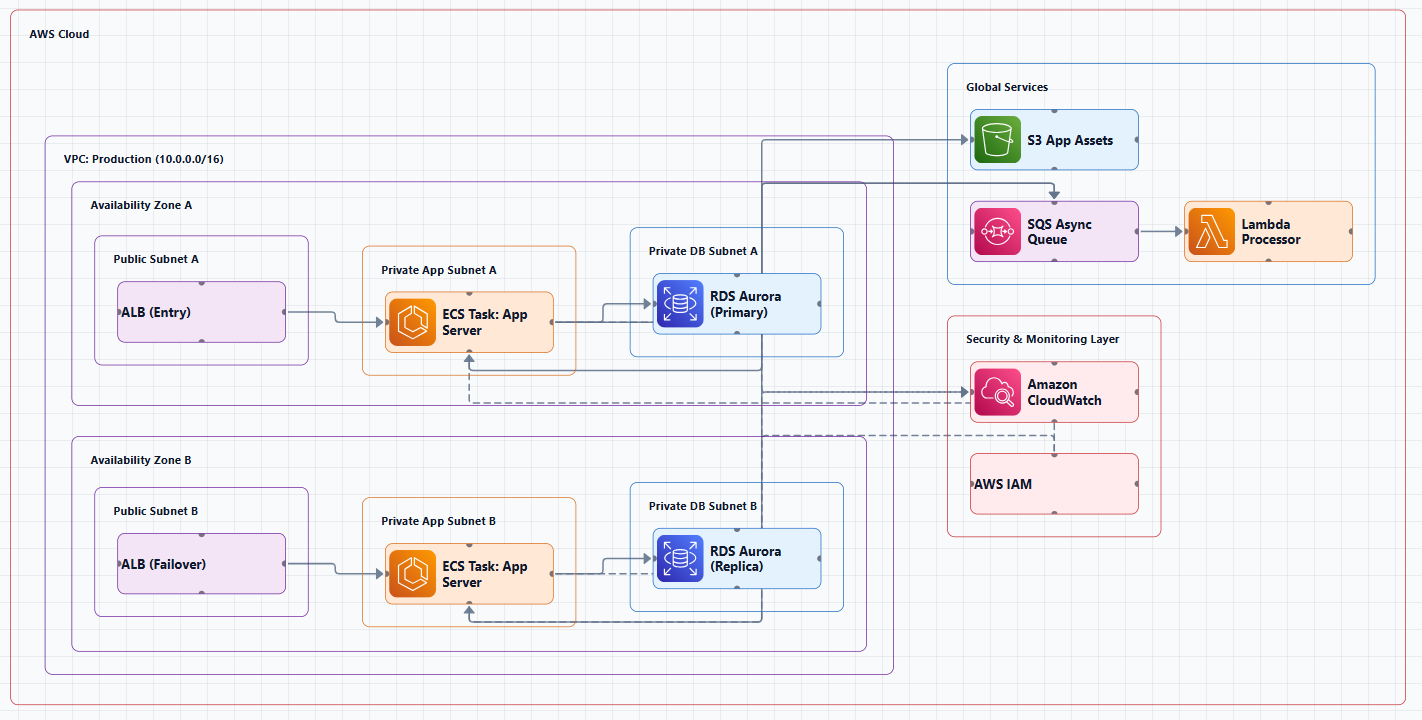
How AI Generation Works
The workflow typically follows this pattern:
- Describe your system: Input a prompt like "a 3-tier web app on AWS with EC2, RDS, and CloudFront"
- Select your provider: Choose AWS and select a deployment strategy, such as Low Cost/MVP or High Availability
- Technical discovery: The AI asks clarifying questions to refine the stack (e.g., choosing between Relational or NoSQL databases)
- Generate architecture: The AI instantly builds a clean, interactive diagram using official AWS icons
- AI-powered modification: Use an AI modify tool to refine the design. Simply type "Add WAF and CloudWatch monitoring," and the diagram updates automatically
AI Line Studio, Natural Language to Animated Diagrams
AI Line Studio takes a fundamentally different approach from traditional diagramming tools. Instead of a drag-and-drop canvas, the primary input is natural language. You describe a system, "a 3-tier web app on AWS with EC2, RDS, and CloudFront", and the tool generates a structured diagram from that description, typically in 15 to 20 seconds.
The output isn't just static. AI Line Studio supports animated diagrams (GIF, MP4) alongside standard PNG exports, plus shareable documentation links. This makes it genuinely useful for demos, training materials, and investor presentations where static diagrams fall flat. For AWS-specific workflows, the dedicated AI cloud diagram generator turns AWS descriptions into production-ready visuals. If you're working across multiple providers, the AI architecture diagram builder covers AWS, Azure, GCP, and OCI with over 3,000 officially licensed icons.
The honest limitation: AI Line Studio is an early-stage product with a smaller install base and fewer third-party integrations than established tools. It's not a general-purpose diagramming tool, if you need org charts, mind maps, or non-technical diagrams, a broader tool is a better fit. And as with any AI-generated output, complex or ambiguous system descriptions may need manual cleanup. It's not a zero-review tool for mission-critical documentation.
Best for: Engineers who value speed and want to generate diagrams from descriptions rather than spending time on manual placement. Also ideal for teams creating presentation-ready, animated architecture visuals.
Tradeoff: Less control over fine-grained layout compared to manual tools. Not suitable for non-technical diagram types.
Visual Paradigm AI Cloud Architecture Studio, Enterprise-Grade AI
Visual Paradigm's AI Cloud Architecture Studio is a browser-based AI tool designed specifically for cloud architects. You describe your requirements in plain English and receive a standards-compliant AWS diagram in minutes.
Key features:
Best for: Enterprise teams that need a comprehensive modeling ecosystem (UML, SysML, ArchiMate, BPMN, C4) alongside cloud architecture diagrams.
Tradeoff: More complex and expensive than purpose-built cloud diagramming tools.
OpenArchFlow, Open-Source AI Diagram Generator
OpenArchFlow is an open-source Progressive Web App designed for cloud architects, DevOps engineers, and developers. Generate interactive AWS architecture diagrams from natural language descriptions using AI, Large Language Models (LLMs), AI Agents, and AWS MCP (Model Context Protocol).
Key features:
- No account required
- Completely free and open-source
- MCP-powered for integration with AI assistants
- Interactive diagram output
Best for: Developers who want a free, open-source AI diagram generator without account requirements.
Tradeoff: Still early-stage. Community-driven development.
AWS Diagram MCP Server, First-Party AI Diagram Generation
The draw.io MCP server, developed by AWS Samples, enables AI assistants to build technical diagrams on your local computer through natural language. Ask for an AWS architecture diagram, a flowchart, or a network topology, and watch it appear in draw.io format.
Key features:
- Privacy First: All operations run entirely on your local machine. No diagram data, telemetry, or information is transmitted over the network
- Natural language diagram creation through AI assistants
- Works with AWS, Kubernetes, and more icons
- 100% local operation with no network dependencies
Quick example:
You: "Create an AWS serverless architecture diagram with CloudFront, API Gateway, container-based Lambda (pulling from ECR), connecting to Aurora PostgreSQL, OpenSearch, S3, and Bedrock. Include Cognito for authentication, IAM roles, and CodePipeline for deployment. Show the VPC and private subnet structure."
AI: [Generates a properly formatted draw.io diagram with official AWS icons]
Best for: Teams using AI assistants (Claude Desktop, Claude Code, Kiro) who want to generate AWS diagrams locally with full privacy.
Tradeoff: Requires MCP client configuration. Still in pre-release alpha.
AWS Architecture Diagram Skill, Works with Any AI Assistant
A reusable skill for generating AWS architecture diagrams in draw.io format. Works with any AI assistant, ChatGPT, Claude Projects, Kiro CLI, Claude Code, or any internal AI agent that supports custom prompts and file uploads.
Key features:
- Left-to-right flow, UI/Frontend on left, data sources on right
- Official AWS icons, from draw.io's built-in
mxgraph.aws4stencil library - Verified icon catalog, only icons confirmed to render correctly
- Consistent styling, 78px icons, strokeWidth=2 edges, proper AWS color palette
- Export support, PNG/SVG/PDF via draw.io Desktop CLI
Installation: npx skills add vidanov/aws-architecture-diagram-skill
Best for: Teams already using AI assistants who want to add AWS diagram generation capabilities.
Tradeoff: Requires setup of AI assistant and skill installation.
Kiro CLI + MCP, AWS's Official AI Approach
Kiro CLI with the Model Context Protocol (MCP) offers a streamlined approach to creating AWS architecture diagrams. By using generative AI through natural language prompts, architects can now generate professional diagrams in minutes rather than hours, while adhering to AWS best practices.
The AWS Diagram MCP server specifically enables Kiro to generate architecture diagrams using the Python diagrams package, with access to the complete AWS icon set and architectural best practices.
Best for: Teams using Kiro CLI who want AWS's official AI-powered diagram generation.
Tradeoff: Requires Kiro CLI and MCP setup.
Code-Based AWS Architecture Diagram Generators
These tools generate diagrams from infrastructure-as-code, ensuring diagrams stay in sync with your actual infrastructure.
Terravision, Diagrams from Terraform Code
Terravision automatically converts your Terraform code into professional-grade cloud architecture diagrams using the official AWS, GCP, and Azure icon sets.
Key features:
- Always up-to-date: diagrams generated directly from your Terraform code
- 100% client-side: no cloud access required, runs locally, your code never leaves your machine
- CI/CD ready: automate diagram updates on every PR merge
- Free & open source: no expensive diagramming tool licenses
- Multi-cloud: AWS (full support, 200+ services), GCP, and Azure (core services)
- Interactive HTML output: clickable nodes, pan/zoom, search, animated data flow
- Editable draw.io export: open in draw.io, Lucidchart, or any mxGraph editor
- Optional AI annotations: labels, titles, and flow sequences from Ollama (local) or AWS Bedrock
Quick start:
pipx install terravision
terravision draw --source ./path-to-your-terraform --show
That's it, your diagram is saved as architecture.png and opens automatically.
Best for: Teams using Terraform who want automated, always-accurate diagrams without manual maintenance.
Tradeoff: Requires Terraform and Python setup. Azure and GCP support is partial (core services only).
terraformgraph, Interactive Diagrams from Terraform
Generate interactive architecture diagrams from your Terraform configurations. Supports AWS resources with automatic service grouping, relationship detection, and beautiful SVG/HTML output.
Key features:
- Supports 100+ AWS resource types including Compute (ECS, EC2, Lambda, Auto Scaling), Networking (VPC, ALB/NLB, Route53, CloudFront)
- Interactive SVG/HTML output
Best for: Teams wanting interactive Terraform-generated diagrams.
Tradeoff: Less mature than Terravision.
Live Infrastructure Scanners
These tools connect to your AWS account and generate diagrams from live infrastructure.
AWS Workload Discovery, First-Party AWS Tool
Amazon's own solution, deployed as a CloudFormation stack in your account. It automatically generates architecture diagrams of your workload on AWS, building, customizing, and sharing detailed workload visualizations based on live data from AWS.
Best for: Teams that need accurate, up-to-date diagrams of their live AWS infrastructure and want to keep data within their AWS account.
Tradeoff: Requires deploying a CloudFormation stack. AWS-only.
Holori, Automated Discovery with Diff Detection
Holori excels at providing high-level visibility for complex cloud environments. Its primary strength is the automated generation of AWS diagrams directly from cloud accounts, eliminating the need for manual drawing.
Key features:
- Daily sync ensures diagrams reflect the real-time state of your infrastructure
- Diff diagrams merge two versions in a single diagram highlighting added, modified, or deleted resources
- Cost management dashboard showing resource configurations alongside costs and usage
- Flexible editor with a vast library of multi-cloud icons
Best for: Large organizations with complex, multi-account AWS environments that need automated, always-up-to-date diagrams.
Tradeoff: Paid. More complex setup than browser-based tools.
Cloudcraft, 3D Isometric Views from Live Infrastructure
Cloudcraft (now owned by Datadog) scans your AWS account and generates both 2D and 3D architecture diagrams. The 3D isometric view looks impressive in presentations. It also includes cost estimation, hover over any resource to see its monthly cost.
Best for: Teams that regularly present architecture to executives, clients, or investors where visual quality and cost insights matter.
Tradeoff: Premium pricing ($49+/month). Security concerns with third-party access. AWS-only.
Manual Tools (with AWS Icon Support)
Draw.io (diagrams.net), The Free Workhorse
Draw.io is the most popular free option and for good reason. It has built-in AWS icon libraries, works in the browser, exports to PNG/SVG/PDF, and integrates with Confluence and Google Drive. To enable AWS shapes, click "More Shapes" in the left panel, scroll to the Networking section, and select the AWS library you want.
Best for: Solo developers, small teams, and anyone who needs a free, flexible diagramming tool.
Tradeoff: Zero automation. You pay with your time. Diagrams require manual updates.
Decision Framework: How to Choose
Ask yourself these questions:
| Question | If Yes | If No |
|---|---|---|
| Do you need a diagram in seconds from a text description? | AI Line Studio or Visual Paradigm AI | Manual tools or code-based |
| Do you use Terraform? | Terravision | Any tool works |
| Do you need animated diagrams for presentations? | AI Line Studio (GIF/MP4) | Any tool works |
| Do you need live infrastructure accuracy? | AWS Workload Discovery, Holori, Cloudcraft | AI Line Studio, Draw.io |
| Do you want to keep data entirely local? | AWS Diagram MCP Server, Terravision | Cloud-based tools |
| What's your budget? | $0 → Draw.io, Terravision, OpenArchFlow; Paid → Holori, Cloudcraft | , |
The Pragmatic Workflow
Here's what I actually use for AWS architecture diagramming:
For rapid ideation and iteration: AI Line Studio. Describe the system in 30 seconds, get a diagram in 20 seconds. The animated exports are invaluable for presentations where static diagrams fall flat.
For documentation that needs to stay accurate: Terravision (if using Terraform) or AWS Workload Discovery (if you want first-party accuracy). Generate diagrams directly from code or live infrastructure.
For AI-assisted diagramming in existing workflows: The AWS Architecture Diagram Skill or AWS Diagram MCP Server lets you generate diagrams through any AI assistant.
For final polish and presentation: Take the AI-generated diagram and refine it in Draw.io if needed. But increasingly, the AI output is good enough to use as-is.
Summary
AWS architecture diagram generators have come a long way. You no longer need to choose between expensive enterprise software and clunky free options. The best tools in 2026 offer AI-powered generation, live infrastructure scanning, or code-based automation, often with generous free tiers.
Key takeaways:
- If you value speed and natural language input, AI Line Studio is the fastest path from description to diagram. Try the AI cloud diagram generator to see how quickly you can turn an AWS description into a visual.
- If you use Terraform, Terravision keeps diagrams in sync with your infrastructure automatically.
- If you need enterprise-grade AI and modeling, Visual Paradigm AI delivers a full ecosystem.
- If you need live infrastructure accuracy, AWS Workload Discovery, Holori, or Cloudcraft eliminate manual maintenance.
- If you want to keep data entirely local, the AWS Diagram MCP server runs everything on your machine.
- If you need a free, reliable manual tool, Draw.io remains the people's champion.
Stop spending hours on diagrams that will be outdated next week. Start documenting your AWS architectures in a way that actually keeps pace with your infrastructure.