
Best Azure Architecture Diagram Tools: 2026 Comparison
Azure architecture diagrams are essential for documenting cloud infrastructure, planning deployments, and communicating system designs. But here's the problem most engineers don't talk about: the diagram that took you two hours to create will be outdated in two weeks.
The Azure diagramming landscape has changed dramatically. AI-powered tools now generate professional diagrams from natural language descriptions in seconds, while traditional manual tools still require dragging, dropping, and aligning. What used to take hours can now take 15 to 20 seconds.
This guide compares the leading Azure architecture diagram tools available in 2026, AI-powered generators, MCP-based assistants, manual options, and infrastructure-as-code tools, so you can choose the one that actually fits your workflow.
Cloud Architecture
Create cloud architecture diagrams for AWS, Azure, GCP, and more. Design scalable infrastructure with professional cloud icons.
2026 comparison of the best Azure architecture diagram tools, AI generators, Draw.io MCP, Visio, Lucidchart, IaC visualizers, and how to choose the right one.
Click Cloud Architecture to open AI Line Studio and generate diagrams from natural language in seconds.
Quick Comparison: Best Azure Architecture Diagram Tools
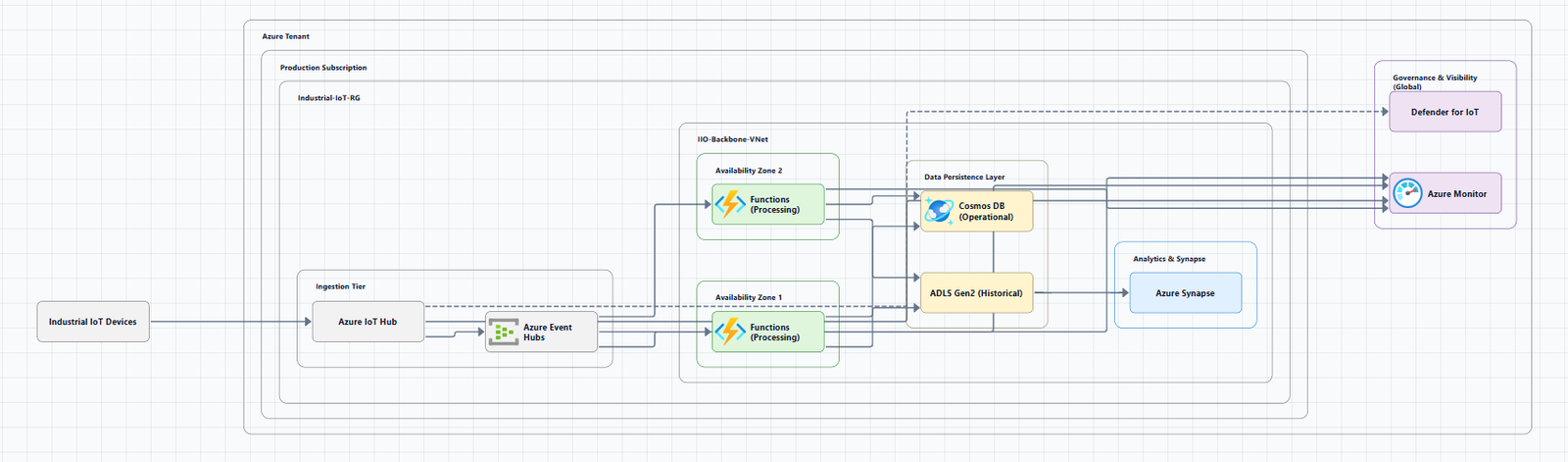
| Tool | Input Method | Azure Support | Key Differentiator | Pricing |
|---|---|---|---|---|
| AI Line Studio | Natural language prompt | Full (Azure, AWS, GCP, OCI) | Animated diagrams from text in 15 to 20 seconds | Free tier available |
| Visual Paradigm AI | Natural language + guided discovery | Azure, AWS, GCP | Azure Well-Architected alignment + AI-guided discovery | Enterprise pricing |
| Azure-DrawIO-MCP | Natural language (via AI assistant) | 100+ Azure resource types | Editable Draw.io output with official Azure icons | Free (open source) |
| Azure Cloud AI Visualizer | Natural language prompt | Azure | Generates Bicep/Terraform IaC from diagrams | Free (open source) |
| Cloud Visualizer Pro | Drag-and-drop + AI | Azure | MCP-backed IaC generation (Bicep & Terraform) | Free (open source) |
| diagram-ai-generator | Natural language (via Claude Desktop) | Azure, AWS, GCP, K8s | Multi-cloud with MCP server integration | Free (open source) |
| SketchMyInfra | Natural language prompt | Azure, AWS, GCP | Exports editable PlantUML code | Free |
| CloudSketcher | Natural language + image upload | Azure, AWS, GCP | Cross-cloud translation + cost estimation | Paid |
| Draw.io (diagrams.net) | Manual drag-and-drop | Full Azure icon library | Completely free, works offline | Free |
| Microsoft Visio | Manual drag-and-drop | Full Azure icon library | Enterprise-grade, official Microsoft tool | Paid |
| Lucidchart | Manual + AI assist | Azure, AWS, GCP | Real-time collaboration | Freemium |
| CloudNetDraw | Live Azure scan | Azure | Generates network diagrams from live environment | Free (open source) |
Tool-by-Tool Breakdown
AI Line Studio, Natural Language to Animated Diagrams
AI Line Studio takes a fundamentally different approach from traditional diagramming tools. Instead of a drag-and-drop canvas, the primary input is natural language. You describe a system, "a web app on Azure with App Service, Azure SQL Database, and Azure Front Door", and the tool generates a structured diagram with official Azure icons in 15 to 20 seconds.
The output supports animated diagrams (GIF, MP4) alongside standard PNG exports, plus shareable documentation links. For Azure-specific workflows, the dedicated AI cloud diagram generator turns Azure descriptions into production-ready visuals. If you're working across multiple providers, the AI architecture diagram builder supports Azure, AWS, GCP, and OCI.
Best for: Engineers who value speed and want to generate diagrams from descriptions rather than manual placement. Also ideal for teams creating presentation-ready, animated architecture visuals.
Tradeoff: Less control over fine-grained layout compared to manual tools. Not suitable for non-technical diagram types.
Visual Paradigm AI, Azure Well-Architected Alignment
Visual Paradigm's AI Cloud Architecture Studio is a browser-based, AI-first platform built specifically for modern cloud professionals. It serves as an AI-powered Azure design tool that aligns your infrastructure with the Azure Well-Architected Framework and enterprise best practices.
How it works:
- Describe your infrastructure: Input a prompt like "I want to build a real-time food delivery app on Azure with AKS, managed SQL Database, and a Redis cache, protected by an Application Gateway"
- Select your strategy: Choose an architecture goal such as High Availability, Enterprise Grade, or Low Cost/MVP
- Technical deep dive: The AI asks clarifying questions like "Should the database use geo-redundancy across different Azure regions for disaster recovery?"
- Automated generation: The AI renders a professional diagram featuring official Azure service icons and logical networking connections
- Interactive AI modification: Type "Add a Web Application Firewall (WAF) to the front end and link the database to a private endpoint," and the diagram updates in real-time
Key benefits:
- Service awareness: Understands AKS, SQL, and VNet relationship logic (not generic boxes)
- Infrastructure strategy: Applies automated high-availability and cost-efficiency patterns
- Iterative refinement: Modify entire VNet configurations via text prompts
- Professional SVG exports: Download high-quality vectors for architecture decision records, stakeholder presentations, or technical documentation
Best for: Enterprise teams that need Azure Well-Architected alignment and comprehensive modeling capabilities.
Tradeoff: More complex and expensive than purpose-built cloud diagramming tools. Part of a broader enterprise ecosystem.
Azure-DrawIO-MCP, Editable Diagrams via AI Assistant
The Azure-DrawIO-MCP server generates editable Azure architecture diagrams in Draw.io format using an MCP (Model Context Protocol) server. Think of it as a plugin for AI assistants like GitHub Copilot or Claude, you simply ask "draw me an Azure architecture diagram" and it generates one for you.
What it does:
- Generates Azure architecture diagrams as
.drawiofiles - Uses official Azure icons from Draw.io's Azure2 SVG library
- Supports 100+ Azure resource types (VMs, App Services, AKS, SQL, etc.)
- Auto-layouts resources left-to-right (data sources on left, destinations on right)
- Groups resources into visual clusters (resource groups, VNets, subnets)
Why Draw.io over PNG:
| Feature | PNG (Original) | Draw.io (This Project) |
|---|---|---|
| Editable | ❌ Not editable | ✅ Fully editable |
| Version Control | ⚠️ Binary diffs | ✅ XML text diffs |
| Export Options | PNG only | ✅ PNG, SVG, PDF |
| Adjust Layout | ❌ Regenerate | ✅ Drag and drop |
Unlike PNG generators, the diagram is just a starting point, customize it however you like: drag icons to reposition, resize groups, add labels, copy/paste icons, and export to PNG, SVG, or PDF.
Best for: Teams using AI assistants (GitHub Copilot, Claude) who want editable, version-controllable Azure diagrams.
Tradeoff: Requires Python 3.10+ and VS Code with the Draw.io extension.
Azure Cloud AI Visualizer, Full-Blown AI Architect
Azure Cloud AI Visualizer by CortexGrid is a free, open-source tool described as "a full-blown AI architect for the cloud". Made with Microsoft Agent Framework in Python.
How it works:
You describe your idea in plain English: "Create an event-driven architecture with IoT, Event Hubs, Stream Analytics, and Power BI."
The AI understands, generates the full Azure architecture diagram, then gives you the Bicep or Terraform templates ready to deploy in one click.
Key features:
- Real, deployable, production-grade infrastructure
- Orchestrates automatically, no manual wiring, no hours in the Azure Portal
- Generates IaC (Bicep and Terraform) from the diagram
Best for: Teams that want to go from diagram to deployment instantly.
Tradeoff: Open-source, community-driven. Still evolving.
Cloud Visualizer Pro, Visual Designer with Grounded IaC
Cloud Visualizer Pro is an open-source web app for visually designing Azure architecture diagrams, generating grounded Infrastructure-as-Code (Bicep & Terraform), and orchestrating deployments.
Key features:
- Visual Azure architecture designer, drag, drop, and connect services effortlessly
- Grounded IaC generation with MCP-backed validation for schema correctness
- Deploy orchestration pipeline with Azure SDK hooks
- Offline & CI-friendly operation with MockAgent/OpenAI fallback
Built with a React + TypeScript frontend and a FastAPI backend, it integrates deeply with the Microsoft Agent Framework (MAF) and Model Context Protocol (MCP) to ground LLM-driven IaC generation in official documentation and provider schemas.
Best for: Teams that want visual design plus production-ready IaC generation.
Tradeoff: Open-source, requires setup.
diagram-ai-generator, Multi-Cloud MCP Server
diagram-ai-generator is a professional AI-powered architecture diagram generator with multi-cloud support and MCP server integration. Generate beautiful, accurate diagrams with provider-specific icons for Azure, AWS, GCP, Kubernetes, and more.
Key features:
- Professional Diagrams: Generate diagrams with real provider icons (Azure Functions, etc.)
- Multi-Cloud Support: Mix Azure, AWS, GCP, and other providers in a single diagram
- Smart Node Suggestions: Automatic suggestions when component names don't match exactly
- MCP Server Integration: Works seamlessly with Claude Desktop and other MCP clients
Quick example:
Prompt: "Create a microservices architecture with load balancer, containers, and Redis cache"
The AI understands your requirements and generates production-ready diagrams with the correct cloud provider icons and relationships
Best for: Teams using Claude Desktop who need multi-cloud diagram generation.
Tradeoff: Requires Python and MCP client configuration.
SketchMyInfra, Free AI Tool with PlantUML Export
SketchMyInfra is a free AI tool that converts natural language descriptions into production-quality infrastructure diagrams using PlantUML. No signup required. No credit card.
Key differentiators:
- AI generation from text, describe in plain English, get a diagram in under 5 seconds
- Official cloud icons for AWS, GCP, and Azure
- Exports editable PlantUML code, version-controllable, portable
- Context-aware iteration, refine your prompt and the AI uses your previous diagram as context
Unlike Eraser or Lucidchart, SketchMyInfra gives you PlantUML code, not just an image. That means you can check the diagram into Git alongside your infrastructure code, tweak the code manually, and integrate it into your docs pipeline (Confluence, Notion, GitHub wikis all support PlantUML).
Best for: Engineers who want a quick, free, no-commitment way to generate diagrams from text and need PlantUML export for version control.
Tradeoff: No native visual editing. PlantUML output requires familiarity with the format for manual tweaks.
CloudSketcher, AI-Powered Multi-Cloud Design
CloudSketcher is an AI-powered cloud architecture diagramming tool designed specifically for Azure, AWS, and Google Cloud Platform (GCP).
Key features:
- Natural language descriptions: "multi-tier web application with load balancer, auto-scaling group, and managed database"
- Cross-cloud translation: Convert a diagram from one cloud provider to another (e.g., Azure to GCP) preserving all architectural relationships
- Image upload: Upload any architecture diagram image and convert it into an editable, smart cloud diagram canvas
- Documentation module: Generate comprehensive business proposals, technical architecture overviews, and cost estimation reports
- Real-time cost estimation across Azure, AWS, and GCP with pricing breakdowns and optimization recommendations
- Export in PNG, SVG, or editable formats without watermarks
Unlike generic diagramming tools such as Lucidchart or Draw.io, CloudSketcher is architecturally intelligent and cloud-native, it understands cloud resources, relationships, and best practices.
Best for: Teams that need cross-cloud design, cost estimation, and documentation generation.
Tradeoff: Paid tool.
Manual Tools, The Traditional Options
Draw.io (diagrams.net): The most popular free option. Browser-based, includes official Azure icon libraries (enable via More Shapes > Networking > Azure), exports to PNG/SVG/PDF, works offline. The real cost isn't money, it's maintenance. Every time your infrastructure changes, someone needs to manually update the diagram.
Microsoft Visio: The official Microsoft tool for Azure diagrams. Azure icons are provided as general-purpose SVG files you can drag and drop into Visio. Enterprise-grade but expensive.
Lucidchart: Collaborative diagramming with Azure-specific templates and real-time collaboration. Freemium model with limited free tier.
How to Choose the Right Tool
If you need a diagram in seconds from a text description: AI Line Studio or Visual Paradigm AI. Try the AI cloud diagram generator to see how quickly you can turn an Azure description into a visual.
If you need animated diagrams for presentations: AI Line Studio supports GIF and MP4 exports.
If you want editable diagrams with official Azure icons: Azure-DrawIO-MCP generates fully editable Draw.io files with official Azure icons.
If you need IaC generation from diagrams: Azure Cloud AI Visualizer or Cloud Visualizer Pro generate Bicep and Terraform code from your diagrams.
If you need multi-cloud support: diagram-ai-generator (Azure, AWS, GCP, K8s) or CloudSketcher (Azure, AWS, GCP).
If you need a free, reliable manual tool: Draw.io remains the people's champion.
If you need version-controllable diagrams: SketchMyInfra exports PlantUML code you can check into Git.
If you need enterprise-grade modeling: Visual Paradigm AI or Microsoft Visio.
The Pragmatic Workflow
Here's what I actually use for Azure architecture diagramming:
For rapid ideation and iteration: AI Line Studio. Describe the system in 30 seconds, get a diagram in 20 seconds. The animated exports are invaluable for presentations where static diagrams fall flat.
For editable, version-controllable diagrams: SketchMyInfra or Azure-DrawIO-MCP. Export PlantUML or Draw.io format and check it into Git alongside your infrastructure code.
For diagrams that need to stay accurate: CloudNetDraw generates network diagrams from your live Azure environment.
For final polish: Take the AI-generated diagram and refine it in Draw.io if needed. But increasingly, the AI output is good enough to use as-is.
Common Mistakes to Avoid
Mistake 1: Outdated diagrams. The biggest problem with any tool is maintenance. Use an automated or AI tool that lets you regenerate in seconds.
Mistake 2: Using the wrong icons. Always use official Azure icons. Draw.io provides them built-in. AI tools like AI Line Studio use official Azure icons automatically.
Mistake 3: No labels. Every icon should have a clear label. Don't assume readers will recognize an icon.
Mistake 4: No directional arrows. Lines without arrows are ambiguous. Always show the flow of data.
Mistake 5: Overloading one diagram. If your diagram has more than 15 to 20 nodes, it's too complex.
Summary
Azure architecture diagram tools have come a long way. You no longer need to choose between expensive enterprise software and clunky free options. The best tools in 2026 offer AI-powered generation, editable outputs, IaC generation, and multi-cloud support.
Key takeaways:
- If you value speed and natural language input, AI Line Studio is the fastest path from description to diagram.
- If you need editable diagrams with official Azure icons, Azure-DrawIO-MCP generates Draw.io files you can customize.
- If you need IaC generation from diagrams, Azure Cloud AI Visualizer or Cloud Visualizer Pro deliver Bicep and Terraform.
- If you need version-controllable diagrams, SketchMyInfra exports PlantUML code.
- If you need multi-cloud support, diagram-ai-generator or CloudSketcher cover Azure, AWS, and GCP.
- If you need a free, reliable manual tool, Draw.io remains the people's champion.
To get started creating Azure architecture diagrams, explore the Azure architecture diagram tool for templates and practical examples. For automated diagram generation, try the AI cloud diagram generator to turn an Azure description into a visual instantly. For complete system architecture beyond Azure, the AI system architecture generator covers distributed and enterprise system designs.