
Best Free Online AWS Architecture Diagram Tools: 2026 Comparison
If you're a cloud engineer, student, or startup founder, you know the drill. You spend an hour carefully placing AWS icons in a diagramming tool, aligning arrows, and labeling components, and by the time you share the diagram, someone has already changed the infrastructure. The diagram that took you an hour to create is outdated before you hit "save."
The good news: 2026 has transformed the landscape of free online AWS architecture diagram tools. You no longer have to choose between expensive enterprise software and clunky open-source options. There are genuinely powerful free tools, including AI-powered generators that turn natural language into professional AWS diagrams in seconds.
This guide compares the best free online AWS architecture diagram tools available right now, covering everything from manual canvas tools to AI-powered generators and live infrastructure scanners.
Cloud Architecture
Create cloud architecture diagrams for AWS, Azure, GCP, and more. Design scalable infrastructure with professional cloud icons.
Compare the best free online AWS architecture diagram tools in 2026, Draw.io, AI generators, ARCH, StackBuilder, Terravision, and more.
Click Cloud Architecture to open AI Line Studio and generate diagrams from natural language in seconds.
Quick Comparison: Best Free Online AWS Architecture Diagram Tools
| Tool | Input Method | AWS Support | Export Formats | Key Differentiator | Signup Required |
|---|---|---|---|---|---|
| Draw.io (diagrams.net) | Manual drag-and-drop | Full AWS icon library (official) | PNG, SVG, PDF, XML, HTML | Completely free, no user limits, works offline | No |
| ARCH App | Drag-and-drop | AWS, Azure, GCP, on-prem | .arch format | Local-first, privacy-focused, offline support | No |
| Grafly | Drag-and-drop | AWS, GCP | PNG, SVG, smart URLs | No account needed, open source | No |
| StackBuilder | Natural language prompt | AWS, Azure, GCP, K8s, multi-cloud | PNG, SVG, PDF, draw.io | AI-powered generation, no signup | No |
| OpenArchFlow | Natural language prompt | AWS | Interactive diagrams | Open-source, no account required, MCP-powered | No |
| SketchMyInfra | Natural language prompt | AWS, Azure, GCP | PNG, SVG, PlantUML | Free AI tool, exports editable PlantUML | No |
| AI Line Studio | Natural language prompt | AWS, Azure, GCP, OCI | PNG, GIF, MP4, shareable links | Animated diagrams from text in 15 to 20 seconds | Free tier available |
| AWS Playboard | Drag-and-drop + AI | AWS | PNG, GIF, MP4, shareable links | 100+ AWS icons, animated connections, AI generation | Free |
| Lucidchart | Manual + AI assist | AWS, Azure, GCP | PNG, PDF, Visio, SVG | Professional collaboration, limited free tier | Free tier (3 documents) |
| AWS Workload Discovery | Live AWS scan | AWS only | Interactive HTML, PNG | First-party AWS tool, self-hosted, free | AWS account required |
| MockFlow IdeaBoard | Natural language prompt + AI | AWS (50+ services) | PNG, SVG | AI generation with your own API key | Free (bring your own key) |
| Terravision | Terraform code | AWS (full), GCP, Azure | PNG, HTML, draw.io XML | CI/CD-ready automation from IaC | Free (open source) |
Tool-by-Tool Breakdown
Draw.io (diagrams.net), The Free Workhorse
Draw.io is the most popular free option for AWS architecture diagrams, and for good reason. It's completely free, runs in the browser (or as a desktop app), has built-in official AWS icon libraries including Amazon's 3D or isometric shapes, and exports to every format imaginable. It integrates with Google Drive, OneDrive, Dropbox, Confluence, and GitHub.
- Drag-and-Drop Components: Place cloud and network components onto a canvas from a built-in library of infrastructure icons
- Smart Connection Routing: Connect components with orthogonal lines that automatically route around other elements, keeping diagrams clean and readable
- Multi-Project Workspaces: Organize diagrams across multiple project workspaces
- Native Export: Save and share diagrams in the .arch format for version control
- Local-First, No Backend: No account creation, no login, no server dependency
- Offline Support: Works without an internet connection once loaded
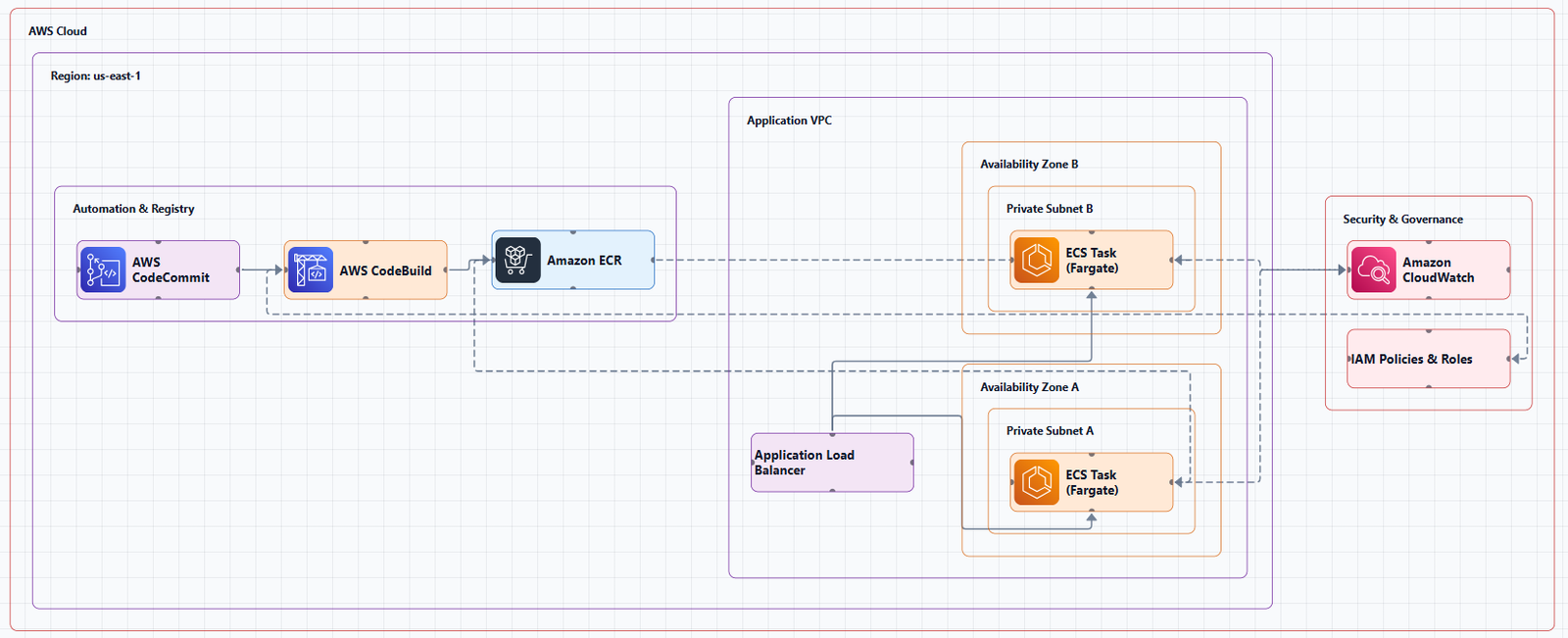
The experience: A simplified Visio. You drag resources onto a canvas, draw connections, and arrange everything manually. To enable AWS shapes, click "More Shapes" in the left panel, scroll to the Networking section, and select the AWS library you want. Draw.io also provides AWS templates you can use as starting points, click Arrange > Insert > Template, expand the Cloud category, and select AWS.
The real cost isn't money, it's maintenance. Every time your infrastructure changes, someone needs to manually update the diagram. In practice, Draw.io diagrams go stale within weeks of being created.
Best for: Solo developers, small teams, students, and anyone who needs a free, flexible diagramming tool. Great for quick sketches and one-off diagrams.
Limitations: No automation. You pay with your time. Diagrams require manual updates.
ARCH App, Privacy-First, Local-First Diagramming
ARCH is a local-first, browser-based architecture designer for creating cloud and network diagrams with drag-and-drop components. It runs entirely in the browser with no backend required, all data stays on your device, making it a privacy-friendly option for teams working with sensitive infrastructure designs.
Key features:
Best for: DevOps engineers and cloud architects working with sensitive infrastructure designs who need privacy and offline capability.
Limitations: No real-time collaboration. Export options are more limited than Draw.io.
Grafly, No Account Needed
Grafly is a free browser-based diagramming tool for creating flowcharts, generic diagrams, and AWS architecture diagrams. No account needed, everything saves locally, and you can share diagrams via smart URLs. It's fully open source.
The origin story: The maker built it out of "pure annoyance" with existing tools, general canvas tools don't understand what you're drawing, and code-based tools are great until you want to nudge one thing visually and can't.
Best for: Quick, simple AWS architecture diagrams without the overhead of account creation.
Tradeoff: Limited feature set compared to more established tools.
StackBuilder, Turn Plain English into AWS Diagrams
StackBuilder is an AI tool that converts plain-English descriptions into professional cloud architecture diagrams in seconds, no dragging boxes required. Type "a 3-tier web app on AWS with an ALB, ECS Fargate, RDS Postgres, S3 and CloudFront" and it draws it with the real provider icons.
Key features:
- Description → diagram, not a blank canvas: Describe your infrastructure and get a professional diagram instantly
- Refine in plain English: Follow up with "add a Redis cache in front of the database"
- Multi-cloud support: AWS, Azure, GCP, Kubernetes, Databricks, and multi-cloud
- Export options: PNG, SVG, PDF, or draw.io format
- No signup required: Just go to stackbuilder.tech and start describing
Best for: Engineers who want to generate diagrams from descriptions rather than spending time on manual placement. Also ideal for system design interview prep and design docs.
Tradeoff: Less control over fine-grained layout compared to manual tools. The creator openly welcomes feedback on "where it got it wrong".
OpenArchFlow, Open-Source AI Diagram Generator
OpenArchFlow is an open-source Progressive Web App designed for cloud architects, DevOps engineers, and developers. Generate interactive AWS architecture diagrams from natural language descriptions using AI, Large Language Models (LLMs), AI Agents, and AWS MCP (Model Context Protocol).
Key features:
- No account required
- Completely free and open-source
- MCP-powered for integration with AI assistants
- Interactive diagram output
Best for: Developers who want a free, open-source AI diagram generator without account requirements.
Tradeoff: Still early-stage. Community-driven development.
SketchMyInfra, Free AI Tool with PlantUML Export
SketchMyInfra is a free AI tool that converts natural language descriptions into production-quality infrastructure diagrams using PlantUML. No signup required.
Key features:
- Plain English to diagram: Describe your architecture and get a diagram in under 5 seconds
- Multi-cloud support: AWS, GCP, and Azure with official provider icons
- Editable PlantUML output: Export the PlantUML source code, version-controllable, portable, and editable
- Context-aware iteration: Refine your prompt and the AI uses your previous diagram as context
Best for: Engineers who want a quick, free, no-commitment way to generate diagrams from text and need PlantUML export for version control.
Tradeoff: No native visual editing. PlantUML output requires familiarity with the format for manual tweaks.
AI Line Studio, Natural Language to Animated AWS Diagrams
AI Line Studio takes a fundamentally different approach from traditional diagramming tools. Instead of a drag-and-drop canvas, the primary input is natural language. You describe a system, "a 3-tier web app on AWS with EC2, RDS, and CloudFront", and the tool generates a structured diagram from that description, typically in 15 to 20 seconds.
The output isn't just static. AI Line Studio supports animated diagrams (GIF, MP4) alongside standard PNG exports, plus shareable documentation links. This makes it genuinely useful for demos, training materials, and investor presentations where static diagrams fall flat. For AWS-specific workflows, the dedicated AI cloud diagram generator turns AWS descriptions into production-ready visuals. If you're working across multiple providers, the AI architecture diagram builder covers AWS, Azure, GCP, and OCI with over 3,000 officially licensed icons.
The honest limitation: AI Line Studio is an early-stage product with a smaller install base and fewer third-party integrations than established tools. It's not a general-purpose diagramming tool, if you need org charts, mind maps, or non-technical diagrams, a broader tool is a better fit. And as with any AI-generated output, complex or ambiguous system descriptions may need manual cleanup.
Best for: Engineers who value speed and want to generate diagrams from descriptions rather than spending time on manual placement. Also ideal for teams creating presentation-ready, animated architecture visuals.
Tradeoff: Less control over fine-grained layout compared to manual tools. Not suitable for non-technical diagram types.
AWS Playboard, Interactive Drag-and-Drop with AI
AWS Playboard is a free online tool that lets you design, visualize, and share AWS architecture diagrams with an interactive drag-and-drop builder. Includes 100+ AWS service icons, animated connections, AI-powered generation, and one-click export.
Best for: Users who want a balance of manual control and AI assistance.
Tradeoff: Newer tool with a smaller user base.
Lucidchart, Professional Collaboration (Limited Free Tier)
Lucidchart is a widely-used, cloud-based diagramming tool that offers extensive templates and real-time collaboration features. It's popular among cloud architects due to its easy integration with AWS, Google Cloud, and Azure. The free tier is quite limited, only 3 files and a limited number of objects.
Best for: Teams that need real-time collaboration and are willing to upgrade to paid plans.
Tradeoff: The free tier is quite limited, and the jump to paid plans feels steep.
AWS Workload Discovery, First-Party AWS Tool
Amazon's own solution, deployed as a CloudFormation stack in your account. It scans your resources and generates interactive diagrams. Being first-party, it avoids security concerns about third-party services scanning your infrastructure.
Best for: Teams that need accurate, up-to-date diagrams of their live AWS infrastructure and want to keep data within their AWS account.
Tradeoff: Requires deploying a CloudFormation stack (about 30 minutes setup). AWS-only.
MockFlow IdeaBoard, AI Generation with Your Own API Key
MockFlow's AI AWS Architecture Diagram Generator lets you write out your AWS infrastructure in plain text and AI turns it into a polished architecture diagram. Every service gets the correct AWS icon, connections carry protocol labels, and subnets are color-coded by tier.
Key features:
- AI recognizes over 50 AWS services by name, abbreviation, or plain description
- Proper VPC & subnet structures with color-coded tiers
- Free unlimited AI generation when you bring your own API key (Claude via MCP or ChatGPT via GPT Actions)
Best for: Users who want unlimited AI diagram generation and already have an API key.
Tradeoff: Requires your own API key for unlimited use.
Terravision, Diagrams from Terraform Code
Terravision automatically converts your Terraform code into professional-grade cloud architecture diagrams using official AWS, GCP, and Azure icon sets. Your diagrams stay in sync with your infrastructure.
Key features:
- Always up-to-date: Diagrams generated directly from your Terraform code
- 100% client-side: No cloud access required; your code never leaves your machine
- CI/CD ready: Automate diagram updates on every PR merge
- Free & open source: No expensive diagramming tool licenses
- Multi-cloud: AWS (full support, 200+ services), GCP, and Azure (core services)
Best for: Teams using Terraform who want automated, always-accurate diagrams without manual maintenance.
Tradeoff: Requires Terraform and Python setup. Azure and GCP support is partial (core services only).
Decision Framework: How to Choose
If you need a free, reliable manual tool: Draw.io remains the people's champion. No signup, full AWS icon library, and works offline.
If privacy is critical: ARCH keeps everything local, no backend, no account, all data stays on your device.
If you want to generate diagrams from natural language: StackBuilder and SketchMyInfra both offer free AI-powered generation with no signup.
If you need animated diagrams for presentations: AI Line Studio supports GIF and MP4 exports alongside standard PNG. AWS Playboard also offers animated connections.
If you need first-party AWS accuracy: AWS Workload Discovery scans your live infrastructure and generates diagrams from actual resources.
If you use Terraform: Terravision generates diagrams directly from your infrastructure code.
If you need unlimited AI generation: MockFlow lets you bring your own API key for unlimited diagrams.
The Pragmatic Workflow
Here's what I actually use for AWS architecture diagramming:
For rapid ideation and iteration: StackBuilder or AI Line Studio. Describe the system in 30 seconds, get a diagram in seconds. The speed makes it practical for exploring design options.
For documentation that needs to stay accurate: Draw.io with manual updates, or Terravision if you use Terraform. For live infrastructure accuracy, AWS Workload Discovery eliminates manual maintenance.
For version-controlled diagrams: Use SketchMyInfra to export PlantUML or StackBuilder to export draw.io format, and check it into Git alongside your infrastructure code.
For final polish and presentation: Take the AI-generated diagram and refine it in Draw.io if needed. But increasingly, the AI output is good enough to use as-is.
Common Mistakes to Avoid
Mistake 1: Outdated diagrams. The biggest problem with free tools is maintenance. If you're using Draw.io manually, set a reminder to update diagrams when infrastructure changes. Better yet, use an automated or AI tool that lets you regenerate in seconds.
Mistake 2: Using the wrong icons. Always use official AWS icons. Draw.io provides them built-in. AI tools like StackBuilder and AI Line Studio use real AWS icons automatically.
Mistake 3: No labels. Every icon should have a clear label. Don't assume readers will recognize an icon.
Mistake 4: No directional arrows. Lines without arrows are ambiguous. Always show the flow of data.
Mistake 5: Overloading one diagram. If your diagram has more than 15 to 20 nodes, it's too complex. Split it into multiple diagrams at different abstraction levels.
Summary
Free online AWS architecture diagram tools have come a long way. You no longer need to pay $49/month for decent diagrams. Draw.io remains the reliable workhorse. ARCH offers privacy-first, offline diagramming. StackBuilder and SketchMyInfra let you generate diagrams from natural language in seconds. AI Line Studio adds animated exports for presentations. And AWS Workload Discovery gives you first-party accuracy from live infrastructure.
The right tool depends on your workflow:
- If you need a free, reliable manual tool, Draw.io is the people's champion. Try the free AWS architecture diagram tool for templates and practical examples.
- If privacy is critical, ARCH keeps everything local.
- If you value speed and natural language input, AI Line Studio is the fastest path from description to diagram. Try the AI cloud diagram generator to see how quickly you can turn an AWS description into a visual.
- If you need animated diagrams for presentations, AI Line Studio delivers GIF and MP4 exports.
- If you want version-controlled diagrams, export PlantUML or draw.io format and check it into Git.
- If you need complete system architecture beyond AWS, the AI system architecture generator covers distributed and enterprise systems.
Stop spending hours on diagrams that will be outdated next week. Start documenting your AWS architectures in a way that actually keeps pace with your infrastructure.