
Best Free Online Azure Architecture Diagram Tools: 2026 Comparison
Azure architecture diagrams are essential for documenting cloud infrastructure, planning deployments, and communicating system designs. But if you've ever spent hours hunting for the right icon or aligning connection points in Visio, you know the pain. The diagram that took you two hours to create will be outdated in two weeks.
The good news: 2026 has transformed the landscape of free online Azure architecture diagram tools. You now have options at every skill level, from AI-powered generators that turn plain English into diagrams in seconds, to manual drag-and-drop tools that work entirely in your browser with no signup required.
This guide compares the best free online Azure architecture diagram tools available right now, so you can choose the one that actually fits your workflow.
Cloud Architecture
Create cloud architecture diagrams for AWS, Azure, GCP, and more. Design scalable infrastructure with professional cloud icons.
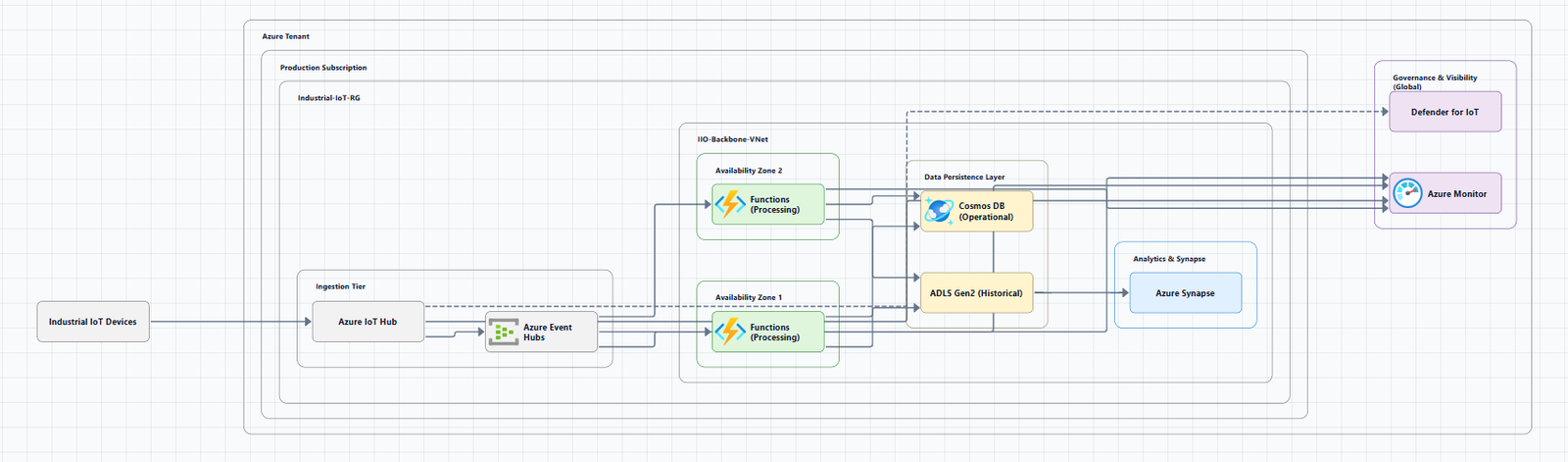
2026 comparison of the best free online Azure architecture diagram tools, Draw.io, StackBuilder, SketchMyInfra, ARCH, CloudNetDraw, and AI generators.
Click Cloud Architecture to open AI Line Studio and generate diagrams from natural language in seconds.
Quick Comparison: Best Free Online Azure Architecture Diagram Tools
| Tool | Input Method | Azure Support | Key Differentiator | Signup Required |
|---|---|---|---|---|
| Draw.io (diagrams.net) | Manual drag-and-drop | Full Azure shape library | Completely free, works offline, built-in templates | No |
| ARCH App | Drag-and-drop | AWS, Azure, GCP, on-prem | Local-first, privacy-focused, offline support | No |
| StackBuilder | Natural language prompt | AWS, Azure, GCP, K8s, multi-cloud | AI-powered, exports to draw.io, no signup | No |
| SketchMyInfra | Natural language prompt | AWS, Azure, GCP | Exports editable PlantUML code, version-controllable | No (5 diagrams/day free) |
| Azure-DrawIO-MCP | Natural language (via AI assistant) | 100+ Azure resource types | Editable Draw.io output with official Azure icons | No (requires setup) |
| Azure Cloud AI Visualizer | Natural language + visual design | Azure | Generates Bicep/Terraform IaC from diagrams | No |
| Azure Architecture Diagram Builder | Natural language, images, ARM templates | Azure | Multi-input support, cost estimates, Bicep export | No |
| CloudNetDraw | Live Azure scan | Azure | Auto-generates network diagrams from your environment | No |
| Terravision | Terraform code | AWS, Azure (core), GCP | CI/CD-ready automation from IaC | No (open source) |
| Visual Paradigm Online | Drag-and-drop | AWS, Azure, GCP | No limits on diagrams or shapes (non-commercial) | No |
| FigJam (by Figma) | Drag-and-drop + templates | Azure (official icons) | Collaborative, free template | Free tier available |
AI-Powered Generators: Diagrams from Text
StackBuilder, Turn Plain English into Diagrams
StackBuilder converts a plain-English description of your system into a professional cloud architecture diagram in seconds, no dragging boxes. Type "a 3-tier web app on AWS with an ALB, ECS Fargate, RDS Postgres, S3 and CloudFront" and it draws it with the real provider icons.
Key features:
- Description → diagram, not a blank canvas, describe your infrastructure and get a professional diagram instantly
- Refine in plain English, follow up with "add a Redis cache in front of the database"
- Multi-cloud support, AWS, Azure, GCP, Kubernetes, Databricks, and multi-cloud
- Export options, PNG, SVG, PDF, or draw.io format
- No signup required, just go to stackbuilder.tech and start describing
Best for: Engineers who want to generate diagrams from descriptions rather than spending time on manual placement. Also ideal for system design and quick documentation.
Tradeoff: Less control over fine-grained layout compared to manual tools.
SketchMyInfra, Free AI with PlantUML Export
SketchMyInfra is a free AI tool that converts natural language descriptions into production-quality infrastructure diagrams using PlantUML. No signup required. No credit card.
Key features:
- Plain English to diagram, describe your architecture and get a diagram in under 5 seconds
- Multi-cloud support, AWS, GCP, and Azure with official provider icons
- Editable PlantUML output, export the PlantUML source code, version-controllable, portable, and editable
- Context-aware iteration, refine your prompt and the AI uses your previous diagram as context
- Free tier, 5 diagrams/day without an account, more with a free login
The key differentiator: SketchMyInfra gives you PlantUML code, not just an image. You can check the diagram into Git alongside your infrastructure code, tweak the code manually, and integrate it into your docs pipeline (Confluence, Notion, GitHub wikis all support PlantUML).
Best for: Engineers who want a quick, free, no-commitment way to generate diagrams from text and need PlantUML export for version control.
Tradeoff: No native visual editing. PlantUML output requires familiarity with the format for manual tweaks.
Azure Cloud AI Visualizer, From Diagram to Deployment
Azure Cloud AI Visualizer by CortexGrid is a free, open-source tool described as "a full-blown AI architect for the cloud." You describe your idea in plain English, "Create an event-driven architecture with IoT, Event Hubs, Stream Analytics, and Power BI", and the AI generates the full Azure architecture diagram, then gives you the Bicep or Terraform templates ready to deploy.
Key features:
- Real, deployable, production-grade infrastructure
- Generates IaC (Bicep and Terraform) from the diagram
- Visually model management groups, policies, and landing zones, then export them directly as Bicep or Terraform
- Visual Azure architecture designer, drag, drop, and connect services
Best for: Teams that want to go from diagram to deployment instantly.
Tradeoff: Open-source, community-driven. Still evolving.
Azure Architecture Diagram Builder, Multi-Input AI Generator
The open-source Azure Architecture Diagram Builder is a browser-based tool that turns natural-language prompts, images, and ARM templates into editable Azure architecture diagrams, cost estimates, and deployment guides with Bicep.
Best for: Teams that need flexibility in input formats (text, images, ARM templates).
Tradeoff: Open-source, community-driven.
Azure-DrawIO-MCP, Editable Diagrams via AI Assistant
Azure-DrawIO-MCP generates editable Azure architecture diagrams in Draw.io format using an MCP (Model Context Protocol) server. Think of it as a plugin for AI assistants like GitHub Copilot or Claude, you simply ask "draw me an Azure architecture diagram" and it generates one for you.
Key features:
- Generates Azure architecture diagrams as
.drawiofiles - Uses official Azure icons from Draw.io's Azure2 SVG library
- Supports 100+ Azure resource types (VMs, App Services, AKS, SQL, etc.)
- Auto-layouts resources left-to-right
- Groups resources into visual clusters (resource groups, VNets, subnets)
Why Draw.io over PNG:
| Feature | PNG (Original) | Draw.io (This Tool) |
|---|---|---|
| Editable | ❌ Not editable | ✅ Fully editable |
| Version Control | ⚠️ Binary diffs | ✅ XML text diffs |
| Export Options | PNG only | ✅ PNG, SVG, PDF |
| Adjust Layout | ❌ Regenerate | ✅ Drag and drop |
Unlike PNG generators, the diagram is just a starting point, customize it however you like: drag icons to reposition, resize groups, add labels, and export to PNG, SVG, or PDF.
Best for: Teams using AI assistants (GitHub Copilot, Claude) who want editable, version-controllable Azure diagrams.
Tradeoff: Requires Python 3.10+ and VS Code with the Draw.io extension.
Manual Drag-and-Drop Tools
Draw.io (diagrams.net), The Free Workhorse
Draw.io (now also known as diagrams.net) is the most popular free option for Azure architecture diagrams, and for good reason. It's completely free, runs in the browser (or as a desktop app), and includes a built-in Azure shape library.
Getting started with Azure shapes:
- Click More Shapes at the bottom of the left panel
- In the Networking section, click the checkbox to enable the Azure shape library
- Click Apply, the Azure shape library will load in the left panel, with shapes separated into categories
Using Azure templates:
- Click Arrange > Insert > Template to open the template library
- Expand the Cloud section and select Azure to see the Azure diagram templates
Pro tips:
- Use the scratchpad for repeating sub-sections: select shapes, drag them onto the scratchpad, then click to add copies
- Use rectangles from the General shape library to indicate regions, send them to the back on the Arrange tab
- Draw connectors by hovering over any shape and dragging from the connection arrows
Azure icon libraries for Draw.io: A community-maintained repository provides ready-to-use Azure and Microsoft 365 icon libraries for draw.io, with one-click links that load directly into diagrams.net.
The real cost isn't money, it's maintenance. Every time your infrastructure changes, someone needs to manually update the diagram. In practice, Draw.io diagrams go stale quickly.
Best for: Solo developers, small teams, and anyone who needs a free, flexible diagramming tool.
Limitations: No automation. You pay with your time. Diagrams require manual updates.
ARCH App, Privacy-First, Local-First Diagramming
ARCH is a local-first, browser-based architecture designer that runs entirely in the browser with no backend required, all data stays on your device.
Key features:
- Drag-and-drop components, place cloud and network components from a built-in library
- Smart connection routing, orthogonal lines that automatically route around other elements
- Multi-project workspaces, organize diagrams across multiple projects
- Native .arch export, save and share diagrams for version control
- Offline support, works without an internet connection once loaded
- No account required, no login, no server dependency
Best for: DevOps engineers, cloud architects, and infrastructure teams working with sensitive designs who need privacy and offline capability.
Limitations: No real-time collaboration. Export options are more limited than Draw.io.
FigJam (by Figma), Free Collaborative Template
If you're looking to create Azure architecture diagram examples without fiddling with endless symbols and arrows, start with a template from FigJam. With official Microsoft Cloud icons and intuitive drag-and-drop capabilities, your team can create and edit an Azure map with ease.
Best for: Teams that want a collaborative, browser-based whiteboard experience.
Tradeoff: Limited compared to dedicated diagramming tools.
Visual Paradigm Online, No Limits (Non-Commercial)
The free Azure Diagram tool from Visual Paradigm comes with no ads, no limited period of access, and no limitations such as number of diagrams or number of shapes. You own the diagrams you create for personal and non-commercial purposes.
Best for: Students and non-commercial use.
Tradeoff: Free version is for non-commercial use only.
Infrastructure-as-Code and Automation Tools
Terravision, Diagrams from Terraform Code
Terravision automatically converts your Terraform code into professional-grade cloud architecture diagrams using the official Azure, AWS, and GCP icon sets.
Key features:
- Always up-to-date, diagrams generated directly from your Terraform code
- 100% client-side, no cloud access required; your code never leaves your machine
- CI/CD ready, automate diagram updates on every PR merge
- Free & open source, no expensive diagramming tool licenses
- Multi-cloud, AWS (full), GCP, and Azure (core services)
Quick start:
pipx install terravision
terravision draw --source ./path-to-your-terraform --show
Best for: Teams using Terraform who want automated, always-accurate diagrams without manual maintenance.
Tradeoff: Requires Terraform and Python setup. Azure support is currently partial (core services only).
CloudNetDraw, Auto-Generate Azure Network Diagrams
CloudNetDraw is a free tool that generates Azure network diagrams (HLD and MLD) directly from your environment. It queries Azure via the API and outputs a .drawio file representing the full virtual network topology, no manual drawing required.
What it does:
- Visualizes hub and spoke topology
- Shows all subnets with CIDRs
- Highlights NSG and UDR presence
- Exports editable Draw.io files
Privacy & Security: CloudNetDraw does not collect any information about your network resources or environment. Drawings are generated in memory and deleted immediately after use.
Best for: Teams that need accurate, up-to-date network topology diagrams from their live Azure environment.
Tradeoff: Focused specifically on network diagrams, not full architecture diagrams.
Official Azure Resources
Azure Icons from Microsoft
The Azure Architecture Center provides an official collection of Azure architecture icons including Azure product icons to help you build custom architecture diagrams. The icons are updated regularly, August 2025 added 10 new icons, including Azure Service Groups and Prometheus.
Download: Azure Architecture Center Icons
How to Choose the Right Tool
| If you need... | Choose... |
|---|---|
| A free, reliable manual tool | Draw.io (diagrams.net) |
| Privacy and offline capability | ARCH App |
| A diagram in seconds from a text description | StackBuilder or SketchMyInfra |
| Version-controllable PlantUML output | SketchMyInfra |
| Editable diagrams with official Azure icons | Azure-DrawIO-MCP |
| IaC generation from diagrams | Azure Cloud AI Visualizer |
| Automated network diagrams from live Azure | CloudNetDraw |
| Automated diagrams from Terraform | Terravision |
| A collaborative whiteboard experience | FigJam |
| Non-commercial use with no limits | Visual Paradigm Online |
The Pragmatic Workflow
Here's what I actually use for Azure architecture diagramming:
For rapid ideation and iteration: StackBuilder or SketchMyInfra. Describe the system in 30 seconds, get a diagram in seconds. The speed makes it practical for exploring design options.
For editable, version-controllable diagrams: SketchMyInfra or Azure-DrawIO-MCP. Export PlantUML or Draw.io format and check it into Git alongside your infrastructure code.
For diagrams that need to stay accurate with Terraform: Terravision. Generate diagrams directly from your infrastructure code. Run it in CI/CD to keep diagrams updated on every PR merge.
For network-focused diagrams: CloudNetDraw generates network diagrams from your live Azure environment.
For final polish: Take the AI-generated diagram and refine it in Draw.io if needed. But increasingly, the AI output is good enough to use as-is.
Common Mistakes to Avoid
Mistake 1: Outdated diagrams. The biggest problem with any tool is maintenance. Use an automated or AI tool that lets you regenerate in seconds.
Mistake 2: Using the wrong icons. Always use official Azure icons. Draw.io provides them built-in. AI tools like StackBuilder and Azure-DrawIO-MCP use official Azure icons automatically.
Mistake 3: No labels. Every icon should have a clear label. Don't assume readers will recognize an icon.
Mistake 4: No directional arrows. Lines without arrows are ambiguous. Always show the flow of data.
Mistake 5: Overloading one diagram. If your diagram has more than 15 to 20 nodes, it's too complex.
Summary
Free online Azure architecture diagram tools have come a long way. You no longer need to pay for expensive diagramming software to create professional, accurate Azure diagrams. Draw.io remains the reliable workhorse. ARCH offers privacy-first, offline diagramming. StackBuilder and SketchMyInfra let you generate diagrams from natural language in seconds. Azure-DrawIO-MCP gives you editable Draw.io files with official Azure icons. CloudNetDraw auto-generates network diagrams from your live Azure environment. And Terravision keeps diagrams in sync with your Terraform code.
The right tool depends on your workflow:
- If you need a free, reliable manual tool, Draw.io is the people's champion. Try the Azure architecture diagram tool for templates and practical examples.
- If privacy is critical, ARCH keeps everything local.
- If you value speed and natural language input, StackBuilder is the fastest path from description to diagram. Try the AI cloud diagram generator to see how quickly you can turn an Azure description into a visual.
- If you need version-controllable diagrams, SketchMyInfra exports PlantUML code you can check into Git.
- If you use Terraform, Terravision keeps diagrams in sync with your infrastructure automatically.
- If you need editable diagrams with official Azure icons, Azure-DrawIO-MCP generates Draw.io files you can customize.
- If you need complete system architecture beyond Azure, the AI system architecture generator covers distributed and enterprise system designs.
Stop spending hours on diagrams that will be outdated next week. Start documenting your Azure architectures in a way that actually keeps pace with your infrastructure.