
Best Tools for Creating GCP Architecture Diagrams
There is no single "best" tool for creating Google Cloud Platform (GCP) architecture diagrams, it depends on your specific needs: AI-powered speed, manual control, or automated generation from existing infrastructure.
Here's a comprehensive breakdown of the best tools available in 2026, organized by category, along with recommendations for each.
Cloud Architecture
Create cloud architecture diagrams for AWS, Azure, GCP, and more. Design scalable infrastructure with professional cloud icons.
Compare the best tools for creating GCP architecture diagrams in 2026, AI Line Studio, draw.io, Lucidscale, Visual Paradigm AI, Cloud Diagrams, gcp-radar, and more.
Click Cloud Architecture to open AI Line Studio and generate diagrams from natural language in seconds.
Overall Recommendation: AI Line Studio
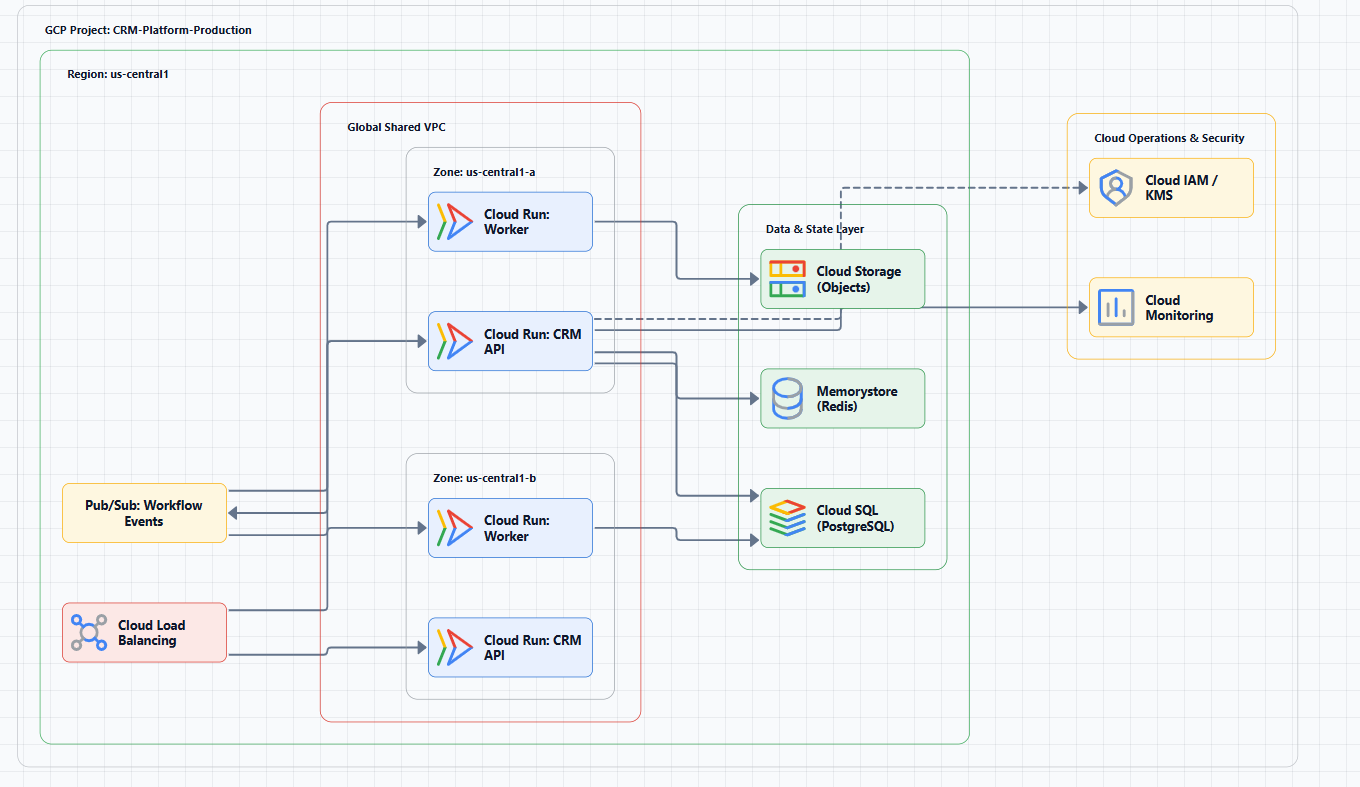
If you prioritize speed and best value, AI Line Studio is the best choice. It uses a prompt-first approach where you describe your architecture in natural language, and it generates a production-ready diagram in 15 to 20 seconds.
Key Strengths:
- Blazing speed: Reduces diagram creation from hours to seconds
- 3,000+ official icons: Supports AWS, Azure, GCP, and OCI with officially licensed icons
- Animated exports: GIF and MP4 format for presentations
- Cost-effective: $19/month for 200 generations, less than $0.10 per diagram
Best for: Rapid prototyping, presentations, iterative design workflows.
Get started: Use the dedicated GCP diagram generator to create GCP architecture diagrams from natural language. For a complete workspace, explore the cloud architecture diagram tool, the AI cloud diagram generator, and the AI system architecture generator.
Manual Drawing & Collaboration Tools
These tools offer the most control and are ideal for detailed adjustments and team collaboration.
diagrams.net (draw.io)
- Free, open-source gold standard for diagramming
- Extensive GCP shape libraries
- Offline capable, works without internet
- Integrates with Google Drive, GitHub, and more
- Best for: Completely free, flexible manual diagramming
Lucidscale
- Automatically generates cloud architecture diagrams from live data
- Supports AWS, Azure, and GCP
- Powerful collaboration and presentation features
- Best for: Team collaboration and polished presentations
Miro
- Collaborative online whiteboard
- GCP architecture templates and icon libraries
- Real-time team collaboration
- Best for: Architecture workshops and brainstorming sessions
Creately
- Free tier available
- Real-time collaboration with GCP shape libraries
- Best for: Small teams on a budget
Cacoo
- Online diagramming with latest Google Cloud icons
- Best for: Quick online GCP diagramming
Figma
- Free design tool with GCP icon libraries
- Real-time collaboration
- Best for: Teams already using Figma for design work
DrawSQL
- Specialized tool for creating and sharing database schema diagrams
- Supports relational database design for GCP
- Best for: Database-focused architecture documentation
AI-Powered Diagram Generators
These tools prioritize speed, generating diagrams from natural language descriptions.
Visual Paradigm AI Cloud Architecture Studio
- Professional AI cloud architecture diagram generator
- Understands GCP-specific concepts (GKE, VPC, Cloud Run)
- Exports SVG for documentation
- Aligns with GCP best practices
- Best for: AI-driven design aligned with GCP best practices
MockFlow IdeaBoard
- Generates GCP diagrams from natural language
- Uses correct GCP icons with VPC grouping
- Requires connecting your own AI API key
- Best for: Teams with existing AI API access
Canvas Cloud AI
- Permanent free tier available
- Generates editable GCP diagrams from natural language
- Provides AI feedback and suggestions
- Best for: Getting started with AI diagramming at zero cost
Google Cloud Application Design Center (ADC)
- Official Google Cloud tool (currently in preview)
- Creates architectures from natural language prompts
- Generates Terraform files for deployment
- Best for: Teams that want official Google Cloud integration
GenAI-DrawIO-Creator
- Open-source AI-powered diagram generator
- Chat interface for natural language generation
- Supports GCP, AWS, Azure, and Kubernetes
- Best for: Open-source users wanting AI-powered draw.io generation
diagram-ai-generator
- Open-source MCP server for AI diagram generation
- Integrates with Claude Desktop
- Generates diagrams with official icons for multi-cloud architectures
- Best for: Teams using Claude or other MCP-compatible AI assistants
DiagramFlowAI
- Fully offline desktop application
- Uses local AI models (Gemma 4) for diagram generation
- Ensures sensitive data never leaves your device
- Best for: Teams with strict data privacy requirements
AI Line Studio (Covered above)
- Fastest AI-powered option with best value proposition
Automation & Infrastructure-Aware Tools
These tools parse your live environment or IaC code to automatically generate diagrams, solving the problem of outdated documentation.
Cloud Diagrams (by DoiT)
- Real-time infrastructure visualization for GCP
- Automatically maps resource dependencies
- Tracks change history
- Best for: Operational visibility and troubleshooting
gcp-radar
- Python CLI tool that scans GCP resources
- Automatically generates draw.io architecture diagrams
- Best for: Automating documentation generation from existing infrastructure
Google Cloud Topology (Topology Visualizer)
- Free built-in tool within GCP Console
- Real-time visualization of current project resources
- Best for: Quickly viewing current project resource topology
Cloudockit
- Focuses on documentation export
- Generates architecture diagrams, best practice warnings, and compliance reports
- Best for: Comprehensive documentation for audits and compliance
Hava
- Quickly generates topology diagrams
- Provides historical version views
- Best for: Tracking architecture changes over time
CoordiMap
- Provides real-time operational views
- Integrates VPC Flow Logs for network troubleshooting
- Best for: Network troubleshooting and operational monitoring
Cloudiscovery
- Open-source tool for analyzing cloud accounts (AWS, GCP, Azure)
- Generates diagrams from cloud resources
- Best for: Multi-cloud infrastructure discovery
MCP Servers (e.g., gcp-diagram-mcp-server)
- Generate GCP architecture diagrams through code
- Integrate with AI assistants via MCP protocol
- Best for: Developers who want to generate diagrams programmatically
Cloudcraft
- Multi-cloud interactive design tool (supports GCP)
- Drag-and-drop interface with real-time cost estimation
- Best for: Interactive architecture design with cost visibility
Quick Comparison Table
| Tool | Category | Key Strength | Best For | Price |
|---|---|---|---|---|
| AI Line Studio | AI-Powered | Natural language in 15 to 20 seconds; 3,000+ official icons | Rapid prototyping, presentations | $19/month (200 gens) |
| diagrams.net | Manual | Free, open-source; offline capable; rich GCP icons | Completely free, flexible diagramming | Free |
| Lucidscale | Automated | Auto-generates from live data; strong collaboration | Team collaboration and presentations | Paid |
| Visual Paradigm AI | AI-Powered | Understands GCP concepts; strategy-based design | Professional, best-practice aligned AI diagrams | Paid |
| Cloud Diagrams | Automation | Real-time GCP resource mapping and dependencies | Operations and troubleshooting | Paid |
| gcp-radar | CLI | Scans GCP resources; auto-generates draw.io diagrams | Automating existing environment documentation | Free/Open Source |
| Google Cloud Topology | Native | Built-in GCP Console; real-time visualization | Quick view of current project topology | Free |
| Google Cloud ADC | Official | Google's own tool; generates Terraform files | Official Google Cloud integration | Preview |
How to Choose
- Fastest speed + best value → AI Line Studio
- Completely free, flexible offline diagramming → diagrams.net
- Team collaboration and polished presentations → Lucidscale or Miro
- AI-driven GCP best practice diagramming → Visual Paradigm AI
- Real-time visualization of existing GCP infrastructure → Cloud Diagrams or Google Cloud Topology
- Automated documentation via CLI → gcp-radar
- Official Google Cloud integration → Google Cloud Application Design Center
- Strict data privacy + offline AI → DiagramFlowAI
Summary
Modern GCP architecture diagram tools have evolved beyond manual drawing into an ecosystem that includes AI-powered generation, real-time visualization, and automated documentation. Choose the tool that best fits your workflow based on whether you prioritize speed, collaboration, automation, or cost.
For most teams, AI Line Studio offers the best balance of speed, cost, and professional output. At $19/month for 200 generations, it's a fraction of the cost of traditional tools and an order of magnitude faster.