
How to Build an AWS Architecture From Scratch: A Step-by-Step Guide
Building an AWS architecture from scratch is less about drawing a perfect diagram and more about following a deliberate process that balances technical requirements with business constraints. Here's a step-by-step guide to doing it right.
Cloud Architecture
Create cloud architecture diagrams for AWS, Azure, GCP, and more. Design scalable infrastructure with professional cloud icons.
Step-by-step guide to building AWS architecture from scratch, define requirements, design patterns, VPC, security, IaC, deploy, monitor, common mistakes, and documentation best practices.
Click Cloud Architecture to open AI Line Studio and generate diagrams from natural language in seconds.
Phase 1: Define the Requirements
Before you launch a single resource, you need to understand what you're building and why.
- What is the core business function of this system?
- Who are the users, and how will they interact with it?
- What are the non-negotiable constraints (budget, compliance, timeline)?
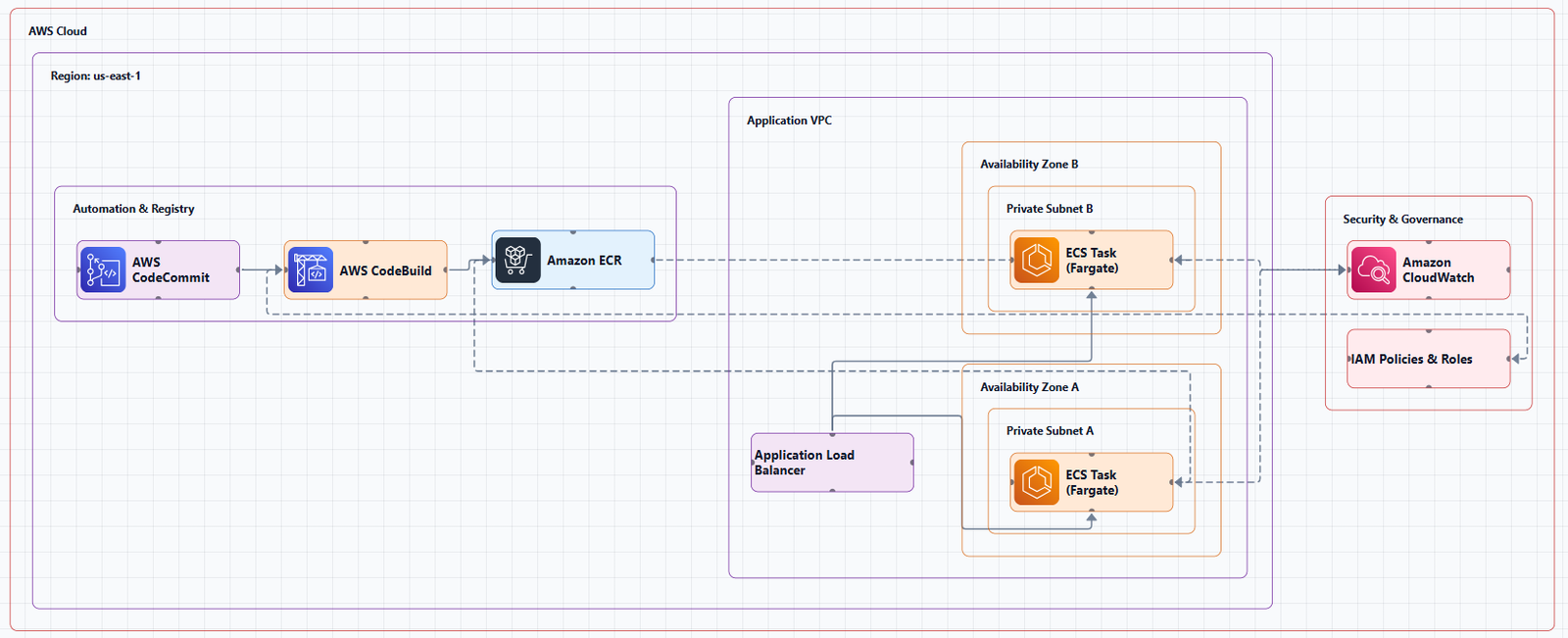
1.1. Start with the Business Problem
Your architecture exists to solve a business problem. If you can't articulate that problem, you can't design a good solution.
Ask yourself (and your stakeholders):
1.2. Gather Technical Requirements
Now translate the business needs into technical specifications.
| Category | Questions to Ask |
|---|---|
| Scalability | How many users initially? How fast is growth expected? |
| Performance | What are the acceptable latency and throughput numbers? |
| Availability | What is the required uptime? Can you tolerate downtime for maintenance? |
| Data | What data is stored? How much? How sensitive? |
| Disaster Recovery | What is the acceptable RTO (Recovery Time Objective) and RPO (Recovery Point Objective)? |
1.3. Identify Constraints
Every architecture operates within constraints. Document them early.
- Budget: What is the monthly cloud spend limit?
- Compliance: Are there regulatory requirements (HIPAA, PCI, GDPR)?
- Team skills: What technologies does your team already know?
- Timeline: How quickly does this need to be delivered?
Phase 2: Design the Architecture
With requirements in hand, you can now design the system.
2.1. Choose Your Architecture Pattern
Most architectures follow one of several common patterns. Pick the one that best fits your requirements.
| Pattern | When to Use |
|---|---|
| Three-Tier Web Application | Traditional web apps with a presentation, application, and database layer |
| Microservices | Large teams, independent deployments, complex domains |
| Serverless | Event-driven workloads, unpredictable traffic, low operational overhead |
| Event-Driven | Systems that react to events (orders, uploads, logs) |
| Data Lake / Analytics | Large-scale data processing and analytics |
For most applications, the three-tier architecture is a solid starting point: a web tier that handles HTTP requests, an application tier that processes business logic, and a database tier for data storage.
2.2. Design the Network (VPC)
Your Virtual Private Cloud (VPC) is the foundation of your AWS architecture.
Key decisions:
- CIDR block: Choose a private IP range (e.g.,
10.0.0.0/16) - Subnets: Create public and private subnets across multiple Availability Zones for high availability
- Internet Gateway: Attach to the VPC to allow public internet access
- NAT Gateway: Allow private subnets to access the internet (for patches, updates) without exposing them publicly
Best practice: Deploy across multiple Availability Zones as the minimum for production workloads. This is a core reliability principle.
2.3. Select Compute Services
Your compute choice depends on your workload characteristics.
| Service | Best For |
|---|---|
| EC2 | Full control, legacy applications, predictable workloads |
| ECS / EKS | Containerized applications, microservices |
| Lambda | Event-driven, short-lived functions, unpredictable traffic |
| EC2 Auto Scaling | Dynamic scaling based on demand |
2.4. Choose Storage and Databases
| Type | Service | Use Case |
|---|---|---|
| Object storage | S3 | Static assets, backups, data lakes |
| Block storage | EBS | EC2 root volumes, databases |
| Relational database | RDS (Aurora, PostgreSQL, MySQL) | Transactional data, structured schemas |
| NoSQL database | DynamoDB | High-scale, low-latency key-value or document data |
2.5. Design for Security
Security is not an afterthought, it's embedded in every decision.
- IAM: Apply least-privilege permissions. No user or service should have more access than it needs.
- Security Groups: Act as virtual firewalls for your EC2 instances and other resources.
- Network ACLs: Provide an additional layer of subnet-level security.
- Encryption: Enable encryption at rest (EBS, S3, RDS) and in transit (TLS).
2.6. Plan for Scalability and High Availability
- Use Auto Scaling Groups to automatically adjust capacity based on demand.
- Deploy across multiple Availability Zones to survive zone failures.
- Use Elastic Load Balancing (ALB/NLB) to distribute traffic across healthy instances.
- Design for failure at every layer. Assume things will break and plan for it.
2.7. Document Your Design with an Architecture Diagram
An architecture diagram is how you communicate your design to your team, stakeholders, and future maintainers.
AI Line Studio can turn a plain-language description of your system into a production-ready architecture diagram in 15 to 20 seconds. Instead of manually drawing boxes and arrows, you describe your system and get a structured, production-grade visual instantly.
The AWS architecture diagram tool provides editable templates with official AWS icons. The AI cloud diagram generator helps you iterate quickly during design sessions. The AI architecture diagram builder enables collaborative editing, and the AI system architecture generator creates end-to-end system diagrams.
Best practices for your diagram:
- Use official AWS icons, they provide a consistent visual language.
- Label everything clearly: "Amazon RDS (PostgreSQL)", not just "DB".
- Show network boundaries (VPCs, subnets) and data flows.
- Use a north-south orientation: external users at the top, internal resources at the bottom.
Phase 3: Build with Infrastructure as Code
Manual clicking in the AWS Console is fine for learning, but for production, you need Infrastructure as Code (IaC).
3.1. Choose Your IaC Tool
| Tool | Best For |
|---|---|
| Terraform | Multi-cloud, mature ecosystem, declarative syntax |
| AWS CloudFormation | AWS-native, integrates with other AWS services |
| AWS CDK | Developers who prefer programming languages over YAML/JSON |
3.2. Structure Your IaC
Organize your code for maintainability and reusability.
- Modules: Group related resources (networking, compute, database) into reusable modules.
- Environments: Separate dev, staging, and production configurations.
- State management: Store Terraform state remotely (e.g., in an S3 bucket with DynamoDB locking).
3.3. Validate Before Deploying
- Run
terraform planto preview changes. - Use static analysis tools (e.g.,
checkov,tfsec) to catch security issues. - Review the plan with your team before applying.
Phase 4: Deploy and Validate
4.1. Deploy in Stages
Start with non-production environments first.
- Dev: Validate functionality.
- Staging: Perform integration testing, security scanning, and performance testing.
- Production: Deploy with a rollback plan.
4.2. Implement CI/CD
Automate your deployments.
- Source control: Store all IaC in Git.
- CI pipeline: Run validation, testing, and security scanning on every commit.
- CD pipeline: Automatically deploy to dev/staging on merge, with manual approval for production.
4.3. Validate the Architecture
Use the AWS Well-Architected Framework to review your architecture against best practices. The framework is organized around six pillars: operational excellence, security, reliability, performance efficiency, cost optimization, and sustainability.
The AWS Well-Architected Tool in the AWS Management Console provides a structured way to review your workload and identify risks.
Phase 5: Monitor, Optimize, and Iterate
An architecture is never "done." You need to monitor, optimize, and evolve it.
5.1. Set Up Observability
- CloudWatch: Collect metrics, logs, and set up alarms.
- CloudTrail: Audit API calls for security and compliance.
- AWS X-Ray: Trace requests through distributed systems.
5.2. Optimize Costs
- Use AWS Cost Explorer to understand your spend.
- Right-size resources: downgrade over-provisioned instances.
- Use Savings Plans or Reserved Instances for predictable workloads.
- Delete unused resources.
5.3. Iterate Based on Feedback
- Conduct regular Well-Architected reviews to identify improvement areas.
- Gather feedback from your team on operational pain points.
- Stay current with new AWS services and features.
Common Mistakes to Avoid
| Mistake | Why It's a Problem |
|---|---|
| Designing in a vacuum | The best architecture is useless if it doesn't meet business needs. |
| Over-engineering | Start simple. Add complexity only when you need it. |
| Forgetting about cost | A technically perfect design that's too expensive is a failed design. |
| Skipping the diagram | If you can't draw it, you can't explain it. And if you can't explain it, you can't defend it. |
| Manual deployments | Click-ops leads to inconsistent environments and human error. |
| Not planning for failure | Assume things will break. Design for recovery. |
External Resources
- AWS Well-Architected Framework, the definitive guide for making key design decisions
- AWS Architecture Center, reference architectures, best practices, and design guidance
- AWS Architecture Icons, official source for AWS product icons
- AWS Well-Architected Tool, review your workloads against best practices
- AWS Prescriptive Guidance, strategies, guides, and patterns for cloud adoption
Final Thoughts
Building an AWS architecture from scratch is a process, not a one-time event. Start with the business problem. Design with the Well-Architected Framework in mind. Build with Infrastructure as Code. Deploy with automation. Monitor, optimize, and iterate.
The best architectures are the ones that are simple to understand, robust enough to handle failure, and flexible enough to evolve. Start simple, validate with real-world tests, and add complexity only when you need it. And always, always, document your design with a clear, accurate architecture diagram.