
How to Document Complex AWS Setups: A Practical Guide
Documenting a complex AWS setup is one of the hardest parts of the job. Not because it's technically difficult, but because it's a discipline. It requires consistent effort, clear communication, and the humility to admit that your beautiful architecture diagram from six months ago is probably wrong now.
The goal isn't to document everything. The goal is to document the right things so that your team can understand, operate, and evolve the system without you.
Here's a practical, no-nonsense guide to doing it well.
Cloud Architecture
Create cloud architecture diagrams for AWS, Azure, GCP, and more. Design scalable infrastructure with professional cloud icons.
Practical guide to documenting complex AWS setups, documentation as code, essential layers, ADRs, tools, common mistakes, and a production documentation workflow.
Click Cloud Architecture to open AI Line Studio and generate diagrams from natural language in seconds.
The Core Principle: Documentation is Code
The single most important shift you can make is treating documentation like code. If your diagrams and docs aren't version-controlled, stored alongside your infrastructure code, and updated as part of your CI/CD pipeline, they will go stale. Period.
- Store architecture diagrams in a format that can be version-controlled (draw.io XML, PlantUML, Mermaid)
- Keep documentation in the same repository as your Terraform or CloudFormation
- Update docs as part of your pull request workflow, not as a separate task
- Use Infrastructure as Code (IaC) as the source of truth for resource configurations
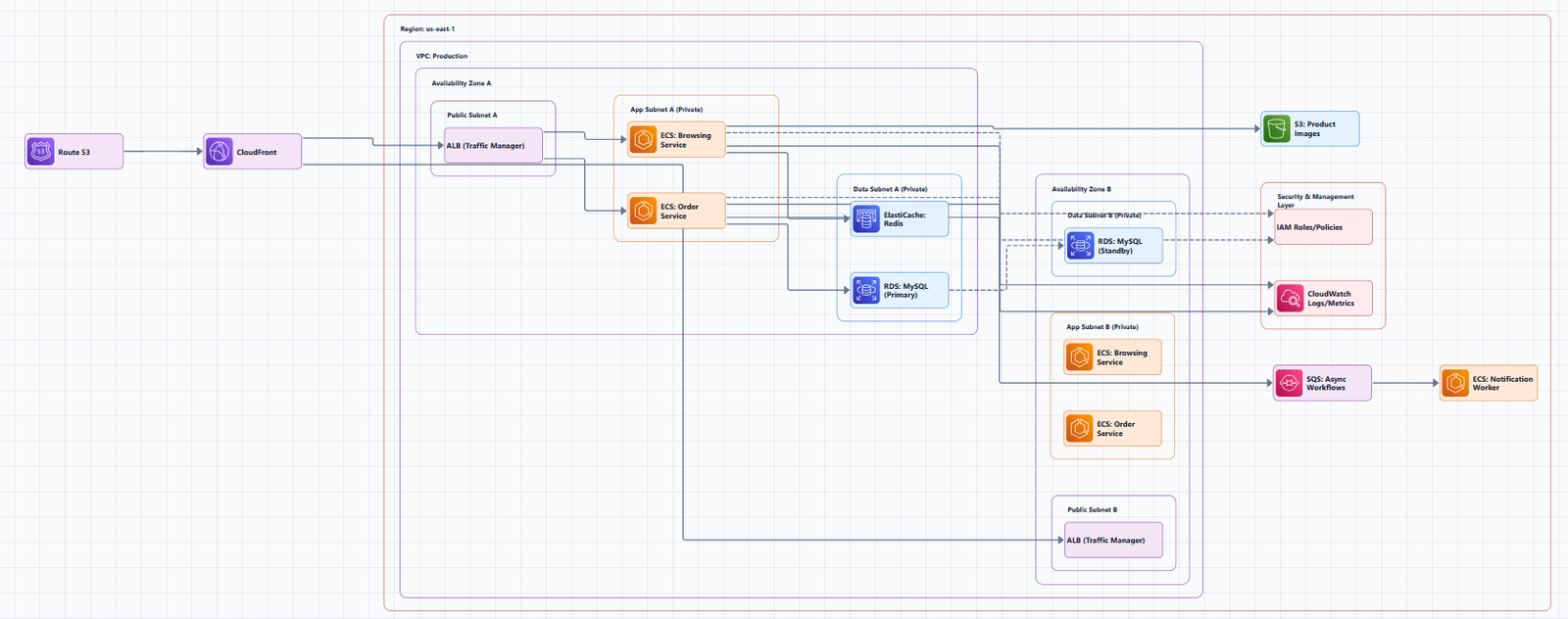
What this means in practice:
The AWS Well-Architected Framework reinforces this: documentation and operational excellence are pillars of a well-designed system. You can't operate what you don't understand, and you can't understand what isn't documented.
What to Document: The Essential Layers
Not everything needs to be documented. Focus on what matters.
1. Architecture Diagrams
This is the most visible part of your documentation. A strong AWS architecture diagram should include the main services, network boundaries, user entry points, and the core data or request flow.
Key elements to include:
- VPC layout with public and private subnets
- Compute resources (EC2, ECS, EKS, Lambda)
- Storage services (S3, EBS, RDS, DynamoDB)
- Networking components (Internet Gateway, NAT Gateway, Load Balancers, Route 53)
- Security controls (Security Groups, NACLs, IAM roles)
- Data flow paths (arrows showing how requests move through the system)
Diagram types to consider:
- Action Flow Diagrams: Show how user actions flow through your system with request/response flow and protocol information
- Infrastructure Diagrams: Focus on network topology, VPCs, subnets, and security boundaries
- Management Diagrams: Show administrative access, monitoring, and observability
2. Account Structure and Governance
Documenting your AWS account structure is critical for incident response, security, and operational excellence.
Document:
- How many AWS accounts you have and how they're organized
- Who are the business owners of each account
- Service Control Policies (SCPs) and organizational guardrails
- Region and service restrictions
- Differences between business units and environments (dev/test/prod)
3. Security and Authentication Patterns
Security documentation is often required for audits and should be maintained continuously.
Document:
- IAM roles and users (or both) and how they're used
- Identity provider (IdP) integration
- How IAM roles or users map to employees or systems
- How access gets revoked when someone is no longer authorized
- IAM policies and resource-based policies
4. Logging, Monitoring, and Network Topology
Document:
- Logging sources and where they're stored
- CloudTrail log aggregation and query methods
- GuardDuty and SIEM integration
- Network topology: how devices, endpoints, and connections are arranged
- How your network connects with AWS and how traffic is filtered between environments
5. External Infrastructure
Document:
- How externally-facing applications are deployed
- What AWS resources are publicly accessible
- What AWS accounts contain externally-facing infrastructure
- DDoS and external filtering
Architecture Decision Records (ADRs)
One of the most effective ways to document complex AWS setups is through Architecture Decision Records (ADRs). ADRs help you document and communicate important process and architecture decisions in your engineering projects.
Why ADRs matter:
- They capture context, alternatives considered, and the rationale behind each decision
- They foster transparency, knowledge-sharing, and accountability within teams
- A collection of ADRs provides a hand-over experience and reference documentation
- They reduce recurring and time-consuming decision-making efforts
ADR best practices:
- Keep ADR meetings short and focused, aim for 30 to 45 minutes maximum
- Embrace the readout meeting style
- Document not just what was decided, but why
Tools That Actually Help
AI Line Studio
AI Line Studio turns plain-language descriptions of technical systems into production-ready architecture diagrams in 15 to 20 seconds. Instead of manually drawing boxes and arrows, you describe your system and get a structured, professional-grade visual instantly.
The AI cloud diagram generator helps you iterate faster during design sessions. The AI architecture diagram builder enables production-ready designs with collaboration features. For end-to-end system design, the AI system architecture generator creates complete architectures. The cloud architecture diagram tool provides editable templates with official icons for common deployment patterns.
The honest limitation: AI Line Studio is an early-stage product with a smaller install base. Complex descriptions may need manual cleanup, it's not a zero-review tool for mission-critical documentation.
Automated Documentation Generators
InfraDocGen (AWS Labs) automatically scans cloud environments and creates comprehensive, real-time documentation with detailed configuration reports, including dependency maps of resources based on access policies.
AWS Well-Architected Tool provides a trusted framework for evaluating your cloud architecture and implementing designs that will scale over time. It lets you review your workloads against current AWS best practices and obtain step-by-step guidance.
Multi-Agent AI Systems like CrewAI with AWS Bedrock Claude Sonnet 4.5 can automatically generate comprehensive AWS architecture documentation including PlantUML diagrams, technical runbooks, executive summaries, and developer guides.
Diagram as Code
diagram-as-code (AWS Labs) provides best practices for creating effective AWS architecture diagrams, including YAML organization, consistent naming, and file structure for large projects.
Common Documentation Mistakes
Mistake 1: Treating documentation as a one-time task. Documentation is never "done." It needs to evolve with your infrastructure.
Mistake 2: Documenting everything. Focus on what matters: architecture decisions, operational procedures, and security controls. Not every detail needs to be captured.
Mistake 3: Using tools that don't support version control. If your diagrams are in a proprietary format that can't be diffed or merged, you're creating a documentation silo.
Mistake 4: Not reviewing AI-generated output. AI tools can generate diagrams and documentation quickly, but they're not infallible. Always review and validate before sharing.
Mistake 5: Forgetting about the audience. Documentation for developers looks different from documentation for operations teams or auditors. Know who you're writing for.
A Practical Documentation Workflow
Here's a workflow that actually works in production:
1. Design First, Document Alongside
Don't treat documentation as a separate phase. When you're designing a new architecture, create the diagram at the same time. Use AI Line Studio or a similar tool to generate an initial diagram from a description, then refine it as you make decisions.
2. Store Everything in Version Control
- Store diagrams as
.drawio,.plantuml, or.mmdfiles in your repository - Keep markdown documentation alongside your Terraform modules
- Use README files for module-level documentation
- Commit documentation changes alongside infrastructure changes
3. Automate What You Can
- Use InfraDocGen or similar tools to scan your environment and generate baseline documentation
- Set up CI/CD to regenerate diagrams when infrastructure changes
- Use AI tools to keep documentation in sync with your code
4. Review Documentation in Pull Requests
Documentation changes should be reviewed just like code changes. This ensures:
- Accuracy (someone else checks your work)
- Consistency (documentation follows team standards)
- Completeness (nothing is forgotten)
5. Keep It Living
Documentation that isn't used is worse than no documentation, it creates false confidence. Make documentation part of your team's daily workflow:
- Reference it during incident response
- Update it during sprint planning
- Use it for onboarding new team members
- Review it during architecture reviews
External Resources
- AWS Well-Architected Framework, foundational guidance for making key design decisions
- AWS Architecture Center, reference architectures and best practices
- Master Architecture Decision Records (ADRs), AWS blog post on ADR best practices
- diagram-as-code Best Practices, AWS Labs guidelines for effective diagrams
- AWS Security Reference Architecture (SRA), prescriptive guidance for multi-account security
- InfraDocGen, AWS Labs tool for automated infrastructure documentation
Final Thoughts
Documenting complex AWS setups is a discipline, not a project. The key is making it part of your regular workflow rather than a separate activity you do when you "have time." Use AI tools to accelerate diagram creation and documentation generation, but always review the output. Store everything in version control. And remember: documentation that's six months old is worse than no documentation at all, it gives people false confidence.
The best documentation is the documentation your team actually uses. Build a workflow that makes keeping it current easy, and you'll never look back.