
Documenting AWS Infrastructure: A Practical Guide That Actually Works
Documenting AWS infrastructure is one of those tasks that sounds straightforward but becomes a nightmare at scale. Static documentation is obsolete the moment you save it; resources change constantly, and static documentation inevitably struggles to keep pace. Yet without good documentation, your team is flying blind, troubleshooting takes longer, onboarding drags, and you repeat the same mistakes.
After years of building and operating on AWS, I've learned that good documentation isn't a nice-to-have. It's how you keep a complex system understandable. Here's a practical guide to documenting AWS infrastructure in a way that actually works.
Cloud Architecture
Create cloud architecture diagrams for AWS, Azure, GCP, and more. Design scalable infrastructure with professional cloud icons.
Practical guide to documenting AWS infrastructure, documentation as code, essential layers, tools and techniques, production workflows, common mistakes, and external resources.
Click Cloud Architecture to open AI Line Studio and generate diagrams from natural language in seconds.
The Core Principle: Documentation as Code
The single most important shift you can make is treating documentation like code. If your diagrams and docs aren't version-controlled, stored alongside your infrastructure code, and updated as part of your CI/CD pipeline, they will go stale. Period.
- Store architecture diagrams in a format that can be version-controlled (draw.io XML, PlantUML, Mermaid)
- Keep documentation in the same repository as your Terraform or CloudFormation
- Update docs as part of your pull request workflow, not as a separate task
- Use Infrastructure as Code (IaC) as the source of truth for resource configurations
What this means in practice:
The AWS Well-Architected Framework reinforces this: documentation and operational excellence are pillars of a well-designed system. You can't operate what you don't understand, and you can't understand what isn't documented.
What to Document: The Essential Layers
Not everything needs to be documented. Focus on what matters.
1. Architecture Diagrams
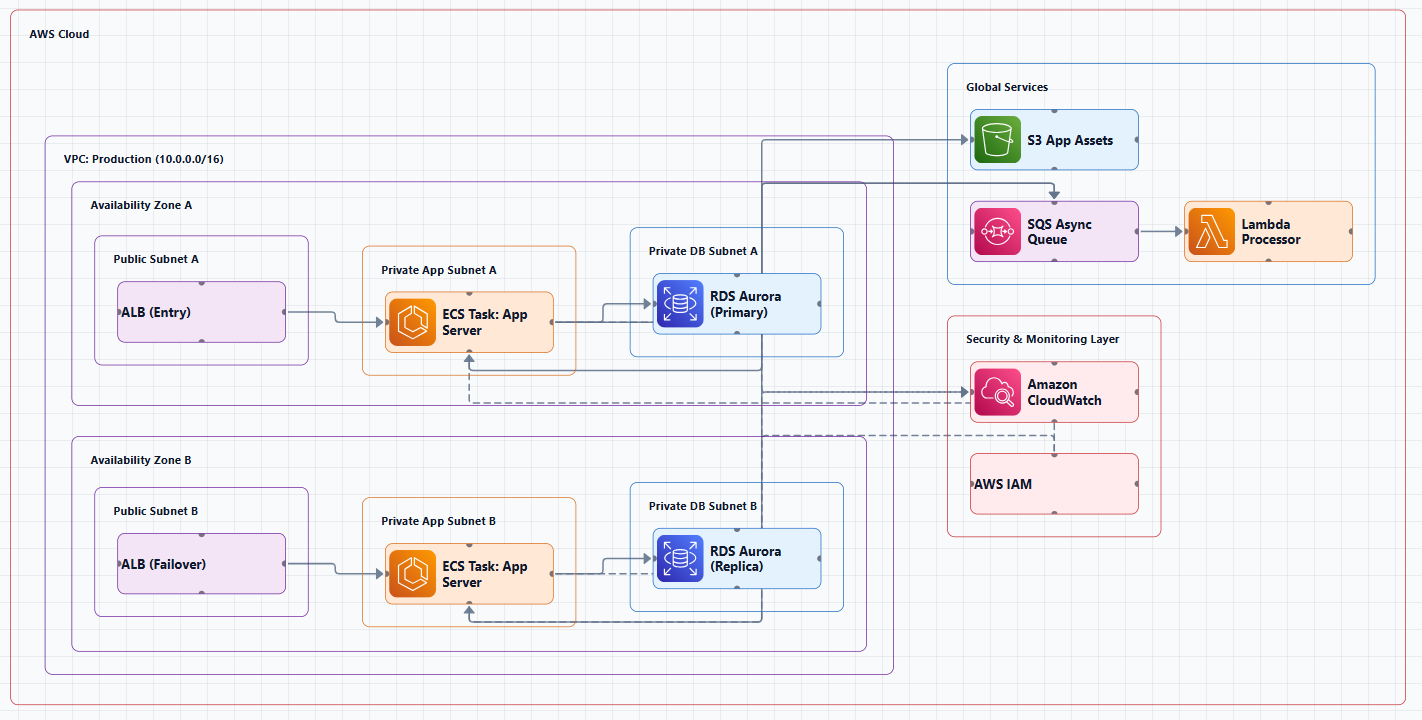
This is the most visible part of your documentation. A strong AWS architecture diagram should include the main services, network boundaries, user entry points, and the core data or request flow. Teams typically document AWS architecture with a layered diagram that separates compute, storage, networking, and access services.
Key elements to include:
- VPC layout with public and private subnets
- Compute resources (EC2, ECS, EKS, Lambda)
- Storage services (S3, EBS, RDS, DynamoDB)
- Networking components (Internet Gateway, NAT Gateway, Load Balancers, Route 53)
- Security controls (Security Groups, NACLs, IAM roles)
- Data flow paths (arrows showing how requests move through the system)
2. Infrastructure as Code
Your Terraform, CloudFormation, or CDK code is documentation. But it needs supplementary documentation to be useful.
Document alongside your IaC:
- Module purpose and usage examples
- Variable definitions and constraints
- Outputs and their intended use
- Dependencies between modules
- Environment-specific configurations (dev, staging, prod)
3. Operational Runbooks
What happens when something breaks? Your runbooks should be clear, actionable, and tested.
Include:
- Deployment procedures
- Rollback procedures
- Monitoring and alerting configuration
- Incident response steps
- Known issues and workarounds
- Escalation paths
4. Security and Compliance Documentation
This is often required for audits and should be maintained continuously.
Document:
- IAM policies and roles (least-privilege principle is a best practice)
- Encryption configuration (at rest and in transit)
- Network security controls (Security Groups, NACLs, VPC endpoints)
- Compliance frameworks (SOC 2, HIPAA, PCI DSS)
- Data classification and handling procedures
5. Networking Documentation
Networking is the foundation for all compute and data services and should be documented before those sections.
Include:
- VPC design and CIDR blocks
- Subnet layouts and availability zone mapping
- Routing tables and route propagation
- VPN and Direct Connect configurations
- VPC peering and Transit Gateway connections
Tools and Techniques for Documentation
Architecture Diagramming
AI Line Studio turns plain-language descriptions into production-ready architecture diagrams in 15 to 20 seconds. It supports 3,000+ officially licensed icons across AWS, Azure, GCP, and OCI, and exports animated GIFs and MP4s for presentations. At $19/month for 200 generations, it's the most cost-effective option on the market.
The AI cloud diagram generator helps you iterate faster during design sessions. The AI architecture diagram builder enables production-ready designs with collaboration features. For end-to-end system design, the AI system architecture generator creates complete cloud and distributed system architectures. The cloud architecture diagram tool provides editable templates with official icons for common deployment patterns.
The honest limitation: AI Line Studio is an early-stage product with a smaller install base. Complex descriptions may need manual cleanup, it's not a zero-review tool for mission-critical documentation.
Visual Paradigm's AI Cloud Architecture Studio lets you describe requirements in plain English and receive a standards-compliant AWS diagram in minutes.
GenAI-DrawIO-Creator is an open-source AI-powered diagram generator that supports 34+ shape libraries (AWS, GCP, Azure, Kubernetes, BPMN, UML, Cisco, and more).
draw.io (diagrams.net) remains the gold standard for manual diagramming. It has built-in AWS icon libraries, exports to PNG/SVG/PDF, and integrates with Confluence and Google Drive. Store the .drawio files in your repository alongside your code.
Automated Documentation Generation
InfraDocGen is an AWS Labs tool that automatically scans cloud environments and creates comprehensive, real-time documentation with detailed configuration reports, including dependency maps of resources based on access policies.
ai-infra-documenter leverages LLMs via OpenAI's API to parse Terraform and AWS CDK files and produce comprehensive documentation and architectural diagrams.
CDK-Canvas automatically generates professional infrastructure diagrams from your CloudFormation templates.
CloudWire queries your AWS account directly via boto3, discovering resources and relationships in real time. No Terraform required.
TerraVision and InfraSketch visualize infrastructure from Terraform state files, generating diagrams that stay in sync with your code.
AI-Powered Documentation Assistants
AWS Architecture Diagram Skill (from AWS Labs) is a reusable skill for generating AWS architecture diagrams in draw.io format. Works with any AI assistant, ChatGPT, Claude Projects, Kiro CLI, Claude Code, or any internal AI agent.
Multi-Agent AI Systems like CrewAI with AWS Bedrock Claude Sonnet 4.5 can automatically generate comprehensive AWS architecture documentation including PlantUML diagrams, technical runbooks, executive summaries, and developer guides.
AWS Guidance for Generating IaC Templates demonstrates how to transform architecture diagrams into Infrastructure as Code templates using AI, addressing the challenge of time-consuming manual coding.
A Practical Documentation Workflow
Here's a workflow that actually works in production:
1. Design First, Document Alongside
Don't treat documentation as a separate phase. When you're designing a new architecture, create the diagram at the same time. Use AI Line Studio or a similar tool to generate an initial diagram from a description, then refine it as you make decisions.
2. Store Everything in Version Control
- Store diagrams as
.drawio,.plantuml, or.mmdfiles in your repository - Keep markdown documentation alongside your Terraform modules
- Use README files for module-level documentation
- Commit documentation changes alongside infrastructure changes
3. Automate What You Can
- Use InfraDocGen or similar tools to scan your environment and generate baseline documentation
- Set up CI/CD to regenerate diagrams when infrastructure changes
- Use AI tools to keep documentation in sync with your code
4. Review Documentation in Pull Requests
Documentation changes should be reviewed just like code changes. This ensures:
- Accuracy (someone else checks your work)
- Consistency (documentation follows team standards)
- Completeness (nothing is forgotten)
5. Keep It Living
Documentation that isn't used is worse than no documentation, it creates false confidence. Make documentation part of your team's daily workflow:
- Reference it during incident response
- Update it during sprint planning
- Use it for onboarding new team members
- Review it during architecture reviews
Common Documentation Mistakes
Mistake 1: Treating documentation as a one-time task. Documentation is never "done." It needs to evolve with your infrastructure.
Mistake 2: Documenting everything. Focus on what matters: architecture decisions, operational procedures, and security controls. Not every detail needs to be captured.
Mistake 3: Using tools that don't support version control. If your diagrams are in a proprietary format that can't be diffed or merged, you're creating a documentation silo.
Mistake 4: Not reviewing AI-generated output. AI tools can generate diagrams and documentation quickly, but they're not infallible. Always review and validate before sharing.
Mistake 5: Forgetting about the audience. Documentation for developers looks different from documentation for operations teams or auditors. Know who you're writing for.
External Resources
- AWS Well-Architected Framework, foundational guidance for designing and operating reliable, secure, efficient, and cost-effective workloads
- AWS Architecture Center, reference architectures, best practices, and design guidance
- AWS Architecture Icons, official source for AWS product icons
- InfraDocGen, AWS Labs tool for automated infrastructure documentation
- Guidance for Generating Infrastructure-as-Code Templates from Architecture Diagrams on AWS, AWS guidance on AI-powered diagram-to-code transformation
Final Thoughts
Documenting AWS infrastructure is a discipline, not a project. The key is making it part of your regular workflow rather than a separate activity you do when you "have time." Use AI tools to accelerate diagram creation and documentation generation, but always review the output. Store everything in version control. And remember: documentation that's six months old is worse than no documentation at all, it gives people false confidence.
The best documentation is the documentation your team actually uses. Build a workflow that makes keeping it current easy, and you'll never look back.