
Free Google Cloud Architecture Diagramming Tool: What Actually Works in 2026 | AI Line Studio
Architecture diagrams are non-negotiable. But paying $10-$20 per user per month for diagramming software, especially when you're prototyping, learning, or documenting a single project, feels unnecessary.
Here are genuinely good free options for creating Google Cloud architecture diagrams in 2026, including tools that use AI to generate diagrams from plain English.
Cloud Architecture
Create cloud architecture diagrams for AWS, Azure, GCP, and more. Design scalable infrastructure with professional cloud icons.
Free options for Google Cloud architecture diagramming in 2026, manual canvas tools, AI generators, and code-to-diagram workflows that stay practical.
Click Cloud Architecture to open AI Line Studio and generate diagrams from natural language in seconds.
The Landscape: Free GCP Diagramming Tools in 2026
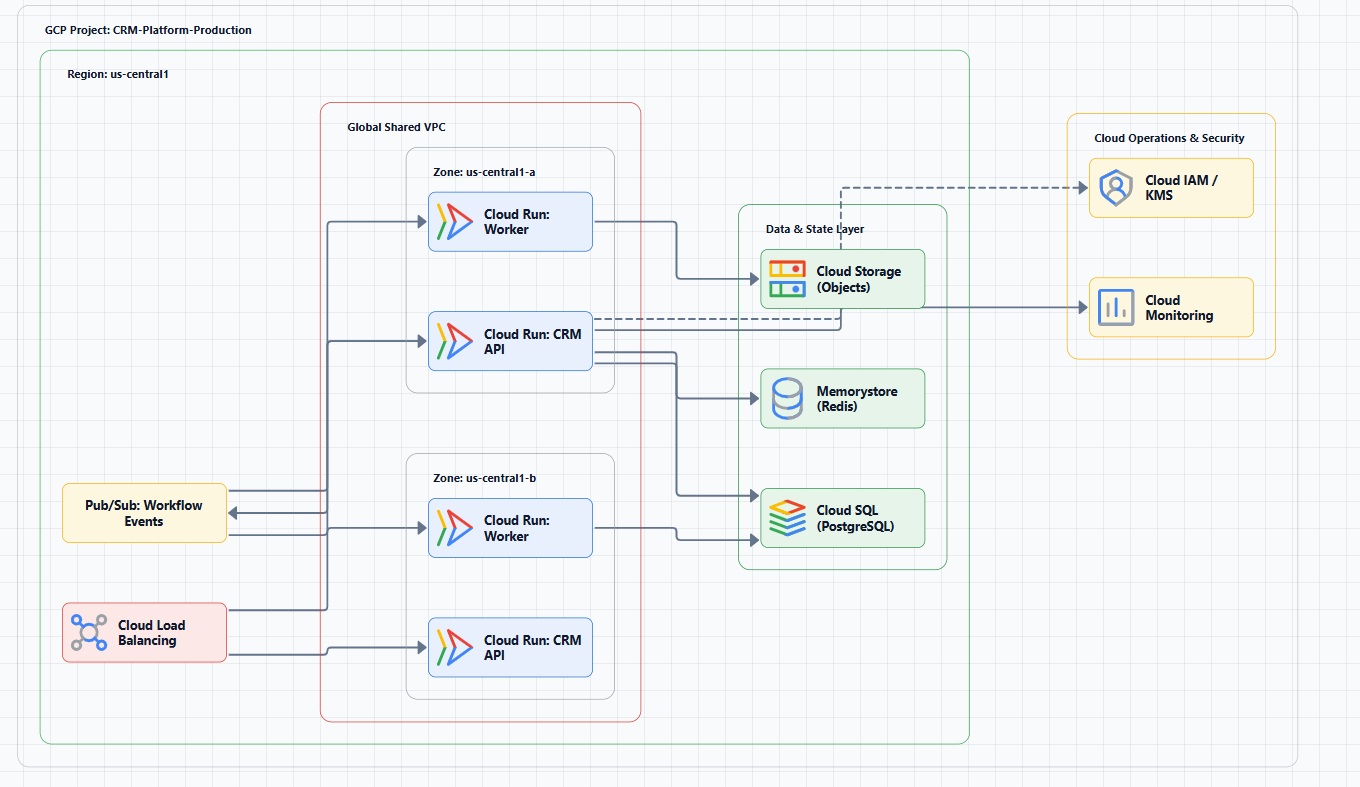
Free GCP diagramming tools fall into three categories:
| Category | What It Does | Best For |
|---|---|---|
| Manual canvas | Drag-drop shapes, connect arrows | One-off diagrams, design docs, presentations |
| AI generation | Text prompts -> structured diagrams | Rapid prototyping, iteration, documentation at speed |
| Code-to-diagram | Terraform -> auto-generated diagrams | Keeping diagrams in sync with infrastructure |
No single free tool does all three well. The right choice depends on whether you need to design, generate, or document.
The Best Free Tools: Detailed Breakdown
1. diagrams.net (formerly draw.io), Best Free Manual Canvas
Diagrams.net is the default choice for most engineering teams, and for good reason. It's fast, completely free, and good enough for serious architecture work. The low friction means engineers actually use it.
GCP support: Built-in GCP shape libraries cover most services. Templates for common cloud infrastructures are available. Google's official icon set is included and regularly updated.
What it does well:
- Completely free, no account required
- Works offline with a desktop app
- Integrates with Google Drive, Dropbox, OneDrive
- Exports to PNG, SVG, PDF, and editable XML
- Large library of GCP-specific shapes and templates
The catch: It's entirely manual. Your diagram is outdated the moment your infrastructure changes. There isn't real-time collaboration.
Best for: Design docs, RFCs, one-off diagrams, and anything that doesn't need frequent updates.
Not for: Keeping diagrams current, operational troubleshooting, or rapid iteration.
2. StackBuilder, Best Free AI Generator (No Signup)
StackBuilder turns plain English descriptions into professional cloud architecture diagrams in seconds. No signup. No templates. Just describe your system and get a diagram.
How it works: You describe your infrastructure and AI generates a clean, labeled diagram using cloud iconography. It supports AWS, Azure, Google Cloud, Kubernetes, and multi-cloud setups.
What it does well:
- Completely free, no account required
- Exports to PNG, SVG, PDF, or draw.io format
- Iterative refinement (example: add a Redis cache in front of the database)
- No signup wall, go straight to the tool
The catch: It's web-based, so descriptions are processed externally. Version control and team sharing aren't the primary workflow.
Best for: Rapid prototyping, system design interview prep, and fast design docs.
Not for: Mission-critical documentation that requires zero review.
3. SketchMyInfra, Best Free AI Generator with PlantUML Export
SketchMyInfra converts natural language descriptions into production-quality infrastructure diagrams using PlantUML. No signup. No credit card.
Key differentiator: It gives you PlantUML code, not just an image. That means you can check the diagram into Git, tweak the code manually if needed, and integrate it into your documentation pipeline.
What it does well:
- Completely free, no account needed
- Exports editable PlantUML code (version-controllable)
- Official cloud icons (AWS/GCP/Azure)
- Refines prompts using previous diagram context
- Generates in under 5 seconds
The catch: Editing requires comfort with PlantUML syntax.
Best for: Documentation-as-code workflows and teams that want Git-friendly diagrams.
Not for: WYSIWYG editing or real-time collaboration.
4. MockFlow IdeaBoard, Free AI Generator (Bring Your Own API Key)
MockFlow's AI GCP diagram generator recognizes 40+ GCP services, maps them to official icons, and organizes them into VPC networks.
What it does well:
- Recognizes 40+ GCP services
- Uses official Google Cloud icons
- Organizes services into VPC groupings
- Exports as PNG/SVG or shareable live links
The catch: You connect your own Claude (MCP) or ChatGPT (GPT Actions) API key, and generation runs on your AI account.
Best for: Teams that already have AI API access and want unlimited generation.
Not for: Teams without their own AI API key.
5. TerraVision, Best Free Code-to-Diagram Tool
TerraVision automatically converts your Terraform code into professional-grade cloud architecture diagrams using official AWS, GCP, and Azure icon sets.
What it does well:
- Always up-to-date (generated directly from Terraform)
- 100% client-side (your code never leaves your machine)
- CI/CD-ready diagram updates on every PR merge
- Interactive HTML output (clickable nodes, pan/zoom, search)
- Editable draw.io export
The catch: GCP support is partial and currently focuses on core services only. It requires setup (Python, Terraform, Graphviz, Git).
Best for: Terraform-first teams that need diagrams that don't drift out of date.
6. gcp-radar, Free CLI Tool for GCP Inventory
gcp-radar inventories your GCP resources and generates draw.io diagrams automatically.
The catch: It's command-line only. You generate a baseline diagram and then open it in diagrams.net.
Best for: Creating an initial diagram of what exists.
Not for: rapid design iteration.
7. Grafly, Free Browser-Based Diagramming
Grafly supports GCP cloud diagrams and doesn't require an account.
The catch: It's less mature than diagrams.net and has fewer GCP-specific features.
Best for: Quick, simple diagrams.
8. ARCH App, Free Local-First Architecture Designer
ARCH is a local-first architecture designer for creating cloud and network diagrams with drag-and-drop components.
The catch: Limited GCP-specific features compared to specialized tools.
Best for: privacy-conscious teams.
9. Cloudairy, Free AI-Powered GCP Diagram Maker
Cloudairy combines AI prompt-to-diagram generation with official Google Cloud icons, plus collaboration and export options.
The catch: Free may have limitations depending on pricing model, so check current terms.
Best for: teams that want AI generation plus collaboration.
Side-by-Side Comparison
| Tool | Category | GCP Support | AI | Export | Account Required |
|---|---|---|---|---|---|
| diagrams.net | Manual canvas | Full | No | PNG, SVG, PDF, XML | No |
| StackBuilder | AI generator | Full | Yes | PNG, SVG, PDF, draw.io | No |
| SketchMyInfra | AI generator | Full | Yes | PlantUML / SVG / PNG | No |
| MockFlow IdeaBoard | AI generator | Full | Yes | PNG, SVG, live link | API key required |
| TerraVision | Code-to-diagram | Partial (core) | Optional | PNG, HTML, draw.io XML | No |
| gcp-radar | Code-to-diagram | Full | No | draw.io XML | No |
| Grafly | Manual canvas | Basic | No | Multiple | No |
| ARCH App | Manual canvas | Basic | No | Export varies | No |
| Cloudairy | AI generator | Full | Yes | Visio / various | Likely |
AI Line Studio
AI Line Studio is an AI-powered platform that converts system descriptions into cloud and system architecture diagrams in about 15-20 seconds.
Key features:
- Natural-language-to-diagram generation (text prompt -> structured diagram)
- 3,000+ officially licensed icons across AWS, Azure, GCP, and OCI
- Animated diagrams for demos and training material
- Multi-format export: PNG, GIF, and MP4
- Shareable documentation links
For rapid iteration during design sessions, the AI cloud diagram generator lets you refine descriptions and regenerate instantly.
You can also build production-ready diagrams with the AI architecture diagram builder.
The free Google Cloud architecture diagramming tool workspace provides editable templates with official GCP icons.
The honest limitation: It's an early-stage product with a smaller install base and fewer battle-tested enterprise deployments than long-established tools. It's not a general-purpose diagramming tool. Complex or ambiguous descriptions may still need manual cleanup.
Best for: Rapid prototyping and design iteration, plus creating diagrams for presentations and demos where speed matters.
Not for: Non-technical diagram types like org charts or mind maps, or mission-critical documentation that requires zero review.
Decision Framework: Which Free Tool Should You Use?
| Your Primary Need | Recommended Free Tool | Why |
|---|---|---|
| Quick, free manual diagram | diagrams.net | Fast, free, good enough, offline capable |
| AI-generated diagrams, no signup | StackBuilder | Instant generation, no account required |
| AI-generated with version control | SketchMyInfra | Exports PlantUML code you can keep in Git |
| AI generation with your own API key | MockFlow IdeaBoard | Unlimited generation, 40+ GCP services |
| Always-current diagrams from Terraform | TerraVision | Diagrams stay in sync with infrastructure |
| Baseline diagram of existing GCP | gcp-radar | Auto-generates from GCP inventory |
| AI generation with animation | AI Line Studio | Animated exports plus fast text-to-diagram |
Common Mistakes When Choosing a Free Tool
Mistake 1: Using a manual tool for operational visibility. Manual diagrams can't stay current. If you need to know what's actually running, use a code-to-diagram tool like TerraVision or gcp-radar.
Mistake 2: Using an AI tool for mission-critical documentation without review. AI diagrams are fast, but they're not infallible. Review before sharing.
Mistake 3: Choosing based on features rather than workflow. The best tool is the one you'll actually use. If setup friction is high, the tool will sit unused.
Mistake 4: Not checking GCP support. Some "free" tools have limited icon sets or only support basic services. Verify support for the services you use.
Mistake 5: Forgetting about export formats. If you need to embed diagrams in Confluence, Notion, or GitHub, confirm that the tool exports in compatible formats (PNG, SVG, or PlantUML).
External Resources
- Google Cloud Architecture Center
- Google Cloud Icons
- Google Cloud Architecture Framework
- TerraVision Documentation
Final Thoughts
You don't need to spend money to create good Google Cloud architecture diagrams. diagrams.net is the gold standard for free manual diagramming. For AI generation, StackBuilder and SketchMyInfra provide genuinely useful free tiers. For Terraform-first teams, TerraVision is a game-changer.
The right free tool depends on what you're trying to do: design, generate, or document. If you're documenting an existing system, prefer code-to-diagram approaches that don't drift.