
GCP Architecture Diagram Examples: Real-World Google Cloud Patterns for Production
Architecture diagrams are the difference between a system that runs reliably and one that fails in ways nobody understands. After years of deploying workloads on Google Cloud, from three-tier web apps to global AI inference platforms, I've learned that good diagrams are not just documentation. They're the blueprint that keeps teams aligned, incidents short, and stakeholders confident.
This guide walks through production-tested GCP architecture diagram examples you can adapt for your own workloads. Each pattern includes a concrete diagram structure, the services involved, the decision logic behind the choices, and the tradeoffs you'll actually face when deploying it.
Cloud Architecture
Create cloud architecture diagrams for AWS, Azure, GCP, and more. Design scalable infrastructure with professional cloud icons.
Production-ready GCP architecture diagram examples for three-tier apps, GKE microservices, serverless, data pipelines, event-driven systems, hybrid cloud, HA/DR, and AI workloads.
Click Cloud Architecture to open AI Line Studio and generate diagrams from natural language in seconds.
Three-Tier Web Application
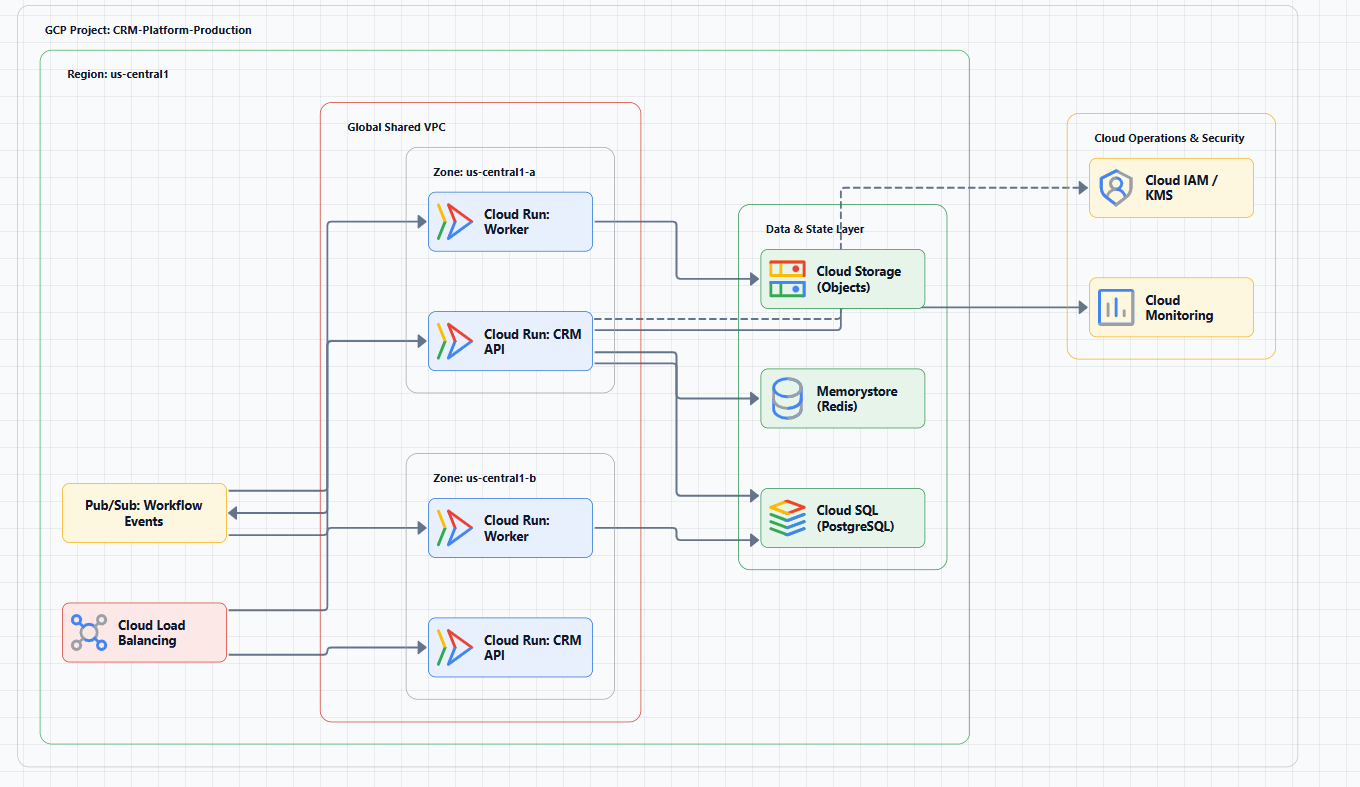
The three-tier pattern separates presentation, application, and data layers. It's the default choice for most customer-facing web applications and one of the most common GCP architecture examples you'll encounter.
Example Diagram
- Web tier: User requests hit Cloud Run services, with Cloud CDN accelerating static assets.
- Application tier: API and business logic run on Cloud Run for independent scaling and language flexibility.
- Data tier: Memorystore for Redis handles hot reads while Cloud SQL (PostgreSQL) persists transactional data.
- DevOps: Cloud Build packages and deploys containers to Cloud Run.
When to Use This Pattern
Use for e-commerce, fintech, and general customer-facing web apps where tier isolation improves scalability and release velocity.
When Not to Use It
Avoid for batch-only or highly event-driven systems that can run cheaper with pure serverless workers.
The Database Trap
Teams frequently oversize Cloud SQL early. Start lean, then scale reads via replicas before resizing primaries.
Internet → Cloud Load Balancer → [Web Tier: Cloud Run]
                                    ↓
                              [Application Tier: Cloud Run]
                                    ↓
                              [Data Tier: Cloud SQL + Memorystore]
                              (within VPC, private subnets)
Microservices on GKE
When service ownership is split across teams, GKE gives you Kubernetes control with production-grade orchestration.
Example Diagram
- GKE cluster with dedicated node pools
- Istio service mesh for traffic policy and observability
- Cloud Armor for WAF protection
- Artifact Registry for container images
- Cloud SQL or AlloyDB for persistence
When to Use This Pattern
Choose this for platform teams, Kubernetes-standard environments, and workloads requiring granular autoscaling controls.
When Not to Use It
Skip if you're a small team with a monolith and no Kubernetes operational maturity.
GKE Inference Reference Architecture
Google's GKE inference blueprint adds GPU/TPU-aware autoscaling, stronger security defaults (private clusters, Shielded Nodes), and deeper observability for production inference.
Internet → Cloud Armor → Global Cloud Load Balancer
                              ↓
                         [GKE Cluster]
                    ┌─────────┼─────────┐
              [User API] [Order Service] [Worker Pods]
                    └─────────┼─────────┘
                         [Cloud SQL]
Serverless with Cloud Run and Cloud Functions
Serverless removes infrastructure management overhead while still supporting production-scale APIs and event processors.
Example Diagram
- Cloud Run for HTTP container services
- Cloud Run functions for event handlers
- Pub/Sub for async decoupling
- Cloud Storage for uploads and static assets
- Firestore or Cloud SQL for persistence
When to Use This Pattern
Great for bursty APIs, low-traffic products, webhook systems, and background task pipelines.
When Not to Use It
Avoid for long-running compute-heavy jobs, strict stateful workloads, or specialized hardware profiles.
Multi-Regional Cloud Run
Deploy identical Cloud Run services to multiple regions behind one global external load balancer for a single global entrypoint and improved resilience.
[HTTP Request] → Cloud Run (frontend)
                       ↓
                 [Pub/Sub Topic]
                       ↓
         Cloud Functions (processor)
                       ↓
              [Cloud SQL / Firestore]
Data Analytics Pipeline: BigQuery + Dataflow
GCP analytics stacks commonly use Dataflow for processing and BigQuery as the serving warehouse across Bronze/Silver/Gold layers.
Example Diagram
- Ingestion via Pub/Sub (streaming) and Cloud Storage (batch)
- Dataflow transforms for cleansing and enrichment
- Cloud Composer orchestrates pipelines
- BigQuery serves analytics and downstream models
- Looker / Looker Studio provides BI consumption
Streaming vs Batch Decision
If sub-second latency is not required, scheduled batch Dataflow jobs are often simpler and cheaper than 24/7 streaming pipelines.
[Data Sources] → Pub/Sub (streaming) ──┐
                Cloud Storage (batch) ──┼→ Dataflow → BigQuery → Looker
                                        │
                              [Cloud Composer orchestrates]
Event-Driven with Pub/Sub
Event-driven architecture decouples producers and consumers, improving recovery and independent scaling.
The Dead-Letter Trap
Always configure dead-letter topics and monitor depth. Poison messages silently break throughput if left unmanaged.
[Event Producer] → Pub/Sub Topic → [Subscription] → Cloud Run/Function
                                            ↓
                                   [Dead-Letter Topic]
Hybrid Cloud with Shared VPC and Interconnect
For enterprises with on-prem dependencies, Shared VPC plus Interconnect/VPN provides a practical bridge model.
The IP Planning Trap
Non-overlapping RFC1918 IP planning is mandatory. Re-addressing later is expensive and disruptive.
[On-Premises Data Center] ← Cloud Interconnect/VPN → [Shared VPC]
                                                           │
                                              ┌────────────┼────────────┐
                                         [Dev VPC]  [Staging VPC]  [Prod VPC]
Multi-Region Disaster Recovery and High Availability
Resilience strategy depends on deployment archetypes: zonal, regional, multi-regional, global, hybrid, or multicloud.
The Cost Tradeoff
Warm standby lowers cost vs active-active, but increases failover time. Select based on RTO/RPO targets.
                    [Global Cloud Load Balancer]
                           /              \
              [Primary Region]      [Secondary Region]
              (Active)              (Warm Standby)
                   │                      │
              [Cloud SQL] ← replication → [Cloud SQL replica]
AI/ML and Generative AI Architectures
Google Cloud publishes broad AI reference patterns, including 101 Gen AI blueprints and inference-oriented GKE guidance.
[User Request] → GKE (model serving) ← Dataflow (feature processing)
                       ↓                      ↑
                 [Vertex AI]          [BigQuery (training data)]
Decision Framework: Which Pattern Fits?
| Your Primary Workload | Recommended Pattern | Key GCP Services | Deployment Archetype |
|---|---|---|---|
| Customer-facing web app | Three-tier | Cloud Load Balancing, Cloud Run, Cloud SQL | Regional (multi-zone) |
| Multiple teams, independent deploys | GKE Microservices | GKE, Istio, Artifact Registry, Cloud Armor | Regional or multi-regional |
| Low-traffic API, event-driven jobs | Serverless | Cloud Run, Cloud Functions, Pub/Sub | Regional |
| Data engineering & analytics | Data Pipeline | Pub/Sub, Dataflow, BigQuery, Cloud Composer | Regional or multi-regional |
| Legacy on-premises integration | Hybrid | Cloud Interconnect, Shared VPC, GKE Enterprise | Hybrid |
| Mission-critical with strict SLAs | Multi-region HA/DR | Global Load Balancing, Cloud SQL replicas, Spanner | Multi-regional or global |
| AI/ML inference | GKE Inference Reference Architecture | GKE, GPUs/TPUs, Vertex AI | Regional (multi-zone) |
Tools for Creating GCP Architecture Diagrams
AI Line Studio generates GCP architecture diagram examples from natural language descriptions in 15-20 seconds, supporting 3,000+ officially licensed Google Cloud icons. It's prompt-first, describe your architecture and get a structured diagram, rather than dragging and dropping shapes.
For rapid iteration during design sessions, the AI cloud diagram generator lets you refine descriptions and regenerate instantly. You can also build production-ready diagrams with the AI architecture diagram builder and reuse them as templates. The GCP architecture diagram examples workspace provides editable templates with official GCP icons for common deployment patterns, while the AI system architecture generator creates complete Google Cloud system architecture examples for enterprise, AI, microservices, and cloud-native workloads.
The tool exports animated diagrams (GIF, MP4) for presentations and training material, which most static-only tools don't support. However, it's an early-stage product with a smaller install base, and complex descriptions may require manual cleanup, it's not a zero-review tool for mission-critical documentation.
Lucidchart offers GCP shape libraries and templates with real-time collaboration.
Eraser.io combines diagramming with Markdown notes and GitHub integration.
Miro provides a GCP architecture template for collaborative whiteboarding.
For documentation-as-code workflows, Mermaid.js and PlantUML with GCP icon macros are solid open-source options.
Common Architecture Mistakes
Mistake 1: Diagrams as afterthoughts. A diagram created after deployment is already wrong. Design visually first, then implement.
Mistake 2: Ignoring deployment archetypes. Archetype choice determines failure domains and cost profile.
Mistake 3: Skipping Well-Architected validation. Validate reliability, security, performance, operations, and cost tradeoffs before launch.
Mistake 4: Forgetting cost dimensions. Include expected cost behavior in the architecture discussion.
Mistake 5: Not checking publication dates. Guidance updates fast; stale diagrams create real risk.
Where to Find Official GCP Reference Architectures
- Google Cloud Architecture Center: canonical source for reference architectures and best practices.
- Google Cloud Well-Architected Framework: principles for secure, resilient, and cost-efficient topologies.
- 101 Gen AI Technical Blueprints: illustrative architecture starting points for Gen AI use cases.
- GKE Inference Reference Architecture: production-ready blueprint for inference workloads.
- VPC Design Best Practices: reference patterns for hub-and-spoke, hybrid routing, and service connectivity.
External Resources
- Google Cloud Architecture Center, reference architectures, design guidance, and best practices
- Google Cloud Well-Architected Framework, comprehensive guidance for designing secure, reliable, cost-efficient GCP architectures
- Google Cloud Deployment Archetypes, zonal, regional, multi-regional, global, hybrid, and multicloud archetypes
- Google Cloud Icons, official GCP icon set for use in any design tool
- GKE Inference Reference Architecture, production-ready blueprint for AI inference on GKE
- 101 Gen AI Technical Blueprints, 101 architectural blueprints for AI projects
Final Thoughts
These GCP architecture diagram examples are starting points, not finished blueprints. Every workload has unique requirements, data sensitivity, latency constraints, team expertise, and budget. Adapt patterns to your context, and validate with the Google Cloud Well-Architected Framework.
The best architecture is the one your team can operate confidently, at predictable cost, with reliable performance under failure. Start with a diagram, review it with stakeholders, and iterate frequently.