
GCP Cloud Architecture Diagram: A Practical Guide to Designing Production-Ready Systems
Google Cloud Platform offers over 150 services. Knowing what to use and how they connect is the difference between an architecture that scales and one that fails under load. Architecture diagrams are the bridge between abstract design and concrete implementation, they force you to think through data flow, failure domains, and integration points before you write a single line of infrastructure code.
This guide walks through production-tested GCP architecture patterns, each with a clear diagram structure and the decision logic behind the service choices.
Cloud Architecture
Create cloud architecture diagrams for AWS, Azure, GCP, and more. Design scalable infrastructure with professional cloud icons.
Practical guide to GCP cloud architecture diagrams, Well-Architected principles, production patterns (three-tier, GKE, serverless, BigQuery, hybrid, HA/DR), networking, and diagramming tools.
Click Cloud Architecture to open AI Line Studio and generate diagrams from natural language in seconds.
The Foundation: GCP's Well-Architected Framework
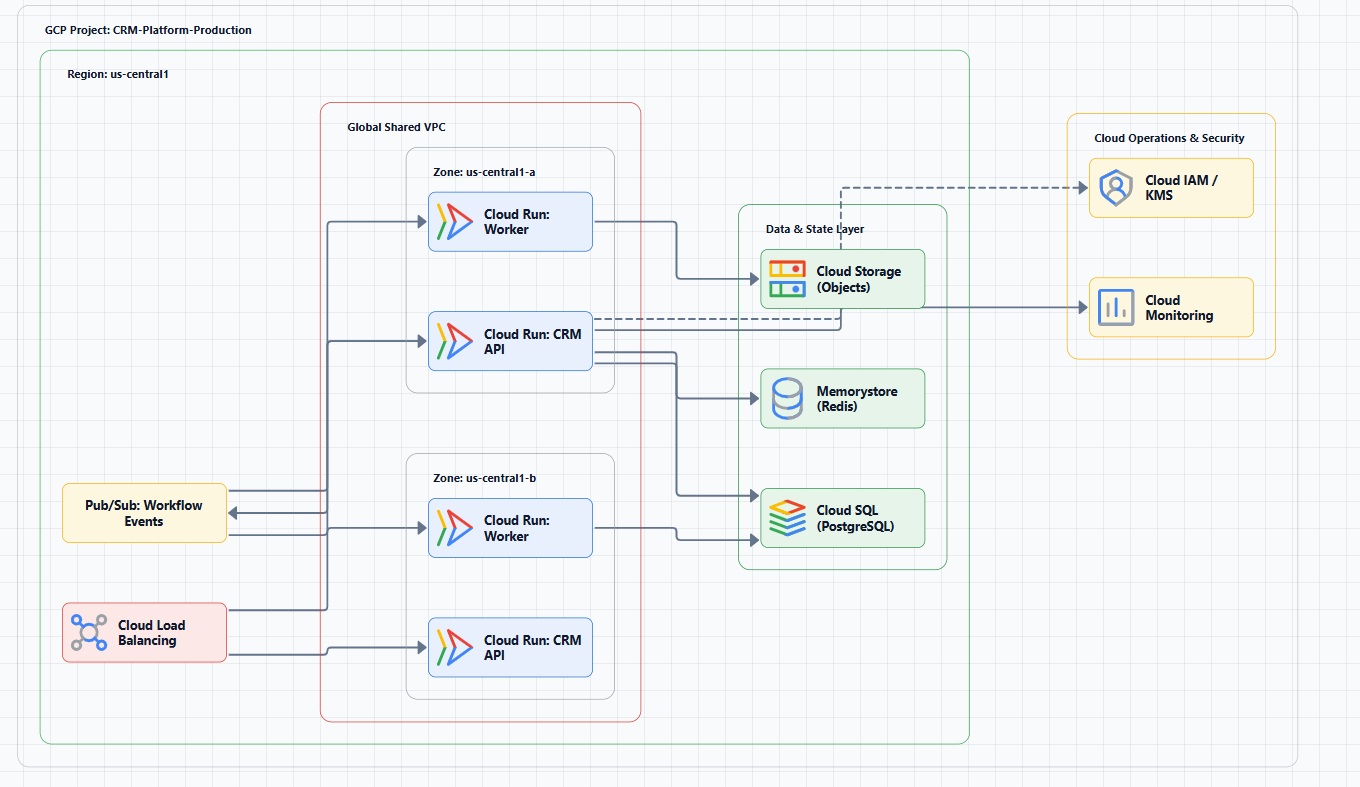
Before diving into specific patterns, understand the principles that should guide every architecture decision. Google Cloud's Well-Architected Framework organizes recommendations around five pillars: operational excellence, security/privacy/compliance, reliability, cost optimization, and performance optimization. These aren't abstract ideals, they're decision filters.
When evaluating any architecture choice, ask: does this improve my ability to operate the system? Does it reduce security risk? Does it make the system more resilient? Does it optimize cost for my workload? Does it deliver the performance my users need?
The framework also emphasizes documenting your architecture. A diagram that lives only in someone's head is useless. A diagram that's shared, reviewed, and updated becomes the common language your team uses to communicate about the system.
Core Architecture Patterns
1. Three-Tier Web Application
The three-tier pattern separates presentation, application, and data layers. It's the default choice for most customer-facing web applications.
Core services:
- Web tier: Cloud Storage (static assets) + Cloud CDN, or Cloud Run for containerized frontends
- Application tier: Cloud Run (serverless) or GKE (container orchestration)
- Data tier: Cloud SQL (PostgreSQL/MySQL) for transactional data, Memorystore (Redis) for caching
- Networking: Global Cloud Load Balancer, VPC with public/private subnets
When to use: E-commerce platforms, SaaS applications, internal dashboards, anything with a user interface and persistent data.
When to avoid: Event-driven workloads, batch processing, or simple CRUD apps that could run entirely on serverless with lower overhead.
Critical design decision: Database sizing. Start with the smallest Cloud SQL instance that meets your performance needs. Use read replicas to scale queries before upgrading the primary. Most teams over-provision databases and waste money.
Diagram structure:
Internet → Cloud Load Balancer → [Web Tier: Cloud Run/GKE]
                                    ↓
                              [Application Tier: Cloud Run/GKE]
                                    ↓
                              [Data Tier: Cloud SQL + Memorystore]
                              (within VPC, private subnets)
2. Microservices on GKE
When your application has multiple teams owning different services, GKE provides the control plane while you manage the nodes.
Core services:
- GKE cluster with multiple node pools (general-purpose, compute-optimized)
- Istio service mesh for traffic management and observability
- Cloud Armor for WAF protection
- Artifact Registry for container images
- Cloud SQL or AlloyDB for database
When to use: Multiple teams deploying independently, existing Kubernetes investment, workloads requiring fine-grained scaling.
When to avoid: Small teams with monolithic applications, the operational overhead isn't justified. Batch or event-driven workloads are better served by serverless options.
The GKE Autopilot decision: Standard mode gives you control over nodes but requires more management. Autopilot manages the infrastructure for you, use it unless you have specific node customization requirements.
Cost reality: GKE clusters require careful planning around networking, IAM, and cost. A poorly configured cluster can run up a bill of thousands per month. Use node auto-provisioning and committed use discounts.
Diagram structure:
Internet → Cloud Armor → Global Cloud Load Balancer
                              ↓
                         [GKE Cluster]
                    ┌─────────┼─────────┐
              [User API] [Order Service] [Worker Pods]
                    └─────────┼─────────┘
                         [Cloud SQL]
3. Serverless with Cloud Run and Cloud Functions
Serverless eliminates infrastructure management entirely. Cloud Run runs containers on demand, scaling to zero when not in use.
Core services:
- Cloud Run for containerized HTTP services
- Cloud Functions (Gen 2) for event-driven functions
- Pub/Sub for asynchronous communication
- Cloud Storage for file uploads and static assets
- Firestore or Cloud SQL for data persistence
When to use: Low-traffic applications, event-driven workflows, APIs with unpredictable traffic, background jobs (image processing, data transformation).
When to avoid: Long-running computations (over 60 minutes), stateful workloads, applications requiring GPUs or high-memory instances.
The cold start tradeoff: Cloud Run and Cloud Functions scale to zero, which saves money but adds latency for infrequent requests. If you need sub-second response times consistently, keep at least one instance warm or consider provisioned infrastructure.
Diagram structure:
[HTTP Request] → Cloud Run (frontend)
                       ↓
                 [Pub/Sub Topic]
                       ↓
         Cloud Functions (processor)
                       ↓
              [Cloud SQL / Firestore]
4. Data Analytics Pipeline: BigQuery + Dataflow
GCP's data analytics stack handles petabytes. BigQuery is the serverless data warehouse. Dataflow (Apache Beam) processes streams and batches.
Core services:
- Pub/Sub for event ingestion (streaming)
- Cloud Storage for batch data landing
- Dataflow for transform and enrich (streaming and batch)
- BigQuery for storage and analysis
- Cloud Composer (Apache Airflow) for orchestration
- Looker or Data Studio for visualization
When to use: Real-time analytics, ETL/ELT, machine learning feature engineering, business intelligence.
When to avoid: Small datasets (under 100 GB), BigQuery's minimum storage and query costs make it uneconomical. Ad-hoc analysis where Cloud SQL or a spreadsheet would suffice.
The streaming vs. batch decision: Dataflow streaming pipelines have higher operational complexity than batch. If your use case doesn't require sub-second latency, batch processing with scheduled Dataflow jobs is simpler and cheaper.
Diagram structure:
[Data Sources] → Pub/Sub (streaming) ──┐
                Cloud Storage (batch) ──┼→ Dataflow → BigQuery → Looker
                                        │
                              [Cloud Composer orchestrates]
5. Event-Driven with Pub/Sub
Event-driven architectures decouple producers and consumers, improving resilience and scalability.
Core services:
- Pub/Sub topics for durable message queues (7-day retention)
- Cloud Run or Cloud Functions as consumers
- Eventarc for routing events from Google Cloud sources
- Dead-letter topics for failed message handling
When to use: Order processing, log ingestion, IoT data pipelines, webhook handling, decoupling microservices.
When to avoid: Request-response patterns where low latency is critical, the asynchronous nature adds milliseconds of overhead. Fewer than three consumers, the complexity isn't justified.
Critical missing piece: Many teams forget dead-letter queues. Messages that can't be processed (schema changes, consumer bugs) pile up and block the queue. Always configure a dead-letter topic and monitor its depth.
Diagram structure:
[Event Producer] → Pub/Sub Topic → [Subscription] → Cloud Run/Function
                                            ↓
                                   [Dead-Letter Topic]
6. Hybrid Cloud with Shared VPC and Interconnect
Many enterprises run workloads both on-premises and in the cloud.
Core services:
- Cloud VPN or Cloud Interconnect for connectivity
- Shared VPC with host and service projects
- GKE Enterprise clusters in both environments
- Cloud Observability for unified monitoring
When to use: Legacy systems that can't move to the cloud, data residency requirements, gradual migration strategies, regulated industries.
When to avoid: If you can go all-in on cloud, the operational overhead of managing both environments is significant. If your on-premises network has limited bandwidth, data transfer costs and latency will kill performance.
The IP planning trap: Hybrid architectures require careful IP address planning. All environments must use non-overlapping RFC 1918 IP space. Re-addressing an existing on-premises network is painful, plan this before you start.
Diagram structure:
[On-Premises Data Center] ← Cloud Interconnect/VPN → [Shared VPC]
                                                           │
                                              ┌────────────┼────────────┐
                                         [Dev VPC]  [Staging VPC]  [Prod VPC]
7. Multi-Region Disaster Recovery
High availability and disaster recovery are built on deployment archetypes: zonal, regional, multi-regional, or global.
Core services:
- Global Cloud Load Balancer for traffic routing
- Cloud SQL replicas or Spanner for data replication
- Cloud DNS for failover routing
- Cloud Storage with multi-regional replication
When to use: Mission-critical applications with strict SLAs. Production workloads should at minimum be multi-zone (regional).
When to avoid: Development or staging environments, the cost isn't justified. Applications with no strict uptime requirements.
The active-passive cost tradeoff: Multi-region DR doubles your infrastructure cost. Warm standby (reduced capacity in the secondary region) is cheaper than active-active but increases failover time. Choose based on your RTO and RPO.
Diagram structure:
                    [Global Cloud Load Balancer]
                           /              \
              [Primary Region]      [Secondary Region]
              (Active)              (Warm Standby)
                   │                      │
              [Cloud SQL] ← replication → [Cloud SQL replica]
GCP Networking Architecture
Every GCP architecture sits on a network foundation. The key decisions:
VPC strategy: Each environment (dev, staging, prod) typically gets its own VPC. For large organizations, Shared VPC with a host project and service projects provides centralized network management.
Subnet design: Divide VPCs into public and private subnets. Public subnets host load balancers and NAT gateways. Private subnets host application workloads with no direct internet access.
Hub-and-spoke: Multiple spoke VPCs connect through a hub VPC for centralized egress and security controls.
Cloud Load Balancing: Global load balancers use Anycast IP to provide cross-region failover. Internal load balancers handle service-to-service communication within VPCs.
Diagram structure:
                    [Shared VPC Host Project]
                              │
              ┌───────────────┼───────────────┐
         [Service Project] [Service Project] [Service Project]
              │               │               │
         [Dev VPC]       [Staging VPC]   [Production VPC]
         (spoke)          (spoke)          (spoke)
Tools for Creating GCP Cloud Architecture Diagrams
Creating these diagrams manually is time-consuming. Several tools can help:
- Lucidchart offers GCP shape libraries and templates.
- Eraser.io combines diagramming with Markdown notes and GitHub integration.
- MockFlow provides AI-assisted diagram generation from text descriptions.
- Google Cloud Topology Visualizer (built into GCP Console) shows real-time resource topology.
AI Line Studio generates GCP cloud architecture diagrams from natural language descriptions in 15 to 20 seconds, supporting 3,000+ officially licensed Google Cloud icons. It's prompt-first, describe your architecture and get a structured diagram, rather than dragging and dropping shapes. For rapid iteration during design sessions, the AI cloud diagram generator lets you refine descriptions and regenerate instantly. You can also build production-ready diagrams with the AI architecture diagram builder and reuse them as templates. The tool exports animated diagrams (GIF, MP4) for presentations and training material, which most static-only tools don't support. However, it's an early-stage product with a smaller install base, and complex descriptions may require manual cleanup, it's not a zero-review tool for mission-critical documentation.
For documentation-as-code workflows, PlantUML with GCP icon macros and Mermaid.js are solid open-source options. The GCP Architecture Diagram Tool provides a dedicated workspace for creating and managing these diagrams with official icons and reusable templates.
Decision Framework: Which Pattern to Use
| Your Primary Workload | Recommended Pattern | Key GCP Services |
|---|---|---|
| Customer-facing web app | Three-tier | Cloud Load Balancing, Cloud Run/GKE, Cloud SQL |
| Multiple teams, independent deploys | GKE Microservices | GKE, Istio, Artifact Registry, Cloud Armor |
| Low-traffic API, event-driven jobs | Serverless | Cloud Run, Cloud Functions, Pub/Sub |
| Data engineering & analytics | Data Pipeline | Pub/Sub, Dataflow, BigQuery, Cloud Composer |
| Legacy on-premises integration | Hybrid | Cloud Interconnect, Shared VPC, GKE Enterprise |
| Mission-critical with strict SLAs | Multi-region HA/DR | Global Load Balancing, Cloud SQL replicas, Spanner |
Common Architecture Mistakes
Mistake 1: Diagrams as afterthoughts. A diagram created after deployment is already wrong. Design your architecture visually first, then implement.
Mistake 2: Ignoring cost. Every GCP service has a cost dimension. Include estimated costs in your diagram, Cloudcraft and similar tools can help.
Mistake 3: Overcomplicating. Start with the simplest architecture that meets your requirements. Add complexity only when you need it.
Mistake 4: Not planning for failure. Every diagram should include at least one failure domain (zone, region) and a recovery path.
Mistake 5: Using the wrong tool for the wrong phase. Discovery and brainstorming need different tools than production documentation. Don't use Visio for whiteboarding. Don't use Miro for production docs.
External Resources
- Google Cloud Well-Architected Framework, comprehensive guidance for designing secure, reliable, cost-efficient cloud topologies
- Google Cloud Architecture Center, reference architectures, diagrams, and best practices
- Hybrid and Multicloud Architecture Patterns, common patterns for hybrid and multicloud deployments
- GCP Network Connectivity Best Practices, networking security and connectivity guidance
Final Thoughts
These GCP cloud architecture patterns are starting points, not finished blueprints. Every workload has unique requirements, data sensitivity, latency constraints, team expertise, budget. Adapt these patterns to your context, and always validate with the Google Cloud Well-Architected Framework.
The best architecture is the one that runs reliably, costs what you expect, and your team can operate confidently. Start with a diagram, validate it with your team, and iterate. A diagram that's six months old is worse than no diagram at all.