
What Is GCP Cloud Functions? A Practical Guide to Google’s Serverless Compute Service
Google Cloud Functions is Google's serverless, event-driven compute service. You write code, and Google runs it in response to events from your cloud infrastructure, no servers to provision, no operating systems to patch, no frameworks to update. The software and infrastructure are fully managed by Google; you just add code.
The simplest way to think about Cloud Functions is action and reaction. Something happens in your cloud environment, a file uploads to Cloud Storage, a message arrives on a Pub/Sub topic, an HTTP request hits an endpoint, and your function runs in response.
Cloud Architecture
Create cloud architecture diagrams for AWS, Azure, GCP, and more. Design scalable infrastructure with professional cloud icons.
Practical guide to GCP Cloud Functions (Cloud Run functions), 1st vs 2nd gen, triggers, execution model, use cases, limits, pricing, and when to choose Cloud Run instead.
Click Cloud Architecture to open AI Line Studio and generate diagrams from natural language in seconds.
What Makes Cloud Functions Different
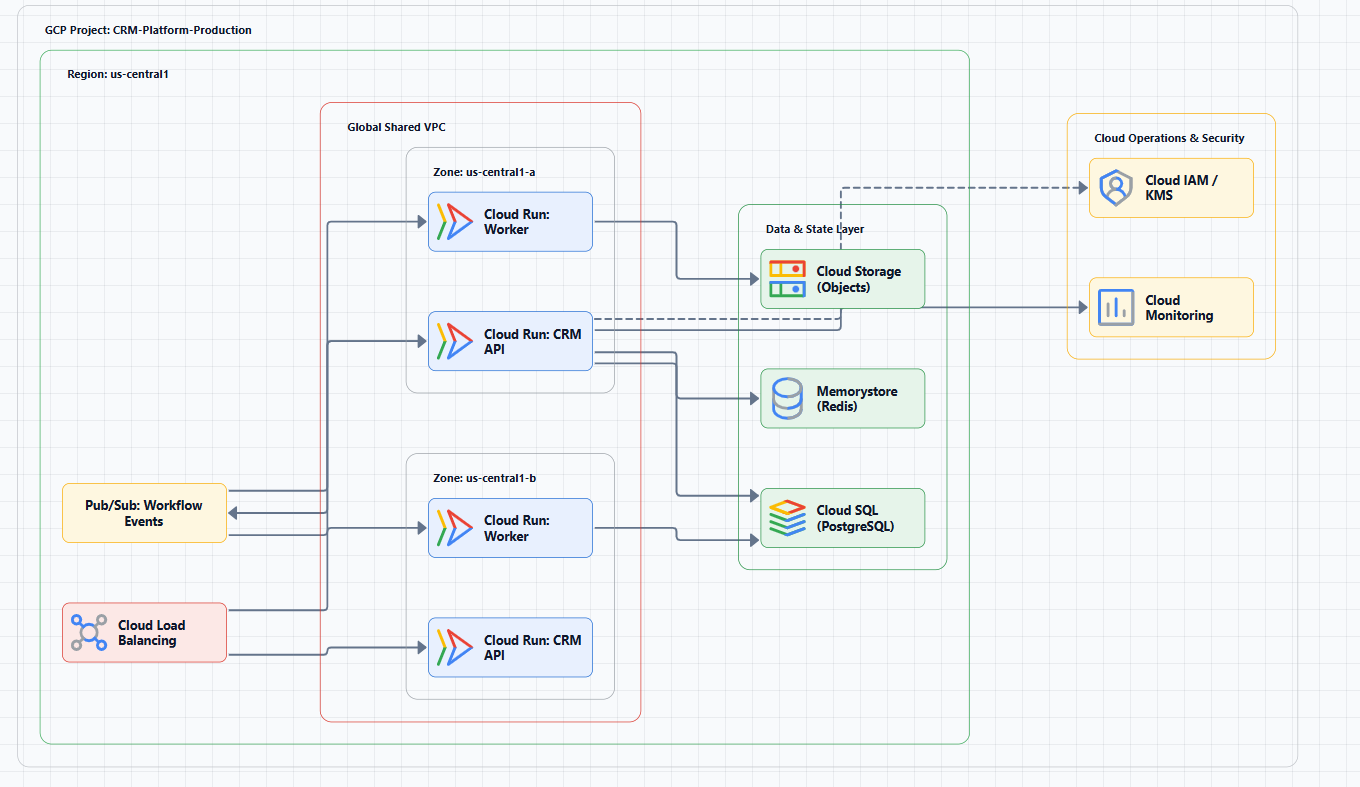
Cloud Functions is a Functions-as-a-Service (FaaS) offering. Unlike Cloud Run, which runs entire containerized applications, Cloud Functions focuses on single-purpose code. You don't worry about containers, routing, or infrastructure. You write a function, define what triggers it, and deploy.
What you get:
- No infrastructure management: Zero server provisioning, OS patching, or framework updates
- Automatic scaling: Functions scale from a few invocations a day to millions with no configuration
- Pay-per-use billing: You pay only for compute time and memory consumed during execution
- Event-driven execution: Functions run only when triggered, no idle compute costs
Cloud Functions acts as a "connective layer of logic", the glue between Google Cloud services and third-party systems. You can listen for file uploads to Cloud Storage, log changes, messages on Pub/Sub topics, or HTTP requests, and respond with custom code.
Cloud Functions (1st Gen) vs. Cloud Functions (2nd Gen)
There are two versions of Cloud Functions. Understanding the difference matters, they're not interchangeable.
What Changed
Cloud Functions (1st Gen) was the original version with limited event triggers and configurable capabilities. It supported only seven event sources and capped each function instance at one concurrent request.
Cloud Functions (2nd Gen) is built on Cloud Run and Eventarc. In August 2024, Google renamed it to Cloud Run functions and folded it under the Cloud Run umbrella. Same event-driven model, now with Cloud Run's controls for performance, scalability, and security.
Key Differences At a Glance
| Feature | 1st Gen | 2nd Gen |
|---|---|---|
| Request timeout | 9 minutes max | 60 minutes for HTTP, 9 minutes for event-triggered |
| vCPUs | 2 max | 4 max |
| Memory | 8 GB max | 16 GiB max |
| Concurrent requests per instance | 1 | Up to 1,000 |
| Event sources | 7 direct sources | 90+ via Eventarc |
| Traffic splitting | Not supported | Supported |
| Image registry | Container Registry or Artifact Registry | Artifact Registry only |
What 2nd Gen Unlocks
The 2nd gen revamp delivered a doubling of computing power and memory, plus a thousand-fold increase in concurrent requests. You can now:
- Run longer workloads like processing large data streams from Cloud Storage or BigQuery
- Handle larger, compute-intensive, in-memory parallel workloads
- Minimize cold starts by processing multiple concurrent requests through a single function instance
- Split traffic between function revisions or roll back to previous versions
- Trigger functions from over 90 event sources via Eventarc and Cloud Audit Logs
Bottom line: For new functions, use 2nd Gen. Google recommends it. 1st Gen remains supported, but 2nd Gen is the path forward.
How Cloud Functions Works: Triggers and Execution
Two Types of Triggers
Cloud Functions supports two trigger categories:
HTTP triggers respond to HTTP(S) requests. When you deploy an HTTP function, Cloud Functions automatically provisions an HTTP endpoint, no complex configuration required. This makes Cloud Functions ideal for lightweight APIs and webhooks.
Event triggers respond to events in your Google Cloud project. In 2nd Gen, all event-driven functions use Eventarc for event delivery. Eventarc is Google's standardized event delivery plane, it's what connects the 90+ event sources to your functions.
Supported event sources include:
- Cloud Storage: File creation, change, or deletion
- Pub/Sub: Messages arriving on a topic
- Cloud Audit Logs: API activity across 90+ Google Cloud products
- Firestore: Database changes
- Third-party systems: Via HTTP triggers from GitHub, Slack, Stripe, and more
Execution Model
Your function code runs in a managed container on Cloud Run's infrastructure. Google handles:
- Provisioning compute resources automatically in response to events
- Horizontal scaling from zero to millions of invocations
- Scale-to-zero when there's no traffic, you pay nothing for idle time
Each function runs in its own isolated secure execution environment, with automatic scaling independent of other functions.
The Functions Framework
Cloud Functions provides the Functions Framework, an open-source library that lets you write functions that run locally for testing and can be deployed across different serverless platforms. It supports:
- Launching a local development server for rapid testing
- Invoking functions in response to requests
- Automatically unmarshalling events that conform to the CloudEvents specification
This means you can test functions locally before deploying to Google Cloud, a significant productivity boost.
When to Use Cloud Functions
Cloud Functions excels at asynchronous, event-driven workloads and lightweight APIs.
Real-World Use Cases
Data processing and ETL
Listen for Cloud Storage events, file creation, change, or deletion, and respond by processing images, performing video transcoding, validating data, or invoking external services. A function can trigger when a file uploads to Cloud Storage, process it, and store results in BigQuery.
Webhooks
Use HTTP triggers to respond to events from third-party systems, GitHub, Slack, Stripe, or any system that can send HTTP requests. For example, when a new organization is created in a CRM, it can push a JSON payload to an HTTP-triggered Cloud Function, which automatically parses the webhook payload.
Lightweight APIs
Build RESTful APIs without managing servers. Start with small, loosely coupled logic that scales instantly. Functions can be event-driven or invoked directly via HTTP/S.
Mobile backends
Use Cloud Functions as the backend for mobile applications, handling authentication, push notifications, and data synchronization. For example, send a welcome email when a user creates an account.
AI and ML integration
Cloud Functions works particularly well with AI APIs. A function can trigger when an image uploads, run it through Google Cloud Vision API for analysis and tagging, then store the results. You can also build AI summarization engines using Gemini models.
Operational automation
Trigger application builds, automate infrastructure responses to log changes, or orchestrate complex workflows. Cloud Functions can be used with Cloud Tasks to run time-consuming, resource-intensive tasks asynchronously outside your main application flow.
Streaming analytics
Gather telemetry from IoT devices, perform real-time analysis, and send processed data to BigQuery.
When NOT to Use Cloud Functions
Cloud Functions is not the right tool for every job.
Long-running computations: HTTP-triggered functions cap at 60 minutes in 2nd Gen; event-triggered functions cap at 9 minutes. If your workload runs longer, use Cloud Run or Compute Engine.
Stateful workloads: Cloud Functions is stateless by design. Each invocation is independent. If you need state or coordination across functions, consider Cloud Run with persistent storage or a stateful service.
High-throughput, sustained traffic: While Cloud Functions scales massively, sustained high throughput can be more cost-effective on Cloud Run or GKE, where you can leverage committed use discounts.
Containerized applications: If you need full control over the runtime environment, custom libraries, or any containerizable workload, use Cloud Run.
Microservices with complex routing: Cloud Run offers more flexibility for complex service architectures.
Cloud Functions vs. Cloud Run: Which One?
This is the most common question teams face. The distinction is straightforward:
| Cloud Run | Cloud Run Functions (Cloud Functions 2nd Gen) | |
|---|---|---|
| Abstraction level | Lower, you control the container | Higher, you write only the function |
| Deployment unit | Container image | Function code |
| Flexibility | Any runtime or library that can be containerized | Supported runtimes only |
| Best for | Full containerized apps, complex microservices | Simple, single-purpose functions |
Choose Cloud Run functions when you want to deploy simple functions without worrying about containers. Choose Cloud Run when you need more control over the runtime environment or want to deploy full containerized applications.
Cloud Run functions is Cloud Run with a simpler developer experience, you write code, not Dockerfiles.
Supported Runtimes
Cloud Functions supports multiple programming languages:
- Node.js
- Python
- Go
- Java
- .NET Core
- PHP
- Ruby
You can run functions in any standard runtime environment for a supported language, which makes local testing and portability straightforward.
Limitations and Constraints
Deployment size: Source files are capped at 100 MB compressed for a single function deployment.
Regional limits: Cloud Run has a default limit of 5 regions where it can be used. If you need more, you must request a quota increase.
Cold starts: While 2nd Gen improves concurrency to minimize cold starts, the first invocation after idle periods still incurs a startup penalty. Preload dependencies at import time to minimize this impact.
No background activity: Functions must return a response within the timeout period. You cannot run background processes that outlive the function invocation.
Cost Model
Cloud Run functions pricing follows Cloud Run's model:
- vCPU-seconds: Compute time consumed
- GiB-seconds: Memory consumed
- Requests: Number of invocations
- Networking egress: Data leaving Google Cloud
There's a free tier (us-central1 example):
- 180,000 vCPU-seconds free per month
- 360,000 GiB-seconds free per month
- 2 million requests free per month
These tiers vary by region and billing mode. For a real-world estimate: a function with 1 vCPU and 2 GiB memory running for 300 ms per request, serving 5 million requests in a month, consumes 1.5 million vCPU-seconds and 3 million GiB-seconds, well beyond the free tier, with charges applied to the excess.
Best Practices
Optimize cold starts: Preload dependencies, configuration, and database clients at import time rather than inside the function handler.
Right-size memory: Memory and CPU are correlated. Test different configurations to find the optimal balance, over-provisioning wastes money.
Use 2nd Gen for production: The concurrency improvements, longer timeouts, and larger instance sizes make it suitable for production workloads that 1st Gen couldn't handle.
Leverage concurrency: 2nd Gen supports up to 1,000 concurrent requests per instance. Design your functions to handle concurrent requests efficiently.
Monitor and log: Use Cloud Logging and Cloud Monitoring to track function performance, errors, and scaling behavior. Set up alerts for anomalous behavior.
Idempotent design: Events may be delivered more than once. Design functions to be idempotent, repeated invocations with the same event should produce the same result.
Tools for Visualizing Cloud Functions Architectures
As you design event-driven architectures with Cloud Functions, visualizing the flow helps. Tools can generate diagrams from descriptions:
AI Line Studio generates Google Cloud architecture diagrams from natural language descriptions in 15-20 seconds, supporting 3,000+ officially licensed Google Cloud icons. For rapid iteration during design sessions, the AI cloud diagram generator lets you refine descriptions and regenerate instantly. You can also build production-ready diagrams with the AI architecture diagram builder and reuse them as templates. The Google Cloud Functions architecture diagram workspace provides editable templates with official GCP icons for common deployment patterns, while the AI system architecture generator creates complete Google Cloud system architecture diagrams for event-driven applications, AI workloads, and cloud-native systems.
The tool exports animated diagrams (GIF, MP4) for presentations and training material. However, it's an early-stage product with a smaller install base, and complex descriptions may require manual cleanup, it's not a zero-review tool for mission-critical documentation.
External Resources
- Cloud Run functions Overview (Official Documentation), comprehensive overview of Cloud Run functions
- Cloud Functions Version Comparison, detailed comparison of 1st and 2nd gen
- Cloud Functions Triggers, all trigger types and how to configure them
- Cloud Functions Pricing, official pricing details
- Cloud Functions Quotas and Limits, resource, time, and rate limits
- Functions Framework GitHub Repository, open-source framework for local testing and portability
Final Thoughts
Google Cloud Functions is a purpose-built tool for event-driven, serverless workloads. It handles the infrastructure so you can focus on code. The 2nd Gen refresh, built on Cloud Run and Eventarc, makes it significantly more capable: longer timeouts, larger instances, 1,000 concurrent requests per instance, and access to over 90 event sources.
Start with Cloud Functions when you have a single-purpose function that needs to respond to events or HTTP requests. Keep it for asynchronous workloads, webhooks, lightweight APIs, and cloud automation. When your needs outgrow single functions, more complex routing, full container control, stateful workloads, Cloud Run is the natural next step.
The key is knowing which tool fits which job. Cloud Functions is not a replacement for Cloud Run; it's a different abstraction for a different set of problems. Use it where it shines, and you'll build faster, cheaper, and with less operational overhead.