
How to Structure Your First AWS Architecture: A Step-by-Step Guide
Structuring your first AWS architecture can feel overwhelming, but it doesn't have to be. The key is to start with a proven, structured approach that builds on industry best practices rather than trying to design everything from scratch.
Here's a practical, step-by-step framework to guide you through your first production-ready AWS architecture design.
Cloud Architecture
Create cloud architecture diagrams for AWS, Azure, GCP, and more. Design scalable infrastructure with professional cloud icons.
Step-by-step framework for your first production-ready AWS architecture, reference patterns, requirements, VPC, compute, storage, security, HA, observability, IaC, and Well-Architected validation.
Click Cloud Architecture to open AI Line Studio and generate diagrams from natural language in seconds.
Step 0: Start with a Proven Pattern, Not a Blank Slate
Don't start from a blank canvas. Use a reference architecture as your template, it saves hours of guesswork and helps you avoid common mistakes.
- Presentation Tier (Web): Handles the user interface and client requests
- Application Tier (Logic): Processes API requests and handles business logic
- Database Tier (Data): Manages data storage and retrieval
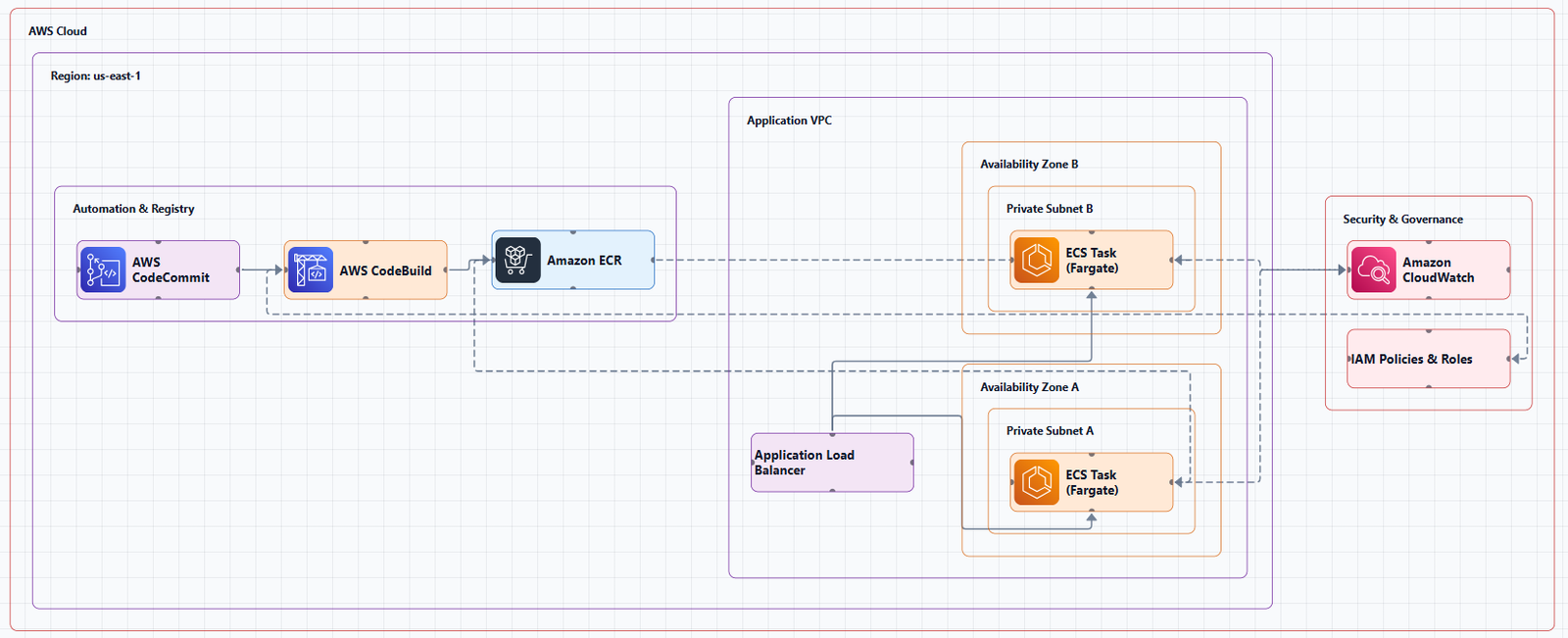
For your first design, the Three-Tier Architecture is the ideal starting point. It's the most common and well-documented pattern, separating an application into three logical and physical computing tiers:
This design improves scalability, security, and maintainability because you can develop, update, and scale each tier independently.
Reference architectures to study:
- AWS's own Guidance for Building a Containerized and Scalable Web Application
- Serverless Web Application pattern:
CloudFront → API Gateway → Lambda → DynamoDB - GitHub repositories with step-by-step implementations of Three-Tier AWS Architecture
Step 1: Define Your Requirements First
Before you launch a single resource, answer these fundamental questions:
Business and Technical Requirements:
- What problem is this architecture solving?
- Who are the users, and how will they interact with the system?
- What's the expected number of users initially, and how fast is growth expected?
- What are the acceptable latency and throughput numbers?
- What is the required uptime? What's your Recovery Time Objective (RTO) and Recovery Point Objective (RPO)?
Constraints to document early:
- Monthly cloud spend budget
- Compliance requirements (HIPAA, PCI, GDPR)
- Team skills and existing technology choices
- Timeline for delivery
Why this matters: The AWS Well-Architected Framework emphasizes testing workloads and applications at production scale before deploying them to production. You can't design for scale if you don't know what scale looks like.
Step 2: Design Your Network Foundation (VPC)
Your Virtual Private Cloud (VPC) is the foundation of your AWS architecture. Get this right and everything else is easier.
Key decisions:
| Component | Recommendation |
|---|---|
| CIDR block | Use /16 CIDR blocks for production VPCs (e.g., 10.0.0.0/16) |
| Availability Zones | Deploy across multiple Availability Zones as the minimum for production workloads |
| Subnets | Create public and private subnets in each AZ |
| Internet Gateway | Attach to allow public internet access |
| NAT Gateway | Allow private subnets to access the internet without exposing them publicly |
Production VPC design rule: Design for failure at every layer. A single Availability Zone is not production-ready.
Networking components to include:
- Security Groups (virtual firewalls for resources)
- Network ACLs (subnet-level security)
- Route Tables (directing traffic within your VPC)
Step 3: Select Your Compute Layer
Your compute choice determines how your application runs and scales.
| Service | Best For |
|---|---|
| EC2 | Full control, legacy applications, predictable workloads |
| ECS / EKS | Containerized applications, microservices |
| Lambda | Event-driven, short-lived functions, unpredictable traffic |
| EC2 Auto Scaling | Dynamic scaling based on demand |
For a first architecture, consider using EC2 with Auto Scaling Groups behind an Application Load Balancer (ALB). This gives you hands-on experience with core AWS services while providing scalability and high availability.
Step 4: Choose Storage and Database Services
Your data layer needs to be reliable, scalable, and secure.
| Type | Service | Use Case |
|---|---|---|
| Object storage | S3 | Static assets, backups, data lakes |
| Block storage | EBS | EC2 root volumes, databases |
| Relational database | RDS (Aurora, PostgreSQL, MySQL) | Transactional data, structured schemas |
| NoSQL database | DynamoDB | High-scale, low-latency key-value or document data |
For a first architecture: Use RDS with Multi-AZ for database failover. This ensures your database survives an Availability Zone failure.
Step 5: Implement Security from Day One
Security is not an afterthought, it's embedded in every decision.
Security checklist:
- IAM: Apply least-privilege permissions
- Security Groups: Act as virtual firewalls for your resources
- Network ACLs: Provide subnet-level security
- Encryption: Enable encryption at rest (EBS, S3, RDS) and in transit (TLS)
- Secrets Manager: Store database credentials and API keys securely
- VPC endpoints: Keep traffic within AWS's private network where possible
The most critical security principle: IAM is the most important thing to get right in any cloud architecture. A minor misconfiguration combined with an overprivileged identity can create a verifiable attack path to sensitive data.
Step 6: Plan for Scalability and High Availability
High availability checklist:
- Deploy across multiple Availability Zones as the minimum for production
- Use Auto Scaling Groups to automatically adjust capacity based on demand
- Use Elastic Load Balancing (ALB/NLB) to distribute traffic across healthy instances
- Design for multi-Region if your RPO/RTO requires it
- Stop guessing your capacity needs, test systems at production scale
The high availability mindset: Assume things will break. Design for recovery, not just for normal operation. The strongest cloud architectures are built not only to withstand failure but to recover predictably when failure becomes larger than expected.
Step 7: Set Up Observability
You can't operate what you can't observe.
Observability checklist:
- CloudWatch: Collect metrics, set up alarms, and monitor logs
- CloudTrail: Audit API calls for security and compliance
- AWS X-Ray: Trace requests through distributed systems
- Cost Explorer: Understand and track your cloud spend
Key principle: Design with observability in mind from day one. Monitoring tracks what you predicted could fail; observability tells you why it's failing.
Step 8: Document with an Architecture Diagram
An architecture diagram is how you communicate your design to your team, stakeholders, and future maintainers.
What to include in your diagram:
- All AWS services with official AWS icons
- Clear labels (e.g., "Amazon RDS (PostgreSQL)", not just "DB")
- Network boundaries (VPCs, subnets, Availability Zones)
- Data flow arrows showing direction of requests, storage, and responses
- Security boundaries (Security Groups, IAM roles)
Tools that help:
AI Line Studio can turn a plain-language description of your system into a production-ready diagram in 15 to 20 seconds, using official AWS icons. The AI cloud diagram generator helps you iterate quickly during design sessions. The AI architecture diagram builder enables collaborative editing and refinement, and the AI system architecture generator creates end-to-end diagrams for complex systems. The cloud architecture diagram tool provides editable templates with official icons to get you started.
Step 9: Build with Infrastructure as Code
Manual clicking in the AWS Console is fine for learning, but for a production-ready design, you need Infrastructure as Code (IaC).
IaC tool options:
| Tool | Best For |
|---|---|
| Terraform | Multi-cloud, mature ecosystem, declarative syntax |
| AWS CloudFormation | AWS-native, integrates with other AWS services |
| AWS CDK | Developers who prefer programming languages over YAML/JSON |
Key IaC practices:
- Store all IaC in version control (Git)
- Use modules to group related resources
- Separate dev, staging, and production configurations
- Store Terraform state remotely (e.g., in an S3 bucket with DynamoDB locking)
Step 10: Validate Against the Well-Architected Framework
The AWS Well-Architected Framework provides a structured way to evaluate your architecture across six pillars:
| Pillar | What It Evaluates |
|---|---|
| Operational Excellence | Run and monitor systems effectively |
| Security | Protect data and systems |
| Reliability | Prevent and recover from failures |
| Performance Efficiency | Use resources efficiently |
| Cost Optimization | Avoid unnecessary costs |
| Sustainability | Minimize environmental impact |
Action: Use the AWS Well-Architected Tool, a free tool in the AWS Management Console, to review your architecture against these six pillars and adopt architectural best practices. The Framework helps you learn architectural best practices for designing and operating reliable, secure, efficient, cost-effective, and sustainable workloads.
Production Readiness Checklist
Before you deploy, run through this checklist:
- Deployed across multiple Availability Zones
- Auto Scaling configured for compute resources
- RDS Multi-AZ enabled for database failover
- IAM least-privilege policies applied
- Security Groups restrict access appropriately
- Encryption enabled at rest and in transit
- CloudWatch alarms configured for key metrics
- CloudTrail enabled for audit logging
- Cost alerts set up
- Architecture diagram created and documented
- Infrastructure as Code stored in version control
- Well-Architected Framework review completed
External Resources
- AWS Well-Architected Framework, the definitive guide for making key design decisions
- AWS Well-Architected Tool, free tool to review your architectures
- AWS Architecture Center, reference architectures and best practices
- AWS Architecture Icons, official source for AWS product icons
- AWS Prescriptive Guidance, strategies, guides, and patterns for cloud adoption
Final Thoughts
Structuring your first AWS architecture is about following a proven process: start with a reference architecture, define your requirements, design your network foundation, choose your services thoughtfully, embed security from day one, plan for failure, and validate against the Well-Architected Framework.
The best architectures are the ones that are simple to understand, robust enough to handle failure, and flexible enough to evolve. Start with the three-tier pattern. Deploy across multiple Availability Zones. Use Infrastructure as Code. Document with clear diagrams. And always, always, validate against the Well-Architected Framework.
The cloud is constantly changing, and so should your architecture. Start simple, validate with real-world tests, and add complexity only when you need it.