
Can You Learn AWS Architecture Design Without a Cloud Job?
Yes, absolutely. You can learn AWS architecture design without a cloud job. In fact, many successful cloud architects built their skills through self-study, hands-on projects, and deliberate practice before landing their first official role.
The idea that you need a job to learn architecture is a myth. What you need is a structured approach, consistent practice, and a portfolio of work that proves you can design production-ready systems. Here's exactly how to do it.
Cloud Architecture
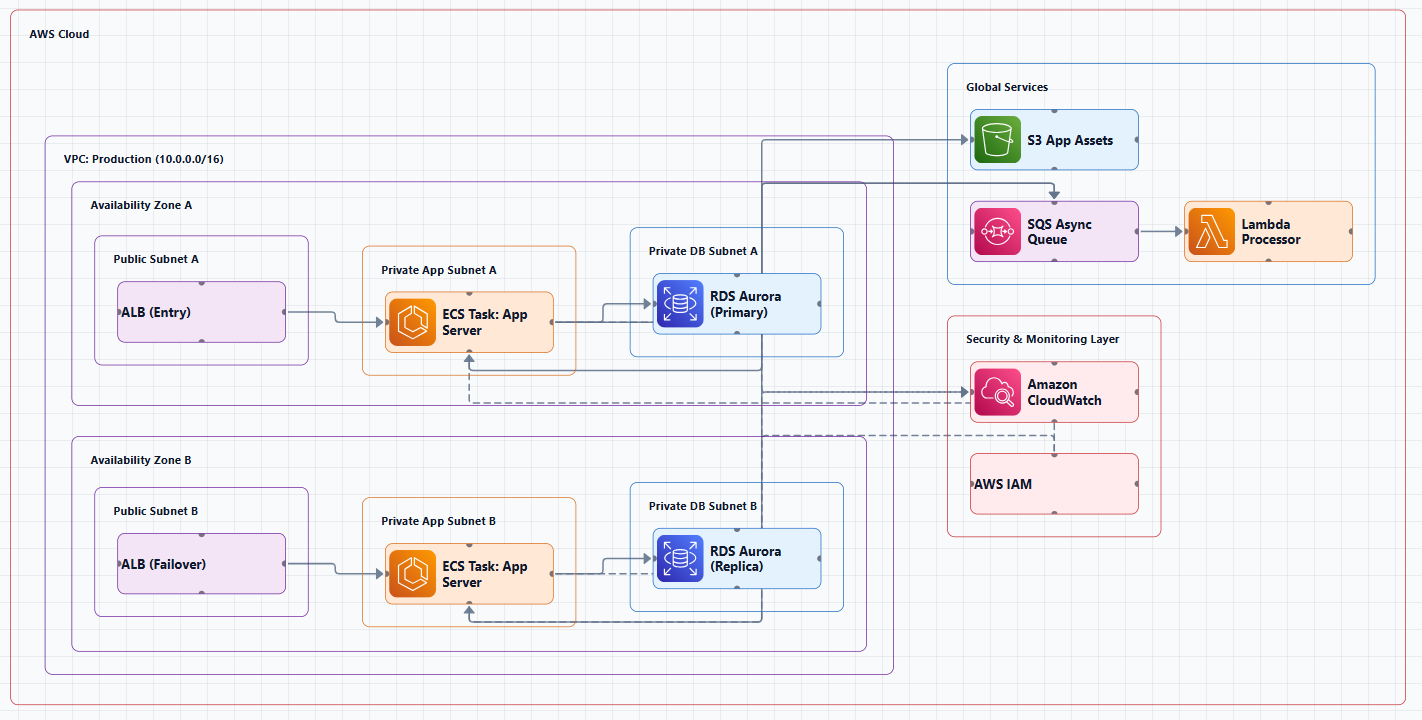
Create cloud architecture diagrams for AWS, Azure, GCP, and more. Design scalable infrastructure with professional cloud icons.
Yes, you can learn AWS architecture without a cloud job. Follow this structured path: Well-Architected foundations, core services, projects, portfolio, certification, and real-world practice.
Click Cloud Architecture to open AI Line Studio and generate diagrams from natural language in seconds.
The Short Answer
You don't need a cloud job to learn AWS architecture. You need:
- Operational Excellence: Run and monitor systems effectively
- Security: Protect data and systems
- Reliability: Prevent and recover from failures
- Performance Efficiency: Use resources efficiently
- Cost Optimization: Avoid unnecessary costs
- Sustainability: Minimize environmental impact
- A structured learning path that covers core services and design principles
- Hands-on practice with real AWS services (using the Free Tier)
- Projects that demonstrate your ability to design and document architectures
- A portfolio that showcases your work to potential employers
The cloud job comes after you've built the skills. Not before.
Step 1: Build Your Foundation
Start with the AWS Well-Architected Framework
Before you design anything, understand how to design. The AWS Well-Architected Framework is the industry standard for evaluating cloud architectures. It's organized around six pillars:
AWS offers a free AWS Well-Architected Foundations course to get you started. For enterprises, there's also a free AWS Well-Architected for Enterprises course that covers best practices for running reviews and identifying architecture risks. Both are available on AWS Skill Builder.
Take the Official AWS Learning Path
AWS provides a Solutions Architect Learning Plan that removes the guesswork from where to start. It's a suggested set of digital courses built by AWS experts that you can take at your own pace. After completing this plan, you'll have skills in account security, monitoring, automation, containers, and more.
AWS also offers a downloadable Ramp-Up Guide that helps you navigate the broader set of learning materials, digital courses, blogs, and whitepapers.
Use AWS Skill Builder and AWS Builder Labs
AWS Skill Builder is the crown jewel of free cloud training resources, offering over 500 courses covering every aspect of AWS services. AWS has also launched AWS Builder Labs, 10 foundational level hands-on labs that are completely free. These labs provide guided, hands-on experience in a real AWS environment covering:
- Amazon VPC: create and configure isolated networks
- Amazon S3: create buckets and configure permissions
- Amazon EC2: launch and manage instances
- AWS IAM: manage users, groups, roles, and policies
- AWS Lambda: deploy serverless functions
- Amazon API Gateway: build and deploy APIs
- Amazon DynamoDB: create tables and perform queries
The labs are self-paced and can be retried to reinforce learning.
Step 2: Learn the Core AWS Services
You don't need to know every AWS service. Focus on the ones you'll use most often as an architect:
| Category | Core Services |
|---|---|
| Compute | EC2, Lambda, ECS, EKS |
| Storage | S3, EBS, EFS |
| Database | RDS, DynamoDB, Aurora |
| Networking | VPC, Route 53, CloudFront, API Gateway, Load Balancers |
| Security | IAM, KMS, Security Groups, WAF |
| Management | CloudWatch, CloudTrail, AWS Config |
| Integration | SNS, SQS, EventBridge, Step Functions |
How to learn them:
- Read the AWS documentation and whitepapers, there are over 250 AWS whitepapers available for free
- Complete hands-on labs for each service
- Build small projects that combine multiple services
Step 3: Design and Document Architectures
This is where you transition from knowing services to thinking like an architect.
Practice with Reference Architectures
AWS provides reference architecture diagrams that show vetted designs for common use cases. Study these diagrams to understand:
- How services connect
- Where to place security boundaries
- How to design for high availability
- What good looks like
Then practice recreating them from memory or modifying them for different requirements.
Create Your Own Architecture Diagrams
Architecture diagrams are how architects communicate. You need to be able to create clear, professional diagrams.
Tools to use:
- Official AWS Icons: Start with the official AWS Architecture Icons page. These are the icons used in professional diagrams.
- draw.io: Free, widely used, and includes built-in AWS shape libraries
- Lucidchart: More polished, with AWS integrations
- AI Line Studio: Generate production-ready diagrams from plain-language descriptions in 15 to 20 seconds. The AI cloud diagram generator can help you quickly visualize architectures you're learning about. The AI architecture diagram builder and AI system architecture generator also support learning through rapid iteration.
What to practice:
- Three-tier web applications
- Serverless architectures (API Gateway + Lambda + DynamoDB)
- Microservices on ECS or EKS
- Data pipelines (S3 + Glue + Redshift)
- Disaster recovery and high-availability designs
Step 4: Build a Portfolio of Projects
This is the most important step. A portfolio of real projects proves you can do the work.
Project Ideas
Beginner:
- Host a static website on S3 with CloudFront for global delivery
- Build a serverless resume using the Cloud Resume Challenge
- Create a simple API with API Gateway, Lambda, and DynamoDB
Intermediate:
- Design and implement a highly available, scalable web application with ALB, Auto Scaling, and CloudWatch
- Build a data pipeline using S3, Glue, and Athena
- Deploy a containerized application on ECS or EKS
Advanced:
- Design a multi-account AWS organization with Control Tower
- Build a disaster recovery architecture across regions
- Implement a CI/CD pipeline with CodePipeline, CodeBuild, and CodeDeploy
Where to Find Project Ideas
- GitHub repositories like
aws-samples/sample-portable-app-deploy-on-awsdemonstrate various deployment options - AWS Proof of Concepts repositories show different architectural approaches
- AWS learning paths include project-based exercises
- Udemy courses like "Learning Cloud Architecture: From Ideas to Practical Design" align designs with the AWS Well-Architected Framework
Document Your Projects
For each project, create:
- An architecture diagram showing the full system
- A written explanation of your design decisions
- The tradeoffs you considered
- How you handled security, cost, and scalability
This documentation becomes your portfolio. Share it on GitHub, LinkedIn, or a personal website.
Step 5: Get Certified
Certifications validate your knowledge and help you get past HR filters.
Recommended path:
- AWS Certified Cloud Practitioner, foundational understanding (no prior experience needed)
- AWS Certified Solutions Architect, Associate, the core architect certification
- AWS Certified Solutions Architect, Professional, advanced design skills
The Associate certification demands a deeper understanding of AWS service integrations and the ability to design cost-effective, performance-optimized solutions.
But remember: Certifications alone don't make you an architect. They validate knowledge; experience (even self-built) proves capability.
Step 6: Apply Your Skills in Real-World Scenarios
Use AWS Free Tier
AWS offers a generous Free Tier that includes many services at no cost. You can build real, working systems without spending money.
Try Free Virtual Internships
AWS offers a free virtual internship program that replicates the real responsibilities of a Solutions Architect. Tasks include understanding AWS services, designing cloud solutions, and making architecture decisions based on client needs. The program takes 1-2 hours, is self-paced, and provides a certificate of completion.
Join Cloud Communities
- AWS subreddits and forums
- Local AWS user groups (many are free)
- Online communities like the AWS Community on LinkedIn
These communities provide feedback on your designs, answer questions, and help you learn from others' experiences.
The Timeline: How Long Does It Take?
| Milestone | Typical Time |
|---|---|
| Foundational understanding | 1-3 months |
| Core services proficiency | 3-6 months |
| First architecture projects | 3-6 months |
| Associate certification | 3-6 months |
| Job-ready portfolio | 6-12 months |
This is a rough estimate. Some people move faster; others take longer. The key is consistent practice, not speed.
Common Mistakes to Avoid
Mistake 1: Passive learning only. Watching videos and reading docs won't make you an architect. You need to build.
Mistake 2: Ignoring the Well-Architected Framework. Certifications teach services; the framework teaches how to design with them.
Mistake 3: Not documenting your work. If you can't show what you've built, it's hard to prove you can do the job.
Mistake 4: Trying to learn everything. Focus on core services first. You can always learn more later.
Mistake 5: Waiting for permission. You don't need a job to start building. Start today.
External Resources
- AWS Solutions Architect Learning Plan, official AWS learning path
- AWS Skill Builder, 500+ free courses and labs
- AWS Builder Labs, 10 free hands-on labs
- AWS Well-Architected Framework, foundation for architectural design
- AWS Architecture Icons, official icons for diagrams
- AWS Reference Architecture Diagrams, vetted designs to study
- AWS Whitepapers, 250+ deep-dive technical documents
- AWS Free Tier, build real systems at no cost
- AWS Virtual Internship, free 1-2 hour job simulation
- GitHub AWS Project Repositories, sample projects to learn from
Final Thoughts
You can absolutely learn AWS architecture design without a cloud job. The path is clear: learn the framework, master core services, build projects, document your work, and get certified. The job will follow the skills, not the other way around.
The most successful architects I know didn't wait for permission. They started building, in their own accounts, on their own time, with their own projects. They made mistakes, learned from them, and kept going. That's how you become an architect.
Start today. Pick one service. Build something small. Document it. Then build something bigger. The cloud is waiting.