
The Online Azure Diagram Drawing Tool That Finally Makes Azure Architecture Visualizations Painless
Let's be honest. You're a US Azure cloud architect, DevOps engineer, or IT manager. You've spent countless hours hunched over Visio, Lucidchart, or Draw.io, hunting for the right Azure icons, aligning connection points, and manually dragging boxes for complex Azure architectures. Then someone changes a subnet, and you start all over again. It's tedious, error-prone, and frankly, a waste of your engineering team's billable hours.
An online Azure diagram drawing tool should make your life easier, not harder. Yet traditional tools treat you like a graphic designer, not an Azure architect.
In 2026, Azure is widening its lead over AWS, now the primary cloud provider for 55% of surveyed US CIOs, with Azure representing 46% of expected cloud spending. American enterprises are running mission-critical workloads on Azure, and US compliance standards (SOC2, HIPAA, FedRAMP) demand clear, up-to-date architecture documentation. An online Azure diagram drawing tool powered by AI changes the game entirely, turning plain English descriptions into professional, production-ready Azure diagrams in under two minutes.
AI Line Studio's online Azure diagram drawing tool is purpose-built for Azure architects. Native Azure service icons. AI-powered generation. No manual dragging. Just instant clarity. An online Azure diagram drawing tool that actually works is the single biggest productivity unlock for US Azure teams in 2026. Here's why you need one yesterday.
Cloud Architecture
Create cloud architecture diagrams for AWS, Azure, GCP, and more. Design scalable infrastructure with professional cloud icons.
Stop wrestling with Visio. Generate Azure architecture diagrams in 2 min with our online Azure diagram drawing tool. Save your US team thousands. Try free.
Click Cloud Architecture to open AI Line Studio and generate diagrams from natural language in seconds.
What Is an Online Azure Diagram Drawing Tool? (And Why US Teams Are Switching in 2026)
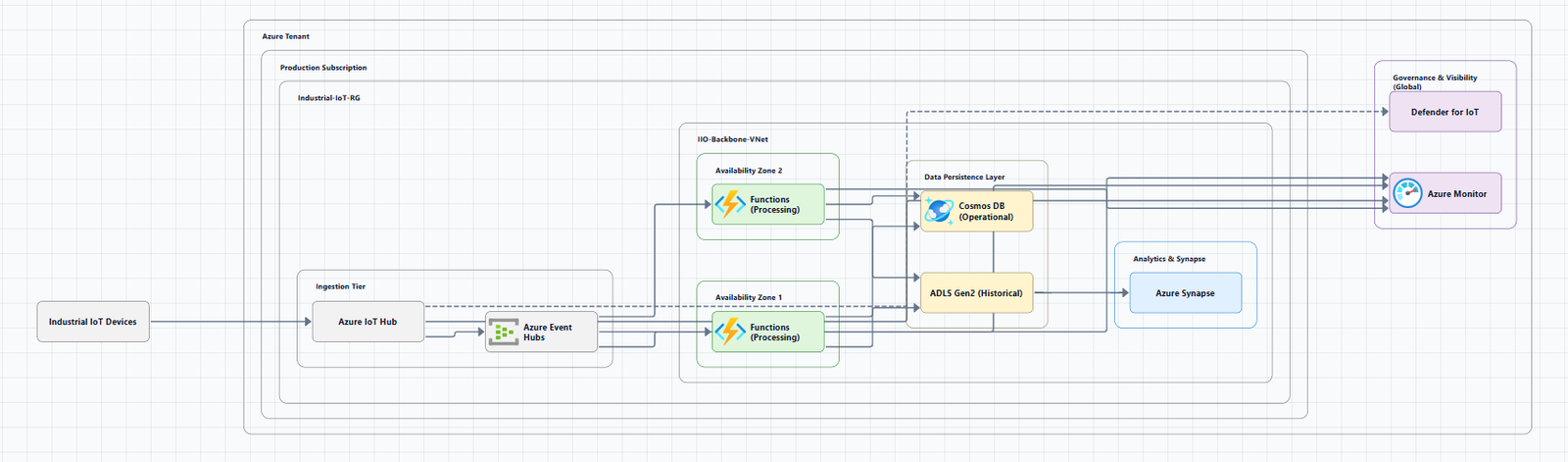
An online Azure diagram drawing tool is a browser-based application that enables cloud architects and engineers to create professional Azure architecture diagrams, without installing desktop software. Unlike traditional desktop tools like Visio, an online Azure diagram drawing tool is accessible from anywhere, supports real-time collaboration, and can be AI-powered to generate diagrams from natural language descriptions.
Why are US Azure architects moving away from desktop-based tools to cloud-native, online solutions? Three reasons: accessibility, collaboration, and speed.
First, an online Azure diagram drawing tool works in any browser, no installation, no license headaches, no "which version of Visio do I have?" Second, US Azure teams managing East Coast, West Coast, and Central US regions need real-time collaboration. An online Azure diagram drawing tool lets distributed teams work on the same diagram simultaneously. Third, AI-powered online Azure diagram drawing tools, like our cloud diagram generator, generate diagrams from plain English descriptions in seconds, not hours.
US companies are ditching Visio for online Azure diagram drawing tools in 2026 because the diagramming landscape has fundamentally shifted. As one industry observer noted, "We no longer just 'draw' diagrams; we generate them, code them, and collaborate on them in real-time." With 95% of US CIOs expecting their cloud budgets to increase in 2026, speed and efficiency aren't optional, they're survival.
Top 5 Benefits of Using an Online Azure Diagram Drawing Tool
- Instant Collaboration Across Time Zones, US Azure teams using an online Azure diagram drawing tool reduce documentation time by 50%. Distributed teams across East Coast, West Coast, and Central US can edit the same diagram in real-time. No more emailing Visio files back and forth like it's 2005.
- Zero Installation, Zero Headaches, An online Azure diagram drawing tool runs in your browser. No desktop software to install. No license keys to manage. No version compatibility issues. Just open a tab and start diagramming. US IT managers love the reduced administrative overhead.
- AI-Powered Generation from Plain English, Type "AKS cluster with Azure SQL Database, Redis Cache, and Application Gateway with WAF" and an AI-powered online Azure diagram drawing tool generates the complete diagram instantly. No manual dragging. No hunting for icons. Just instant clarity.
- Native Azure Icon Libraries, A proper online Azure diagram drawing tool uses official Azure service icons, not generic boxes. Your diagrams look professional and follow Microsoft's architecture conventions. US enterprises running mission-critical workloads on Azure need this level of polish for stakeholder presentations and compliance documentation.
- Audit-Ready Documentation, US compliance standards (SOC2, HIPAA, FedRAMP) demand clear, up-to-date architecture documentation. An online Azure diagram drawing tool ensures your diagrams are always current. Export to PNG, SVG, or PDF with one click. Your auditors will thank you.
AI Line Studio vs. Traditional Azure Diagram Tools (Visio, Lucidchart, Draw.io)
Legacy tools like Visio, Lucidchart, and Draw.io were built for a different era. Visio defaults to professional-looking diagrams but "lacks hugely on the collaboration and engineering design templates side." Draw.io is free but requires manual dragging for every single component. And none of them truly understand Azure.
AI Line Studio's online Azure diagram drawing tool flips this model entirely. Our AI understands Azure services natively, Azure Functions, AKS, Azure SQL, Virtual Networks, App Services, Blob Storage, Azure DevOps, and more. Type "three-tier Azure architecture with App Service, SQL Database, and Blob Storage behind Application Gateway" and our online Azure diagram drawing tool produces a complete, professional diagram in seconds.
Compare that to traditional tools, Azure teams spend hours drawing architecture diagrams that become outdated the same week. The Azure Architecture Diagram Builder from Microsoft has evolved into an agent-ready platform with conversational design, but it's a Microsoft tool for Microsoft users. AI Line Studio's online Azure diagram drawing tool is built for everyone, enterprise-grade, browser-based, and AI-first.
No searching for the right shape. No alignment struggles. No "where does the VNet fit?" confusion. With AI Line Studio, your online Azure diagram drawing tool updates instantly when you change the description. Export to PNG, SVG, or PDF with one click. Share with your team immediately.
Step-by-Step: How to Create Azure Architecture Diagrams in Under 2 Minutes
Ready to see how fast an online Azure diagram drawing tool can work? Here's your two-minute workflow:
Step 1: Describe Your Azure Architecture, Type a plain English description into AI Line Studio's online Azure diagram drawing tool. Example: "Azure architecture with Application Gateway with WAF, App Service hosting a web API, Azure SQL Database with geo-redundancy, Blob Storage for static assets, and Azure Functions for background processing. Use AKS for containerized microservices."
Step 2: Select Azure Services, Our online Azure diagram drawing tool natively supports Azure Functions, AKS, Azure SQL, Virtual Networks, App Services, Blob Storage, Azure DevOps, Cosmos DB, Event Hubs, and 100+ other Azure services. The AI automatically selects the right icons and places them correctly.
Step 3: Hit Generate, Watch our AI build your Azure architecture diagram in 10 to 15 seconds. The online Azure diagram drawing tool handles all formatting, VNet boundaries, subnet placement, and service dependencies automatically. No manual dragging. No "let me just fix this one arrow" rabbit holes.
Step 4: Refine via Chat, "Add a Redis Cache in front of the database" or "Make the AKS cluster zone-redundant." Our online Azure diagram drawing tool updates instantly, no manual redrawing required. Each message refines the current canvas, compounding naturally the way it would with a human architect at a whiteboard.
Step 5: Export and Share, One click to PNG, SVG, or PDF. Embed in Confluence, attach to an architecture review, or drop into an executive presentation. Your online Azure diagram drawing tool output is presentation-ready and audit-ready.
Looking for more Azure visualization options? Check out our cloud architecture diagram tool for enterprise-grade multi-cloud diagrams.
Best Practices for Azure Architecture Diagramming in US Enterprises
Designing Azure architecture diagrams for US enterprises requires more than just placing icons. Here's how to get it right with your online Azure diagram drawing tool:
- Follow the Azure Well-Architected Framework, The Well-Architected Framework provides five pillars for architectural excellence: Reliability, Security, Operational Excellence, Performance Efficiency, and Cost Optimization. Use your online Azure diagram drawing tool to visualize how your architecture addresses each pillar. A well-designed visualization helps executives, security reviewers, and business stakeholders reach consensus, surface risks early, and reduce rework. For reference architectures and design principles, see the Microsoft Azure Architecture Center.
- Tag Resources and Show Boundaries, US enterprises running FedRAMP workloads need clear security boundaries. Use your online Azure diagram drawing tool to show VNets, subnets, NSGs, and private endpoints explicitly. Azure Government customers need zone-redundant, compliant, mission-ready cloud capabilities, your diagrams should reflect that.
- Include Cost and Region Metadata, Modern Azure diagram tools can include cost badges and region metadata directly on the image. Use your online Azure diagram drawing tool to show which regions your resources are deployed in, East US, West US, Central US, and estimated costs. US finance teams love this visibility.
- Design for Scalability and High Availability, US enterprises need Azure architectures that scale from pilot to production. Your online Azure diagram drawing tool should show auto-scaling policies, availability zones, and geo-redundancy. With Azure now the primary cloud for 55% of US CIOs, scalable architectures aren't optional, they're survival.
Conclusion
Manual diagramming is a relic of the pre-AI era. AI Line Studio's online Azure diagram drawing tool is the future, instant, AI-powered, and built for the complexity of modern Azure architectures. Whether you're documenting a simple web app or a global enterprise deployment with AKS, Azure SQL, and multi-region failover, our online Azure diagram drawing tool turns hours of work into seconds. Stop wrestling with Visio. Start diagramming Azure the right way. Your engineering team, and your bottom line, will thank you. Try AI Line Studio's online Azure diagram drawing tool free today.
Frequently Asked Questions
We offer a free trial of AI Line Studio's online Azure diagram drawing tool so you can experience the speed difference firsthand. Generate your first three Azure architecture diagrams for free, no credit card required. See why US Azure teams are ditching Visio for AI-powered tools in 2026.