
What Should Your AWS Architecture Look Like? A Practical Guide
A well-designed AWS architecture isn't about using every service available. It's about making intentional, balanced decisions that align with your specific business and technical requirements. A good architecture is secure, reliable, performant, cost-efficient, and easy to operate.
This guide provides a practical framework for what your AWS architecture should look like and how to build it.
Cloud Architecture
Create cloud architecture diagrams for AWS, Azure, GCP, and more. Design scalable infrastructure with professional cloud icons.
Practical framework for what a good AWS architecture should look like, Well-Architected pillars, core patterns, service selection, diagramming, and best practices for production systems.
Click Cloud Architecture to open AI Line Studio and generate diagrams from natural language in seconds.
1. The Foundation: The AWS Well-Architected Framework
Before you draw a single box, you need a set of principles to guide your decisions. The AWS Well-Architected Framework is the industry standard for this. It's structured around six pillars that help you assess how well your architecture aligns with AWS best practices.
- Operational Excellence: Run and monitor systems to deliver business value, and continually improve supporting processes and procedures.
- Security: Protect information, systems, and assets while delivering business value through risk assessments and mitigation strategies.
- Reliability: Prevent and quickly recover from failures to meet business and customer demand.
- Performance Efficiency: Use computing resources efficiently to meet system requirements, and maintain that efficiency as demand changes and technologies evolve.
- Cost Optimization: Avoid unnecessary costs and run systems to deliver business value at the lowest price point.
- Sustainability: Minimize the environmental impacts of running cloud workloads.
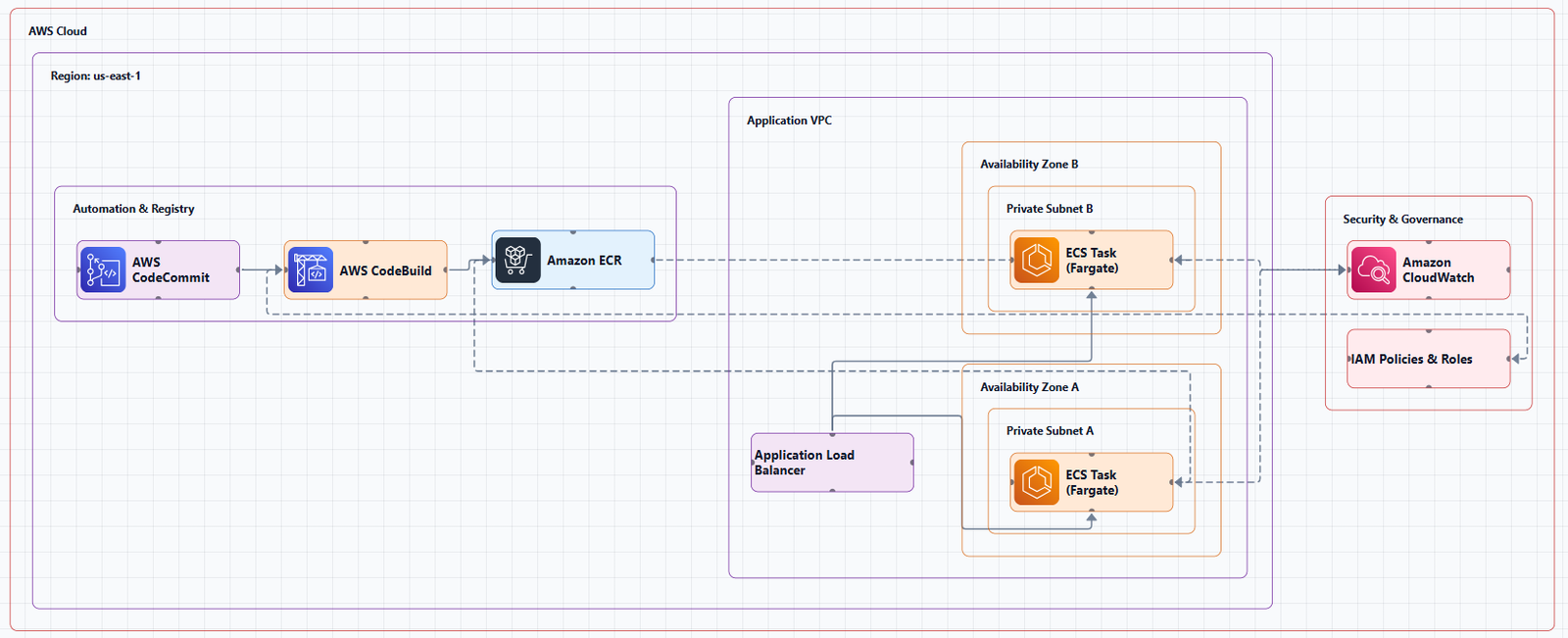
The six pillars are:
How to use it: For any design decision, ask yourself: "How does this choice impact each pillar?" A technically perfect design that's too expensive or insecure is a failed design. The framework helps you catch issues that a simple pattern guide cannot encode for your specific workload.
2. What a "Good" AWS Architecture Looks Like: Core Patterns
While every architecture is unique, successful ones often follow proven patterns. Here are the most common and robust patterns to use as a starting point.
The Three-Tier Architecture (The Classic Web App)
This is the backbone of many production systems at scale. It logically separates an application into three distinct layers:
- Presentation (Web) Tier: Serves the user interface, often using Amazon CloudFront, Amazon S3 for static assets, and Amazon API Gateway.
- Application Tier: Contains the business logic, typically running on Amazon EC2, Amazon ECS, or AWS Lambda.
- Data Tier: Manages data storage and retrieval, using services like Amazon RDS, Amazon DynamoDB, or Amazon S3.
Key components for a robust design:
- Network Segmentation: Use Amazon VPC to create public and private subnets.
- High Availability: Deploy across multiple Availability Zones (Multi-AZ) within a region.
- Security: Implement security groups at every layer.
- Scalability: Use Auto Scaling Groups for EC2 or serverless services that scale automatically.
Serverless Web Application (The Modern Default)
For many new applications, a serverless approach is the simplest and most scalable starting point:
- User Interface: Static assets hosted in Amazon S3.
- Content Delivery: Amazon CloudFront for global content delivery.
- Authentication: Amazon Cognito for user management.
- API Layer: Amazon API Gateway to handle requests.
- Business Logic: AWS Lambda functions for backend processing.
- Database: Amazon DynamoDB for a serverless, scalable database.
This pattern eliminates server management, scales automatically, and you only pay for what you use.
Microservices on Containers (For Complex, Independent Teams)
When you have multiple teams owning different services, containers and orchestration provide the necessary flexibility:
- Orchestration: Amazon EKS (Kubernetes) or Amazon ECS.
- Compute: AWS Fargate for a serverless container experience, or EC2 for more control.
- Service Communication: Use Amazon API Gateway or an Application Load Balancer (ALB).
- Data: Each microservice typically owns its own data store.
- Event-Driven Communication: Use Amazon SNS, Amazon SQS, or Amazon EventBridge to decouple services.
Data and Analytics Architecture
For data pipelines, a layered approach is critical. The "medallion" architecture (Bronze, Silver, Gold) is a robust pattern:
- Ingestion: Amazon Kinesis for real-time, AWS DMS for database migration, AWS AppFlow for SaaS data.
- Storage - Bronze (Raw): Amazon S3.
- Processing: AWS Glue (ETL), Amazon EMR (Spark), or AWS Lambda for lightweight transformations.
- Storage - Silver (Cleaned): Amazon S3 in open formats like Parquet.
- Storage - Gold (Curated): Amazon Redshift or Amazon S3 with Amazon Athena.
- Cataloging: AWS Glue Data Catalog to manage metadata.
- Orchestration: AWS Step Functions or Amazon MWAA (Airflow).
- Consumption: Amazon Athena, Amazon QuickSight, or Amazon SageMaker.
3. Key Decision Points: "What Should I Use?"
The most common question for any architect is service selection. Here's a decision framework to guide you:
| Requirement | Recommended Service |
|---|---|
| Compute (Virtual Machines) | Amazon EC2 (full control) |
| Compute (Containers) | Amazon ECS or Amazon EKS (orchestration) |
| Compute (Serverless) | AWS Lambda (event-driven, short-lived) |
| Compute (Batch) | AWS Batch |
| Relational Database | Amazon RDS (managed) or Amazon Aurora (high performance) |
| NoSQL Database | Amazon DynamoDB (serverless, key-value) |
| Object Storage | Amazon S3 |
| File Storage | Amazon EFS (Linux) or Amazon FSx (Windows) |
| API Management | Amazon API Gateway |
| Load Balancing | Application Load Balancer (ALB) (HTTP/HTTPS) or Network Load Balancer (NLB) (TCP/UDP) |
| DNS | Amazon Route 53 |
| Content Delivery | Amazon CloudFront |
| Messaging (Queue) | Amazon SQS |
| Messaging (Pub/Sub) | Amazon SNS |
| Event Bus | Amazon EventBridge |
| Orchestration | AWS Step Functions (serverless) or Amazon MWAA (Airflow) |
| Monitoring | Amazon CloudWatch |
4. Creating Your Architecture Diagram
Once you've made your design decisions, the next step is to document them. Architecture diagrams are the universal language for communicating your design to stakeholders, operations teams, and future maintainers.
AI Line Studio is an AI-powered platform that can turn your plain-language descriptions into production-ready architecture diagrams in about 15 to 20 seconds. Instead of manually drawing boxes and arrows, you describe your system and get a structured, professional-grade visual instantly.
It supports over 3,000 officially licensed icons across AWS, Azure, GCP, and OCI, and exports animated diagrams (GIF, MP4) for presentations. The AI cloud diagram generator helps you iterate faster during design sessions. For end-to-end system design, the AI system architecture generator can create complete architectures. The cloud architecture diagram tool provides editable templates with official icons for common deployment patterns.
However, there is an honest limitation: AI Line Studio is an early-stage product. Complex descriptions may need manual cleanup, and it's not a zero-review tool for mission-critical documentation. Always review and validate AI-generated diagrams before sharing them.
AWS also provides official reference architecture diagrams that you can download and customize. Many of these come as editable PowerPoint files, which is a great way to get started. The AWS Architecture Center is the best place to find these.
External Resources
- AWS Well-Architected Framework, The foundational guide for making key design decisions.
- AWS Architecture Center, Reference architectures, best practices, and design guidance.
- AWS Architecture Icons, Official source for AWS product icons.
- AWS Prescriptive Guidance, Strategies, guides, and patterns for cloud adoption and modernization.
Final Thoughts
A good AWS architecture is not about using the latest or most complex service. It's about making intentional, balanced decisions that align with your business needs. Start by grounding your design in the AWS Well-Architected Framework. Use proven patterns like the three-tier or serverless web application as a starting point. Choose services based on a clear decision framework. And always, always document your decisions with clear, accurate diagrams.
The best architectures are the ones that are simple to understand, robust enough to handle failure, and flexible enough to evolve. Start simple, validate with real-world tests, and add complexity only when you need it.