
Azure Cloud Architecture Generator: Diagrams in 20 Seconds
An Azure cloud architecture generator can produce clean, enterprise-ready diagrams in 15 to 20 seconds using official Azure components. AI Line Studio's Cloud Architecture feature is built on a simple premise: stop drawing, start explaining. After registering, you land on the Workspace page, click Cloud Architecture, and select Azure to initiate generation. The tool structures compute, storage, networking, and other Azure services into a layout that makes your system design immediately understandable to engineers and stakeholders.

YouTube Tutorial
Azure Cloud Architecture Generator: Create Diagrams in 20 Seconds - Tutorial 8
What an Azure Cloud Architecture Generator Actually Does
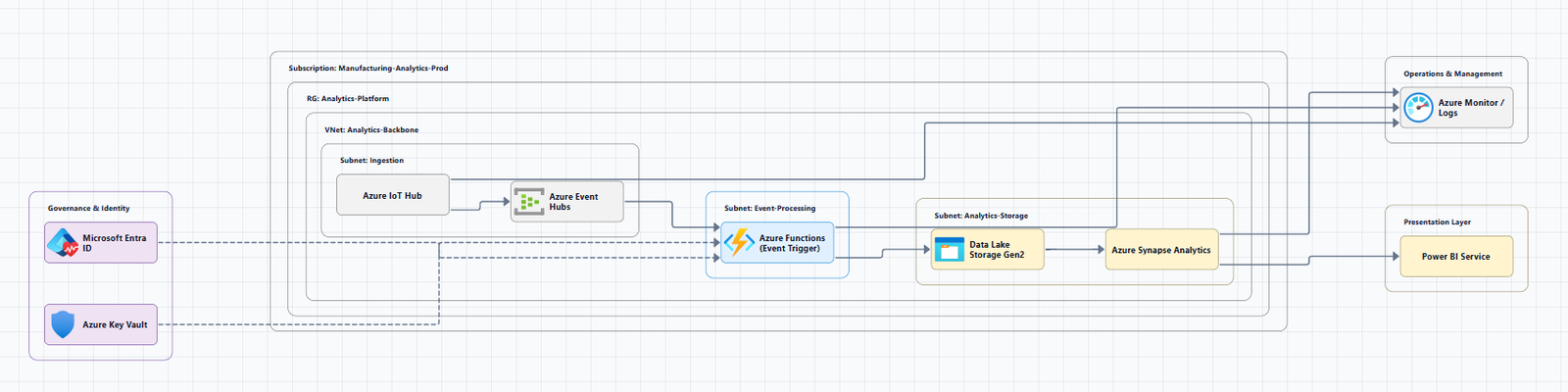
The phrase "stop drawing, start explaining" is not a marketing tagline. It is the core design philosophy behind AI Line Studio's Cloud Architecture feature. Traditional diagramming forces you to drag icons, align boxes, and manage connectors before you can communicate an idea. The generator reverses that order. You describe or select what you are building, and the tool produces the visual structure.
After you register on AI Line Studio, the workflow is straightforward. You land on the Workspace page, where four diagramming tools are available. Clicking on Cloud Architecture redirects you to a dedicated selector page. From there, you choose Azure as your cloud provider and initiate the AI cloud architecture diagram creation process. The interface is built for speed, not configuration overload.
The output is not a generic template with Azure logos pasted on top. The generator uses official Azure services and components, compute instances, storage accounts, virtual networks, load balancers, databases, and more, and arranges them according to the relationships that actually exist in your architecture. This means the diagram reflects real Azure topology rather than a simplified illustration.
For teams already working in Microsoft environments, this specificity matters. A diagram that shows an App Service connected to Azure SQL Database through a private endpoint communicates more to a DevOps engineer than a generic web-server-connected-to-database shape. The components are recognizable, the connections are accurate, and the layout follows Azure conventions.
How the Tool Structures Azure Services
One of the most useful aspects of the generator is its ability to organize diverse Azure services into an extremely structured layout. Whether your architecture spans compute, storage, networking, security, or analytics, the tool places each component in a spatial relationship that makes the system's data flow and dependency chain visible at a glance.
This structured representation serves a practical purpose. When an application is built on Microsoft Azure, it often involves dozens of interdependent services. A text-based architecture document or a whiteboard sketch can obscure those dependencies. The generator's layout makes them explicit. You can see which services are public-facing, which sit behind firewalls or private endpoints, where data replication occurs, and how traffic routes through load balancers or API management layers.
Having this clarity makes it significantly easier for engineers and teams to design, explain, and understand exactly how an application or system is built on Microsoft Azure. During design reviews, the diagram becomes a shared reference point. During onboarding, new team members can orient themselves to the infrastructure without reading through pages of Terraform or ARM template definitions. During incident response, the visual topology helps identify blast radius and dependency paths faster than console navigation alone.
If you are responsible for designing these systems, the cloud architecture diagram generator provides additional context on how AI Line Studio handles multi-cloud and hybrid scenarios. While this tutorial focuses on Azure, the underlying approach, structured, component-accurate, rapid generation, applies across providers.
The 15-to-20-Second Advantage
Speed is the most immediately noticeable feature. Users can generate clean, enterprise-ready Azure diagrams in just 15 to 20 seconds. That is not an incremental improvement over manual diagramming. It is a different category of tool.
In 20 seconds, you cannot manually place a dozen Azure service icons, label them correctly, draw connection lines, and apply a readable layout. In 20 seconds with the generator, you can have a reviewable first draft of a multi-tier architecture. That draft might need refinement, you may want to adjust grouping, add annotations, or change the direction of data flow, but the structural skeleton is present immediately.
This speed changes when and how diagrams get created. Instead of treating architecture diagrams as artifacts produced at the end of a design phase, teams can generate them continuously. After every sprint planning session, after every infrastructure change, after every stakeholder presentation. The cost of creating a diagram drops to nearly zero, which means the cost of keeping it current also drops.
The quality of the output supports this frequency. The diagrams are clean and professional enough to drop directly into documentation, slide decks, or compliance submissions without additional design work. For teams operating under tight deadlines or agile workflows, that polish removes a common bottleneck.
Writing Prompts That Produce Better Azure Diagrams
The generator is fast, but the quality of the output still depends on the quality of the input. Azure architectures can range from a simple single-region web app to a complex multi-region, multi-subscription setup with hybrid connectivity. The more precisely you describe your intended topology, the more accurate the generated diagram will be.
This is where how to write prompts for diagrams becomes relevant. The input guide covers techniques for specifying regions, availability zones, service tiers, and connectivity patterns in ways that the generator can parse unambiguously. Even a few well-chosen details, "the database sits in a separate virtual network with private link", can dramatically improve the fidelity of the layout.
You do not need to write infrastructure-as-code or provide JSON definitions. Natural language works. But structured natural language, with explicit service names and relationship verbs, produces better results than vague descriptions.
Who Should Use This Feature
The primary audience is technical professionals who design, deploy, or maintain systems on Microsoft Azure. That includes cloud architects mapping migration paths, platform engineers documenting shared services, and system architects validating compliance requirements against visual topologies.
It is also valuable for cross-functional communication. A well-structured Azure diagram can bridge the gap between engineering and product management, or between a development team and a security review board. When everyone is looking at the same visual representation of the infrastructure, discussions about risk, cost, and scalability become more concrete.
If you are comparing this approach against traditional diagramming tools, the breakdown of AI Line Studio vs Draw.io highlights the tradeoffs. Draw.io offers deep manual control and an extensive shape library, which is ideal for highly custom diagrams. AI Line Studio prioritizes speed, accuracy, and structured output, which is ideal for cloud architecture work where component correctness and layout clarity matter more than pixel-perfect customization.
Getting Started
To use the Azure Cloud Architecture feature, register on AI Line Studio, navigate to the Workspace page, and select Cloud Architecture. Choose Azure from the selector, provide your architecture description, and generate your diagram. The entire process from login to visual output takes under a minute.
You can try it free without entering payment information. The free plan includes access to the Cloud Architecture generator, so you can test the 15-to-20-second workflow on your own Azure projects before deciding whether to upgrade.
For more tutorials and feature guides, visit the resources hub.
Key Takeaways
- An Azure cloud architecture generator can produce clean, enterprise-ready Azure diagrams in 15 to 20 seconds using official Azure components.
- After registering, users access the feature from the Workspace page by selecting Cloud Architecture and choosing Azure from the selector.
- The tool structures compute, storage, networking, and other Azure services into an extremely structured layout that clarifies system design.
- The "stop drawing, start explaining" philosophy shifts focus from manual layout to architectural communication.
- The feature is available on the free plan with no payment required to start.
Ready to stop drawing and start explaining?
Register on AI Line Studio, select Azure Cloud Architecture, and generate your first diagram in under 20 seconds. You can try it free and see how fast structured Azure visuals can clarify your system design.
Try It FreeFrequently Asked Questions
It is a diagramming tool that generates professional architecture diagrams using official Azure services and components. After registering, users select Cloud Architecture from the Workspace page, choose Azure, and initiate generation.