
How to Create Architecture Diagrams for S3 and Advanced Networking
Creating architecture diagrams for Amazon S3 combined with advanced AWS networking components requires a clear understanding of how S3 fits into your network design. This guide covers everything you need, from identifying the right components, to choosing an architecture pattern, to leveraging the best tools for the job.
Cloud Architecture
Create cloud architecture diagrams for AWS, Azure, GCP, and more. Design scalable infrastructure with professional cloud icons.
Step-by-step guide to creating architecture diagrams for Amazon S3 with advanced AWS networking, VPC endpoints, Transit Gateway, Direct Connect, patterns, and tools.
Click Cloud Architecture to open AI Line Studio and generate diagrams from natural language in seconds.
Step 1: Identify Your Key Components and Plan Your Layout
Before drawing anything, map out the core AWS networking and storage components your architecture needs. A typical advanced S3 architecture involves the following:
- Internet Gateway → Public Subnet (Load Balancer) → Private Subnet (EC2) → VPC Endpoint → S3
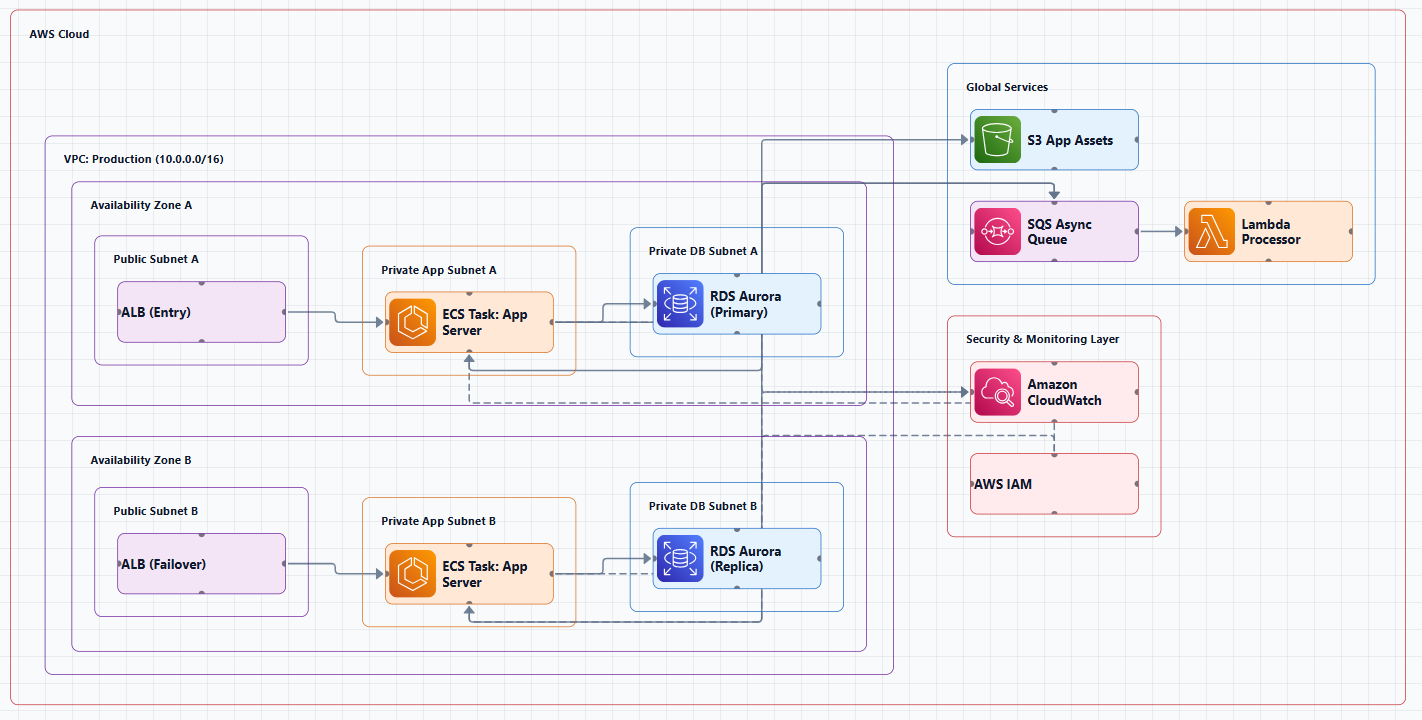
1. The Network Foundation
| Component | Description |
|---|---|
| VPC (Virtual Private Cloud) | The logical network boundary where your resources live |
| Public Subnets | For resources that need direct internet access (e.g., load balancers, bastion hosts) |
| Private Subnets | For application servers that should not be directly internet-accessible |
| Data Subnets | Dedicated private subnets for databases and data services, providing extra isolation |
| Internet Gateway (IGW) | The entry/exit point for public internet traffic |
| NAT Gateway | Allows private subnets to initiate outbound internet access (e.g., for updates) |
2. Advanced Networking Components
| Component | Purpose |
|---|---|
| VPC Endpoint (Gateway Endpoint for S3) | Enables private access from your VPC to S3 over the AWS network, bypassing the public internet |
| Transit Gateway (TGW) | A central routing hub that connects multiple VPCs, on-premises networks, and VPNs |
| Direct Connect (DX) | A dedicated, private, high-bandwidth connection from your on-premises data center to AWS |
| Direct Connect Gateway (DXGW) | Bridges your Direct Connect circuits to VPCs or Transit Gateways |
| VPN Connection | An encrypted connection over the public internet, often used as backup for Direct Connect |
3. Storage Service
| Component | Purpose |
|---|---|
| Amazon S3 | The primary object storage service |
| S3 Access Points | Named network endpoints with dedicated access policies for simplified data access control |
| S3 Storage Classes | For high-performance workloads (e.g., ML training), note the specific class, such as S3 Express One Zone, to emphasize low-latency requirements |
Step 2: Choose Your Architecture Pattern
Here are the most common architecture patterns that combine S3 with advanced networking.
Pattern 1: Private S3 Access Within a VPC
This is the most common pattern, showing a VPC where private subnets access S3 securely via a VPC Endpoint.
Example flow:
- User requests traffic from the internet to a load balancer in a public subnet
- Load balancer routes traffic to EC2 instances in private subnets
- EC2 instances access S3 via a VPC Endpoint (Gateway Endpoint) over the AWS private network
Key components:
Pattern 2: Private S3 Access with Interface Endpoints
For scenarios requiring more granular control, Interface Endpoints (powered by AWS PrivateLink) provide private IP addresses within your VPC, allowing access to S3 via a REST API.
Key components:
- VPC → Private Subnet (EC2) → Interface Endpoint (VPC Endpoint) → S3
Pattern 3: Hybrid Cloud Integration
This pattern shows how on-premises infrastructure securely connects to AWS to access S3.
Example flow:
- On-premises data center connects to AWS via Direct Connect
- Direct Connect connects to Direct Connect Gateway (DXGW)
- DXGW connects to Transit Gateway (TGW)
- TGW connects to multiple VPCs and provides centralized routing
- Applications within VPCs access S3 via VPC Endpoints
Key components:
- On-Premises → Direct Connect → DXGW → Transit Gateway → VPC → VPC Endpoint → S3
Pattern 4: Multi-Account and Multi-Region S3 Access
For larger enterprises, this pattern demonstrates how Transit Gateway and VPC Endpoints enable secure S3 access across accounts and regions.
Key components:
- Transit Gateway interconnects VPCs across multiple accounts and regions
- VPC Endpoints provide secure S3 access from within each VPC
- Route propagation ensures network routes are shared between connected networks
- IAM policies control access across account boundaries
Pattern 5: Direct Connect + Gateway Endpoint Without Transit Gateway
For simpler hybrid setups that don't require a Transit Gateway, this pattern provides private S3 access from on-premises environments:
Key components:
- On-premises data center connected via Direct Connect
- Virtual Private Gateway (VGW) attached to the VPC
- Gateway Endpoint enables private access from the VPC to S3
Step 3: Apply Diagram Best Practices
Following these best practices ensures your diagrams are professional and clear.
| Practice | How to Apply |
|---|---|
| Use official AWS icons | Always use icons from the official AWS Architecture Icons set |
| Emphasize network boundaries | Clearly draw VPCs, subnets, and security group boundaries |
| Show routing information | Document key route tables and route propagation paths |
| Follow North-South orientation | Place external users/internet at top; internal resources at bottom |
| Use grouping strategies | Group resources by function (Web, App, Data) or Availability Zone |
| Label everything | Use descriptive names (e.g., "WebServerInstance" not "Instance1") |
| Indicate data flow | Label arrows with the type of traffic (HTTPS, internal, S3 API call) |
| Use consistent colors | Use the AWS color palette for each service category (orange for compute, green for storage, purple for databases) |
Icon Placement Guidelines
| Layer | Suggested Placement | Color Theme |
|---|---|---|
| User/Internet | Top | , |
| Public Subnet Resources | Upper-middle | Orange compute icons |
| Private Subnet Resources | Middle | Blue/orange compute icons |
| Networking Hubs | Middle/Center | Purple networking icons |
| Storage Services | Bottom | Green storage icons |
| Hybrid Connectivity | Left side | Gray/dark blue |
Step 4: Tools for Creating S3 and Advanced Networking Diagrams
AI Line Studio
AI Line Studio is the fastest tool for generating AWS architecture diagrams. It turns natural language descriptions into production-ready diagrams in 15 to 20 seconds, with 3,000+ official AWS icons.
Key features:
- Prompt-first generation: Describe your architecture ("a VPC with public and private subnets, EC2 instances, and VPC endpoints for S3 access") and get a diagram instantly
- Official AWS icons: Automatically uses the correct official icons
- Animated exports: GIF and MP4 export for presentations
- Editable output: Refine and customize your diagrams
- Enterprise collaboration: Share and work with your team
Pricing: $19/month (200 generations), less than $0.10 per diagram.
Get started: Use the dedicated AWS diagram generator to create S3 and networking diagrams. For a complete workspace, explore the cloud architecture diagram tool, the AI cloud diagram generator, and the AI system architecture generator.
Other Diagramming Tools
| Tool | Best For |
|---|---|
| draw.io (diagrams.net) | Free, manual diagramming with AWS shape libraries |
| Lucidchart | Polished, collaborative AWS diagramming |
| Miro | Whiteboarding and team AWS design sessions |
| Visual Paradigm AI | AI-powered diagram generation with strategy-based design |
| MockFlow IdeaBoard | AI-powered AWS diagram generation from text descriptions |
Common Mistakes to Avoid
| Mistake | How to Avoid |
|---|---|
| Not showing private S3 access paths | Always include VPC endpoints for private S3 access in your diagram |
| Using public internet for S3 access | Show the private path via VPC endpoints, not public internet arrows |
| Ignoring routing propagation | For Transit Gateway architectures, show how routes are propagated between networks |
| Using inconsistent icon styles | Always use official AWS icons from a single source |
| Not labeling CIDR ranges | Include CIDR blocks for your VPCs and subnets in the diagram |
| Showing every detail | Show the right level of detail for your audience, don't overwhelm with every security group |
External Resources
- AWS Architecture Icons (Official), official source for AWS product icons
- AWS Architecture Center, reference architectures and best practices
- AWS Transit Gateway Documentation, Transit Gateway architecture and routing
- AWS VPC Endpoints Documentation, VPC endpoint configuration and use cases
- AWS Direct Connect Documentation, Direct Connect architecture and connectivity
- AI Line Studio Pricing, $19/month for 200 diagram generations
Final Thoughts
Creating architecture diagrams for S3 and advanced AWS networking is about clearly documenting how your storage service fits into your broader network design. The key is showing data paths, whether it's private S3 access via VPC endpoints, hybrid connectivity through Transit Gateway and Direct Connect, or cross-account routing.
The most effective S3 and networking diagrams:
- Use official AWS icons and consistent colors
- Show VPC boundaries, subnets, and security groups
- Include VPC endpoints for private S3 access
- Demonstrate route propagation and routing paths
- Show hybrid connectivity where applicable
- Tell the complete story of how data flows from users to storage
For most teams, AI Line Studio is the most efficient way to create professional S3 and networking architecture diagrams. At $19/month for 200 generations, it generates diagrams from descriptions in 15 to 20 seconds with 3,000+ official AWS icons, a fraction of the cost of traditional tools.
Remember: these diagrams are living documents. As your AWS infrastructure evolves, your diagrams must evolve too. With automation tools, keeping them current has never been easier.