
AI AWS Diagram Generator
Create accurate and production-ready AWS diagrams instantly using AI. AI Line Studios is an AI AWS diagram generator that converts your cloud setup, infrastructure, and system design into structured visual diagrams in seconds.
Whether you need an AWS architecture diagram, network diagram, or system flow, you can generate everything from simple text input without manual drawing.
Create cloud architecture diagrams for AWS, Azure, GCP, and more. Design scalable infrastructure with professional cloud icons.
Create accurate and production-ready AWS diagrams instantly using AI. AI Line Studios is an AI AWS diagram generator that converts your cloud setup, infrastructure, and system design into structured visual diagrams in seconds.
Whether you need an AWS architecture diagram, network diagram, or system flow, you can generate everything from simple text input without manual drawing.
What is an AI AWS Diagram Generator
An AI AWS diagram generator is a tool that converts descriptions of AWS systems into visual diagrams that represent services, infrastructure, and data flow.
AI Line Studios allows you to generate AWS diagrams that include services like EC2, S3, Lambda, RDS, VPC, load balancers, and more. It eliminates manual diagram creation and ensures clarity, structure, and accuracy.
Generate AWS Diagrams from Text in Seconds
With AI Line Studios, you can describe your AWS system and instantly generate a structured diagram.
You can:
- Create AWS architecture diagrams from text
- Visualize cloud infrastructure and workflows
- Generate AWS network diagrams and system flows
- Edit nodes, services, and connections instantly
- Avoid manual AWS diagram tools
This makes it one of the most efficient AI AWS diagram generators available online.
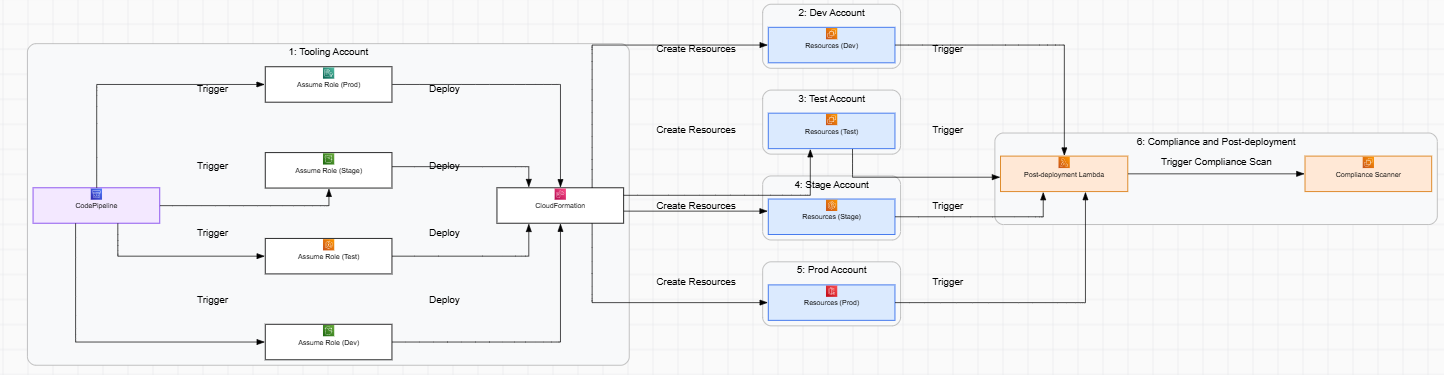
What you can generate
Generate complete diagrams with nodes, labels, and connections tailored to your scenario.
How to start
Describe your system in plain language, review the output, and refine instantly with one-click edits.
How to Create an AWS Diagram using AI Line Studios
Follow these steps to generate your AWS diagram:
Step 1: Open AI Line Studios
Go to your browser and search for ailinestudio.com. Open the website to access the platform.
Step 2: Sign Up and Log In
Click on the Sign Up button on the top right corner and log in using your Gmail account.
Step 3: Open Workspace
After logging in, you will be redirected to your workspace dashboard.
Step 4: Select Cloud Architecture
Inside the workspace, click on the Cloud Architecture option with the plus icon.
Step 5: Choose AWS Cloud Provider
You will see multiple cloud providers such as AWS, Azure, Google Cloud, Digital Ocean, and Oracle Cloud. Select AWS to generate your diagram.
Step 6: Create a New Canvas
Name your canvas based on your AWS system or diagram.
Step 7: Describe Your AWS System
In the input box on the top right, describe your AWS setup.
Example:
User requests go through load balancer, routed to EC2 instances, data stored in RDS, static content served via S3 and CloudFront
Step 8: Generate the Diagram
Click on Generate. Within 15 to 20 seconds, AI Line Studios will create your AWS diagram automatically.
Step 9: Edit and Customize Instantly
Click on any node to edit services, labels, colors, or connections. Modify everything without writing any code.
Why Use AI Line Studios for AWS Diagrams
AI Line Studios removes manual AWS diagram creation, generates diagrams from text, supports real cloud architecture patterns, allows one-click editing, and produces diagrams quickly with high clarity.
Explore all the other diagram generator
Frequently Asked Questions
An AI AWS diagram generator is a tool that converts descriptions of AWS systems into visual diagrams showing services, infrastructure, and data flow. AI Line Studios generates structured AWS diagrams automatically from text input.