
AI Kubernetes Diagram Generator
Kubernetes diagram generatorK8s architecture visualizerDiagram-as-code KubernetesKubernetes manifest to diagramInteractive K8s mapCloud architecture diagram toolK8s cluster topology viewerAutomated Kubernetes documentationKubernetes icon set downloadAI architecture generatorControl Plane visualizationWorker Node mappingIngress Controller diagramService Mesh visualizerPersistent Volume Claim (PVC) mapPod Topology viewerNamespace isolation diagramHorizontal Pod Autoscaler (HPA) logicConfigMap & Secrets mappingCRD (Custom Resource Definitions) toolBest K8s visualization tools 2026Open source K8s dashboardLens vs. K9s comparisonAWS EKS diagram generatorAzure AKS architecture templateGKE visualizerKubernetes observability stackK8s security visualizationLive cluster dashboardHelm chart visualizer
Create cloud architecture diagrams for AWS, Azure, GCP, and more. Design scalable infrastructure with professional cloud icons.
Create accurate, production-ready Kubernetes diagrams instantly using AI. AI Line Studios converts your cluster description into structured, readable visuals in seconds.
Represent control plane, worker nodes, pods, services, ingress, and storage accurately without manual drawing.
What is a Kubernetes Diagram Generator
A Kubernetes diagram generator converts cluster architecture and manifest intent into visual diagrams that show nodes, pods, services, networking, and storage relationships.
AI Line Studios generates structured cluster diagrams from text and supports real K8s architecture patterns, service meshes, and ingress flows.
How to Create a Kubernetes Diagram using AI Line Studios
Follow these steps to generate your Kubernetes diagram:
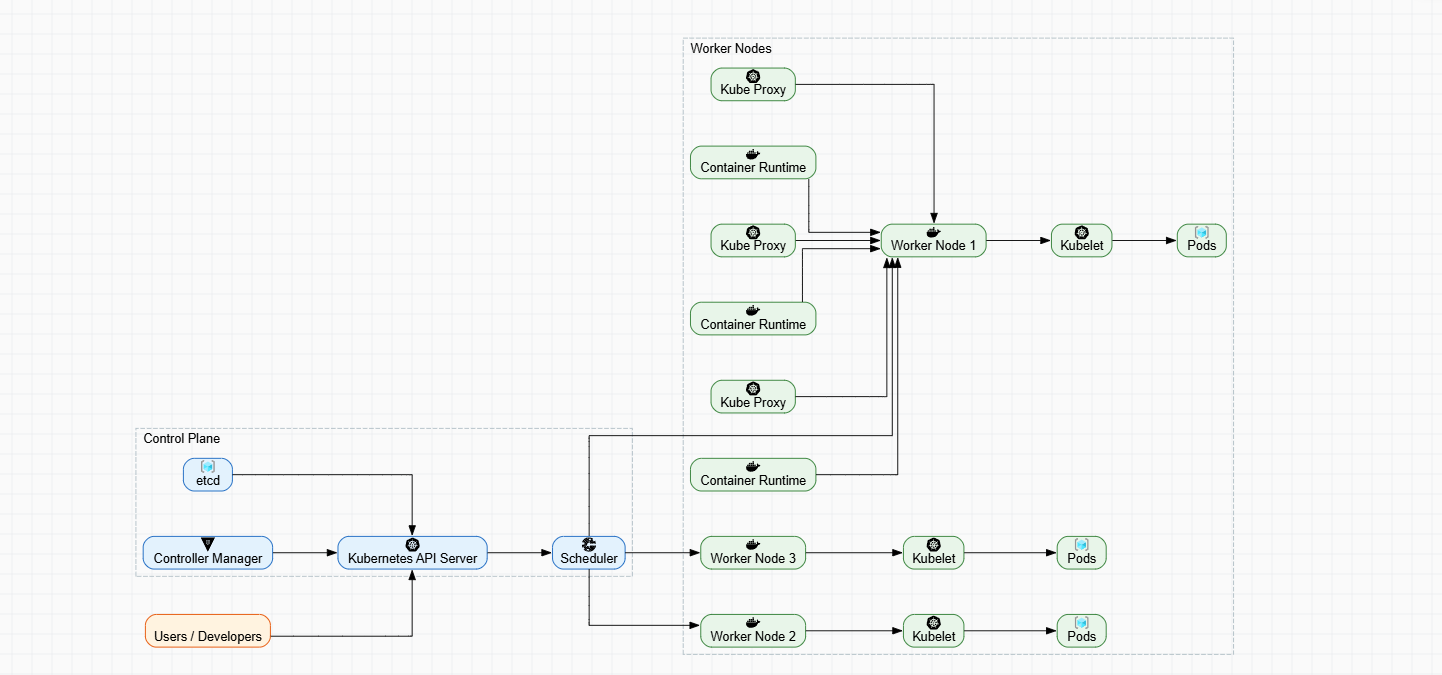
What you can generate
Generate complete diagrams with nodes, labels, and connections tailored to your scenario.
How to start
Describe your system in plain language, review the output, and refine instantly with one-click edits.
How to Create a Kubernetes Diagram using AI Line Studios
Follow these steps to generate your Kubernetes diagram:
Step 1: Open AI Line Studios
Go to your browser and search for ailinestudio.com. Open the website to access the platform.
Step 2: Sign Up and Log In
Click on the Sign Up button on the top right corner and log in using your Gmail account.
Step 3: Open Workspace
After logging in, you will be redirected to your workspace dashboard.
Step 4: Select Cloud Architecture
Inside the workspace, click on the Cloud Architecture option with the plus icon.
Step 5: Choose System Diagram
Within Cloud Architecture, select System Diagram to represent Kubernetes architecture and cluster topology.
Step 6: Create a New Canvas
Name your canvas based on your Kubernetes cluster or system.
Step 7: Describe Your Kubernetes Architecture
In the input box on the top right, describe your Kubernetes setup.
Example:
Kubernetes cluster with control plane managing worker nodes, pods running microservices, ingress controller routing traffic, services handling communication, persistent volumes storing data
Step 8: Generate the Diagram
Click on Generate. Within 15 to 20 seconds, AI Line Studios will create your Kubernetes diagram automatically.
Step 9: Edit and Customize Instantly
Click on any node to edit components, labels, colors, or connections. Modify everything without writing any code.
Why Use AI Line Studios for Kubernetes Diagrams
AI Line Studios removes manual Kubernetes diagram creation, generates structured cluster diagrams from text, supports real K8s architecture patterns, allows one-click editing, and produces diagrams quickly with high clarity.
Explore all the other diagram generator
Frequently Asked Questions
A Kubernetes diagram generator is a tool that converts cluster architecture, workloads, and system descriptions into visual diagrams showing nodes, pods, services, and networking. AI Line Studios generates these diagrams automatically from text input.