
AI Network Diagram Generator
Create accurate and production-ready network diagrams instantly using AI. AI Line Studios is an AI network diagram generator that converts your network architecture, infrastructure, and system connections into structured visual diagrams in seconds.
Whether you are designing a cloud network, enterprise infrastructure, or system topology, you can generate everything from simple text input without manual drawing.
Create cloud architecture diagrams for AWS, Azure, GCP, and more. Design scalable infrastructure with professional cloud icons.
Create accurate and production-ready network diagrams instantly using AI. AI Line Studios is an AI network diagram generator that converts your network architecture, infrastructure, and system connections into structured visual diagrams in seconds.
Whether you are designing a cloud network, enterprise infrastructure, or system topology, you can generate everything from simple text input without manual drawing.
What is an AI Network Diagram Generator
An AI network diagram generator is a tool that converts descriptions of network systems into visual diagrams that show how devices, services, and systems are connected.
AI Line Studios enables you to generate network diagrams that include servers, routers, load balancers, firewalls, databases, and communication flows. It removes the need to manually design network topologies and ensures clarity, structure, and accuracy.
Generate Network Diagrams from Text in Seconds
With AI Line Studios, you can describe your network setup and instantly generate a structured network diagram.
You can:
- Visualize network architecture and topology
- Represent connections between systems and services
- Generate diagrams for cloud and on-premise networks
- Edit any node or connection with a single click
- Avoid manual diagramming tools completely
This makes it a powerful AI network diagram generator for engineers, architects, and teams.
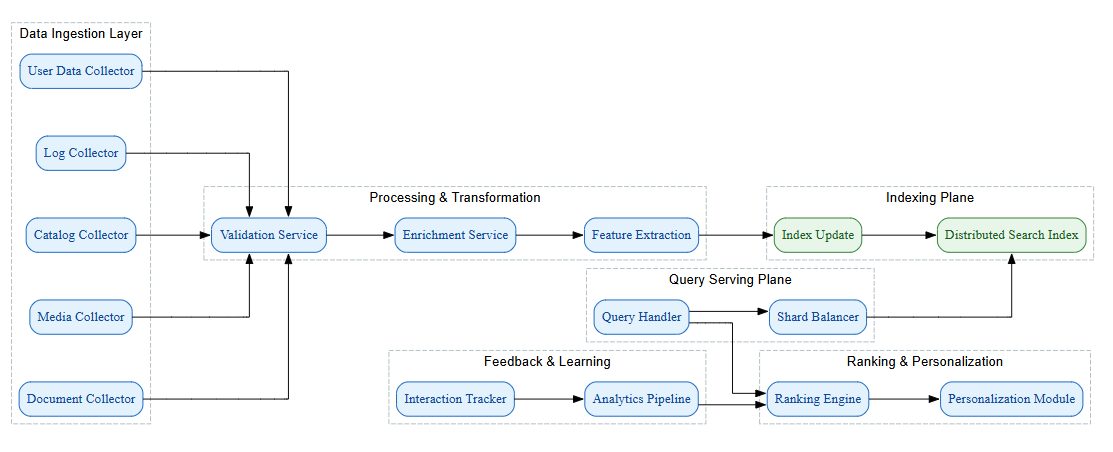
What you can generate
Generate complete diagrams with nodes, labels, and connections tailored to your scenario.
How to start
Describe your system in plain language, review the output, and refine instantly with one-click edits.
How to Create a Network Diagram using AI Line Studios
Follow these steps to generate your network diagram:
Step 1: Open AI Line Studios
Go to your browser and search for ailinestudio.com. Open the website to access the platform.
Step 2: Sign Up and Log In
Click on the Sign Up button on the top right corner and log in using your Gmail account.
Step 3: Open Workspace
After logging in, you will be redirected to your workspace dashboard.
Step 4: Select Cloud Architecture
Inside the workspace, click on the Cloud Architecture option with the plus icon.
Step 5: Choose System Diagram
After selecting Cloud Architecture, you will see multiple diagram options. Choose System Diagram, which is used to generate network diagrams.
Step 6: Create a New Canvas
Name your canvas based on your network diagram or system.
Step 7: Describe Your Network
In the input box on the top right, describe your network architecture.
Example:
User requests go through load balancer, traffic is routed to multiple application servers, firewall secures access, database stores user data
Step 8: Generate the Diagram
Click on Generate. Within 15 to 20 seconds, AI Line Studios will create your network diagram automatically.
Step 9: Edit and Customize Instantly
Click on any node to edit text, color, structure, or connections. You can modify the diagram without writing any code.
Why Use AI Line Studios for Network Diagrams
AI Line Studios eliminates manual network diagram creation, generates structured diagrams from text, supports real infrastructure and topology visualization, allows one-click editing of nodes and connections, and produces diagrams quickly with high clarity and accuracy.
Explore all the other diagram generator
Frequently Asked Questions
An AI network diagram generator is a tool that converts descriptions of network systems into visual diagrams showing devices, connections, and data flow. AI Line Studios generates structured network diagrams from text input, helping users visualize infrastructure clearly without manual design.