
AWS Automatic Network Diagram Generator, Visualize Your VPC in 2 Minutes
Let's be honest. You're a US AWS network engineer, cloud architect, or DevOps engineer. You've spent countless hours hunched over Visio, Lucidchart, or Draw.io, manually mapping VPCs, subnets, route tables, and security groups. Then someone adds a new VPC peering connection or updates a NAT Gateway, and your diagram is obsolete.
An AWS automatic network diagram generator should make your life easier, not harder. Yet traditional tools force you to drag boxes and align arrows like it's 2005.
In 2026, US AWS teams managing multi-region VPC deployments across us-east-1, us-west-2, and us-central-1 need better solutions. American enterprises running mission-critical workloads on AWS with complex network topologies can't afford outdated documentation. US compliance standards (SOC2, HIPAA, FedRAMP) require documented network architectures.
AI Line Studio's AWS automatic network diagram generator changes everything. Describe your AWS network architecture in plain English, and our AI generates professional, production-ready diagrams in under two minutes. VPCs, subnets, route tables, Internet Gateways, NAT Gateways, Transit Gateways, Security Groups, Network ACLs, we handle it all.
An AWS automatic network diagram generator that actually works is the single biggest productivity unlock for US AWS teams in 2026. Here's why.
Cloud Architecture
Create cloud architecture diagrams for AWS, Azure, GCP, and more. Design scalable infrastructure with professional cloud icons.
Generate AWS network diagrams automatically in 2 minutes. No manual dragging. Visualize VPCs, subnets, and security groups instantly. Free trial for US teams.
Click Cloud Architecture to open AI Line Studio and generate diagrams from natural language in seconds.
What Is an AWS Automatic Network Diagram Generator? (And Why US Teams Are Switching in 2026)
An AWS automatic network diagram generator is an AI-powered tool that creates visual representations of your AWS network infrastructure, automatically. Instead of manually placing icons and drawing connection lines, you describe your architecture in plain English, and the AWS automatic network diagram generator produces a clean, professional diagram in seconds.
- Time Savings, Manual network diagrams take hours. An AWS automatic network diagram generator produces them in minutes. US AWS teams using automatic generators reduce documentation time by up to 80%.
- Accuracy, Manual diagrams get outdated. An AWS automatic network diagram generator can automatically reflect changes in your AWS environment. No more "is this diagram still accurate?" guesswork.
- Compliance, US enterprises need documented network architectures for SOC2, HIPAA, and FedRAMP. An AWS automatic network diagram generator keeps you audit-ready.
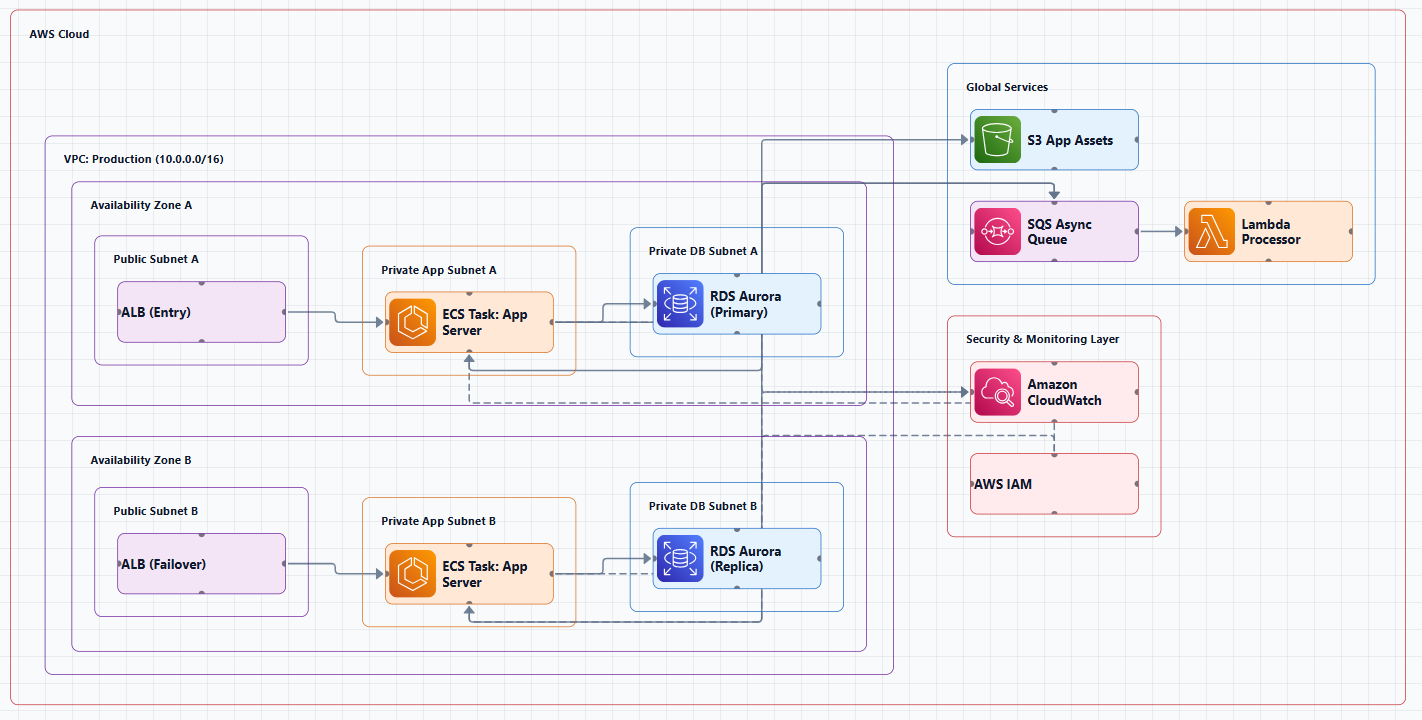
Why are US AWS engineers moving away from manual diagramming to automated solutions? Three reasons: time, accuracy, and compliance.
With generative AI, architects can now generate professional diagrams in minutes rather than hours, while adhering to AWS best practices. US cloud engineers are ditching manual Visio diagrams for AWS automatic network diagram generators in 2026, including our dedicated AWS VPC diagram generator for subnet-level designs. For official VPC guidance, see the AWS VPC documentation.
Top 5 Benefits of Using an AWS Automatic Network Diagram Generator
- Save 80% of Diagramming Time, US AWS teams using an AWS automatic network diagram generator reduce documentation time from hours to minutes. Instead of dragging boxes, you describe your network, and the AI does the rest.
- Always Up-to-Date, Your network diagrams automatically reflect changes in your AWS environment. An AWS automatic network diagram generator ensures your documentation never goes stale. No more "I need to update the diagram" delays.
- Audit-Ready Documentation, US compliance standards (SOC2, HIPAA, FedRAMP) require documented network architectures. An AWS automatic network diagram generator keeps you audit-ready with professional, accurate diagrams.
- Visualize Complex Topologies, Automatically map VPCs, subnets, route tables, security groups, Transit Gateways, VPC peering, and Direct Connect connections. An AWS automatic network diagram generator handles the complexity so you don't have to.
- Share with Your Team, Export to PNG, SVG, or PDF. Share with your US engineering team instantly. An AWS automatic network diagram generator makes collaboration seamless.
AI Line Studio vs. Traditional AWS Network Diagram Tools (Visio, Lucidchart, Draw.io)
Let's compare. When you use AI Line Studio's AWS automatic network diagram generator, you get:
- Visio: Expensive ($300+/user), Windows-only, manual dragging, outdated AWS icons, no AI. US teams are abandoning it for modern solutions.
- Lucidchart: Better collaboration, still manual, no automatic generation. You're still dragging boxes, just in a browser.
- Draw.io: Free but manual. No automatic AWS topology discovery. You're on your own.
- AI Line Studio: AI-powered, automatic generation from text descriptions, native AWS icon support, instant exports. Our AWS automatic network diagram generator is built for the way US teams work in 2026.
As one industry observer put it: "No more Visio. No more Lucidchart revisions. No more 'Can someone update this...' Just connect your AWS account, and draw the entire topology for you."
Traditional tools can't keep pace with rapid deployment cycles across AWS environments. AI Line Studio's AWS automatic network diagram generator changes that.
Step-by-Step: How to Generate an AWS Network Diagram Automatically
Ready to see how fast an AWS automatic network diagram generator can work? Here's your 2-minute workflow:
Step 1: Open your browser, Go to AI Line Studio. No installation. No downloads. No IT approvals. Just a browser tab.
Step 2: Describe your AWS network, Type a description of your AWS network architecture into our AWS automatic network diagram generator. Example: "VPC with public and private subnets across two Availability Zones, Internet Gateway, NAT Gateway in public subnets, Application Load Balancer, and VPC peering to a shared services VPC."
Step 3: Select AWS as your provider, Our AWS automatic network diagram generator natively supports all AWS networking components: VPCs, subnets, route tables, Internet Gateways, NAT Gateways, Security Groups, Network ACLs, VPC peering, Transit Gateway, Direct Connect, VPN connections, and more.
Step 4: Hit generate, Watch your AWS network diagram appear in 10 to 15 seconds. The AWS automatic network diagram generator handles all formatting, component placement, and connection mapping automatically.
Step 5: Export, share, or keep iterating, One click to PNG, SVG, or PDF. Share with your team instantly. Or refine via chat: "Add a Transit Gateway connection" and your diagram updates instantly.
Total time? Under 2 minutes. That's the power of an AWS automatic network diagram generator.
Looking for more AWS diagramming options? Check out our architecture diagram tool for cloud, enterprise, and system diagrams.
Best Practices for AWS Network Diagram Automation in US Enterprises
When you use an AWS automatic network diagram generator in a US enterprise, follow these best practices:
- Standardize Naming Conventions, Use consistent naming for VPCs, subnets, and security groups. An AWS automatic network diagram generator works best when your AWS resources follow clear naming patterns.
- Document Security Group Rules, Ensure security group rules are documented alongside network diagrams. An AWS automatic network diagram generator should show which security groups are attached to which resources.
- Show Multi-Region and Hybrid Connectivity, US enterprises often run across multiple regions. Use your AWS automatic network diagram generator to visualize VPC peering, Transit Gateway, and Direct Connect connections.
- Version Control, Track changes to your network architecture over time. An AWS automatic network diagram generator makes it easy to regenerate diagrams as your infrastructure evolves.
- Compliance Integration, Connect diagrams to your SOC2/HIPAA/FedRAMP compliance workflows. An AWS automatic network diagram generator ensures your documentation is always audit-ready.
Conclusion
Manual diagramming is dead. In 2026, US AWS network engineers use an AWS automatic network diagram generator, in their browser, with AI, in minutes. AI Line Studio is the fastest way to get started. No installation. No credit card required. Just open your browser, describe your AWS network, and get a professional diagram in under 2 minutes.
Stop wrestling with Visio. Start generating AWS network diagrams automatically. Try AI Line Studio's AWS automatic network diagram generator free today.
Frequently Asked Questions
Yes. We offer a free trial of AI Line Studio's AWS automatic network diagram generator so you can experience the speed difference firsthand. Generate your first three AWS network diagrams for free, no credit card required. See why US AWS teams are ditching Visio for AI-powered tools in 2026.