
The AWS VPC Diagram Tool That Finally Makes Network Design Fast, No More Visio Guesswork
Let's cut the crap. You're a US AWS cloud architect, DevOps engineer, or network engineer. You've spent more hours than you'd admit dragging boxes in Visio or Lucidchart just to produce a clean AWS VPC diagram. Then someone tweaks a CIDR block or adds a NAT Gateway, and your AWS VPC diagram is already stale.
American enterprises running mission-critical workloads on AWS VPC need diagrams that are accurate, audit-ready, and fast. An AWS VPC diagram tool that still forces you to hunt icons and realign arrows is a productivity black hole.
AI Line Studio's AWS VPC diagram generator turns plain English into a production-ready VPC architecture diagram in under two minutes. Public and private subnets. Route tables. Internet Gateways. NAT Gateways. Security Groups. NACLs. VPN. Peering. Transit Gateway. All of it, natively.
US cloud architects are ditching Visio for AWS VPC diagram generators in 2026. Here's why this one finally makes sense.
Cloud Architecture
Create cloud architecture diagrams for AWS, Azure, GCP, and more. Design scalable infrastructure with professional cloud icons.
Stop wrestling with Visio. Generate an AWS VPC diagram in 2 min with our AI tool. Visualize subnets, gateways & peering for US teams. Try free.
Click Cloud Architecture to open AI Line Studio and generate diagrams from natural language in seconds.
What Is an AWS VPC Diagram? (And Why US Teams Are Visualizing Them in 2026)
An AWS VPC diagram is a visual map of your Virtual Private Cloud, how subnets, gateways, routing, and security controls connect to isolate and route traffic across your AWS account. It shows public vs private subnets, which route tables point where, how an Internet Gateway or NAT Gateway gets traffic out, and how Security Groups and NACLs enforce boundaries.
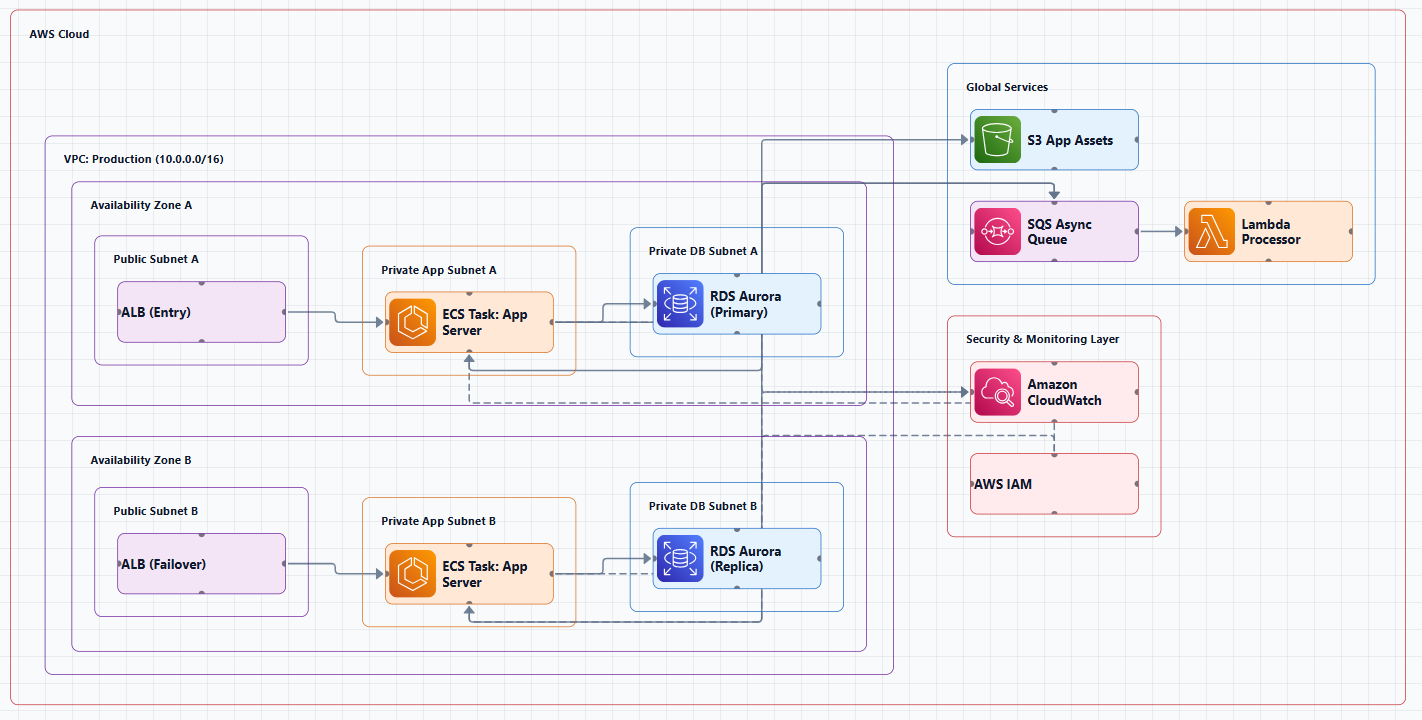
Why do US AWS architects obsess over a clear AWS VPC diagram in 2026? Because modern VPCs aren't "one VPC, two subnets" anymore. US AWS teams managing multi-region VPC deployments across us-east-1, us-west-2, and us-central-1 juggle VPC peering, Transit Gateway hubs, VPN Connections, and Direct Connect links. One missed private route or over-permissive Security Group can sink a SOC2 or FedRAMP review.
US compliance standards (SOC2, HIPAA, FedRAMP) for AWS VPC architectures demand documentation that matches reality. A stale Visio file doesn't cut it. An accurate AWS VPC diagram is how security reviewers, auditors, and distributed engineering teams stay aligned, fast.
Top 5 Benefits of Using an AWS VPC Diagram Generator
- Audit Ready, Fast, US enterprises using AWS VPC diagram generators reduce audit prep time by up to 60%. Export a current VPC architecture diagram for SOC2, HIPAA, or FedRAMP instead of scrambling before the review.
- Zero Manual Toil, Stop hunting AWS icons and realigning arrows. An AWS VPC diagram tool that generates from plain English frees 4 to 6 hours a week for actual network design work.
- Multi-Region Clarity, Visualize us-east-1 and us-west-2 side by side, peering, Transit Gateway, failover paths, so East Coast and West Coast ops teams share one source of truth.
- Security Boundaries Made Obvious, An AWS VPC diagram that shows Security Groups, NACLs, private subnets, and NAT egress makes misconfigurations jump out before they hit production.
- Stakeholder-Ready Exports, One click to PNG, SVG, or PDF. Drop your AWS VPC diagram into Confluence, a design review, or an executive deck without "I'll clean it up later."
AI Line Studio vs. Traditional AWS VPC Diagram Tools (Visio, Lucidchart, Draw.io)
Visio, Lucidchart, and Draw.io still treat every AWS VPC diagram like a blank canvas. You drag. You resize. You hunt for the right AWS icon. Then the landing zone changes and you redraw half the page. That's not a design tool, that's busywork.
AI Line Studio's AWS VPC diagram generator was built for VPC architecture diagrams from day one. Official-style AWS icons. AI that understands public/private subnets, route tables, Internet Gateways, NAT Gateways, Security Groups, NACLs, VPN Connections, VPC Peering, and Transit Gateway. Type the design; get the diagram.
No manual dragging. No "where did I put that NACL?" panic. No Lucidchart file nobody can open without a seat. US AWS teams using an AI-powered AWS VPC design tool ship accurate diagrams in minutes, not hours, and keep them current as the network evolves.
Bottom line: traditional tools document what you draw. AI Line Studio generates what you describe. For mission-critical AWS networks, that's a game-changer.
Step-by-Step: How to Generate an AWS VPC Diagram in Under 2 Minutes
Ready to see how fast an AWS VPC diagram can come together? Here's the two-minute workflow:
Step 1: Describe Your VPC, Type a plain English prompt into AI Line Studio. Example: "AWS VPC in us-east-1 with public and private subnets across two AZs, Internet Gateway on public subnets, NAT Gateway for private egress, Security Groups for app and DB tiers, NACLs on public subnets, and VPN Connection to on-prem."
Step 2: Include Core VPC Components, Call out Route Tables, Internet Gateways, NAT Gateways, Security Groups, NACLs, VPN Connections, VPC Peering, and Transit Gateway if you use them. Our AWS VPC diagram tool maps those components natively, no icon hunting.
Step 3: Hit Generate, In 10 to 15 seconds you get a clean AWS VPC diagram with subnet boundaries, gateway placement, and traffic paths labeled for presentation or review.
Step 4: Refine via Chat, "Add Transit Gateway for multi-account routing" or "Peer this VPC with the shared services VPC." The AWS VPC diagram updates instantly, no redraw.
Step 5: Export and Share, PNG, SVG, or PDF in one click. Attach to a PR, Confluence page, or FedRAMP evidence pack.
Need broader cloud coverage beyond VPC? Use our cloud diagram generator or the AWS architecture diagram tool for multi-service designs.
Best Practices for AWS VPC Architecture Diagramming in US Enterprises
An AWS VPC diagram is only valuable if it reflects how US enterprises actually run AWS:
- Plan CIDR Blocks First, Show non-overlapping CIDRs for accounts and regions on the diagram. Overlapping ranges kill VPC Peering and Transit Gateway designs, and waste audit cycles.
- Design Multi-AZ by Default, Draw public and private subnets across at least two Availability Zones. US teams managing us-east-1 and us-west-2 should make AZ failure modes visible on every VPC architecture diagram.
- Separate Security Groups from NACLs, Diagram stateful Security Groups at the ENI/instance layer and NACLs at the subnet edge. Auditors for SOC2 and FedRAMP want that distinction crystal clear, especially on AWS GovCloud.
- Choose Peering vs Transit Gateway Deliberately, Small hub-and-spoke? Peering may be enough. Multi-account, multi-region enterprise mesh? Show Transit Gateway. Your AWS VPC diagram should make the connectivity pattern obvious at a glance. Align designs with the AWS VPC documentation.
Conclusion
A stale Visio file is a liability. An accurate AWS VPC diagram is how US AWS architects ship secure networks, pass audits, and keep East Coast and West Coast teams aligned. AI Line Studio's AWS VPC diagram generator turns hours of manual drawing into seconds of AI-powered clarity, subnets, gateways, Security Groups, peering, Transit Gateway, and all. Stop dragging boxes. Start designing. Try AI Line Studio's AWS VPC diagram tool free today.
Frequently Asked Questions
Yes. AI Line Studio offers a free trial of its AWS VPC diagram generator so US AWS architects can generate their first three VPC architecture diagrams at no cost, no credit card required. Experience the speed difference versus Visio or Lucidchart before you commit.