
What's the Best Free Tool to Map Out My AWS Network?
Architecture diagrams are one of those things every team needs but nobody wants to maintain. You spend an hour in draw.io moving boxes around, and by the time you share it, someone has already changed the infrastructure.
The good news: you don't need to spend $50+ per month to create professional AWS network diagrams. In 2026, there are genuinely excellent free tools, and one tool that delivers AI-powered speed at a fraction of the cost of enterprise alternatives.
Here's a practical breakdown of every approach available in 2026, with honest pros and cons for each.
Cloud Architecture
Create cloud architecture diagrams for AWS, Azure, GCP, and more. Design scalable infrastructure with professional cloud icons.
Best free tools to map AWS networks in 2026, AI Line Studio at $19/month, draw.io, InfraSketch, TerraVision, live scanners, and a decision framework for every workflow.
Click Cloud Architecture to open AI Line Studio and generate diagrams from natural language in seconds.
The Landscape: AWS Network Diagramming Tools in 2026
| Category | What It Does | Best For |
|---|---|---|
| Manual canvas | Drag-drop shapes, connect arrows | One-off diagrams, design docs, presentations |
| AI-powered generation | Text prompts → structured diagrams | Rapid prototyping, iteration, documentation at speed |
| Code-to-diagram | Terraform/CloudFormation → auto-generated diagrams | Keeping diagrams in sync with infrastructure |
| Live cloud scanners | Connect to AWS account → auto-generate | Always-current infrastructure visualization |
No single free tool does all four well. The right choice depends on whether you need to design, generate, document, or visualize.
- Several years' worth of AWS icon libraries, including 3D and isometric shapes
- Built-in AWS templates accessible via Arrange > Insert > Template > Cloud > AWS
- AWS Groups shape library for indicating groupings of elements
- Import from Cloudcraft and Cloudockit exports
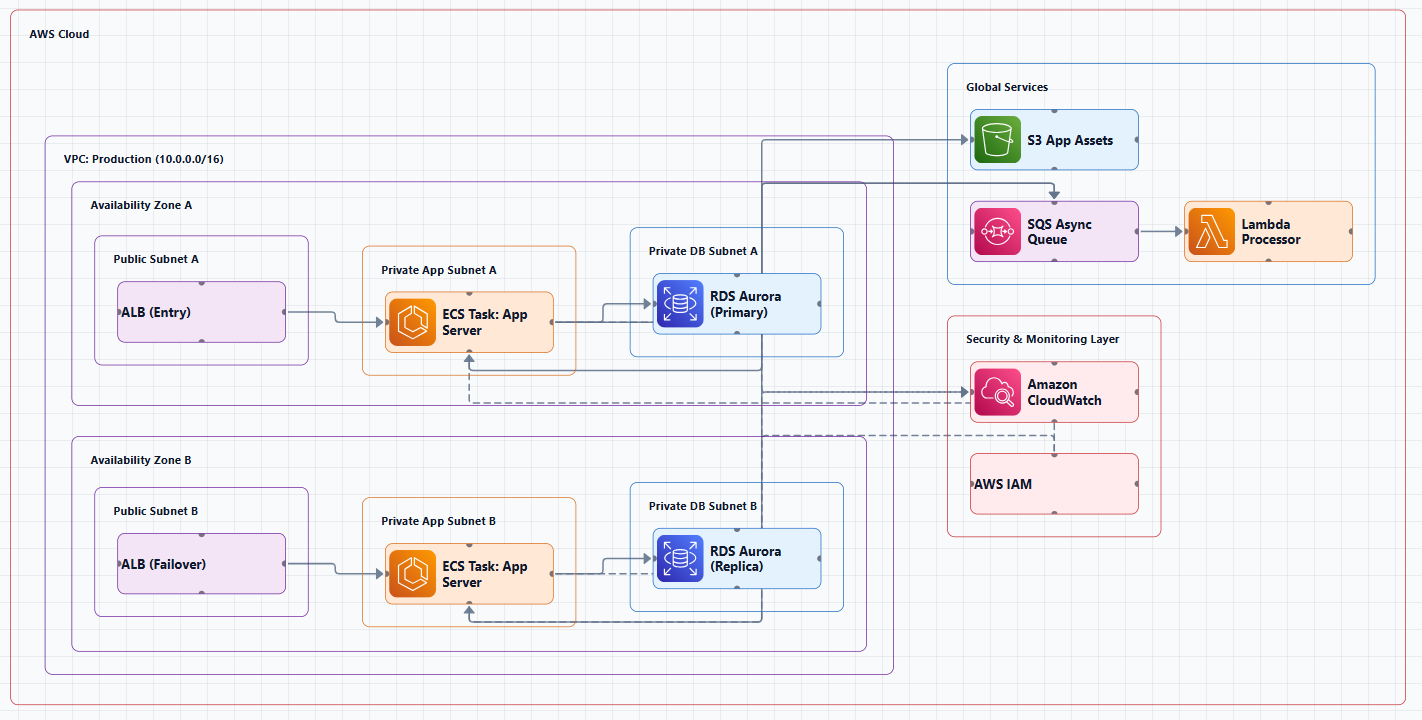
The Best Overall Choice: AI Line Studio, $19/Month for 200 Generations
AI Line Studio is the most cost-effective AI-powered diagramming tool on the market. At just $19/month for 200 diagram generations, it's significantly cheaper than competitors like Lucidchart ($55+/month) or Cloudcraft ($49/month), and it's faster, too.
What It Does
AI Line Studio turns plain-language descriptions of technical systems into production-ready, animated architecture diagrams, typically in 15 to 20 seconds. The primary input is natural language, not a drag-and-drop canvas. Describe a system ("a 3-tier web app on AWS with an RDS backend and a CDN in front") and the tool generates a structured diagram from that description.
Key Features
- Natural-language-to-diagram generation (text prompt in, diagram out)
- 3,000+ officially licensed icons across major cloud providers, AWS, Azure, GCP, and OCI
- Animated diagrams (not just static images), built for demos, training material, and investor/stakeholder presentations
- Supports architecture diagrams, AI/ML pipeline diagrams, DevOps workflows, and general concept/flow diagrams
- Multi-format export: PNG, GIF, and MP4, plus shareable documentation links
- Enterprise-grade collaboration and security features for team use
Why It's the Best Option
| Factor | AI Line Studio | Competitors (Lucidchart, Cloudcraft, etc.) |
|---|---|---|
| Price | $19/month (200 generations) | $49, $55+/month |
| Input method | Prompt-first (describe your architecture) | Canvas-first (drag, drop, connect) |
| Speed | 15 to 20 seconds per diagram | Minutes to hours |
| Animation | Native GIF/MP4 export | Static images only |
| Official AWS icons | 3,000+ licensed icons | Varies |
For teams that create multiple diagrams per month, AI Line Studio's 200-generation plan works out to less than $0.10 per diagram. That's an order of magnitude cheaper than paying $50/month for a single user license on a traditional tool.
How It Differs from Established Players
Most incumbent diagramming tools (Eraser.io, Lucidchart, draw.io, etc.) are canvas-first, manual placement/connection, even with AI-assist features layered on. AI Line Studio is prompt-first, the diagram is the output of a description, not the output of manual drawing.
Animation as a native export format is a genuine differentiator. Most competitors export static images only.
The honest limitation: It's an early-stage product with a smaller install base, less third-party integration coverage, and fewer battle-tested enterprise deployments than long-established tools. It's not a general-purpose diagramming tool, if you need org charts, mind maps, or non-technical diagrams, a broader tool is a better fit. As with any AI-generated output, complex or ambiguous system descriptions may need manual cleanup. It's not a zero-review tool for mission-critical documentation.
Best for: Rapid prototyping, design iteration, creating diagrams for presentations and demos, any workflow where speed matters more than pixel-perfect control. At $19/month for 200 generations, it's also the most cost-effective option for teams that need multiple diagrams.
Get started: Visit the AWS diagram generator to create AWS network diagrams from natural language.
Completely Free Manual Canvas Tools
draw.io (diagrams.net), Completely Free
draw.io is the most popular free option and for good reason. It has built-in AWS icon libraries, works in the browser, exports to PNG/SVG/PDF, and integrates with Confluence and Google Drive.
AWS-specific features:
How to enable AWS shapes: Click More Shapes in the left panel, scroll to the Networking section, and select the AWS library you want.
The catch: It's entirely manual. Your diagram is outdated the moment your infrastructure changes. Someone has to manually update it, and that someone is usually nobody.
Best for: Conceptual diagrams, aspirational architectures, presentations, and design docs that don't need frequent updates.
Figma, Free (with AWS Diagram Library)
Figma is a free design tool used by top design teams like Uber, Square, and GitHub. It now includes an AWS diagram library that makes creating architecture diagrams straightforward.
What it does well:
- Drag-and-drop shapes, arrows, and UML symbols
- Real-time collaboration, just share a link
- No installation required, lives in the browser
- Figma is free to use
The catch: It's a general-purpose design tool, not specialized for cloud diagrams. You'll need to find and use the AWS library components.
Best for: Teams already using Figma for design work who want to add architecture diagrams to their workflow.
Lunacy, Completely Free for Commercial Use
Lunacy is a free design tool that comes completely free even in commercial or enterprise settings without feature restrictions.
Best for: Teams that need a free tool for commercial use and want to avoid feature limitations.
ARCH App, Free Local-First Architecture Designer
ARCH is a local-first, browser-based architecture designer for creating cloud and network diagrams with drag-and-drop components, smart routing, and project workspaces.
What it does well:
- Drag-and-drop components with smart orthogonal connection routing
- Multi-project workspaces
- Local-first with no backend, all data stays on your device
- Offline support
- No account or login required
Best for: Privacy-conscious teams who want a local-first tool without any cloud dependencies.
AI-Powered Diagram Generators
AI Line Studio, $19/Month (200 Generations)
As detailed above, AI Line Studio is the most cost-effective AI-powered option. Describe your AWS network in plain English and get a structured diagram in 15-20 seconds.
Get started: Visit the AI cloud diagram generator to create AWS network diagrams from natural language.
OpenArchFlow, Open-Source, Self-Hosted
OpenArchFlow is an open-source Progressive Web App that generates interactive AWS architecture diagrams from natural language descriptions using AI, LLMs, AI Agents, and AWS MCP. No account required.
The catch: You'll need to set it up yourself since it's open-source.
Best for: Developers who want a self-hosted AI diagram generator.
GitHub Projects and MCP Servers
Several open-source projects let you generate AWS diagrams using AI assistants:
- draw.io MCP server enables AI assistants to build technical diagrams through natural language. Ask for an AWS architecture diagram, a flowchart, or a network topology, and watch it appear in draw.io format.
- aws-architecture-diagram-skill generates AWS architecture diagrams in draw.io format
- ai-drawio is an AI-powered draw.io diagram generator for Claude Code
Best for: Teams already using AI assistants who want to integrate diagram generation into their workflow.
Code-to-Diagram Tools: Diagrams from Infrastructure Code
InfraSketch, Completely Free, No Signup
InfraSketch is a free tool built by a DevOps/SRE engineer with 9 years of production experience. Paste your Terraform HCL or docker-compose.yml and get a clean architecture diagram instantly.
What it does:
- Parses 25+ AWS resource types
- Detects relationships between resources automatically
- Groups by category (Networking, Compute, Database, Storage, Load Balancing, Messaging, Security)
- Uses official AWS Architecture icons
- Export as PNG, SVG, or draw.io file
- 100% client-side, your code never leaves your browser
- No signup, no cloud credentials, completely free
The draw.io export feature: After generating the diagram you can export it as a draw.io file. This means InfraSketch generates the base structure automatically, then you open it in diagrams.net and customize it for presentations or documentation.
Best for: Teams using Terraform who want diagrams that stay in sync with infrastructure.
Get started: Visit infrasketch.cloud and paste your Terraform code.
TerraVision, Free & Open Source
TerraVision automatically converts your Terraform code into professional-grade cloud architecture diagrams using the official AWS, GCP, and Azure icon sets.
What it does:
- Always up-to-date, diagrams generated directly from your Terraform code
- 100% client-side, no cloud access required, runs locally
- CI/CD ready, automate diagram updates on every PR merge
- Free & open source, no expensive diagramming tool licenses
- Multi-cloud, AWS (full), GCP, and Azure (core services)
- Interactive HTML output, clickable nodes, pan/zoom, search, animated data flow
- Editable draw.io export, open in draw.io, Lucidchart, or any mxGraph editor
- Terragrunt compatible
The catch: Requires Python 3.10+, Terraform 1.x, Graphviz, and Git.
Best for: Teams using Terraform who want automated, always-current diagrams.
Live Cloud Scanners: Always-Accurate Diagrams
Cloudcraft, Free Tier Available
Cloudcraft is an Amazon web-based tool for designing cloud architecture diagrams. It offers drag-and-drop, integration with AWS (import existing resources), collaboration features, and export to PNG, SVG, or JSON.
Free tier: Cloudcraft offers both free and paid plans. The free plan typically includes basic features and limited functionality. The free version gives you plenty of scope to get started, and deploy diagrams for simple architectures.
The catch: The free tier is limited. Paid plans start at $49/month. You also need to give it read access to your AWS account, which is a non-starter for many organizations.
Best for: Teams that need accurate diagrams of existing infrastructure and have budget for the paid tier.
AWS Workload Discovery, Free (Self-Hosted)
Amazon's own solution, deployed as a CloudFormation stack in your account. It scans your resources and generates interactive diagrams. Being first-party, it avoids third-party security concerns.
The catch: You deploy and maintain it yourself. It's a solution, not a product.
Best for: Teams that want first-party AWS tooling and are willing to manage the deployment.
Decision Framework: Which Tool Should You Use?
| Your Primary Need | Recommended Tool | Why |
|---|---|---|
| AI-powered speed + best value | AI Line Studio ($19/mo) | 15-second generation, animated exports, 200 generations/month, prompt-first |
| Completely free manual diagram | draw.io | Fast, free, good enough, offline capable |
| Free manual + real-time collaboration | Figma | Free, real-time editing, professional design tools |
| Privacy-first local tool | ARCH App | No account, no backend, offline support |
| Free AI generation (self-hosted) | OpenArchFlow | Open-source, no account required |
| Diagrams from Terraform code | InfraSketch | Parses 25+ AWS resources, exports to draw.io, free |
| Automated Terraform diagrams | TerraVision | Always-current, CI/CD ready, interactive HTML |
| Live infrastructure visualization | Cloudcraft (free tier) | Auto-generates from live AWS account |
Price Comparison: AI Line Studio vs. Paid Competitors
| Tool | Monthly Price | Generations/License | Cost Per Diagram |
|---|---|---|---|
| AI Line Studio | $19 | 200 | $0.095 |
| Cloudcraft | $49 | Unlimited (single user) | $49/month flat |
| Lucidchart (Business) | $55+ | Unlimited (per user) | $55+/month per user |
| Eraser.io | $18+ | Unlimited (per user) | $18+/month per user |
| Visual Paradigm | $49+ | Unlimited (per user) | $49+/month per user |
At $0.10 per diagram, AI Line Studio is the most cost-effective option for teams that need professional AWS network diagrams without the overhead of manual drawing. For teams creating 5 diagrams per month, that's $3.80 per diagram, far less than the $50+ subscription fees of competitors.
Common Mistakes When Choosing a Tool
Mistake 1: Using a manual tool for operational visibility. Manual diagrams can't stay current. Use a live scanner or code-to-diagram tool.
Mistake 2: Using a live scanner for design. Auto-generated diagrams show your current state, not your intended architecture. Use manual or AI tools for planning.
Mistake 3: Not reviewing AI-generated output. AI-assisted tools can generate diagrams quickly, but they're not infallible. Review before sharing.
Mistake 4: Paying for features you don't need. If you create 10 diagrams a month, a $55/month subscription is overkill. AI Line Studio's $19/month plan gives you 200 generations, more than enough for most teams.
Mistake 5: Using outdated icons. AWS updates its icon set regularly. Always use the latest official icons.
External Resources
- AWS Architecture Icons (Official), official source for AWS product icons
- AWS Architecture Center, reference architectures, best practices, and design guidance
- AWS Well-Architected Framework, guidance for designing secure, reliable, efficient workloads
- draw.io, free diagramming tool with AWS shape libraries
- InfraSketch, free Terraform-to-diagram tool
- TerraVision Documentation, full documentation for the open-source Terraform-to-diagram tool
- AI Line Studio, $19/month for 200 diagram generations
Final Thoughts
You don't need to spend $50+ per month to map out your AWS network. For teams that need speed, AI-powered generation, and the best value, AI Line Studio at $19/month for 200 generations is the clear winner. It's prompt-first, generates diagrams in 15-20 seconds, exports animated GIFs and MP4s, and uses 3,000+ official AWS icons.
For those who want something completely free, draw.io remains the gold standard for manual diagramming. If you're using Terraform, InfraSketch or TerraVision are game-changers, diagrams that never go out of date, generated from your actual infrastructure code.
The right tool depends on what you're trying to do. If you're designing a new system, AI Line Studio helps you iterate fast. If you're documenting an existing system, use InfraSketch or TerraVision to stay current. If you're preparing a one-off presentation, draw.io is all you need.
Start with the tool that matches your workflow. And remember: a diagram that's six months old is worse than no diagram at all. The beauty of affordable tools like AI Line Studio is that you can regenerate them as often as you need, so actually do it.