
Best Free Tools to Create AWS Architecture Diagrams
Creating AWS architecture diagrams doesn't have to be expensive or time-consuming. There's a growing ecosystem of excellent free tools, from AI-powered generators that can create a diagram from a simple text prompt to code-based tools that sync directly with your Terraform infrastructure.
Here's a breakdown of the best options available, categorized by how they work, and why AI Line Studio stands out as the best overall choice.
Cloud Architecture
Create cloud architecture diagrams for AWS, Azure, GCP, and more. Design scalable infrastructure with professional cloud icons.
Compare the best free tools to create AWS architecture diagrams, AI Line Studio, SketchMyInfra, draw.io, Lucidchart free tier, TerraVision, Diagrams (Python), and more.
Click Cloud Architecture to open AI Line Studio and generate diagrams from natural language in seconds.
🏆 The Best Overall Choice: AI Line Studio ($19/Month, 200 Generations)
AI Line Studio is the most cost-effective AI-powered diagramming tool on the market. At just $19/month for 200 diagram generations, it's significantly cheaper than competitors like Lucidchart ($55+/month) or Cloudcraft ($49/month), and it's faster, too.
- For the best overall value and speed: AI Line Studio is the clear winner at $19/month for 200 generations, less than $0.10 per diagram. It's prompt-first, generates diagrams in 15-20 seconds, exports animated GIFs and MP4s, and uses 3,000+ official AWS icons. For teams creating 5 diagrams per month, that's $3.80 per diagram, far less than the $50+ subscription fees of competitors.
- For a completely free manual tool: draw.io remains the gold standard.
- For version-controlled, code-based diagrams: SketchMyInfra (AI + PlantUML export) or TerraVision (Terraform automation) are excellent choices.
- For integration with AI assistants: The AWS Architecture Diagram Skill is a powerful and flexible option.
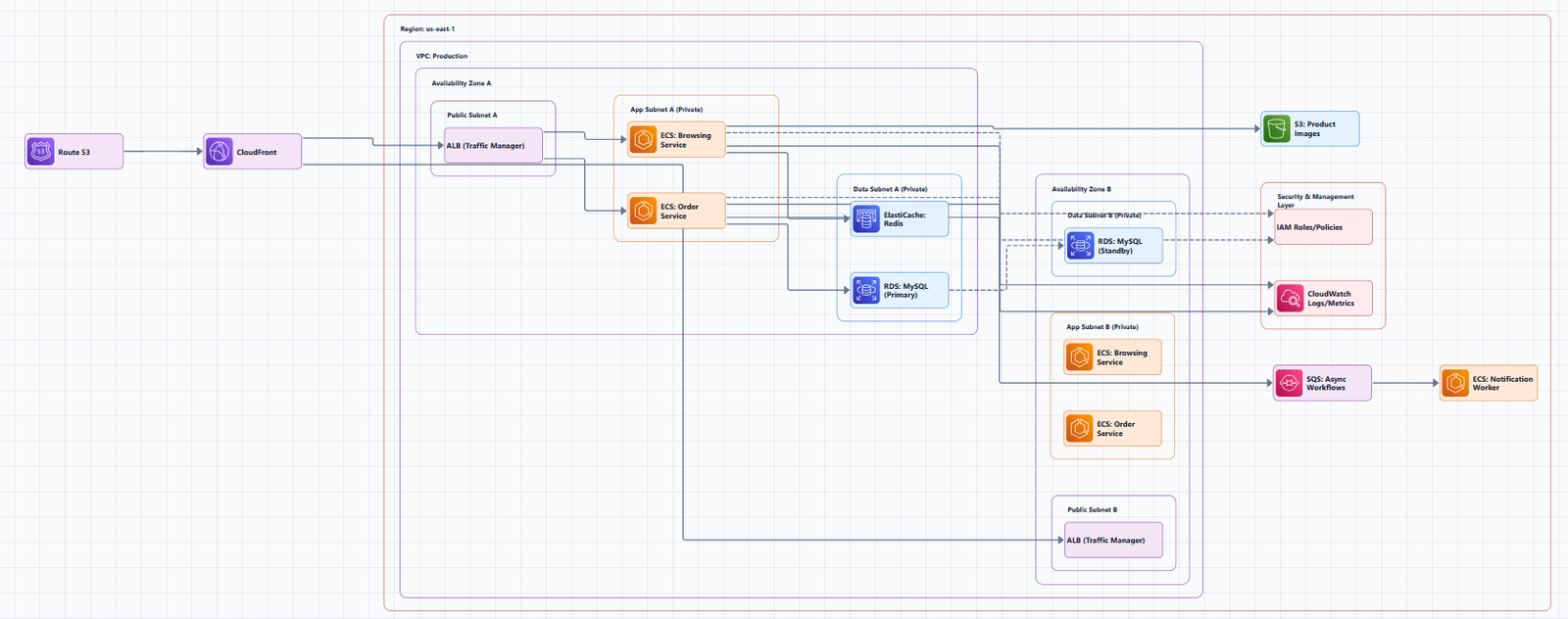
What It Does
AI Line Studio turns plain-language descriptions of technical systems into production-ready, animated architecture diagrams, typically in 15 to 20 seconds. The primary input is natural language, not a drag-and-drop canvas. Describe a system ("a 3-tier web app on AWS with an RDS backend and a CDN in front") and the tool generates a structured diagram from that description.
Key Features
- Natural-language-to-diagram generation (text prompt in, diagram out)
- 3,000+ officially licensed icons across major cloud providers, AWS, Azure, GCP, and OCI
- Animated diagrams (not just static images), built for demos, training material, and investor/stakeholder presentations
- Supports architecture diagrams, AI/ML pipeline diagrams, DevOps workflows, and general concept/flow diagrams
- Multi-format export: PNG, GIF, and MP4, plus shareable documentation links
- Enterprise-grade collaboration and security features for team use
Why It's the Best Option
| Factor | AI Line Studio | Competitors (Lucidchart, Cloudcraft, etc.) |
|---|---|---|
| Price | $19/month (200 generations) | $49, $55+/month |
| Input method | Prompt-first (describe your architecture) | Canvas-first (drag, drop, connect) |
| Speed | 15 to 20 seconds per diagram | Minutes to hours |
| Animation | Native GIF/MP4 export | Static images only |
| Official AWS icons | 3,000+ licensed icons | Varies |
For teams that create multiple diagrams per month, AI Line Studio's 200-generation plan works out to less than $0.10 per diagram. That's an order of magnitude cheaper than paying $50/month for a single user license on a traditional tool.
How It Differs from Established Players
Most incumbent diagramming tools (Eraser.io, Lucidchart, draw.io, etc.) are canvas-first, manual placement/connection, even with AI-assist features layered on. AI Line Studio is prompt-first, the diagram is the output of a description, not the output of manual drawing.
Animation as a native export format is a genuine differentiator. Most competitors export static images only.
The honest limitation: It's an early-stage product with a smaller install base, less third-party integration coverage, and fewer battle-tested enterprise deployments than long-established tools. It's not a general-purpose diagramming tool, if you need org charts, mind maps, or non-technical diagrams, a broader tool is a better fit. As with any AI-generated output, complex or ambiguous system descriptions may need manual cleanup. It's not a zero-review tool for mission-critical documentation.
Best for: Rapid prototyping, design iteration, creating diagrams for presentations and demos, any workflow where speed matters more than pixel-perfect control. At $19/month for 200 generations, it's also the most cost-effective option for teams that need multiple diagrams.
Get started: Visit the AWS diagram generator to create AWS architecture diagrams from natural language. For a complete workspace with editable templates and official AWS icons, explore the cloud architecture diagram tool.
🤖 AI-Powered Generators: The Next Best Options
SketchMyInfra
This unique tool converts natural language descriptions into PlantUML code. Instead of just giving you an image, it gives you editable, version-controllable code that you can check into Git alongside your infrastructure. You can generate 5 diagrams per day for free without an account, or more with a free login.
Best for: Teams that treat diagrams as code and want to integrate them into their documentation pipeline.
AWS Architecture Diagram Skill
A reusable skill for generating production-quality .drawio files. Works with any AI assistant like ChatGPT, Claude Projects, or Kiro CLI. Uses official AWS icons and ensures consistent styling.
Best for: Bringing AI diagramming into your existing AI assistant workflow.
OpenArchFlow
An open-source Progressive Web App (PWA) that generates interactive AWS architecture diagrams from natural language. No account is required. Uses AI, LLMs, and AWS MCP to create diagrams.
Best for: A free, open-source alternative for AI diagram generation.
✍️ Manual & Drag-and-Drop Tools: The Tried-and-True Free Options
draw.io (diagrams.net)
The most popular free option. Completely free, open-source, works in your browser or as a desktop app. Has built-in AWS icon libraries, supports real-time collaboration, and integrates with cloud storage platforms like Google Drive and OneDrive. No sign-up required.
Best for: Quick, one-off diagrams and documentation.
Lucidchart (Free Tier)
While Lucidchart is a paid tool, its free tier is generous. Offers a polished, professional experience with a vast library of AWS-specific templates and shapes.
Best for: Individuals or small teams getting started with AWS diagramming.
Figma
A free, browser-based design tool with powerful real-time collaboration and a vast ecosystem of community-built AWS diagram libraries.
Best for: Team collaboration and creating visually polished diagrams.
Cavaro.io
A free collaborative whiteboard specifically designed for cloud architecture. Has built-in AWS, Azure, and GCP icons and supports real-time collaboration. Currently free and open for beta.
Best for: Teams wanting a purpose-built cloud architecture whiteboard.
💻 Code & Infrastructure-as-Code (IaC) Tools
TerraVision
Open-source tool that automatically converts your Terraform code into professional-grade cloud architecture diagrams. Uses official AWS, GCP, and Azure icon sets. 100% client-side, your code never leaves your machine.
Best for: Teams that want diagrams automatically generated from Terraform code.
terraformgraph
Generates interactive architecture diagrams from your Terraform configurations. Supports AWS resources with automatic service grouping and relationship detection. Outputs beautiful, interactive SVG/HTML files.
Best for: Teams needing interactive HTML diagrams with clickable nodes.
Diagrams (Python)
A "Diagram as Code" tool that lets you draw cloud system architecture in Python code. Perfect for prototyping new system architectures without using any design tools. Supports AWS, Azure, GCP, Kubernetes, and more.
Best for: Developers who prefer code-based diagrams that can be version-controlled.
⚖️ Quick Comparison
| Tool | Category | Key Strength | Best For |
|---|---|---|---|
| AI Line Studio | AI-Powered | Speed, Animation, Value ($19/mo) | Rapid iteration, demos, presentations, and cost-effective team use |
| SketchMyInfra | AI-Powered | Code Export | Teams using "diagrams as code" and Git |
| draw.io | Manual | Free & Flexible | Quick, one-off diagrams and documentation |
| Lucidchart | Manual | Professional Polish | Creating polished diagrams with templates |
| TerraVision | IaC | Automation | Keeping diagrams in sync with Terraform |
| AWS Architecture Diagram Skill | AI-Powered | AI Assistant Integration | Generating diagrams within ChatGPT, Claude, etc. |
💎 The Bottom Line
The best tool for you depends on your workflow:
Start with the tool that matches your workflow. And remember: a diagram that's six months old is worse than no diagram at all. The beauty of affordable tools like AI Line Studio is that you can regenerate them as often as you need, so actually do it.