
Best Tools for Documenting Complex AWS Environments
Documenting complex, multi-service AWS deployments is one of the hardest problems in cloud engineering. Infrastructure changes constantly, and static documentation inevitably falls out of sync. A diagram that's six months old is often worse than no diagram at all, it creates false confidence and leads to poor decisions. The best tools solve this by automating discovery, diagram generation, or both.
Here's a breakdown of the best options for documenting complex AWS environments, ranked by capability and workflow fit.
Cloud Architecture
Create cloud architecture diagrams for AWS, Azure, GCP, and more. Design scalable infrastructure with professional cloud icons.
Document complex multi-service AWS environments with AI Line Studio, Workload Discovery, Cloudcraft, Holori, TerraVision, InfraSketch, and more.
Click Cloud Architecture to open AI Line Studio and generate diagrams from natural language in seconds.
🏆 The Best Overall: AI Line Studio
AI Line Studio is the most cost-effective and fastest tool for generating production-ready AWS architecture diagrams. At $19/month for 200 diagram generations, it's significantly cheaper than competitors like Lucidchart ($55+/month) or Cloudcraft ($49/month), and it's faster.
- Automatic discovery, no manual data entry required
- Interactive diagrams with drag-and-drop repositioning
- Export capabilities for third-party annotation tools
- Console integration, click any resource to open it in the AWS Management Console
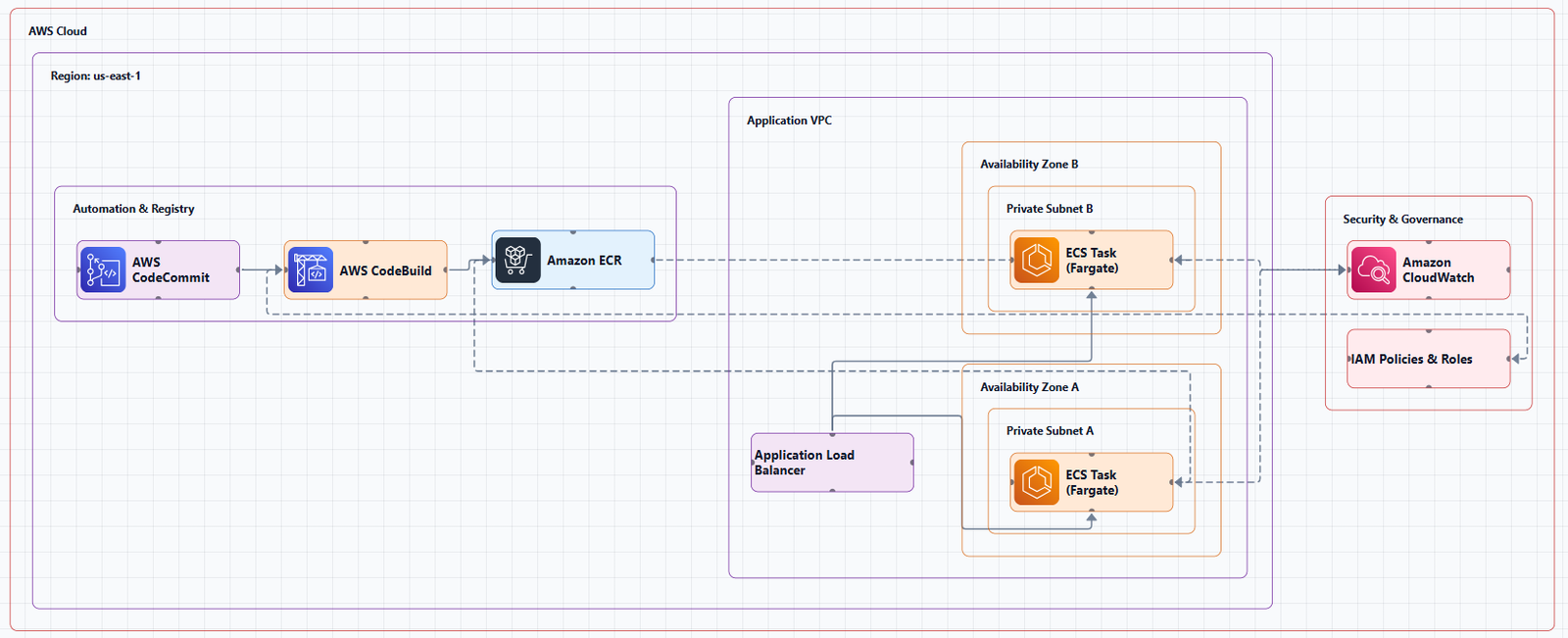
What It Does
AI Line Studio turns plain-language descriptions of technical systems into production-ready, animated architecture diagrams, typically in 15 to 20 seconds. The primary input is natural language, not a drag-and-drop canvas. Describe a system ("a 3-tier web app on AWS with an RDS backend and a CDN in front") and the tool generates a structured diagram from that description.
Key Features
- Natural-language-to-diagram generation (text prompt in, diagram out)
- 3,000+ officially licensed icons across major cloud providers, AWS, Azure, GCP, and OCI
- Animated diagrams (not just static images), built for demos, training material, and investor/stakeholder presentations
- Supports architecture diagrams, AI/ML pipeline diagrams, DevOps workflows, and general concept/flow diagrams
- Multi-format export: PNG, GIF, and MP4, plus shareable documentation links
- Enterprise-grade collaboration and security features for team use
Why It's the Best Option
| Factor | AI Line Studio | Competitors (Lucidchart, Cloudcraft, etc.) |
|---|---|---|
| Price | $19/month (200 generations) | $49, $55+/month |
| Input method | Prompt-first (describe your architecture) | Canvas-first (drag, drop, connect) |
| Speed | 15 to 20 seconds per diagram | Minutes to hours |
| Animation | Native GIF/MP4 export | Static images only |
| Official AWS Icons | 3,000+ licensed | Varies |
For teams that create multiple diagrams per month, AI Line Studio's 200-generation plan works out to less than $0.10 per diagram, an order of magnitude cheaper than paying $50/month for a single user license on a traditional tool.
How It Differs from Established Players
Most incumbent diagramming tools are canvas-first, manual placement/connection, even with AI-assist features layered on. AI Line Studio is prompt-first, the diagram is the output of a description, not the output of manual drawing. Animation as a native export format is a genuine differentiator. Most competitors export static images only.
The Honest Limitation
AI Line Studio is an early-stage product with a smaller install base, less third-party integration coverage, and fewer battle-tested enterprise deployments than long-established tools. It's not a general-purpose diagramming tool, if you need org charts, mind maps, or non-technical diagrams, a broader tool is a better fit. As with any AI-generated output, complex or ambiguous system descriptions may need manual cleanup. It's not a zero-review tool for mission-critical documentation.
Best for: Rapid prototyping, design iteration, creating diagrams for presentations and demos, any workflow where speed matters more than pixel-perfect control.
Get started: Visit the AWS diagram generator to create architecture diagrams from natural language. For a complete workspace with editable templates and official icons, explore the cloud architecture diagram tool. The AI cloud diagram generator helps you iterate quickly during design sessions, and the AI system architecture generator creates end-to-end system architectures for enterprise deployments.
🔍 Automated Discovery & Live Scanning Tools
These tools connect to your AWS account and auto-generate diagrams from live infrastructure. They're the only category that stays current without manual effort.
AWS Workload Discovery (formerly AWS Perspective)
AWS Workload Discovery is a free, official AWS solution that automatically generates architecture diagrams from your live AWS environment. It maintains an inventory of AWS resources across your accounts and Regions, mapping relationships between them. It scans your accounts every 15 minutes to ensure diagrams are accurate and current.
Key Features:
Important Note: This AWS Solution will retire on August 14, 2026. Teams should plan for migration to alternative tools.
Best for: Teams that want a first-party AWS solution for always-current documentation.
Cloudcraft (by Datadog)
Cloudcraft remains one of the most advanced platforms for visualizing AWS infrastructure with minimal manual work. It connects to your AWS environment, pulls in real-time data, and auto-generates new diagrams or enhances existing ones.
Key Features:
- 3D isometric view for presentations
- Real-time cost estimation
- Live scanning that saves hours of manual work
- Smart components for Amazon EC2, ELB, Lambda, RDS, DynamoDB, and more
Limitation: Free tier is limited; paid plans start at $49/month.
Best for: Teams that need real-time diagrams of live infrastructure with cost visibility.
Lucidscale
Lucidscale is an AWS cloud visualization solution that automatically generates accurate, dynamic cloud diagrams. It uses your own data to generate AWS architecture diagrams, ensuring you and your team are working with accurate and consistent visuals. Available to Lucid Suite Enterprise accounts as an add-on purchase with the Cloud Accelerator.
Key Features:
- Zero in on accounts, VPCs, security groups, and more
- Multiple views within a single cloud frame
- Filter and customize views based on EC2 instances, VPCs, and more
Best for: Teams already using Lucidchart who want automated AWS visualization.
Holori
Holori automates infrastructure diagrams and provides high-level visibility for complex cloud environments. Its Auto-Sync diagram engine automatically generates infrastructure diagrams, making it easy to keep documentation current.
Key Features:
- Automated diagram generation and auto-sync for AWS, GCP, and Azure
- Built-in cost modeling
- Daily or weekly visual documentation of cloud assets
- 3D diagram toggle
Pricing: 14-day free trial with a free tier for companies with monthly cloud spend under $3,000.
Best for: Teams that want cost-aware infrastructure visualization alongside diagramming.
Cloudockit
Cloudockit is a powerful automation tool that focuses heavily on comprehensive cloud documentation. In less than 5 minutes, it generates complete documentation of AWS, Azure, Google Cloud, VMware, and Hyper-V environments.
Key Features:
- Automated documentation with architecture diagrams
- 2D/3D diagrams with multiple views
- Technical documentation and reports with best practices warnings
- Cost management
Best for: Teams that need full documentation, not just diagrams, but technical reports, best practices warnings, and compliance rules.
💻 Infrastructure as Code (IaC) Tools
If you use Terraform or CloudFormation, these tools generate diagrams directly from your code, ensuring they're always in sync with your infrastructure.
TerraVision
TerraVision automatically converts your Terraform code into professional-grade cloud architecture diagrams using the official AWS, GCP, and Azure icon sets. Your diagrams stay in sync with your infrastructure, no more outdated Visio, draw.io or Lucidchart files.
Key Features:
- Always up-to-date, diagrams generated directly from your Terraform code
- 100% client-side, no cloud access required; runs locally
- CI/CD ready, automate diagram updates on every PR merge
- Interactive HTML output, clickable nodes, pan/zoom, search, animated data flow
- Editable draw.io export, open in draw.io, Lucidchart, or any mxGraph editor
Best for: Teams using Terraform who want diagrams that never go out of date.
InfraSketch
InfraSketch is a free tool that turns infrastructure code into clean architecture diagrams directly in your browser. Paste Terraform HCL, a plan JSON, Terragrunt stack, or docker-compose.yml and get a visual diagram in seconds.
Key Features:
- Static analysis of HCL code, no plan, no state, no AWS credentials required
- Groups by logical layer: Internet, Ingress, Compute, Data, Messaging, Security
- Export as PNG, SVG, or draw.io XML
- MCP server integration for AI assistant diagram generation
Best for: Quick, free diagrams from existing Terraform code, no signup required.
CDK-Canvas
CDK-Canvas is a powerful web-based tool that automatically generates professional infrastructure diagrams from your CloudFormation templates. Transform your AWS CDK stacks into beautiful, customizable diagrams with complete control over layout, styling, and annotations.
Best for: Teams using AWS CDK who want automated diagram generation from their stacks.
CloudFormation Diagram Generator
A web-based tool that helps developers and architects visualize their AWS infrastructure. By parsing CloudFormation templates, it creates interactive diagrams that make it easier to understand, document, and share your cloud architecture.
Best for: Teams using CloudFormation who want quick visualizations from their templates.
🧠 AI-Powered & Agentic Tools
AWS Architecture Diagram Skill (AWS Labs)
A reusable skill for generating AWS architecture diagrams in draw.io format. Works with any AI assistant, ChatGPT, Claude Projects, Kiro CLI, Claude Code, or any internal AI agent. Generates production-quality .drawio files using the official AWS 2026 icon style from draw.io's mxgraph.aws4 namespace.
Key Features:
- Generates draw.io (.drawio) XML files representing AWS architecture diagrams
- Uses official AWS 2026 icon style
- Left-to-right flow: UI/Frontend on left, data sources on right
Best for: Teams already using AI assistants who want to generate diagrams without switching tools.
draw.io MCP Server (AWS Samples)
The draw.io MCP server enables AI assistants to build technical diagrams on your local computer through natural language. Ask for an AWS architecture diagram, a flowchart, or a network topology, and watch it appear in draw.io format.
Best for: Teams using AI assistants that support MCP (Model Context Protocol).
CloudSketcher
CloudSketcher is an AI-enabled cloud architecture tool designed for AWS, Azure, and Google Cloud. It automates and streamlines the task of designing, converting, and documenting cloud infrastructures. Users can input natural language descriptions and CloudSketcher instantly generates editable architecture diagrams.
Best for: Teams that want AI-powered diagram generation with multi-cloud conversion capabilities.
Visual Paradigm AI Cloud Architecture Studio
Visual Paradigm's AI Cloud Architecture Studio is a specialized AI tool for building professional cloud architecture diagrams. It's designed to scale with your team's needs and supports 100+ diagram types.
Best for: Teams wanting a structured AI-assisted workflow with strategy-based design.
✍️ Manual & Collaborative Tools
draw.io (diagrams.net)
Draw.io is the most popular free option and for good reason. It has built-in AWS icon libraries, works in the browser, exports to PNG/SVG/PDF, and integrates with Confluence and Google Drive.
Best for: Quick, one-off diagrams and documentation, completely free and offline capable.
Lucidchart
Lucidchart provides a clean, efficient way to diagram AWS-dependent infrastructures. For IT professionals and system administrators using AWS, it strikes the right balance between professional quality and smooth, intuitive use.
Key Features:
- Built-in AWS shape libraries
- Real-time collaboration
- Export to multiple formats
Best for: Polished presentations, team collaboration, and professional diagramming.
Miro
Miro enables the visualization of complex architectures via collaborative diagramming. Its AWS Cloud View app allows you to generate a diagram of your AWS infrastructure by importing the data from an AWS account. Miro will generate a visualization of your AWS infrastructure, giving your team a single source of truth to work from.
Best for: Team workshops, brainstorming, and real-time collaboration.
✅ Validation & Best Practices Tools
AWS Well-Architected Tool
Available at no cost in the AWS Management Console, the AWS Well-Architected Tool provides a trusted framework for you to evaluate your cloud architecture and implement designs that will scale over time. It provides a mechanism for regularly evaluating workloads, identifying high-risk issues, and recording improvements.
Best for: Validating your architecture against AWS best practices as part of your documentation process.
⚖️ Quick Comparison
| Tool | Category | Price | Key Strength | Best For |
|---|---|---|---|---|
| AI Line Studio | AI-Powered | $19/mo (200 gens) | Speed, animation, value | Rapid iteration, demos, cost-effective teams |
| AWS Workload Discovery | Live Scanning | Free | First-party AWS solution | Always-current AWS documentation |
| Cloudcraft | Live Scanning | $49+/mo | 3D views, cost estimation | Live infrastructure visualization |
| Lucidscale | Live Scanning | Subscription | Dynamic diagrams, Lucid integration | Teams using Lucidchart |
| Holori | Live Scanning | Free tier / trial | Cost-aware visualization | Cost optimization + diagrams |
| Cloudockit | Live Scanning | Subscription | Comprehensive documentation | Full documentation + reports |
| TerraVision | IaC | Free (open source) | Terraform automation | Teams using Terraform |
| InfraSketch | IaC | Free | No signup, client-side | Quick Terraform diagramming |
| draw.io | Manual | Free | Flexible, offline capable | Quick one-off diagrams |
| Lucidchart | Manual | $7.95+/mo | Professional polish | Polished presentations, collaboration |
| Miro | Manual | Freemium | Collaborative whiteboard | Workshops, brainstorming |
| AWS Architecture Diagram Skill | AI Agent | Free | AI assistant integration | Claude/ChatGPT users |
| AWS Well-Architected Tool | Validation | Free | Best practices validation | Architecture reviews |
🎯 How to Choose: Decision Framework
| Your Primary Need | Recommended Tool | Why |
|---|---|---|
| AI-powered speed + best value | AI Line Studio ($19/mo) | 15-second generation, animated exports, 200 generations/month, 3,000+ official icons |
| Always-current from live AWS | AWS Workload Discovery or Cloudcraft | Official AWS tool; scans live data; real-time diagrams |
| Live AWS + cost visibility | Cloudcraft or Holori | Real-time diagrams, cost estimation, 3D views |
| Comprehensive documentation | Cloudockit | Full technical reports, best practices, compliance rules |
| Terraform automation | TerraVision or InfraSketch | Parses Terraform, exports to draw.io, CI/CD ready |
| AI assistant workflow | AWS Architecture Diagram Skill | Works with ChatGPT, Claude, and other AI assistants |
| Completely free manual | draw.io | Fast, free, good enough, works offline |
| Polished team collaboration | Lucidchart | Real-time editing, professional templates |
| Collaborative workshops | Miro | Real-time collaboration, brainstorming |
| Validate against best practices | AWS Well-Architected Tool | Free, first-party validation tool |
🚫 Common Mistakes to Avoid
Mistake 1: Using manual tools for operational visibility. Manual diagrams can't stay current. If you need to document what's actually running, use a live discovery tool.
Mistake 2: Not reviewing AI-generated output. AI tools can generate diagrams quickly, but they're not infallible. Review before sharing.
Mistake 3: Paying for features you don't need. If you create 10 diagrams a month, a $55/month subscription is overkill. AI Line Studio's $19/month plan gives you 200 generations, more than enough for most teams.
Mistake 4: Using outdated icons. Always use tools that source official AWS icons. AI Line Studio uses 3,000+ officially licensed icons.
Mistake 5: Letting diagrams go stale. Documentation that's six months old is worse than no documentation at all. Use automation to keep your diagrams current.
🔗 External Resources
- AI Line Studio Pricing, $19/month for 200 diagram generations
- AWS Workload Discovery Documentation, official deployment and usage guide
- AWS Architecture Icons (Official), official source for AWS product icons
- AWS Well-Architected Tool, free tool in the AWS Management Console
- TerraVision GitHub Repository, open-source Terraform-to-diagram tool
- InfraSketch, free Terraform-to-diagram tool
- AWS Architecture Diagram Skill, reusable skill for AI assistants
- AWS Architecture Center, reference architectures and best practices
💎 The Bottom Line
Documenting multi-service AWS deployments doesn't have to be a manual, error-prone chore. The best tools automate discovery, diagram generation, or both, keeping your documentation current with minimal effort.
For most teams, the sweet spot is AI Line Studio at $19/month for 200 generations. It's prompt-first, generates diagrams in 15 to 20 seconds, exports animated GIFs and MP4s, and uses 3,000+ official AWS icons. At $0.10 per diagram, it's the most cost-effective option on the market.
For always-current documentation from live infrastructure, AWS Workload Discovery and Cloudcraft are top choices. For Terraform teams, TerraVision and InfraSketch keep diagrams in sync with your code. For AI assistant workflows, the AWS Architecture Diagram Skill integrates directly into ChatGPT and Claude.
Start with the tool that matches your workflow. And remember: with automation, your diagrams can stay current, so actually keep them that way.