
GCP Multi-Cloud Architecture: A Comprehensive Guide
Google Cloud's multi-cloud architecture has entered a new era. With the jointly engineered open networking specification from AWS and Google Cloud, cross-cloud connectivity has evolved from weeks of manual configuration to managed connectivity provisioned in minutes. This makes Google Cloud a powerful hub for building and managing multi-cloud environments.
Cloud Architecture
Create cloud architecture diagrams for AWS, Azure, GCP, and more. Design scalable infrastructure with professional cloud icons.
Comprehensive guide to GCP multi-cloud architecture, Cross-Cloud Interconnect, GKE Enterprise, architecture patterns, security, reference architectures, and diagramming with AI Line Studio.
Click Cloud Architecture to open AI Line Studio and generate diagrams from natural language in seconds.
What Is GCP Multi-Cloud Architecture?
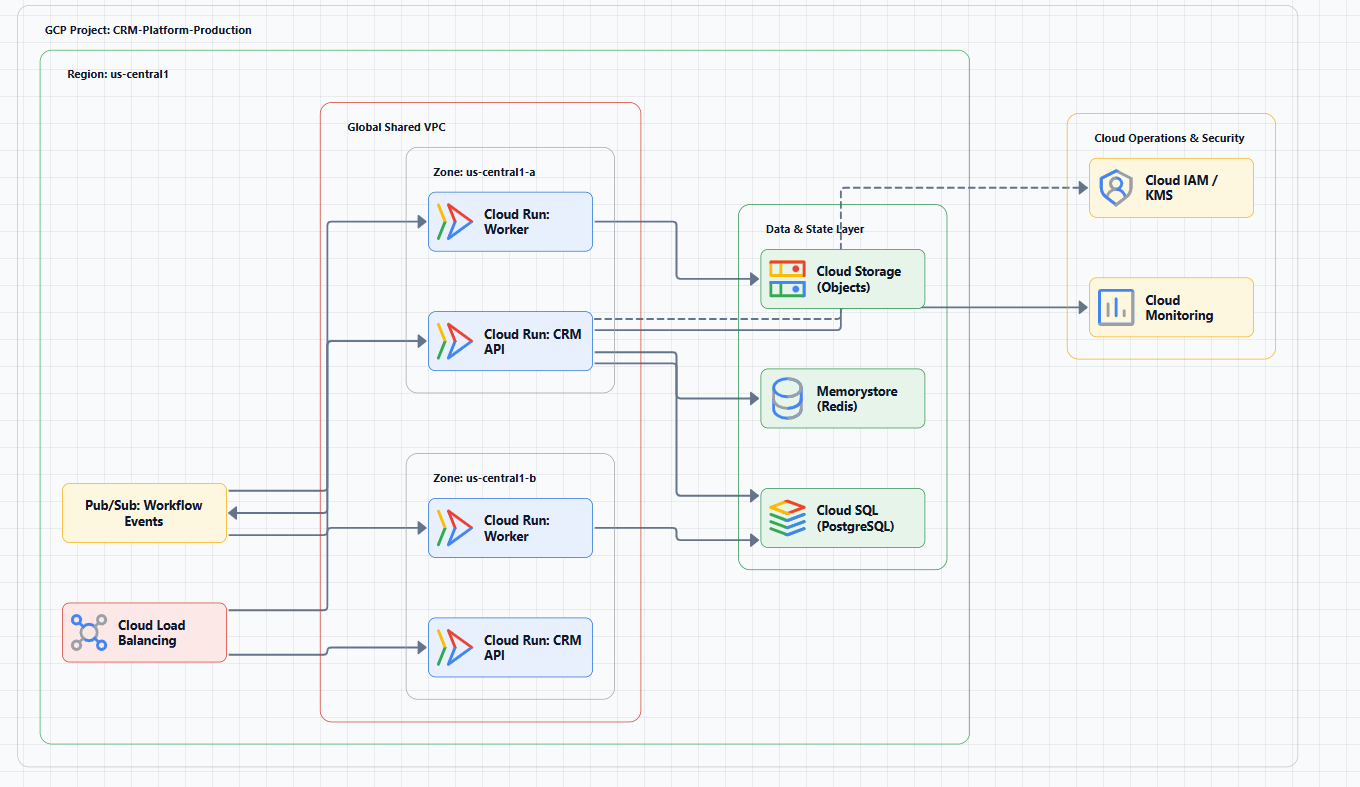
GCP multi-cloud architecture refers to the deployment of applications or workloads across Google Cloud combined with at least one other public cloud provider, such as AWS, Azure, or OCI.
A critical architectural decision is selecting the deployment archetype, which defines the application's failure domain. Common archetypes include:
| Archetype | Description |
|---|---|
| Zonal | Single availability zone within a region |
| Regional | Across multiple zones within a region |
| Multi-regional | Across multiple regions |
| Global | Worldwide deployment |
For multi-cloud architectures, this concept extends to include failure domains across multiple cloud providers.
Core Multi-Cloud Patterns
Google Cloud's Architecture Center defines several multi-cloud architecture patterns:
Distributed Architecture Patterns
These patterns deploy different application components across the most suitable computing environments:
Partitioned Multi-Cloud: Different parts of the application or workloads are partitioned across different public clouds. This pattern is useful for:
- Meeting data residency regulations
- Application consolidation after mergers and acquisitions
- Accommodating different teams' cloud preferences
Tiered Hybrid Pattern: Different functional layers of the application (web tier, application tier, database tier) are deployed across different environments.
Redundant Architecture Patterns
These patterns deploy identical applications across multiple computing environments for improved performance, resilience, and disaster recovery:
Active-Active: Applications run simultaneously in multiple clouds with traffic distributed by a global load balancer. Each cloud runs the full stack and serves production traffic.
Active-Passive: One cloud environment serves as production, while another serves as a disaster recovery backup. Traffic only fails over when the primary environment experiences a disruption.
GCP Multi-Cloud Networking: The Key to Connectivity
Networking is the foundation of multi-cloud architecture. Google Cloud's Cross-Cloud Network provides a comprehensive solution.
Core Services
Cross-Cloud Interconnect:
This critical service provides dedicated, high-bandwidth, SLA-backed private connectivity between Google Cloud and major cloud providers including AWS, Azure, and OCI. It enables reliable and private connectivity with scalable bandwidth and resilient failover.
AWS-Google Cloud Integration:
AWS and Google Cloud jointly engineered the AWS Interconnect - multicloud integration with Cross-Cloud Interconnect. This solution supports:
- Up to 100 Gbps bandwidth
- Built-in MACsec encryption
- Quadruple physical redundancy for security and high availability
Benefits and Value
| Benefit | Impact |
|---|---|
| Simplification | Reduces multi-cloud network setup from weeks to minutes via console or API |
| Cost Reduction | Cross-Cloud Network can help reduce total cost of ownership (TCO) by up to 40% |
| Unified Experience | Delivers a single-cloud-like experience across multiple clouds |
Security and Identity: Unified Management
In a multi-cloud environment, unified identity and access management (IAM) is essential. Best practices include:
- Treating each cloud as a "relying party" rather than an independent identity source
- Defining permissions centrally in one platform and distributing them via Policy-as-Code to each cloud
- Using GKE Enterprise (formerly Anthos) to provide consistent governance, operations, and security posture across clouds
- Leveraging Google Cloud's Cross-Cloud Network for secure network connectivity
Cross-Cloud IAM Integration
Multi-cloud requires a unified approach to identity. Organizations should consider using a single identity provider (like Google Cloud IAM) to manage identities across multiple clouds, ensuring consistent access control and simplified management.
Reference Architectures and Blueprints
Official Reference Architectures
Google Cloud's Architecture Center provides extensive documentation on hybrid and multi-cloud architecture patterns, including:
- Distributed patterns (partitioned multi-cloud, tiered hybrid)
- Redundant patterns (active-active, active-passive)
Community Blueprints and Tools
Open-source projects like multi-cloud-runway provide blueprints for building multi-cloud environments compliant with frameworks such as PCI DSS and CIS benchmarks.
Google Cloud's Cross-Cloud Network Reference Architecture
The Cross-Cloud Network includes five key architectural pillars for a unified, secure, and application-centric multi-cloud network:
- Unified application networking
- Secure application networking
- Observability and insights
- Network resilience and availability
- Collaborative cloud operations
GKE Enterprise and Multi-Cloud
GKE Enterprise (formerly Anthos) is a key component of Google Cloud's multi-cloud strategy. It provides a consistent Kubernetes platform that runs on:
- Google Cloud
- AWS
- Azure
- On-premises data centers
- Edge locations
Key Benefits:
- Consistent operations across all environments
- Unified security posture with Cloud Run and a zero-trust approach
- Cross-cloud application deployment with a single platform
- Built-in observability across all clusters
GKE Enterprise Architecture Components
GKE Enterprise provides a multi-cloud application platform that includes:
- GKE on Google Cloud: Managed Kubernetes in GCP
- GKE on AWS: Managed Kubernetes on AWS
- GKE on Azure: Managed Kubernetes on Azure
- GKE on-prem: Kubernetes on your own infrastructure
- Connectivity: Cross-Cloud Network for secure connectivity
- Config Management: Policy-as-code for consistent governance
Deployment Options: Cloud Run and Vertex AI
Google Cloud offers several services that can run on multi-cloud environments:
Cloud Run: A serverless platform that runs containers across Google Cloud and on-premises using GKE Enterprise. It provides consistent deployment and scaling across environments.
Vertex AI: Google Cloud's AI platform that supports multi-cloud and hybrid deployments. While the platform runs on Google Cloud, its agents and models can run across environments using GKE Enterprise.
Cloud Run for GKE Enterprise: Enables serverless workloads across on-premises and public clouds with consistent pricing and scaling.
Best Practices for GCP Multi-Cloud Architecture
1. Define Clear Business Drivers
Before implementation, define your multi-cloud strategy goals:
- Avoid vendor lock-in
- Access best-of-breed services
- Meet compliance requirements
- Improve resilience and disaster recovery
2. Choose the Right Pattern
Select the appropriate architecture pattern based on your application characteristics:
- Distributed patterns for workload segmentation
- Redundant patterns for resilience and disaster recovery
3. Unify Network and Security
Use Cross-Cloud Interconnect for secure connectivity and unified IAM policies for consistent security across clouds.
4. Embrace Automation and IaC
Use tools like Terraform to implement Infrastructure as Code (IaC), ensuring consistency and repeatability across environments.
5. Start with Reference Architectures
Leverage Google Cloud Architecture Center reference architectures and community blueprints to accelerate design.
6. Consider Geographic Distribution
When deploying across multiple clouds, consider:
- Data residency requirements
- Latency to end users
- Disaster recovery zones
- Regulatory compliance
Visualizing GCP Multi-Cloud Architectures
Creating clear architecture diagrams is essential for documentation, communication, and planning.
AI Line Studio
AI Line Studio is the fastest and most cost-effective tool for multi-cloud diagramming:
- Natural-language-to-diagram generation: Describe your architecture and get a diagram in 15 to 20 seconds
- 3,000+ official icons across AWS, Azure, GCP, and OCI
- Animated exports: GIF and MP4 for presentations
- Editable output: Refine and customize your diagrams
- Enterprise collaboration: Share and work with your team
Get started: Use the dedicated AWS diagram generator, Azure diagram generator, or GCP diagram generator. For a complete workspace, explore the cloud architecture diagram tool, the AI cloud diagram generator, and the AI system architecture generator.
Other Multi-Cloud Diagramming Tools
| Tool | Description | Best For |
|---|---|---|
| diagram-ai-generator | Open-source AI-powered generator with MCP integration | Claude Desktop users, multi-cloud diagrams |
| Visual Paradigm AI | AI-powered cloud architecture generation | Structured AI workflows |
| PlantUML Templates | Community templates for C4 model diagrams | Diagram-as-code workflows |
| draw.io | Free, manual diagramming with cloud shape libraries | Quick, one-off diagrams |
Common Mistakes to Avoid
Mistake 1: Ignoring network complexity. Multi-cloud networking is not simple point-to-point connections. Use managed services like Cross-Cloud Interconnect instead of building your own.
Mistake 2: Lack of unified identity management. Managing identity independently in each cloud creates significant security risks. Establish a central identity management platform.
Mistake 3: Insufficient data sovereignty planning. Not planning data residency locations in advance can lead to compliance risks. Determine data storage strategy early in the design phase.
Mistake 4: Using inconsistent icon styles. Mixing icon styles across clouds makes diagrams look unprofessional. Use official icon sets from each provider, AI Line Studio includes these built-in.
Mistake 5: Underestimating cost. Cross-cloud data transfer can be expensive. Perform cost estimation and optimization during the design phase.
Mistake 6: Not designing for failure. Multi-cloud is a resilience strategy, but only if you design for it. Ensure your diagram shows failover paths and recovery procedures.
External Resources
- Google Cloud Architecture Center - Hybrid and Multi-Cloud Patterns
- GKE Enterprise Documentation
- Google Cloud Networking - Cross-Cloud Network
- Google Cloud Architecture Framework
- Google Cloud Deployment Archetypes
- AWS Interconnect - Multicloud
Final Thoughts
GCP multi-cloud architecture has evolved from complex, do-it-yourself networking to highly automated and integrated solutions driven by technologies like Cross-Cloud Network. The joint engineering effort between AWS and Google Cloud represents a significant milestone, cross-cloud private connectivity that can be provisioned in minutes with enterprise-grade SLA, encryption, and redundancy.
By understanding the core patterns, leveraging powerful networking services, following security best practices, and using tools like AI Line Studio to clearly document your architecture, you can build flexible, resilient, and efficient multi-cloud systems.
Key takeaways:
- Multi-cloud is a strategic choice for flexibility, resilience, and best-of-breed services
- Cross-Cloud Interconnect is the new standard for multi-cloud networking
- GKE Enterprise provides a consistent platform across all environments
- Unified identity management is non-negotiable
- Clear architecture diagrams are essential for communication and operations
The question for 2026 isn't "should we go multi-cloud?", it's "how do we do it securely, cost-effectively, and without chaos?" GCP provides the tools to answer that question.