
Google Cloud Architecture Icons, PPTX & Diagram Templates
If you're creating a Google Cloud architecture diagram, using the correct icons and current architecture references matters.
Google Cloud provides an official product icon library for diagrams, technical documentation, and presentations. Google also maintains the Cloud Architecture Center, which includes reference architectures, deployment patterns, design guidance, and best practices.
For architects and engineering teams, these resources provide a reliable starting point for building GCP architecture diagrams that are easier to understand and maintain.
This guide covers where to get official Google Cloud icons, how to use the Google Cloud icon library, where to find Google Cloud architecture examples, how to use reference architectures, how to create GCP architecture diagrams in PowerPoint, how to structure professional Google Cloud architecture presentations, how to choose a GCP diagramming tool, and how AI can accelerate architecture diagram creation.
Cloud Architecture
Create cloud architecture diagrams for AWS, Azure, GCP, and more. Design scalable infrastructure with professional cloud icons.
Find official Google Cloud icons, PPTX diagram resources, architecture templates, reference architectures, and tools for creating GCP diagrams.
Click Cloud Architecture to open AI Line Studio and generate diagrams from natural language in seconds.
Where to Get Official Google Cloud Icons
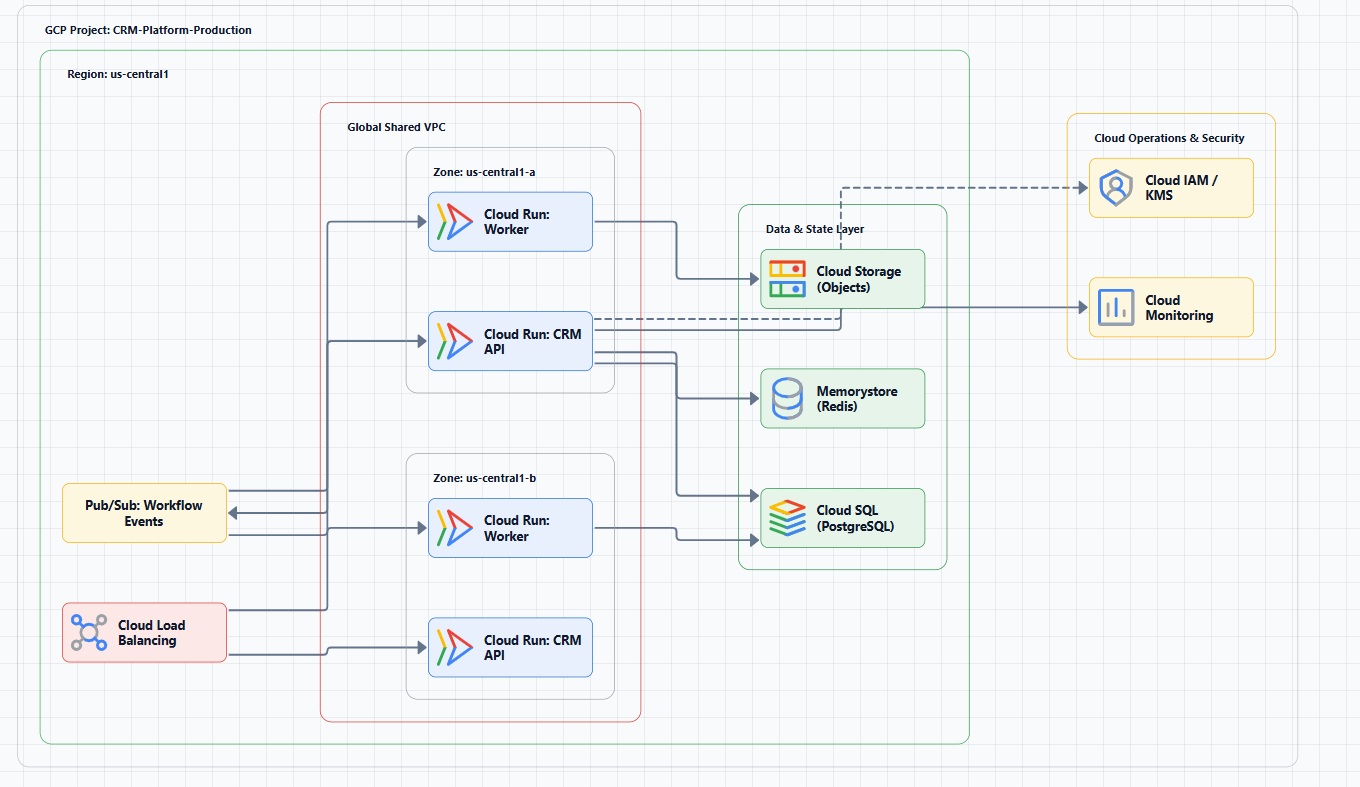
The safest place to get Google Cloud product icons is Google's official icon library.
The Google Cloud icon library provides official product icons for diagrams, technical documentation, and other visual materials. Google notes that its product iconography was updated in early 2025 and provides updated product and category icon packages.
The library includes icons for services and products across areas such as:
- Compute
- Storage
- Databases
- Networking
- Data analytics
- AI and machine learning
- Security
- Developer tools
- Containers
- Integration
- Management and observability
Examples include Compute Engine, Google Kubernetes Engine (GKE), Cloud Run, Cloud Storage, Cloud SQL, AlloyDB, BigQuery, Pub/Sub, Dataflow, Cloud Load Balancing, Cloud CDN, and Vertex AI.
Why use the official icon library?
Cloud architecture diagrams depend on visual consistency.
Using the correct service icon helps engineers quickly recognize what a component represents.
It also reduces the risk of using retired service icons, incorrect product logos, unofficial variations, outdated visual assets, and inconsistent icon styles.
For an architecture presentation or technical document, start with the current official Google Cloud icon set rather than downloading random icons from image-search results.
Google Cloud Icon Updates
Google updated its product iconography in early 2025.
The current official library provides the updated icon system and downloadable packages.
This is important if you maintain older architecture presentations.
If your organization has GCP diagrams created several years ago, review the icons before reusing them in new documentation.
Do not assume that an older Google Cloud icon library is still the current visual standard.
Practical recommendation
When updating an existing architecture diagram:
- Check the current Google Cloud icon library.
- Replace obsolete or outdated icons.
- Keep the visual style consistent throughout the diagram.
- Avoid mixing multiple generations of cloud icons.
- Preserve the meaning of the original architecture while updating the visual assets.
Google Cloud Architecture Center
Official icons are only one part of creating a good architecture diagram.
The second major resource is the Google Cloud Architecture Center.
Google's Architecture Center provides reference architectures, design guidance, architecture patterns, deployment archetypes, landing-zone guidance, enterprise foundations, reliability guidance, security guidance, hybrid and multicloud architectures, and AI and ML architecture guidance.
The current Architecture Center includes deployment archetypes such as zonal, regional, multi-regional, global, hybrid, and multicloud architectures.
This makes the Architecture Center useful not just for finding diagrams, but for understanding why an architecture is structured a certain way.
Explore the Google Cloud Architecture Center.
Google Cloud Reference Architectures
Reference architectures provide starting points for common workloads.
Instead of creating an architecture entirely from scratch, you can begin with a relevant Google Cloud pattern and adapt it to your workload.
Examples of architecture topics include enterprise foundations, landing zones, hybrid cloud, multicloud, networking, security, GKE, data platforms, AI and machine learning, application modernization, reliability, and infrastructure.
Google continues to add and update architecture guidance. Recent 2026 updates include architectures for agentic AI, distributed analytics, GKE inference networking, multicloud data platforms, private networking for AI applications, and secure data environments.
That makes the Architecture Center particularly useful for architects working on newer AI and cloud-native workloads.
Google Cloud Deployment Archetypes
One useful concept when designing a GCP architecture diagram is the deployment archetype.
Google Cloud's Architecture Center identifies several common deployment models:
- Zonal, Resources are deployed within a single zone. This can be appropriate for workloads where the failure domain and availability requirements are limited.
- Regional, Resources are distributed across zones within a region. This can improve resilience while keeping workloads geographically close.
- Multi-Regional, Resources are distributed across multiple Google Cloud regions. This can support workloads with broader geographic or availability requirements.
- Global, The architecture uses globally distributed services and infrastructure. This is useful when serving users across multiple geographic locations.
- Hybrid, The architecture combines Google Cloud with on-premises or other private infrastructure.
- Multicloud, The architecture spans Google Cloud and one or more additional cloud providers.
Your architecture diagram should make the deployment model clear because it affects failure domains, network design, data placement, latency, availability, cost, and disaster recovery.
Google Cloud Architecture Diagram Examples
A useful GCP architecture diagram should communicate the system rather than simply display a collection of service icons.
For example, a basic web application could be represented as:
Users → Cloud Load Balancing → Cloud Run → Cloud SQL
A more detailed architecture could add:
Users → Cloud CDN → Cloud Load Balancing → Cloud Run → Cloud SQL
with supporting services such as Cloud Storage, Pub/Sub, Secret Manager, Cloud Logging, Cloud Monitoring, and IAM.
The right level of detail depends on the purpose of the diagram.
Example: Three-Tier Google Cloud Architecture
A common architecture pattern separates the application into presentation, application, and data tiers.
A simplified GCP implementation might look like:
Users
  │
  ▼
Cloud Load Balancing
  │
  ▼
Application Tier
Cloud Run / GKE
  │
  ▼
Data Tier
Cloud SQL
A production architecture could add Cloud CDN, Cloud Armor, multiple zones, private networking, Secret Manager, Cloud Monitoring, Cloud Logging, Pub/Sub, and Cloud Storage.
The diagram should distinguish the primary request path from supporting services.
Example: GKE Architecture Diagram
                    Internet
                       │
                       ▼
              Cloud Load Balancing
                       │
                       ▼
                 GKE Cluster
              ┌───────────────┐
              │               │
          Service A       Service B
              │               │
              └───────┬───────┘
                      │
                 Data Services
                      │
              ┌───────┴────────┐
              │                │
           Cloud SQL       Cloud Storage
A detailed GKE architecture may additionally show node pools, pods, services, Ingress/Gateway, service mesh, Artifact Registry, CI/CD, secret management, observability, and private clusters.
Google's current Architecture Center also contains newer GKE architecture guidance, including multi-cluster and AI inference networking patterns.
How to Use Google Cloud Architecture Reference Diagrams
Reference architectures should be treated as design starting points, not templates that must be copied exactly.
A practical workflow is:
Step 1: Define the workload
Identify application type, users, data, availability requirements, performance requirements, and security requirements.
Step 2: Find a relevant reference architecture
Search the Google Cloud Architecture Center for a pattern that resembles your workload.
Step 3: Identify reusable components
Determine which parts of the reference architecture apply to your environment.
Step 4: Remove irrelevant services
Do not copy services simply because they appear in a reference architecture.
Step 5: Add workload-specific requirements
Add your application components, databases, APIs, network boundaries, security controls, and external dependencies.
Step 6: Validate the design
Use the Google Cloud Well-Architected Framework as one of the validation references.
Google Cloud Well-Architected Framework
The Google Cloud Well-Architected Framework provides recommendations for designing and operating cloud environments that are secure, efficient, reliable, high-performing, cost-effective, and sustainable.
The framework was updated in 2026, including sustainability as a full pillar and additional AI/ML guidance.
The current pillars are:
- Operational excellence
- Security
- Reliability
- Cost optimization
- Performance optimization
- Sustainability
The framework also includes cross-pillar perspectives for specific domains such as AI and ML.
When creating an architecture diagram, use these principles to ask questions such as:
- How does the system recover from failure?
- Where are the security boundaries?
- What resources are expensive?
- How does the architecture scale?
- How is the workload monitored?
- Where does data reside?
- Which components are stateful?
- What happens when a dependency fails?
A diagram should support this analysis rather than simply reproduce the service catalog.
How to Build a Google Cloud Architecture Presentation
If you're preparing a GCP architecture presentation for an architecture review, technical meeting, client presentation, or stakeholder discussion, structure the diagrams around the audience.
- Slide 1: System Context, Users, application, major external systems, primary data sources. Keep it simple.
- Slide 2: High-Level Architecture, Major GCP services, application components, data stores, primary data flows.
- Slide 3: Network Architecture, VPC, subnets, regions, connectivity, firewalls, private services.
- Slide 4: Security Architecture, IAM, authentication, authorization, security controls, data protection, trust boundaries.
- Slide 5: Data Architecture, Databases, object storage, data pipelines, analytics, data movement.
- Slide 6: Reliability and Operations, Monitoring, logging, alerting, redundancy, failover, disaster recovery.
This is generally more effective than putting the entire architecture onto one enormous diagram.
Google Cloud Diagramming Conventions
There is no single layout that every GCP architecture must follow, but consistent visual conventions make diagrams easier to review.
Use clear boundaries
Use containers to communicate VPCs, regions, zones, GKE clusters, application boundaries, and security domains.
Show directional data flow
Use arrows to communicate Source → Processing → Destination.
For example: User → Load Balancer → Application → Database
For asynchronous workloads: Application → Pub/Sub → Worker → Database
Group related services
Group components according to their architectural role: networking, compute, storage, data, security, and observability.
Label services
Do not rely only on icons.
Instead of a bare Cloud SQL icon, use Application Database, Cloud SQL.
This is particularly helpful when diagrams are reviewed by non-specialist stakeholders.
How to Create GCP Architecture Diagrams Faster
There are several ways to create Google Cloud architecture diagrams.
Option 1: PowerPoint
PowerPoint can be useful when you need complete manual control, the diagram is part of a presentation, you need editable vector shapes, or your team already uses Microsoft Office.
The official Google Cloud icon library provides downloadable icon packages and related resources.
Option 2: Collaborative diagramming
Tools such as Lucidchart and Miro can be useful when multiple people need to review and edit architecture diagrams together.
Option 3: Code-based diagrams
Tools such as Mermaid and PlantUML can be useful when diagrams need to live alongside technical documentation or source control.
The tradeoff is that code-based diagrams may require additional work to reproduce provider-specific visual styles.
Option 4: AI diagram generation
AI-powered diagramming starts with a description instead of a blank canvas.
For example:
Create a Google Cloud architecture for a SaaS application using Cloud Load Balancing, GKE across multiple zones, Cloud SQL, Cloud Storage, Pub/Sub, Secret Manager, and Cloud Monitoring. Show public and private network boundaries and the primary request and data flows.
The AI can generate the initial visual structure.
The engineer then reviews and refines it.
For broader cloud workflows, a cloud architecture diagram generator can also help teams move from written designs to visual architecture more quickly.
Create a GCP Architecture Diagram With AI Line Studio
AI Line Studio provides an AI-to-diagram workflow for cloud and system architecture.
Instead of manually searching for every GCP icon and connecting each service, you can start with a natural-language architecture description.
For example:
Create a production GCP architecture for a SaaS application. Use Cloud Load Balancing, Cloud Run, Cloud SQL, Cloud Storage, Pub/Sub, Secret Manager, and Cloud Monitoring. Deploy the application across multiple zones and show the external request flow, data flow, and security boundaries.
The generated diagram can then be reviewed and refined.
For Google Cloud-specific workflows, use the GCP architecture diagram generator.
For broader cloud architecture, the AI architecture diagram generator supports architecture designs beyond a single provider.
For working with diagrams after generation, use the AI diagram workspace.
If your team also documents AWS or Azure environments alongside GCP, the AWS architecture diagram generator and Azure architecture diagram generator support the same multi-cloud diagramming workflow.
AI-Generated GCP Diagrams Still Need Technical Review
AI can accelerate the diagramming process, but a generated diagram should not automatically be treated as authoritative architecture documentation.
Review networking (VPC configuration, subnets, regions, connectivity, routing, firewall rules), security (IAM, authentication, authorization, trust boundaries, data protection), reliability (zones, regions, redundancy, failover, recovery), data (database placement, storage, replication, data movement, backup), and operations (monitoring, logging, alerting, deployment, incident response).
The more complex the architecture, the more important human review becomes.
Common Mistakes With Google Cloud Architecture Diagrams
Mistake 1: Using outdated icons
Google updated its product iconography in early 2025. Use the current official icon library when creating new diagrams.
Mistake 2: Mixing icon styles
Avoid combining different icon generations or unofficial icon packs in the same architecture.
Mistake 3: Copying a reference architecture without understanding it
A reference architecture is a starting point.
Your workload may have different security requirements, availability requirements, data flows, performance requirements, and cost constraints.
Mistake 4: Putting everything on one diagram
A giant diagram is often less useful than several focused views.
Create separate diagrams for context, logical architecture, network architecture, security, data, and deployment.
Mistake 5: Ignoring deployment archetypes
A zonal, regional, multiregional, global, hybrid, or multicloud architecture has different implications for resilience, latency, and cost.
Choose the deployment model intentionally.
Mistake 6: Treating the diagram as the source of truth
Architecture diagrams should complement infrastructure-as-code, configuration, monitoring, application documentation, and security documentation.
They should not replace them.
Mistake 7: Failing to update diagrams
Architecture changes.
Set an owner and review diagrams when major infrastructure changes occur.
Google Cloud Architecture Diagram Checklist
Before publishing a GCP architecture diagram, check:
Visual
- Current Google Cloud icons are used
- Icons are visually consistent
- Components have meaningful labels
- Data flow arrows are directional
- Boundaries are clear
- The diagram is readable at normal zoom
Architecture
- Primary components are shown
- External dependencies are identified
- Network architecture is represented
- Data stores are identified
- Security boundaries are visible
- Failure domains are understood
Operations
- Monitoring is considered
- Logging is considered
- Alerting is considered
- Backup/recovery requirements are documented
- Deployment architecture is understood
Documentation
- Diagram has a title
- Diagram has an owner
- Last-updated date is recorded
- Environment is identified
- Detailed documentation exists where necessary
Google Cloud Architecture Resources: Quick Reference
| Resource | What it provides |
|---|---|
| Google Cloud Icon Library | Official GCP product and category icons |
| Google Cloud Architecture Center | Reference architectures and design guidance |
| Deployment Archetypes | Zonal, regional, multiregional, global, hybrid, multicloud patterns |
| Well-Architected Framework | Security, reliability, performance, cost, operations, sustainability guidance |
| GCP architecture diagram generator | AI-assisted diagram generation |
| AI architecture diagram generator | Multi-provider and system architecture generation |
For the official icon source, use Google's Google Cloud icon library.
For architecture patterns and reference designs, use the Google Cloud Architecture Center.
For architecture quality and design validation, use the Google Cloud Well-Architected Framework.
Create a Professional Google Cloud Architecture Diagram
A professional GCP architecture diagram starts with more than the right icons.
You need: Correct assets + sound architecture + clear visual hierarchy + understandable data flow + current documentation.
Start with Google's official icon library when you need current GCP visual assets. Then use the Architecture Center to understand relevant reference architectures and deployment patterns.
For new architecture designs, AI can reduce the mechanical work involved in turning a written system description into a visual starting point.
Try the GCP architecture diagram generator to create a Google Cloud architecture from a natural-language description.
For AWS, Azure, and GCP designs in the same workflow, use the AI architecture diagram generator.
For editing, refining, and organizing diagrams, use the AI diagram workspace.
The goal is not simply to make a diagram that looks like Google Cloud.
The goal is to create an architecture diagram that makes the system accurate, understandable, reviewable, and maintainable.
Frequently Asked Questions
Google provides an official Google Cloud product icon library containing current product and category icons for diagrams and technical documentation.