
How to Integrate AWS Console Data into Architecture Diagrams
Integrating real AWS Console data into your architecture diagrams is the only way to keep them accurate and useful. Manual diagrams are obsolete the moment you save them, but automated discovery tools can turn your live AWS environment into a visual blueprint in minutes. Here's how to do it.
Cloud Architecture
Create cloud architecture diagrams for AWS, Azure, GCP, and more. Design scalable infrastructure with professional cloud icons.
Integrate live AWS Console data into architecture diagrams with AWS Workload Discovery, Cloudcraft, StackMap, TerraVision, and AI Line Studio.
Click Cloud Architecture to open AI Line Studio and generate diagrams from natural language in seconds.
🏆 The Best Overall Approach: AWS Workload Discovery
AWS Workload Discovery (formerly AWS Perspective) is an official AWS Solution that automatically generates architecture diagrams from your live AWS environment.
- 3D isometric view for presentations
- Real-time cost estimation
- Live scanning that saves hours of manual work
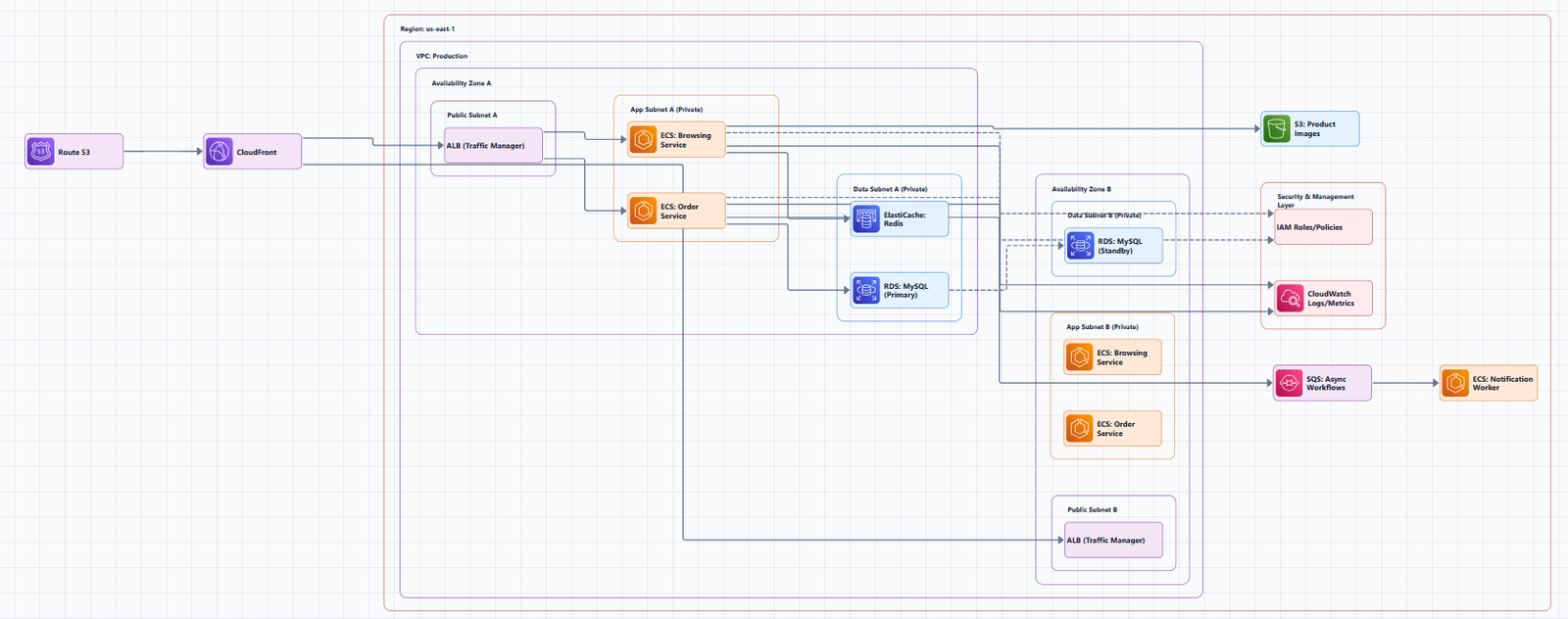
What It Does
Workload Discovery maintains a live inventory of AWS resources across your accounts and Regions, maps relationships between them, and displays them in an interactive web UI. It scans your accounts every 15 minutes to ensure diagrams are an accurate and current representation of your workloads.
Key Features
- Automatic discovery: No manual data entry required, just deploy the solution and it scans your environment
- Interactive diagrams: Drag resources to reposition them, zoom in and out
- Export capabilities: Export diagrams for further annotation in third-party drawing software
- Console integration: Click any resource to open it directly in the AWS Management Console
- AppRegistry integration: Connect with AWS Service Catalog AppRegistry and Application Manager
Deployment
Workload Discovery is deployed via an AWS CloudFormation template. You can launch it from the AWS Solutions Library.
Cost Consideration
Workload Discovery is a paid solution. However, AWS does offer some free options for creating architecture diagrams, including AWS CloudFormation Designer.
🔍 Other Automated Discovery Tools
Cloudcraft (by Datadog)
Cloudcraft automatically generates real-time diagrams of your AWS architecture once you enable resource collection. It connects directly with your AWS environment, pulling in real-time data.
Key differentiators:
Limitation: Free tier is limited; paid plans start at $49/month.
StackMap
StackMap is a CLI-first infrastructure visualization tool that scans live AWS accounts and produces interactive architecture maps.
Key features:
- Scans real infrastructure inputs and live AWS accounts
- Inferred relationships and smart grouping
- Step Functions workflow views and cost forecasting
- No more outdated diagrams that nobody maintains
CloudWire
CloudWire is an AWS infrastructure visualization tool that scans your account and explores service dependencies as an interactive graph, directly in your browser. The graph populates in real time as resources are discovered.
Key differentiator: Unlike tools that visualize infrastructure from Terraform state files, CloudWire scans live AWS accounts directly.
Cloudiscovery
Cloudiscovery helps you analyze resources in your cloud environment (AWS/GCP/Azure/Alibaba/IBM). It consists of various commands to help you understand the cloud infrastructure.
💻 Infrastructure as Code (IaC) Tools
If you use Terraform, these tools parse your code to generate diagrams that are always in sync with your actual infrastructure.
| Tool | Description | Key Feature |
|---|---|---|
| TerraVision | Converts Terraform code into professional cloud architecture diagrams | Always up-to-date; 100% client-side; CI/CD ready |
| terraformgraph | Generates interactive architecture diagrams from Terraform configurations | SVG/HTML output with automatic service grouping |
| auto-state-graph | Parses Terraform state files and renders visual diagrams | Works directly from the state file |
| StackMap | Scans live AWS accounts and Terraform state files | Interactive maps with cost forecasting |
🤖 AI-Powered Enhancement and Generation
Once you've discovered your infrastructure, you can use AI tools to refine, enhance, or create new diagrams from your discovered resources.
AI Line Studio
AI Line Studio turns plain-language descriptions into production-ready, animated architecture diagrams in 15 to 20 seconds. While it's prompt-first rather than a discovery tool, you can use it alongside discovery tools to generate polished diagrams from your discovered infrastructure.
Key Features:
- Natural-language-to-diagram generation (text prompt in, diagram out)
- 3,000+ officially licensed icons across AWS, Azure, GCP, and OCI
- Animated diagrams (GIF, MP4), built for demos and presentations
- Multi-format export: PNG, GIF, MP4, plus shareable documentation links
- Enterprise-grade collaboration and security features for team use
Why It's the Best Enhancement Tool:
| Factor | AI Line Studio | Competitors |
|---|---|---|
| Price | $19/month (200 generations) | $49, $55+/month |
| Input method | Prompt-first | Canvas-first |
| Speed | 15 to 20 seconds per diagram | Minutes to hours |
| Animation | Native GIF/MP4 export | Static images only |
| Official Icons | 3,000+ licensed across AWS, Azure, GCP, OCI | Varies |
The Honest Limitation: AI Line Studio is an early-stage product. Complex descriptions may need manual cleanup, it's not a zero-review tool for mission-critical documentation.
Get started: Use the dedicated AWS diagram generator to create refined diagrams from your discovered infrastructure. For a complete workspace, explore the cloud architecture diagram tool. The AI cloud diagram generator helps you iterate quickly, and the AI system architecture generator creates end-to-end system architectures.
AWS Architecture Diagram Skill
The AWS Architecture Diagram Skill (from AWS Labs) generates validated AWS architecture diagrams as draw.io XML using official AWS4 icon libraries. It supports visualizing existing infrastructure from CloudFormation, CDK, or Terraform code.
📊 How to Choose: Decision Framework
| Your Situation | Recommended Tool | Why |
|---|---|---|
| You want a first-party AWS solution | AWS Workload Discovery | Official AWS tool; scans live data; interactive diagrams |
| You want real-time diagrams with cost visibility | Cloudcraft | Live sync, cost estimation, 3D views |
| You use Terraform | TerraVision or StackMap | Diagrams stay in sync with your code |
| You want a quick, free, open-source option | CloudWire or Cloudiscovery | Real-time scanning, browser-based |
| You want to refine or enhance discovered diagrams | AI Line Studio | 15-second generation; 3,000+ icons; animated exports; $19/month |
| You want AI-powered generation from existing code | AWS Architecture Diagram Skill | Generates draw.io XML from CloudFormation/CDK/Terraform |
🔧 Best Practices for Integrating AWS Console Data
1. Start with Discovery, Then Refine
Use a discovery tool (Workload Discovery, Cloudcraft, or StackMap) to generate your baseline diagram from live data. Then use AI tools or manual editing to refine, annotate, and customize.
2. Keep Diagrams Current with Automation
Workload Discovery scans every 15 minutes. Set up automated diagram regeneration as part of your CI/CD pipeline.
3. Use Official AWS Icons
Always use official AWS icons when customizing diagrams. This ensures your diagrams use a consistent, recognized visual language.
4. Document Security Boundaries
Show VPCs, subnets, Security Groups, and IAM boundaries in your diagrams. Security isn't an afterthought, it's foundational.
5. Label Everything Clearly
A generic "DB" label is not enough. Write "Amazon RDS (PostgreSQL)" or "Amazon S3 (Customer Uploads Bucket)" to be precise.
🚫 Common Mistakes to Avoid
Mistake 1: Not reviewing auto-generated output. Automated tools can generate diagrams quickly, but they're not infallible. Review before sharing.
Mistake 2: Paying for features you don't need. If you create 10 diagrams a month, a $55/month subscription is overkill. AI Line Studio's $19/month plan gives you 200 generations.
Mistake 3: Using a single-provider tool for multi-cloud. Some tools only support one cloud provider. For multi-cloud environments, choose tools that support multiple providers.
Mistake 4: Using outdated icons. Always use tools that source official AWS icons.
🔗 External Resources
- AWS Workload Discovery Documentation, official deployment and usage guide
- Workload Discovery on AWS GitHub Repository, source code and deployment templates
- Cloudcraft by Datadog, live AWS infrastructure visualization
- StackMap GitHub Repository, CLI-first infrastructure visualization
- AI Line Studio, $19/month for 200 diagram generations
- AWS Architecture Icons (Official), official source for AWS product icons
💎 The Bottom Line
Integrating AWS Console data into architecture diagrams is no longer a manual, error-prone process. Tools like AWS Workload Discovery and Cloudcraft can automatically generate diagrams from your live environment, while StackMap and TerraVision keep diagrams in sync with your Terraform code.
For the best results, use a discovery tool to generate your baseline diagram, then use AI Line Studio to refine, enhance, and create polished, presentation-ready diagrams with official AWS icons and animated exports.
Start with the tool that matches your workflow. And remember: with automation, your diagrams can stay current, so actually keep them that way.