
Quick Ways to Generate AWS Architecture Diagrams
The fastest way to generate AWS architecture diagrams is no longer opening a drawing tool and starting from a blank canvas. Now you can generate them in seconds through AI conversations, parsing Infrastructure as Code (IaC), or using automation tools.
Here's a breakdown of the fastest methods available, organized by approach.
Cloud Architecture
Create cloud architecture diagrams for AWS, Azure, GCP, and more. Design scalable infrastructure with professional cloud icons.
Fastest ways to generate AWS architecture diagrams, AI Line Studio, Amazon Q + MCP, terraformgraph, StackMap, Agedashi, and a decision framework for each approach.
Click Cloud Architecture to open AI Line Studio and generate diagrams from natural language in seconds.
Quick Comparison: Fastest Options
| Method | Tool | Speed | Best For | Price |
|---|---|---|---|---|
| AI Text-to-Diagram | AI Line Studio | 15 to 20 seconds | Rapid prototyping, demos, presentations | $19/month (200 gens) |
| AI Text-to-Diagram | Amazon Q + MCP | 1-2 minutes | AWS-native, free | Free |
| IaC Parsing | terraformgraph | Seconds (from code) | Terraform users | Free/Open Source |
| IaC Parsing | Agedashi | Seconds (from code) | Terraform users, CLI-first | Free/Open Source |
| AI Assistant Integration | diagram-ai-generator | 30 seconds | Claude Desktop users | Free/Open Source |
Method 1: AI Text-to-Diagram Generation
The most direct and fastest method. You describe your architecture in natural language, and AI generates a professional diagram in seconds.
- 3,000+ official AWS icons, automatically uses the correct icons
- Animated exports, GIF and MP4 format for presentations
- Editable output, refine and customize after generation
- Enterprise collaboration, share with your team
- Prompt-first workflow, no manual drawing required
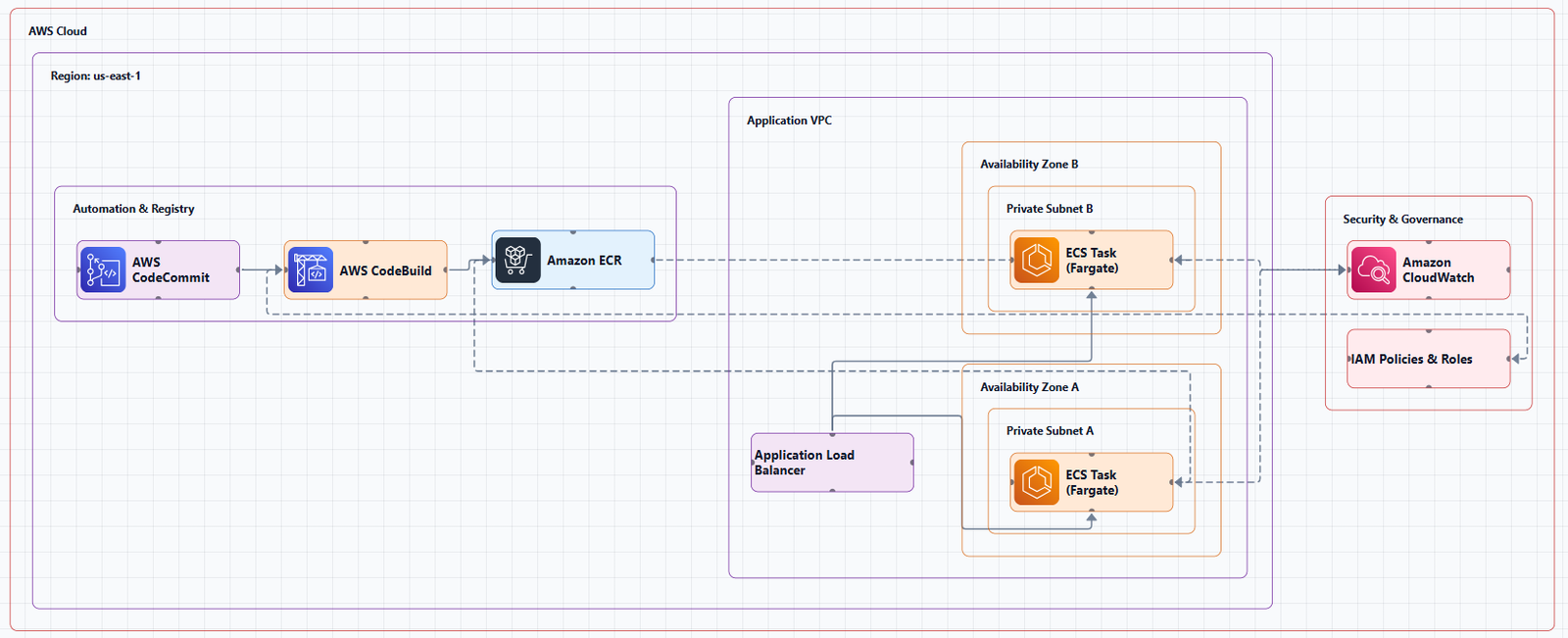
AI Line Studio, Best Overall
AI Line Studio is the most cost-effective and fastest professional option. You describe your architecture in plain English, and it generates a production-ready diagram in 15 to 20 seconds.
Key Features:
Pricing: $19/month for 200 generations, less than $0.10 per diagram.
Get started: Visit the dedicated AWS diagram generator to create AWS architecture diagrams from natural language. For a complete workspace, explore the cloud architecture diagram tool, the AI cloud diagram generator, and the AI system architecture generator.
Amazon Q Developer CLI + MCP, AWS Official (Free)
AWS provides free AI-powered diagram generation through Amazon Q Developer CLI with MCP (Model Context Protocol) servers.
Installation Steps:
- Install
amazon-qCLI - Install
uvpackage manager - Configure
mcp.jsonfile - Use
q chatcommand to generate diagrams
MCP Servers:
- AWS Diagram MCP: Generates AWS architecture diagrams with official AWS icons
- AWS Documentation MCP: Fetches latest AWS service information
Example:
q chat "Generate a diagram for a 3-tier web application on AWS"GenAI-DrawIO-Creator, Open Source
An open-source AI-powered diagram generator that lets you create and modify draw.io diagrams through natural language chat. Supports uploading PDF and text files to extract content.
Best for: Open-source users wanting AI-powered draw.io generation.
Visual Paradigm AI Cloud Architecture Studio
Professional AI cloud architecture diagram generator with interactive editing. Its AI asks clarifying questions to refine your architecture design. Exports high-quality SVG for documentation and presentations.
Best for: Teams wanting structured AI-assisted design with Well-Architected alignment.
Method 2: Infrastructure as Code (IaC) Parsing
If you're already using Terraform or CloudFormation, your code itself is the best "blueprint." These tools parse your code and generate diagrams that stay in sync with your infrastructure.
terraformgraph, Interactive HTML
Parses Terraform HCL files and generates interactive HTML diagrams with drag-and-drop, relationship highlighting, zoom, and pan. Exports to PNG/JPG. No cloud credentials required, runs offline.
Best for: Terraform users wanting interactive diagrams.
Agedashi, CLI-First
Rust-based CLI tool that generates diagrams with a simple command: tofu graph | agedashi. Outputs SVG, PNG, PDF, JPG. Automatically maps 25+ AWS resource types to official icons.
Best for: Terraform users who prefer CLI-first workflows.
StackMap, Comprehensive Visibility
Feature-rich CLI tool that parses Terraform state files and scans live AWS accounts. Generates interactive, zoomable, filterable HTML diagrams with cost forecasting and drift detection.
Best for: Platform engineers needing comprehensive visibility with cost insights.
TerraVision, Multi-Format Export
Converts Terraform code to diagrams with interactive HTML, PNG, and draw.io formats. 100% client-side, your code never leaves your machine.
Best for: Teams needing diagrams in multiple formats (HTML, PNG, draw.io).
Terramaid, Terraform to Mermaid
Converts Terraform configurations to Mermaid diagrams for easy embedding in Markdown documentation.
Best for: Embedding Terraform diagrams in READMEs and documentation.
CDK-Canvas, CloudFormation/CDK to Diagram
Web tool that automatically generates professional infrastructure diagrams from CloudFormation templates.
Best for: Teams using AWS CDK or CloudFormation.
Method 3: MCP (Model Context Protocol) Integration
MCP is an open protocol that allows AI models (like Claude, Amazon Q) to connect with various data sources and tools through "MCP servers."
diagram-ai-generator, Open Source MCP Server
An MCP server that integrates with Claude Desktop and other AI assistants. Supports AWS, Azure, GCP, and Kubernetes with real cloud provider icons.
Best for: Teams using Claude or other MCP-compatible AI assistants.
diagrams-mcp, Python Diagrams Library
An MCP server that uses the Python diagrams library to generate diagrams. Supports 15+ cloud providers (AWS, Azure, GCP, Kubernetes, and more).
Best for: Developers who want to generate diagrams programmatically.
AWS Diagram MCP, Official
AWS's official MCP server that provides diagram generation for Amazon Q and other tools using official AWS icon sets.
Best for: AWS-native teams wanting official support.
Method 4: Manual Drawing with Templates
While not as fast as AI, these tools offer quick start-up with rich templates and free access.
draw.io (diagrams.net)
Completely free online tool with built-in AWS icon libraries. No registration required. Supports multiple storage options (local, Google Drive, GitHub).
Best for: Quick, one-off diagrams at zero cost.
Lucidchart
Popular professional diagramming tool with drag-and-drop interface and team collaboration features.
Best for: Polished, collaborative diagramming.
Cloudcraft
Drag-and-drop interface with real-time cost estimation. Free and paid versions available.
Best for: Diagramming with cost visibility.
Figma
Free design tool with AWS diagram libraries. Great for teams needing high-quality visual output.
Best for: Design-focused teams already using Figma.
Decision Framework
| Your Primary Need | Recommended Tool | Why |
|---|---|---|
| Fastest speed + best value | AI Line Studio ($19/mo) | 15 to 20 second generation, 3,000+ official icons, animated exports |
| Free AWS official AI | Amazon Q + MCP | AWS-native, natural language, free |
| Terraform code → diagrams | terraformgraph or Agedashi | Always current, no manual updates |
| Comprehensive visibility + cost | StackMap | Live scanning, cost forecasting, drift detection |
| AI assistant integration | diagram-ai-generator | Open source, MCP, Claude integration |
| Completely free manual | draw.io | Free, flexible, no registration |
External Resources
- AI Line Studio Pricing, $19/month for 200 diagram generations
- AWS Architecture Icons (Official), official AWS icon set
- Terraformgraph GitHub, interactive diagrams from Terraform
- StackMap GitHub, interactive infrastructure maps
- diagram-ai-generator, MCP server for AI diagram generation
- AWS Diagram MCP, AWS official MCP server
Final Thoughts
The fastest way to generate AWS architecture diagrams depends on your workflow:
- For rapid prototyping and demos: AI Line Studio at $19/month for 200 generations, 15 to 20 second generation with 3,000+ official icons and animated exports.
- For free AWS-native AI: Amazon Q + MCP, use natural language commands to generate diagrams.
- For Terraform users: terraformgraph or Agedashi, diagrams stay in sync with your code.
- For comprehensive visibility: StackMap, scan live infrastructure, detect drift, forecast costs.
- For AI assistant integration: diagram-ai-generator, open source MCP server for Claude.
With modern AI and automation tools, generating AWS architecture diagrams has never been faster or easier. The barrier to keeping your documentation current has dropped dramatically.