
AWS Cloud Architecture Generator from Text Prompts: Build Diagrams in 20 Seconds
AI Line Studio's Cloud Architecture builder lets you generate AWS diagrams from plain text prompts in about 20 seconds. After signing up, you select AWS as your provider, name your diagram, type a description like "AWS three tier web application architecture diagram," and the tool renders the full architecture automatically. No manual dragging, no shape libraries, no layout work. You describe what you need, and the structure appears ready for review.

YouTube Tutorial
Create AWS Cloud Architectures from Text Prompts in 20 Seconds using ai line studio Tutorial 15
How the AWS Cloud Architecture Builder Works
After you register on AI Line Studio and land on the primary Workspace page, you have several options for starting a new diagram. For AWS infrastructure, you click on the Cloud Architecture option. That takes you directly to the AI Builder page, where the tool is set up to understand cloud-specific relationships and service dependencies.
Once you're on the builder, the first decision is selecting your cloud provider. Since this tutorial focuses on Amazon Web Services, you select AWS from the available options. The interface then asks you to name your diagram. In the video, the demonstration uses "AWS three tier web application diagram in AWS part 17" as the title, but you can name yours whatever matches your project or documentation standards.
With the provider and name set, you click Continue to move into the generation phase. This is where the input field appears. You type your prompt in natural language, the video demonstrates this with "AWS three tier web application architecture diagram", and then click Generate. The platform processes the request and, within 15 to 20 seconds, renders the completed diagram directly onto your screen.
That's the full workflow. No template browsing, no manual placement of EC2 or RDS icons, no drawing connection lines between subnets and load balancers. The tool handles the visual layout based on what you described.
How an AWS Cloud Architecture Generator from Text Prompts Works
Traditional AWS diagramming follows a familiar pattern: open a canvas, drag a VPC shape from a library, add subnets, place instances, draw arrows, label everything, and then spend twenty minutes nudging boxes so the diagram looks professional. An AWS cloud architecture generator from text prompts removes that entire phase. You describe the architecture, and the structure appears already organized.
The difference isn't just speed, though 20 seconds versus an hour is significant. It's that the tool interprets your intent from language, not from manual spatial arrangement. When you write "three tier web application," the model understands that implies a presentation layer, an application layer, and a data layer. It knows that in AWS, those tiers typically map to services like Elastic Load Balancing, EC2 or ECS, and RDS or DynamoDB. It then arranges those services in a standard topology and connects them appropriately.
This matters because most engineers don't struggle with knowing what services to use. They struggle with communicating the layout to stakeholders, documenting the current state, or iterating quickly during design reviews. When the generation is text-driven, you can copy a Jira ticket description, paste it into the input field, and get a draft diagram back before the meeting starts.
Compared to general-purpose tools like Draw.io, which require you to build every component manually, this approach keeps you focused on architecture decisions rather than pixel alignment.
What Happens During the 20-Second Generation
Fifteen to twenty seconds is fast enough that you can iterate during a conversation. You type a prompt, review the output, spot what's missing, adjust your description, and regenerate. That feedback loop changes how architecture reviews work. Instead of preparing diagrams days in advance, you can generate candidates in real time while discussing trade-offs.
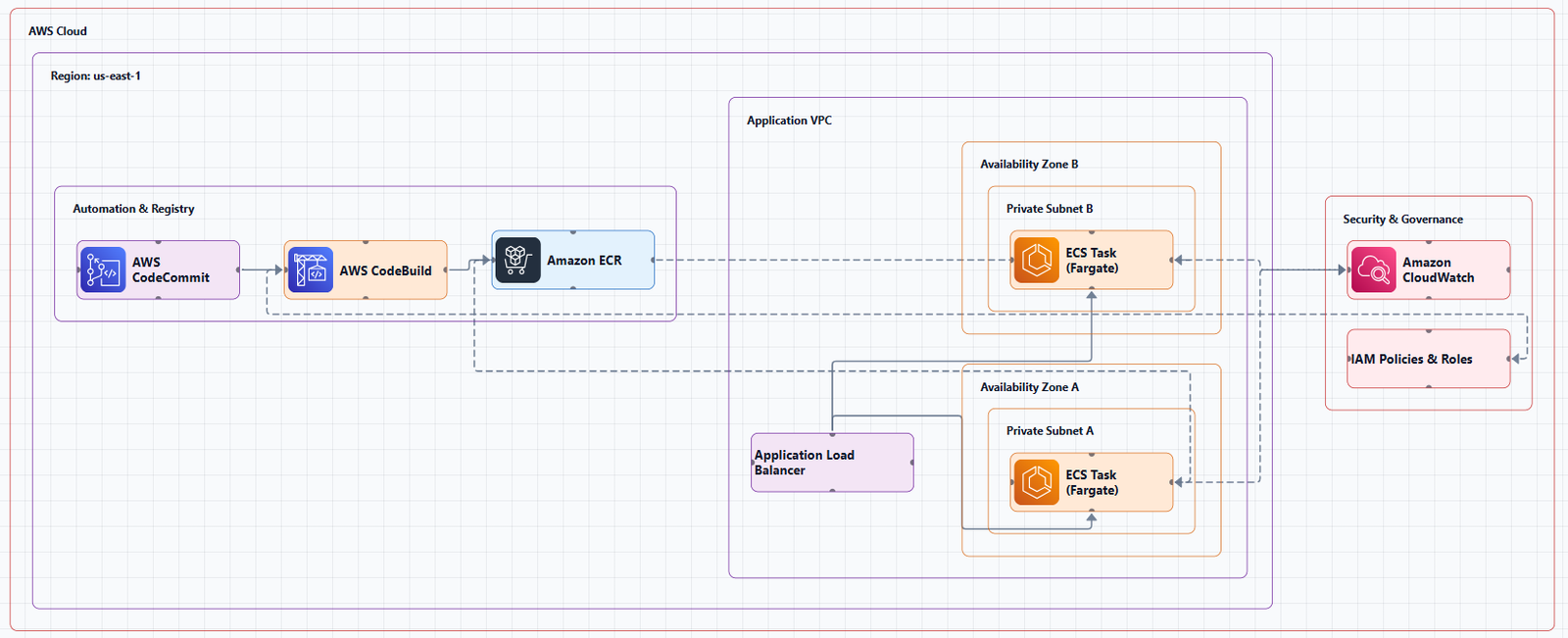
The generation process itself is straightforward from the user side. After clicking Generate, the platform processes your natural language input and renders the diagram. The video shows the AWS three-tier web application diagram appearing fully formed, subnets, service icons, and connection lines all in place. You don't watch it draw element by element. The result lands complete.
This immediacy is useful when you're exploring multiple approaches. You might generate one diagram with a traditional three-tier setup, then generate another using a serverless pattern, and compare them side by side. The time cost of each variant is minimal, so experimentation becomes practical rather than prohibitive.
If you're working to improve the precision of your outputs, the input guide covers how to structure prompts so the tool captures service relationships and scaling considerations accurately.
Who Should Use This for AWS Architecture
System architects are the obvious audience. When you're translating non-technical requirements into infrastructure, you often start with vague constraints. Turning a sentence like "we need a scalable web app with a database" into a concrete visual helps you validate whether your interpretation matches what the stakeholder actually meant. The system architects page outlines how this fits into broader design workflows.
DevOps engineers use it differently. During incident reviews or planning sessions, you often need to reconstruct what the current infrastructure looks like or propose a change. Generating a diagram from a text description of the target state gives the team a shared reference point immediately. For teams focused on deployment automation and infrastructure management, the DevOps engineers page explains how diagram generation integrates with documentation practices.
Software engineers also benefit when they're designing new services or onboarding to an existing AWS environment. A generated diagram of the current architecture is faster to digest than reading through Terraform files or clicking through the AWS Console to trace resource dependencies.
Getting Started With Your First AWS Diagram
The entry point is simple. Sign up, navigate to the Workspace, select Cloud Architecture, choose AWS, name your diagram, and type your prompt. The video demonstrates this with a three-tier web application, but the same flow works for serverless architectures, microservices, VPC designs, or any other AWS topology you need to visualize.
If you're comparing this approach to other tools, Cloudcraft is a common reference point for AWS-specific diagramming. The key difference is that Cloudcraft focuses on isometric 3D visualization with manual placement, while AI Line Studio generates the structure from your text description automatically.
For current pricing and plan details, you can review the pricing plans to see which tier includes the Cloud Architecture builder.
Key Takeaways
- An AWS cloud architecture generator from text prompts can produce a complete AWS three-tier diagram in 15 to 20 seconds from a plain language description.
- The workflow is: register, select Cloud Architecture, choose AWS, name the diagram, type the prompt, and click Generate.
- The tool interprets natural language to arrange services in standard topologies without manual layout.
- It works for any AWS topology, not just the three-tier web application demonstrated in the video.
- System architects, DevOps engineers, and software engineers can all use it for design reviews, documentation, and onboarding.
Ready to generate your first AWS architecture diagram from a text prompt?
Try the Cloud Architecture builder on AI Line Studio's free plan and see the diagram render in under 20 seconds.
Try Free PlanFrequently Asked Questions
It is an AI-driven diagramming tool on the Workspace page that generates cloud infrastructure visuals from natural language prompts. You select a provider like AWS, name your diagram, type a description, and the tool renders the architecture automatically.