
Best AWS Architecture Diagram Tools in 2026
Documenting a multi-service AWS environment is difficult because the infrastructure keeps changing.
A diagram that accurately represented your architecture six months ago may no longer match the resources, dependencies, network boundaries, or services running today. For engineering teams, that creates a documentation problem: the diagram exists, but nobody can be sure whether it still represents reality.
The best tools for AWS architecture diagrams solve different parts of that problem.
Some generate diagrams from natural language. Others discover resources directly from AWS accounts. Terraform-focused tools generate diagrams from infrastructure-as-code, while traditional diagramming platforms provide precise manual control and collaboration.
The right choice depends on what you are trying to document.
This guide compares the strongest options by workflow rather than treating every AWS diagram tool as interchangeable.
Cloud Architecture
Create cloud architecture diagrams for AWS, Azure, GCP, and more. Design scalable infrastructure with professional cloud icons.
Compare the best AWS architecture diagram tools for AI generation, live infrastructure discovery, Terraform, collaboration, and documentation.
Click Cloud Architecture to open AI Line Studio and generate diagrams from natural language in seconds.
Quick Comparison: AWS Architecture Diagram Tools
| Tool | Primary approach | Best for |
|---|---|---|
| AI Line Studio | AI / natural language | Rapid AWS architecture generation |
| Cloudcraft | Live infrastructure + visual diagramming | AWS/Azure visualization and cost planning |
| TerraVision | Terraform → diagram | Infrastructure-as-code teams |
| draw.io / diagrams.net | Manual diagramming | Free, flexible AWS diagrams |
| Lucidchart / Lucidscale | Collaborative + cloud visualization | Teams already using Lucid |
| AWS Architecture tools | Reference architectures + official icons | AWS design standards and documentation |
| AWS Workload Discovery | Live AWS discovery | Existing deployments, with an important retirement caveat |
The key distinction is simple:
- Natural-language-to-diagram generation
- AWS architecture diagrams
- Azure architecture diagrams
- GCP architecture diagrams
- OCI architecture diagrams
- 3,000+ structured cloud and enterprise icons
- Multiple diagram types
- Animation
- Collaboration
- Multiple export options
- Shareable documentation links
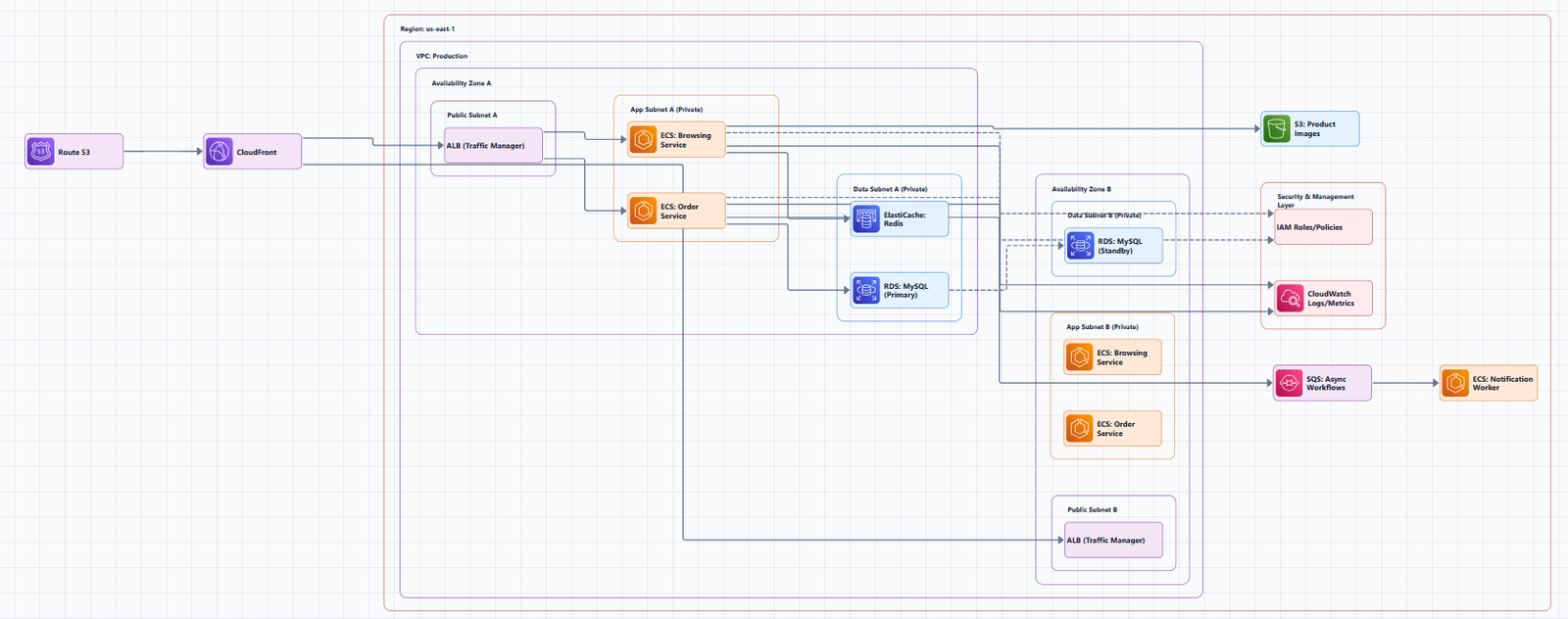
Do you want to describe an architecture, discover an existing architecture, generate a diagram from code, or draw it manually?
1. AI Line Studio, Best for AI-Powered AWS Architecture Diagrams
AI Line Studio is designed around an AI-first workflow for creating technical and cloud architecture diagrams.
Instead of starting with a blank canvas and manually placing every AWS service, you describe the architecture in natural language.
For example:
Create a highly available three-tier AWS application with CloudFront, an Application Load Balancer, EC2 instances across two Availability Zones, and an RDS PostgreSQL database in private subnets.
The goal is to turn that description into a structured architecture diagram that can then be reviewed and refined.
Why AI Line Studio stands out
Its current platform supports:
AI Line Studio currently lists a $19/month Starter plan with 200 diagram generations per month and a $29/month Pro plan with 300 generations.
Best workflow
AI Line Studio is particularly useful when the architecture exists first as an idea, design requirement, migration plan, or written description.
For example:
Architecture requirement → Natural-language prompt → Diagram → Engineering review → Refinement
This is different from live discovery tools that start with infrastructure that already exists.
AWS architecture diagram generation
If your primary requirement is creating an AWS architecture from a description, use the AWS architecture diagram generator.
For broader system designs, the AI architecture diagram generator can be used for cloud and system architecture workflows.
For working with diagrams after generation, the AI diagram workspace provides the broader editing environment.
Important limitation
AI-generated architecture should still be reviewed by an engineer or architect.
A diagram generated from an incomplete prompt may omit:
- Security boundaries
- Network routes
- Failure scenarios
- Data dependencies
- IAM requirements
- Availability requirements
- Cost considerations
AI is most useful as a diagram-generation accelerator, not as a substitute for architecture review.
Best for: AI-assisted AWS architecture design, rapid iteration, architecture brainstorming, technical presentations, documentation drafts, and design reviews.
2. Cloudcraft, Best for Live AWS Visualization and Cost Planning
Cloudcraft takes a different approach from AI Line Studio.
Instead of primarily starting with a natural-language description, Cloudcraft focuses on visualizing cloud infrastructure and providing tools for architecture planning.
Its current pricing page lists a free plan, a Pro plan, and an Enterprise plan. Pro includes live scanning and cost-related capabilities, with pricing shown as $40.83 per user/month when billed annually or $99 monthly.
Key capabilities
Cloudcraft supports:
- AWS architecture diagrams
- Azure architecture diagrams
- Live infrastructure scanning
- 3D visualization
- Cost calculations
- Diagram sharing
- Collaboration
- Architecture annotations
- API integrations
- Version history
When Cloudcraft makes sense
Cloudcraft is a strong choice when your team wants to combine architecture visualization with cloud infrastructure and cost planning.
For example:
AWS environment → Live scan → Architecture visualization → Cost analysis
This is a different workflow from:
Architecture idea → AI prompt → New diagram
Best for: Teams that want a visual AWS/Azure architecture environment with infrastructure scanning and cloud cost planning.
3. TerraVision, Best for Terraform-Based AWS Documentation
If Terraform is the source of truth for your infrastructure, generating diagrams directly from Terraform can be more useful than manually maintaining them.
TerraVision converts Terraform configurations into cloud architecture diagrams and currently supports AWS, GCP, and Azure. Its repository describes the project as free and open source, with AWS support covering more than 200 services.
Why Terraform-based diagramming matters
Consider a workflow like:
Terraform → Infrastructure → Architecture Diagram
Instead of:
Terraform → Infrastructure
and separately:
Manual diagram → Hope it stays synchronized
TerraVision can generate diagrams from Terraform and supports outputs including PNG, SVG, PDF, and draw.io formats. It also provides interactive HTML visualization and optional AI annotations.
Best for: Terraform-heavy engineering teams that want architecture documentation connected to infrastructure-as-code.
Important consideration
Generating a diagram from Terraform does not automatically mean the diagram is the best explanation for every audience.
A Terraform-derived diagram can contain a large amount of infrastructure detail.
For executives or architecture reviews, a simplified view may be more useful.
For engineers, a detailed deployment view may be appropriate.
4. draw.io / diagrams.net, Best Free Manual AWS Diagram Tool
draw.io, also known as diagrams.net, remains a useful option when you want complete manual control.
It is particularly useful for teams that need:
- Free diagramming
- Manual layout control
- AWS icons
- Offline workflows
- PNG/SVG/PDF exports
- Custom annotations
- Architecture documentation
AWS itself lists draw.io among the third-party tools available for architecture diagramming and provides official AWS architecture icon resources.
When draw.io is the better choice
Use it when:
- You already know the architecture
- You need pixel-level layout control
- You are creating a one-off architecture
- You want a free tool
- You need custom annotations
The tradeoff
Manual diagramming requires manual maintenance.
If your AWS infrastructure changes frequently, the diagram can quickly become stale unless you have a process for updating it.
Best for: Free, manual, flexible AWS architecture diagrams.
5. Lucidchart and Lucidscale, Best for Collaborative Documentation
Lucid's ecosystem is useful for teams that already rely on Lucidchart for technical documentation and collaborative diagramming.
The distinction between the two workflows is important:
- Lucidchart: Manual and collaborative diagram creation.
- Lucidscale: Cloud visualization and dynamic cloud diagrams.
This makes the Lucid ecosystem useful when architecture documentation needs to live alongside broader organizational diagramming workflows.
Best for:
- Enterprise collaboration
- Architecture workshops
- Presentation-quality diagrams
- Teams already using Lucid
- Organizations that need multiple diagram types
Tradeoff: If your only requirement is quickly generating an AWS architecture from a natural-language description, an AI-first tool may require less manual work.
6. AWS Architecture Resources, Best for Official AWS Design Standards
AWS itself provides official resources for architecture diagrams, reference architectures, and AWS service icons.
The AWS Architecture Icons page provides AWS-approved icons and diagramming resources. AWS also notes that architecture icon packages are released quarterly and recommends using current icon sets because third-party libraries can contain legacy icons.
AWS also provides reference architectures that can be used as starting points for common workloads.
This is valuable when the objective is not simply to draw a diagram but to communicate an AWS architecture using familiar AWS conventions.
Best for:
- AWS architecture reviews
- Reference architecture documentation
- Design standards
- AWS solution documentation
- Teams that need official AWS visual assets
7. AWS Workload Discovery on AWS, Important 2026 Retirement Note
The original version of this article positioned AWS Workload Discovery as one of the strongest choices for keeping diagrams synchronized with live AWS infrastructure.
That recommendation needs to be updated.
AWS currently states that Workload Discovery on AWS will retire on August 14, 2026. Existing deployments will remain operational, but customers will become responsible for maintenance and API-related updates after retirement. AWS recommends exploring Amazon CloudWatch Application Map and AWS DevOps Agent as alternatives for discovering, visualizing, and explaining AWS workloads.
Until the retirement date, the solution provides useful capabilities including:
- Near-real-time architecture diagrams
- Multi-account and multi-Region resource discovery
- Resource relationship mapping
- Cost data
- Diagram export
- AWS resource inventory
AWS documents that the solution scans accounts every 15 minutes and can export diagrams to formats including PNG, JSON, CSV, and draw.io.
Recommendation
For a new long-term documentation workflow, do not build your strategy around Workload Discovery on AWS without accounting for its retirement.
This is one of the most important changes from older AWS diagram-tool comparisons.
AWS Architecture Diagram Tools by Use Case
Choosing the "best" AWS diagram tool depends on the workflow.
Need an architecture from a written description?
Choose an AI-powered architecture generator.
Best fit: AI Line Studio
Typical workflow: Prompt → AWS architecture → Review → Refine
Need to visualize infrastructure that already exists?
Use a live discovery or infrastructure visualization solution.
Best fit: Cloudcraft or AWS-native alternatives, depending on your current environment and requirements.
Typical workflow: AWS account → Resource discovery → Architecture visualization
Use Terraform as your source of truth?
Use a Terraform-aware diagramming tool.
Best fit: TerraVision
Typical workflow: Terraform → Generated architecture → Documentation
Need a free manual diagram?
Use draw.io / diagrams.net.
Typical workflow: Blank canvas → AWS icons → Manual architecture
Need collaborative enterprise diagramming?
Consider Lucidchart / Lucidscale.
Typical workflow: Team workspace → Architecture → Review → Collaboration
Need official AWS architecture visuals?
Use AWS Architecture Icons + AWS Architecture Center.
This is especially useful when diagrams need to follow AWS visual conventions.
When comparing broader cloud workflows, the cloud architecture diagram tool and cloud architecture diagram generator can also help you map the right approach for multi-cloud documentation.
AI vs Live Discovery vs IaC vs Manual Diagramming
The biggest mistake is comparing these tools as if they solve exactly the same problem.
They don't.
| Approach | Starting point | Main strength | Main limitation |
|---|---|---|---|
| AI generation | Natural-language description | Fast creation | Requires technical review |
| Live discovery | AWS account | Reflects deployed infrastructure | Depends on discovery/integration |
| IaC generation | Terraform/code | Connects documentation to code | Can be implementation-heavy |
| Manual | Engineer | Maximum visual control | Requires ongoing maintenance |
| Collaborative | Team workspace | Reviews and communication | May require more manual modeling |
This distinction is more useful than simply ranking tools from #1 to #10.
How to Choose the Right AWS Architecture Diagram Tool
Ask these five questions before choosing a tool.
1. Are you documenting an existing AWS environment or designing a new one?
This is the most important question.
Existing environment, Look at live discovery, cloud scanning, Terraform parsing, and CloudFormation parsing.
New architecture, Look at AI generation, manual diagramming, architecture templates, and reference architectures.
2. What is your source of truth?
Your source of truth might be:
- AWS infrastructure
- Terraform
- CloudFormation
- Architecture requirements
- Existing documentation
The diagramming tool should fit that workflow.
3. How much manual control do you need?
If you need exact placement and custom notation, manual tools may be preferable.
If speed is more important, AI generation can create the initial structure much faster.
4. Who will consume the diagram?
An infrastructure engineer may need VPCs, subnets, route tables, security groups, Availability Zones, and service dependencies.
An executive stakeholder may need: Users → Application → Data → External Systems
Do not create one diagram that tries to satisfy every audience.
5. How often does the architecture change?
If the infrastructure changes daily, manual documentation becomes increasingly difficult to maintain.
If the architecture is stable, manual or collaborative tools may be perfectly adequate.
Common AWS Architecture Documentation Mistakes
Mistake 1: Treating every diagram as a live infrastructure map
A conceptual architecture diagram and a deployment diagram serve different purposes.
Clearly label the diagram's scope.
Mistake 2: Using AI output without technical review
AI can create a visually convincing architecture that is technically incomplete.
Always validate network boundaries, IAM, security controls, data flow, availability, scaling, and failure handling.
Mistake 3: Generating diagrams directly from Terraform without simplifying them
IaC contains implementation detail.
That does not mean every resource belongs in an executive architecture diagram.
Create separate views when necessary.
Mistake 4: Using outdated AWS icons
AWS recommends using current architecture icon packages because third-party libraries may contain legacy icons.
Mistake 5: Maintaining diagrams manually when infrastructure changes constantly
If your infrastructure changes frequently, investigate whether AI, live discovery, or IaC-driven generation can reduce maintenance effort.
Mistake 6: Ranking tools only by price
Price is only one factor.
The better question is: What does this tool automate?
A $0 tool that requires several hours of manual work may be more expensive operationally than a paid tool that automates the workflow your team actually needs.
A Practical AWS Documentation Workflow
For many engineering teams, the strongest approach is not choosing one tool for everything.
Use different tools for different stages.
Stage 1: Architecture design
Start with an AI or manual diagram.
For example: Requirement → AI-generated architecture → Architect review
Stage 2: Infrastructure implementation
Implement the architecture using Terraform, CloudFormation, AWS CDK, or other deployment tooling.
Stage 3: Infrastructure validation
Compare the intended architecture with what actually exists.
Stage 4: Documentation
Generate or update the detailed infrastructure view from the appropriate source.
Stage 5: Architecture review
Maintain a simplified architecture view for security reviews, architecture reviews, stakeholder communication, incident response, and onboarding.
This creates a useful separation between design documentation and deployment documentation.
AI Line Studio vs Traditional AWS Diagramming
AI Line Studio is particularly different from canvas-first tools because the initial interaction is based on describing the architecture rather than manually constructing every component.
For example:
"Create a highly available AWS web application with CloudFront, WAF, an Application Load Balancer, EC2 Auto Scaling across three Availability Zones, RDS Multi-AZ, ElastiCache, and S3."
That description can become the starting point for the architecture diagram.
You can then review the result and make corrections.
This workflow is especially useful during architecture brainstorming, design reviews, migration planning, documentation creation, technical presentations, and system design discussions.
AI Line Studio also supports animated diagrams and multiple export options, making it useful when the architecture needs to be presented rather than simply stored as static documentation. Its current site lists AWS, Azure, GCP, and OCI architecture workflows alongside broader diagram types.
What I Would Choose
There is no single best AWS architecture diagram tool for every engineering team.
- Choose AI Line Studio if: You want to turn architecture descriptions into diagrams quickly and iterate on designs without starting from a blank canvas.
- Choose Cloudcraft if: You want cloud visualization with live scanning, cost planning, and a visual architecture workspace.
- Choose TerraVision if: Terraform is your infrastructure source of truth and you want diagrams generated from code.
- Choose draw.io if: You need a free manual diagramming tool with flexibility and offline capability.
- Choose Lucidchart/Lucidscale if: Your organization already uses the Lucid ecosystem and collaboration is a major requirement.
- Use AWS architecture resources if: You need official AWS icons, reference architectures, and AWS-specific design guidance.
- Be cautious with Workload Discovery: It has useful live-discovery capabilities, but AWS has announced its retirement for August 14, 2026.
Final Recommendation
The best AWS architecture diagram tool is the one that matches your source of truth and workflow.
For a new architecture, AI generation can dramatically reduce the time required to create the first visual design.
For existing infrastructure, live discovery or infrastructure-as-code generation can help reduce documentation drift.
For manual control and free diagramming, draw.io remains useful.
For Terraform-driven environments, TerraVision provides a direct path from infrastructure code to architecture visualization.
And for AWS-specific visual standards, use the official AWS architecture icons and reference architecture resources.
If your goal is to describe an AWS architecture and turn it into a structured diagram quickly, start with the AWS architecture diagram generator.
For broader cloud and system architecture, use the AI architecture diagram generator.
For creating and refining diagrams in one place, explore the AI diagram workspace.
Choose the workflow first. Then choose the AWS architecture diagram tool that fits it.
Frequently Asked Questions
There is no universal winner. AI Line Studio is a strong option for generating AWS diagrams from natural-language descriptions, Cloudcraft is suited to live cloud visualization and cost planning, TerraVision is useful for Terraform-based documentation, and draw.io is a strong free manual option.